Introduction
You know the drill. You are deep in a problem, headphones on, finally making progress, when Slack pings. "Hey, what's the SOC 2 shared responsibility doc again?"
Twenty minutes later, you have lost your flow, answered three more questions, and forgotten what you were building. This interruption culture is the single biggest tax on engineering velocity. We have normalized the idea that a quick Slack answer is free, but the context-switching cost is massive.
AI agents are changing this. Over half of consumers prefer bots for fast answers, and that expectation has moved inside the enterprise. A Slack AI agent can answer those repetitive questions instantly, in the thread, without tagging a human. You can build this. I mapped our top 10 questions and wired up a simple reaction emoji trigger, and the first real response landed the same afternoon.
This guide walks through the four Slack integration methods (Events, Shortcuts, Slash Commands, and Modals), then dives into the architecture, security, and rollout steps that turn a simple bot into a trusted, accurate team member.
Key Takeaways
Start by auditing the questions that actually kill your team's focus; you'll likely find three to five patterns that matter. Here is the path to turning those into a self-serve knowledge culture:
- Map the noise first: Audit your team's top questions, then match each type to the right Slack integration method (Events, Shortcuts, Slash Commands, or Modals) for a frictionless ask-and-answer loop.
- Plan-based execution is the reliability engine: Choose an architecture where the AI follows predefined plans in a secure sandbox. This approach sidesteps the freeform text output that carries no guardrails.
- Hook into real knowledge sources: Connect the AI directly to Confluence, Notion, and Google Drive so answers are synthesized from your actual docs, pulled fresh each time.
- Build triggers that feel native: Use a reaction emoji to answer a question in-thread, or a slash command to summon a deeper analysis, and start with the `reacji` event.
- Always design the handoff: Log what the bot could not answer as a knowledge gap, and automate a human escalation with a clear confidence threshold so the team trusts it.
- Measure saved context-switching: Track the two metrics that map to real engineering hours: direct messages and response times, together with bot resolution rates.
Step 1: Map Your Repetitive Questions and Design AI Entry Points (Events, Shortcuts, Slash Commands, Modals)
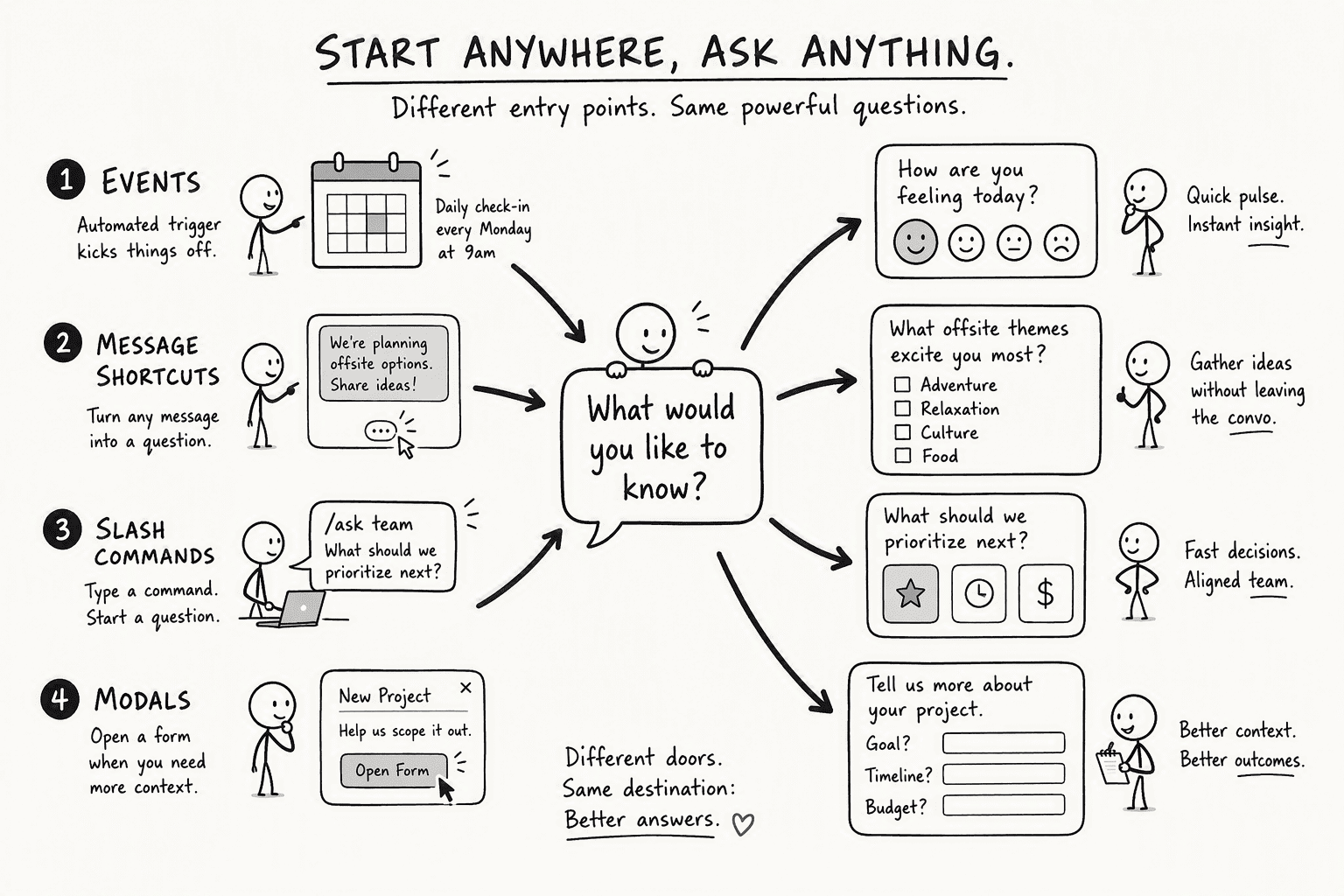
Slack provides four distinct ways to integrate AI. Matching the right method to the question type makes the experience feel smooth.
| Entry Point | Best For | Trigger | User Experience |
|---|
| Events (reacji) | Q&A on a specific message | User adds an emoji reaction | The bot listens for the reaction, passes the message to the AI, and replies in thread immediately. |
| Message Shortcuts | One-click deep dives | Three-dot menu on a message | A menu option sends the message context to the AI for a detailed, focused analysis. |
| Slash Commands | Broad, ad-hoc questions | Typing `/ask-knowledge-base` | Invokes the AI from anywhere in Slack with a typed command for a direct answer in channel. |
| Modals | Structured, repeatable tasks | Workflow or app home button | A form collects predictable inputs (like product features) so the AI generates consistent outputs without a chat thread. |
Start with an audit. Grab your three busiest channels and scroll through the last two weeks, counting every "where is…?" or "what's the status…?" message. You will spot patterns fast. The reaction emoji event is my first build because it maps directly to the "what's the process for X?" questions that clog our engineering channels.
Step 2: Choose the Right AI Agent Architecture (Secure Sandbox vs. Plan-Based Execution)
Standard chatbots are the wrong tool here. A freeform LLM answering enterprise questions directly will hallucinate under pressure. The alternative is plan-based execution: the AI writes and runs a deterministic set of steps, like querying a knowledge base, then checking permissions, then formatting the result, inside a secure sandbox.
This changes the trust model. With plan-based execution, you watch the model follow a blueprint instead of hoping it generates a correct answer on its own. Slack AI is the lowest-friction option for teams already on paid Slack plans, but for custom data sources and internal APIs, you need an agent that can execute code without touching your production network.
A tool like PromptQL achieves this by running those generated code plans in a secure cloud sandbox, isolated from your primary infrastructure. The plan is the contract. If the step fails, the bot admits it cannot answer. If it succeeds, the answer is referenceable and auditable. That guarantee is what makes your engineering team stop pinging each other and start trusting the bot.
Step 3: Connect Your Knowledge Stack for Automatic Answers (Confluence, Notion, Google Drive)
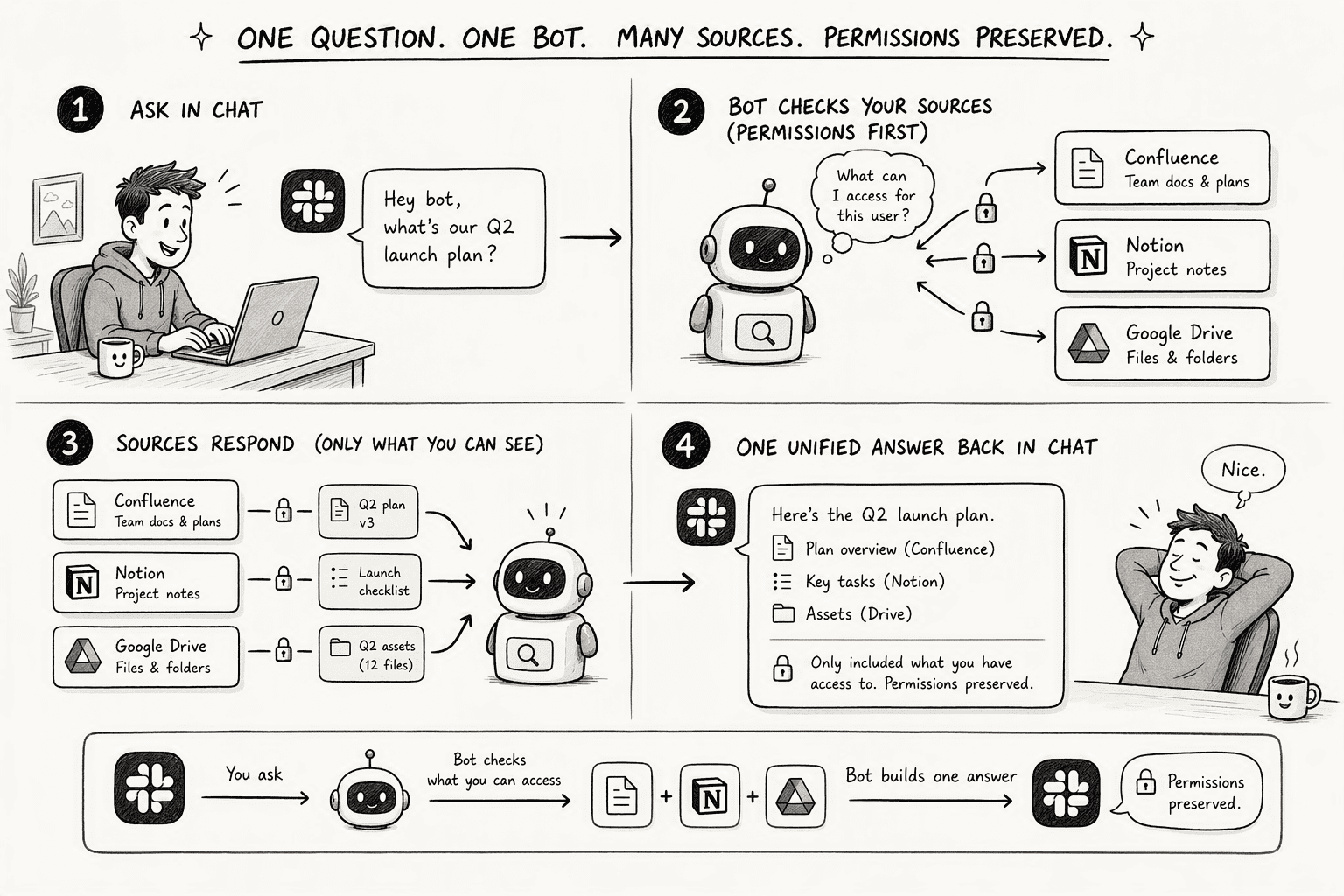
Your company's knowledge lives in three separate places: Confluence for specs, Notion for runbooks, and Google Drive for client documents. A bot that searches only one source delivers partial answers. You need an AI that pulls from all three at once, without migrating a single file.
You connect the bot to each source through an API authentication. It indexes the current content and preserves each system's access controls. When a salesperson asks for the Q3 pricing guide, the bot first checks what they can see on Drive, then pulls the relevant snippet into its response.
Source coverage separates functional bots from limited ones. Some products connect only to Notion. Others stumble over Drive permissions.
Evaluate each option on how well it handles Confluence page trees, Notion database properties, and Drive folder structures in parallel. The end result is a unified knowledge layer that answers with a single thread reply: "Here is the pricing sheet from Drive, and the supporting contract terms from Confluence." You stop telling colleagues, "I think the doc is in the Marketing Drive, but maybe Sarah updated it in Notion."
Step 4: Build the Integration with Code Examples (Reaction Emoji and Slash Command Triggers)
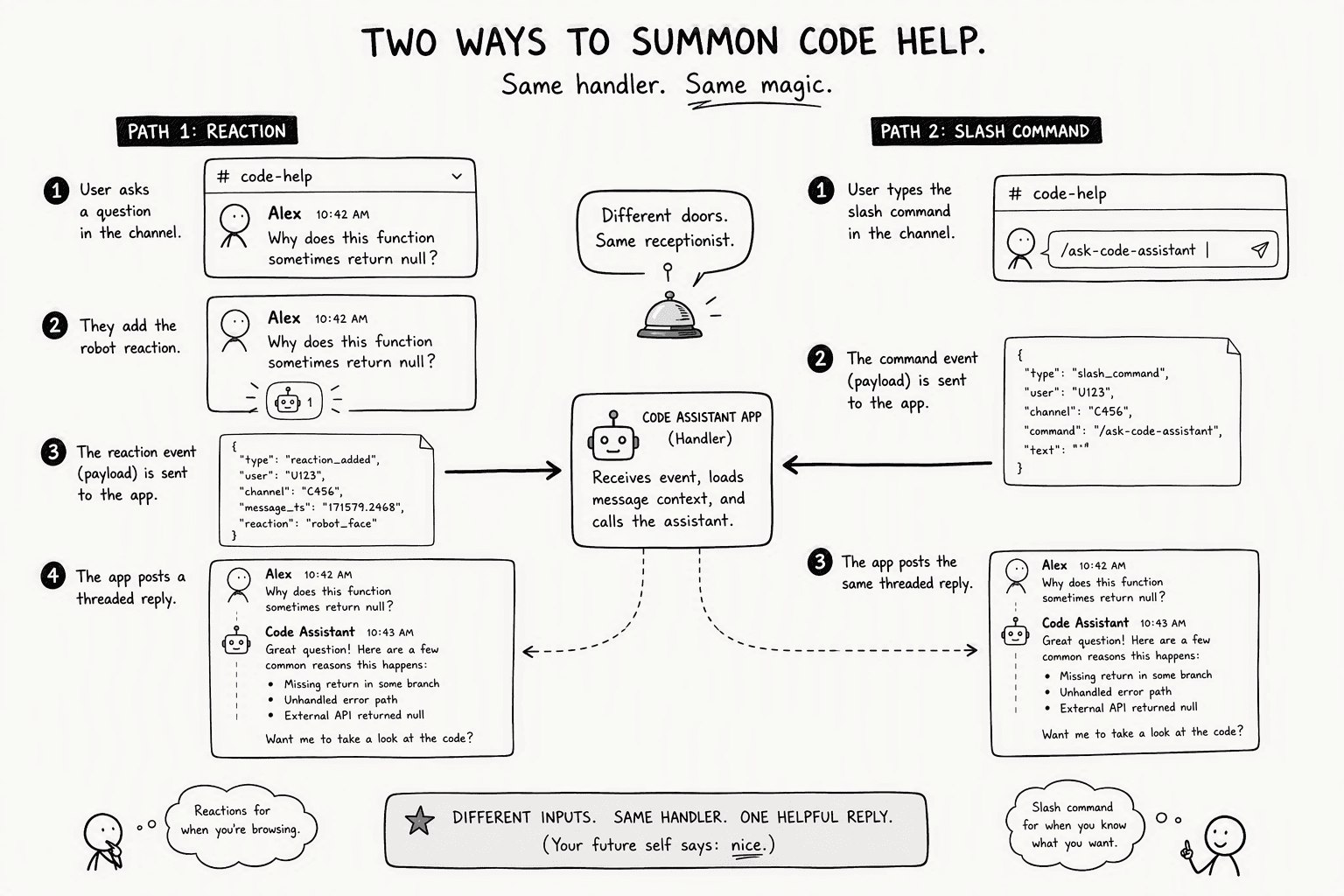
The `reacji` event is the fastest path to a working bot. You configure your Slack app to listen for a specific reaction emoji added to a message. When a user adds:robot_face: to a question in a public channel, Slack fires an event to your app with the full message payload. Your handler extracts the text, passes it to your AI agent, and the agent posts a reply in the thread.
A slash command gives you a more direct invocation path. You register `/ask-code-assistant` in your app manifest, and Slack sends the user's text after the command to your endpoint. Your server acknowledges the request immediately with a 200 response, then processes the question asynchronously, using `chat.postMessage` to deliver the answer back to the channel.
Your Bolt app handles both flows in one place. The `Assistant` class simplifies incoming events, and you initialize your AI client with your key stored as an environment variable.
That first terminal output reading "⚡️ Bolt app is running!" is a script listening for an emoji, and it works.
Step 5: Implement Reliable Escalation Logic (Human Handoff and Ticketing)
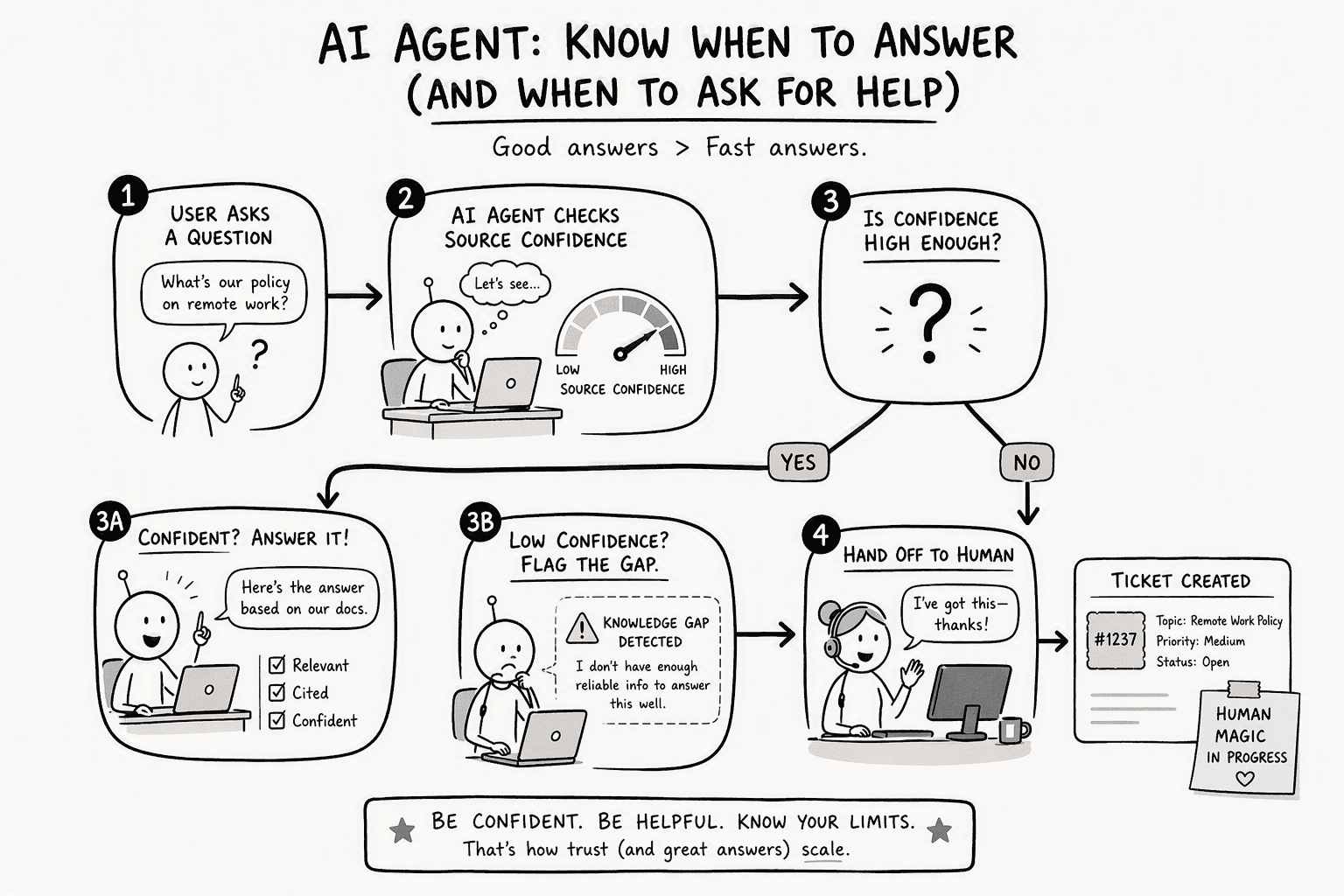
The bot's most important answer is "I don't know." Letting an AI silently guess wrong loses the team's trust before the first week ends. Set a hard confidence threshold that triggers an automated escalation by following three rules:
- Flag knowledge gaps proactively: when the AI's plan-based execution fails to retrieve a source document above a 90% confidence score, or when the knowledge base returns zero results, the bot should not attempt an answer, it should immediately flag the question as a knowledge gap and hand it off.
- Implement a clear handoff: the bot should `@mention` the relevant subject matter expert with a canned message like "@james, the bot could not answer this question about the deployment pipeline. Can you check the thread?" and trigger a webhook that creates a ticket in your existing system with the full thread context attached.
- Trust the fallback under pressure: you will not appreciate this logic until the first PagerDuty incident, someone asks an urgent question and the bot says, "I cannot confidently answer that, but I have notified the on-call engineer." That separates a toy from a tool.
Step 6: Harden Security with Isolated Execution (Cloud Sandbox and Single-Tenant VPC)
Enterprise security review will not allow an AI to run arbitrary code on your network. That is a hard stop. The solution is an isolated execution environment: a single-tenant cloud sandbox where the AI's generated functions run with no direct access to your primary VPC.
Deploy the AI runtime in its own dedicated environment. Customer data never leaves Slack; Slack does not train large-language models (LLMs) on customer data. Your AI agent must match that standard.
PromptQL, for instance, runs code in a secure cloud sandbox within your own cloud or a single-tenant VPC, enforcing permissions deterministically at the data layer. You get SOC 2 compliance and audit trails for every data access. The bot does not hold its own credentials; it acts with the requesting user's permissions, verified at query time. The sandbox makes the AI auditable and safe.
Step 7: Monitor Accuracy, Knowledge Gaps, and Measure Impact on Interruption Culture
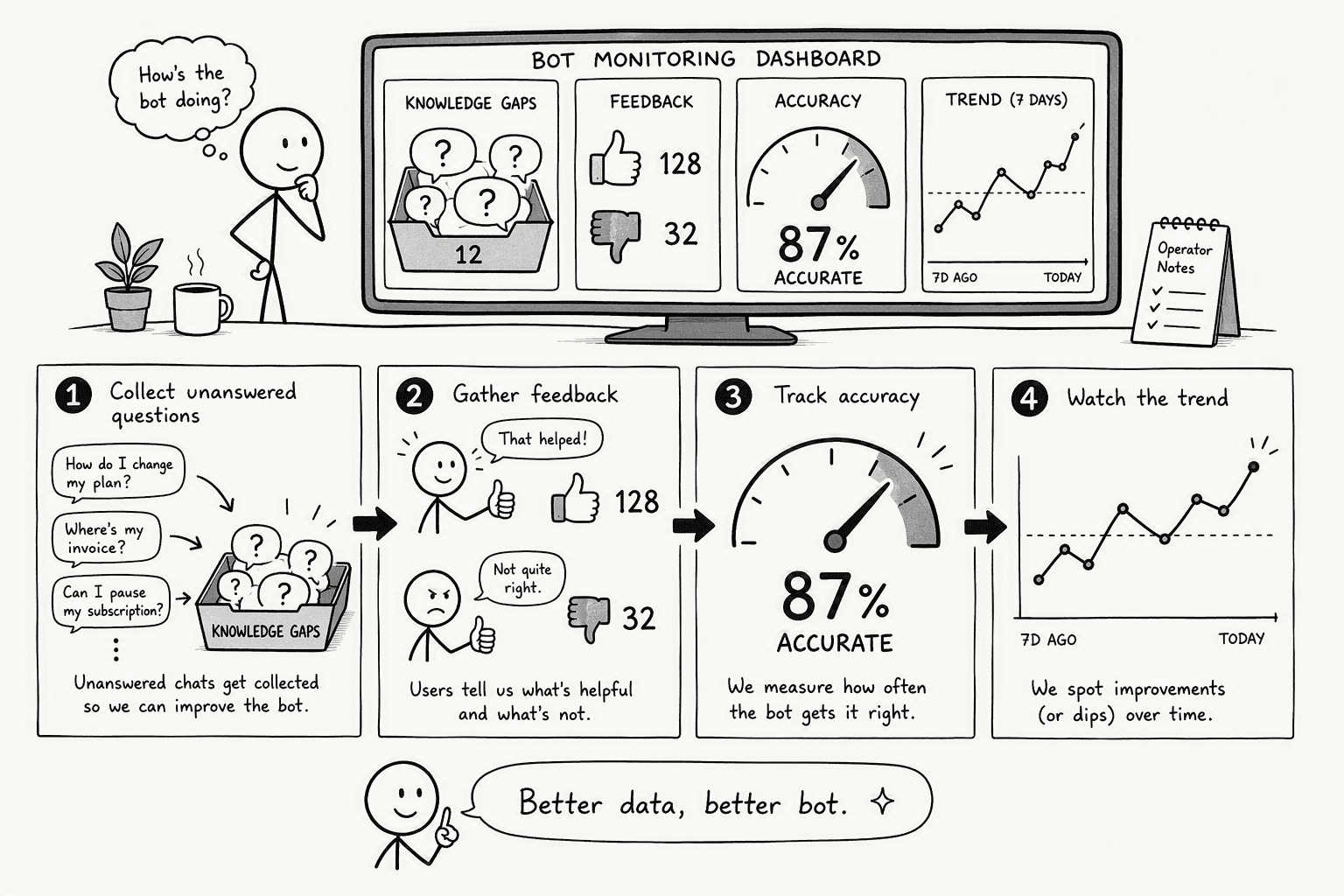
The finish line is not deployment. The bot has to do the work that used to eat your team's focus. Set up monitoring in four deliberate phases:
- Log every unanswered interaction. Tag questions the AI could not resolve as knowledge gaps. This log becomes your roadmap for which documentation needs writing or which APIs need connecting next.
- Implement a lightweight feedback loop. Add a simple thumbs-up or thumbs-down reaction to the bot's thread replies. Track this accuracy percentage weekly. A dip tells you a source has gone stale or a permission changed.
- Measure context-switching reduction directly. Track the drop in direct messages to the most-frequently-questioned subject matter experts. Sales teams using AI agents in Slack move faster because their agents understand deals, stakeholders, and past conversations. Count the number of threads the bot resolved without a human jumping in.
- Calculate ROI on engineering time. On average, each AI-resolved question saves roughly five minutes of context-switching. Multiply that by the number of resolved threads per week and the blended hourly rate of your engineers. That is the real number leadership cares about, and it is usually in the tens of thousands of dollars per month.
Conclusion
I have watched a single reaction emoji answer a question about our deployment freeze that four different people would have asked that week. No one got interrupted. No one lost their flow. The bot picked up the relevant policy snippet from Confluence, credited the source, and the thread ended. That is the transformation: from a noisy channel where the same questions circulate forever, to a self-serve knowledge culture where the AI is the first responder.
Start with your top repeated question. Wire the reacji trigger, connect one knowledge source, and show your team the result. The architecture, security, and escalation logic can follow because you will have momentum. Security is a design choice you make up front, and building the human handoff in from day one keeps the trust alive long after the bot's first week. Your team will get back hours of deep work every week, and that is the entire point.
Frequently Asked Questions
How can AI help reduce repetitive questions and interruptions in Slack?
AI agents answer common questions automatically in the thread or channel, removing the need to tag a human expert. This eliminates context-switching for the person who would have answered and gives the asker an immediate, accurate response.
What specific AI-powered Slack bot or agent features are designed to answer repetitive questions automatically?
Key features include reaction emoji (reacji) triggers that reply in-thread, slash commands for ad-hoc queries, message shortcuts for one-click analysis from the three-dot menu, and modals for structured, repeatable tasks with predictable inputs.
How do you set up an AI agent like PromptQL in Slack to handle frequent workplace queries?
Start by mapping your top repeated questions, then connect the agent to your knowledge sources (Confluence, Notion, Google Drive). Build a Slack app that listens for a reaction emoji event using the Bolt framework, passing the message to the AI and replying in the thread.
What are the security and permission considerations when deploying an AI agent in Slack for enterprise use?
The AI must meet three security requirements to pass enterprise review:
- Isolated sandbox execution: the AI must run in an isolated cloud sandbox with no direct network access to your production environment.
- Query-time permission enforcement: the agent should enforce user permissions at query time, never use shared credentials, and never expose raw database tokens.
- Single-tenant compliance: all processing should be within a single-tenant VPC to meet SOC 2 compliance.
How does plan-based execution by an AI agent improve reliability compared to standard chatbots for answering questions?
Instead of generating a freeform guess, the AI follows a predefined, auditable plan. It retrieves specific documents, checks permissions, and synthesizes an answer step-by-step inside a sandbox. If a step fails, the bot admits it does not know, preventing hallucinations.
What measurable impact can an AI agent have on team productivity and interruption culture in Slack?
Even a handful of prevented interruptions per day yields substantial ROI in recaptured deep-work time.
Sources
- AI Assistant - Slack Developer Docs - docs.slack.dev
- Slack AI Agents for Every Department | Slack - slack.com
- Slack AI Features & AI Assistants | Slack - api.slack.com
- Beyond the Chatbot: 4 ways to integrate AI directly into Slack | Blog | Slack Developers - slack.dev
- 8 Best AI Knowledge Base Bots for Slack in 2026 - clearfeed.ai




