Introduction
Last quarter I watched a colleague toggle between Slack, Snowflake, and Salesforce for forty minutes to answer a single question from a customer success manager. The data was all there. The context was not. She had to pull a usage report from Snowflake, cross-reference the account health score in Salesforce, and then manually compose a summary in a Slack thread for the account team.
That is the real cost of data silos: the cognitive drain of re-entering context into three different systems when a decision is waiting upstream.
The fix is one AI agent that can reason across Slack, Snowflake, and Salesforce within a single thread, using plan-based execution and secure, managed connections so you never move the data. You can build this today with Azure Logic Apps, which gives you 1,400+ connectors to build tools for an agent loop, including native connectors for all three platforms. The agent stays inside your single-tenant environment and follows a deterministic Think-Act-Learn cycle that logs every action for audit.
This guide walks the exact sequence: provision a secure deployment, authenticate without exposing raw credentials, define the agent’s reasoning logic, build the cross-platform workflow, add governance checkpoints, and scale it from a single-user copilot to a company-wide agent.
Key Takeaways
Here is the shortest path to a governed AI agent that reasons across Slack, Snowflake, and Salesforce without copying data between them.
- Secure single-tenant deployment: Provision a dedicated Azure Logic Apps environment so your agent's compute, storage, and data residency stay isolated from other tenants.
- Plan-based execution loop: The agent follows a structured Think-Act-Learn cycle that is deterministic rather than open-ended; it logs which tool it invoked, what it queried, and why.
- Managed identity, not shared secrets: Connect all three platforms through OAuth and managed identities so raw credentials are never hard-coded or passed into the agent loop.
- Human-in-the-loop governance: Place explicit approval checkpoints before high-impact Salesforce writes and enable immutable audit logging of every tool invocation and token consumed.
- Cost-aware scaling: Each agent cycle incurs model inference cost per token plus per-connector execution fees; budget for both when you move from a single thread to concurrent multi-user sessions.
Step 1: Provision a Secure, Single-Tenant AI Agent Deployment
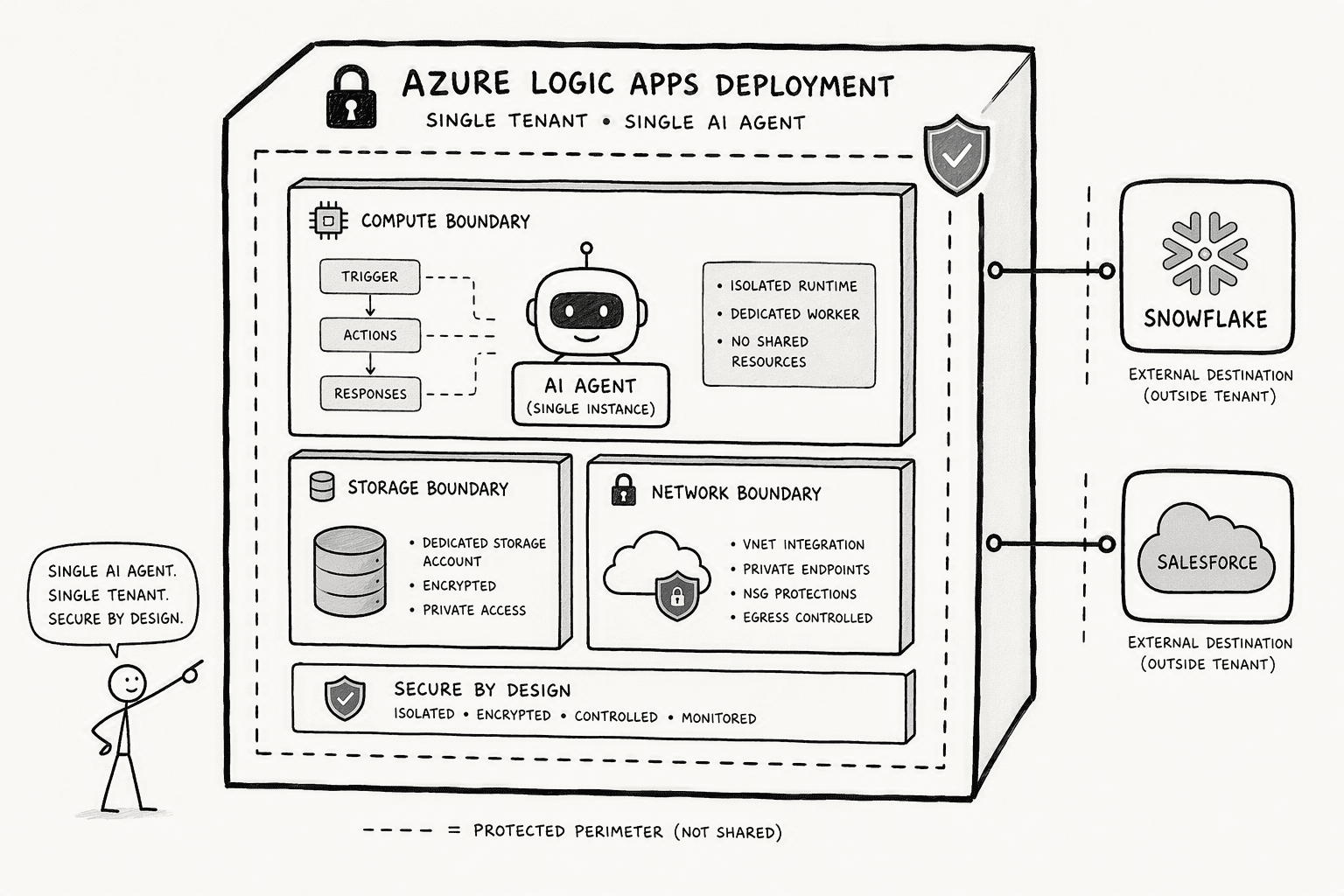
The foundation decision is architectural: do not put an agent that touches your Snowflake warehouse and Salesforce customer records into a shared, multi-tenant runtime. You need a single-tenant Azure Logic Apps deployment. Your compute, storage, and network isolation belong exclusively to your organization. Other tenants cannot see your agent’s logs, tool invocations, or connector configurations. For teams operating under CCPA, HIPAA, or internal data-residency policies, single tenancy is the compliance floor.
In the Azure portal, create a Logic App resource and select the ‘Logic App (Standard)’ plan type under a single-tenant hosting model. This gives you a dedicated App Service Environment.
Inside that environment, enable agent workflows. Azure allows you to publish a prebuilt agent loop action directly from the designer. The moment you create the resource, you have a sandbox where the agent will later invoke Snowflake queries, Salesforce record updates, and Slack messages, all logged within your tenant boundary. You can use a tool like PromptQL for a deployment that stays in your own cloud, single-tenant VPC, or on-prem, with BYOC so data never leaves your environment.
The result is a foundation that meets enterprise security teams where they live. No shared secrets. No neighbor noise. You own the resource from day one.
Step 2: Authenticate and Connect Slack, Snowflake, and Salesforce Without Exposing Raw Credentials
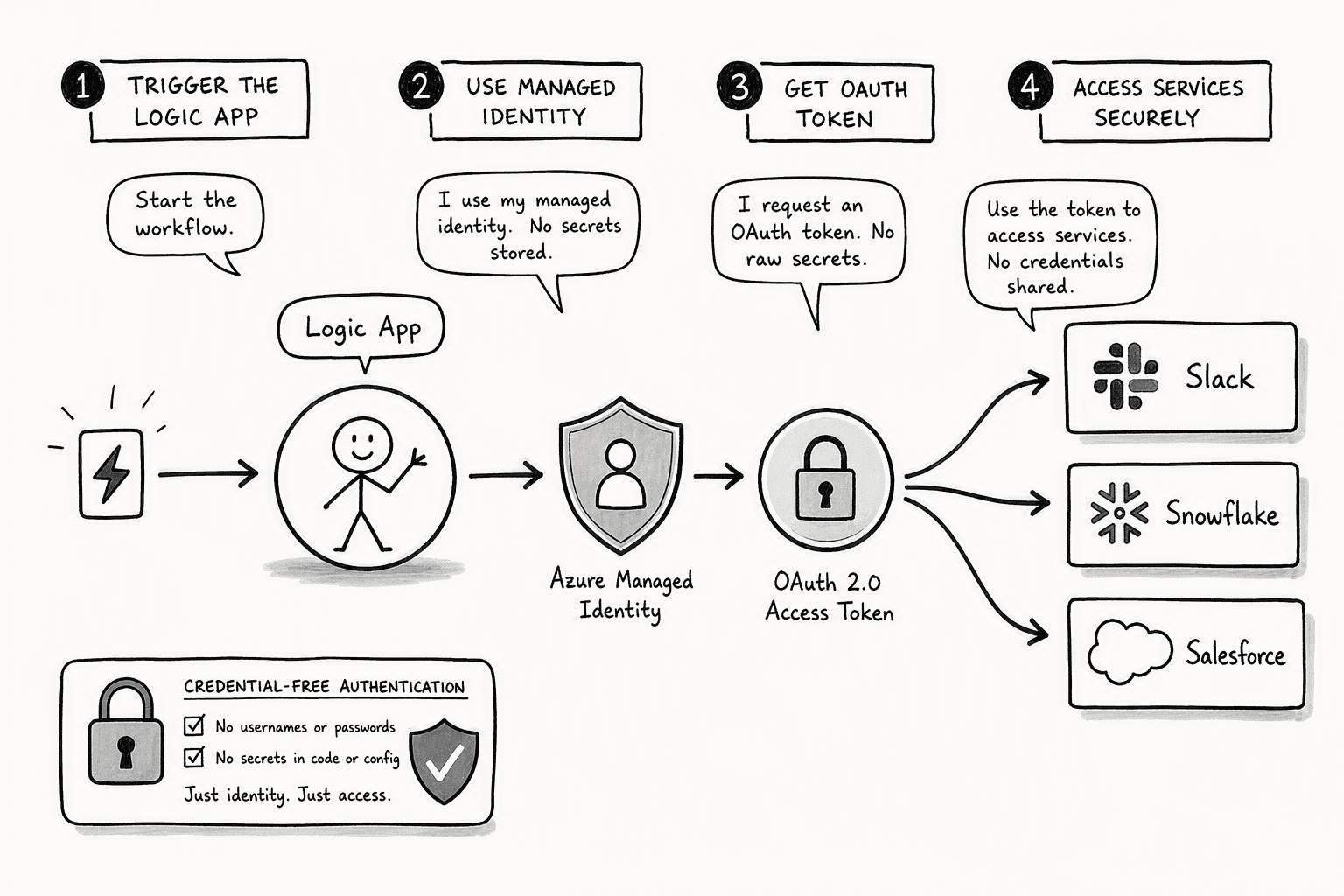
Most integrations break security policy at this step. A single hardcoded secret floating through the agent loop is enough to get you flagged in the next audit. The fix is straightforward: use managed identities and OAuth flows for every connection. No raw passwords. No shared service accounts that outlive the people who set them up.
Here is the exact sequence.
- Configure managed identity for the Logic App resource. Turn on system-assigned managed identity in the Identity blade. Azure uses it to authenticate to other services without a secret string in your code.
- Create API connections via OAuth. Connect the Salesforce connector with an OAuth 2.0 authorization code flow, the Snowflake connector with Azure AD or OAuth, and the Slack connector with a Slack app bot token scope. Each connection authorizes at the user or service-principal level rather than leaning on one credential shared across the team.
- Lock down Snowflake access to the specific warehouse, database, and schema the agent needs. Scope the connection to the minimum required objects. You shrink the blast radius immediately. CData notes that customers can authenticate via OAuth, OKTA, Azure AD, Azure Managed Service Identity, and more, so you have several paths to avoid a raw credential sitting in memory.
- Grant Slack bot scopes only for the channels the agent should read and write. Skip workspace-wide admin tokens. Use granular scopes like `channels:read`, `chat:write`, and `reactions:write` tied to a single bot user.
- Test each connection in isolation before wiring them together. Invoke a trivial Snowflake `SELECT 1`. Create a sandbox Salesforce record. Post a confirmation into a test Slack channel. Confirm the authentication chain is complete before you feed it real requests.
The whole authentication layer takes under an hour if you have owner rights on the resources. If you need a security reviewer sign-off, plan for an extra day. That hour buys you an agent loop that an auditor can actually approve.
Step 3: Define the AI Agent’s Plan-Based Execution Logic
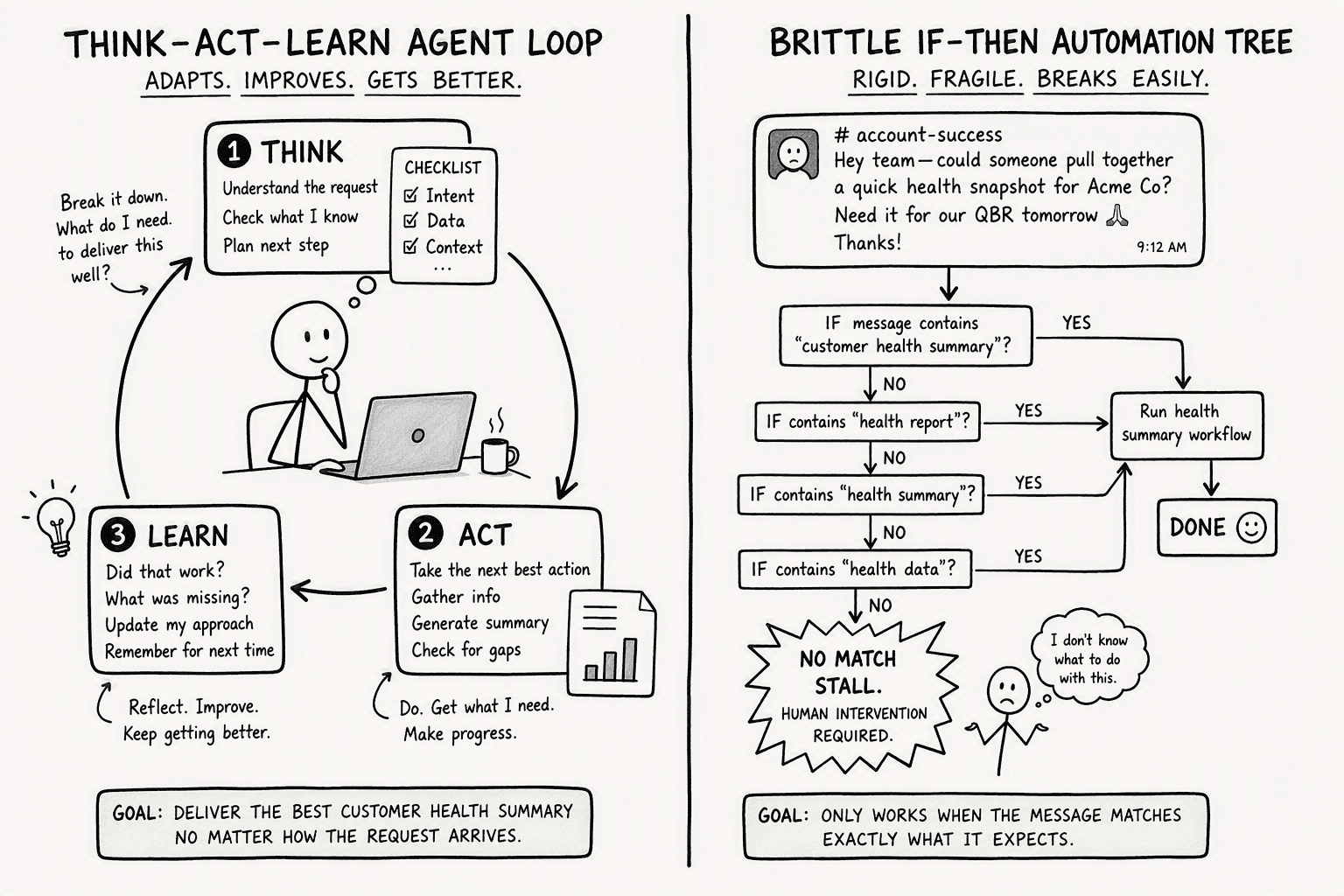
A brittle automation script fails the moment a Slack message is phrased differently. An agentic workflow parses the request, picks its own tools, and checks whether the output actually answers the question before it posts a reply. It runs a Think-Act-Learn cycle instead of a fixed if-then tree. Here is how the two architectures compare when a user asks for a customer health summary:
| Phase | Plan-Based Agent (Azure agent loop) | Static Automation |
|---|
| Input interpretation | Parses natural language, identifies intent (‘account health’), and selects tools based on available context | Matches keywords against a predefined trigger phrase |
| Action selection | Chooses Snowflake for usage data and Salesforce for health score based on the prompt, not a hard-coded route | Calls a fixed sequence of API endpoints regardless of the actual request |
| Result evaluation | Reads the structured output from both tools and decides whether the information answers the query before posting to Slack | Posts whatever data it receives without validation or reasoning |
| Adaptation | If Snowflake returns an empty result, the agent can reformulate the query or ask a clarifying question in the Slack thread | Fails silently or returns an unhelpful error |
| Audit trail | Logs every Think-Act-Learn cycle including which model generated the tool selection and which tokens were consumed | Logs only whether the trigger fired and the action completed |
The agent loop that Azure provides is a prebuilt action that solves multi-step problems by iterating through Think, Act, and Learn phases. When you drop a Slack request into the conversation, the agent thinks about which tool to invoke, acts by querying Snowflake or updating Salesforce, and then learns from the result so the next cycle is more informed. The model-generated outputs choose the tools. That is what separates deterministic agentic behavior from fragile automation.
Step 4: Build the Agentic Workflow: Iteratively Querying Snowflake, Acting on Salesforce, and Posting in Slack
The actual workflow is four steps that repeat in a loop. A rep in Slack types, "What is Acme Corp's current health, and should I schedule a check-in?" The agent parses that natural-language request and extracts three pieces of context: the account name, the intent to retrieve health data, and the implied task of deciding whether to act. The agent reasons about the request the way an analyst would.
- Generate and run a scoped Snowflake SQL query: It might pull 90-day usage volume and feature adoption metrics filtered on the Acme Corp account ID. The result set is structured and returned to the agent's runtime, not dumped into Slack.
- Evaluate the result and act in Salesforce: If usage is trending down and adoption is below a threshold your team has documented in the agent's system prompt, it creates a task under the Acme Corp account, sets the due date for this week, and attaches the Snowflake usage summary as a note.
- Compose and post a summary to Slack: It posts into the originating Slack thread: "Acme health score is 62 (down 11 points). Usage dropped 22% month over month. I created a check-in task in Salesforce for Thursday. Want me to draft a summary for the account team?" The loop finishes, but the context persists for the next exchange. PromptQL, for instance, handles this same pattern with plan-based execution and referenceable outputs across multiple reasoning steps, running code in a secure cloud sandbox so the query and the Salesforce write stay within your boundary.
Step 5: Implement Governance, Human-in-the-Loop Validation, and Audit Logging
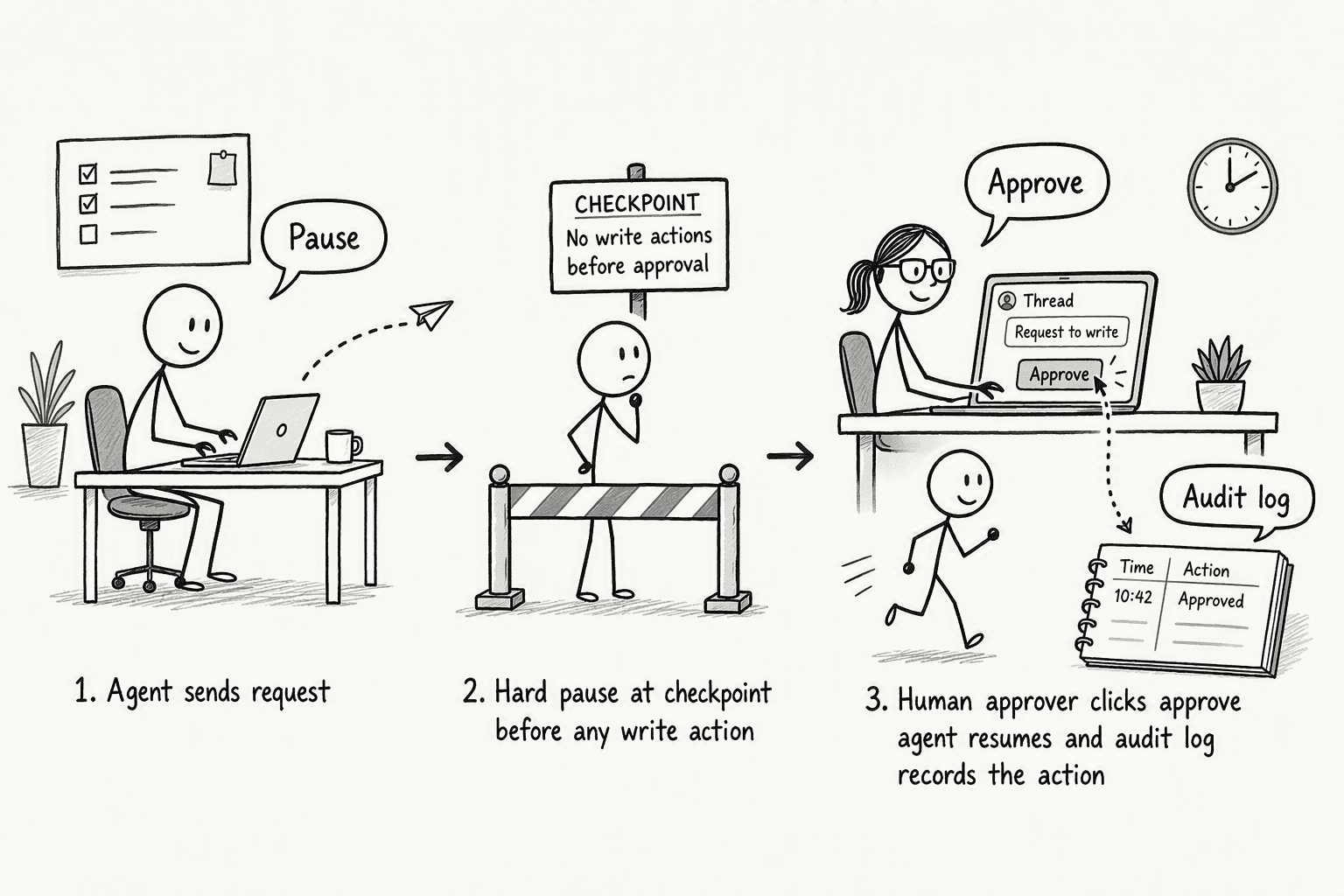
An agent reading from Snowflake is straightforward. Letting that same agent create records in Salesforce or post in a customer-facing Slack channel without a checkpoint is the kind of thing that keeps compliance teams up at night.
The production-safe pattern is a conversational agentic workflow with a hard pause. Before the agent writes to Salesforce or sends a Slack message to any high-impact channel, the workflow stops and posts a confirmation request to the thread. You approve. Then it executes.
That pause is mandatory for every side-effecting action. Wrap the Salesforce connector action inside an approval condition that triggers a response card in Slack, and configure it at the workflow level in Azure.
Behind the scenes, the agent keeps a context window of recent messages and tool calls. Azure's agent loop tracks this context and token consumption, which gives you an immutable, queryable record of what the agent thought, which tool it chose, and what data it returned. Layer organizational governance on top:
- IT, Security, Compliance, and Legal must be in the room from day one, and teams must document data residency, retention, and privacy policies explicitly.
- Naming conventions for agents matter: when an incident ticket lands, you need to trace which workflow acted on which system immediately.
- Deterministic permissions enforcement: For teams that surface every decision with an explanation built in, PromptQL enforces permissions deterministically at the data layer: role-based access down to row and column level, so the agent acts with each user's own permissions and never escalates privilege.
Step 6: Scale from a Single-User Copilot to a Multi-Player Enterprise AI Agent
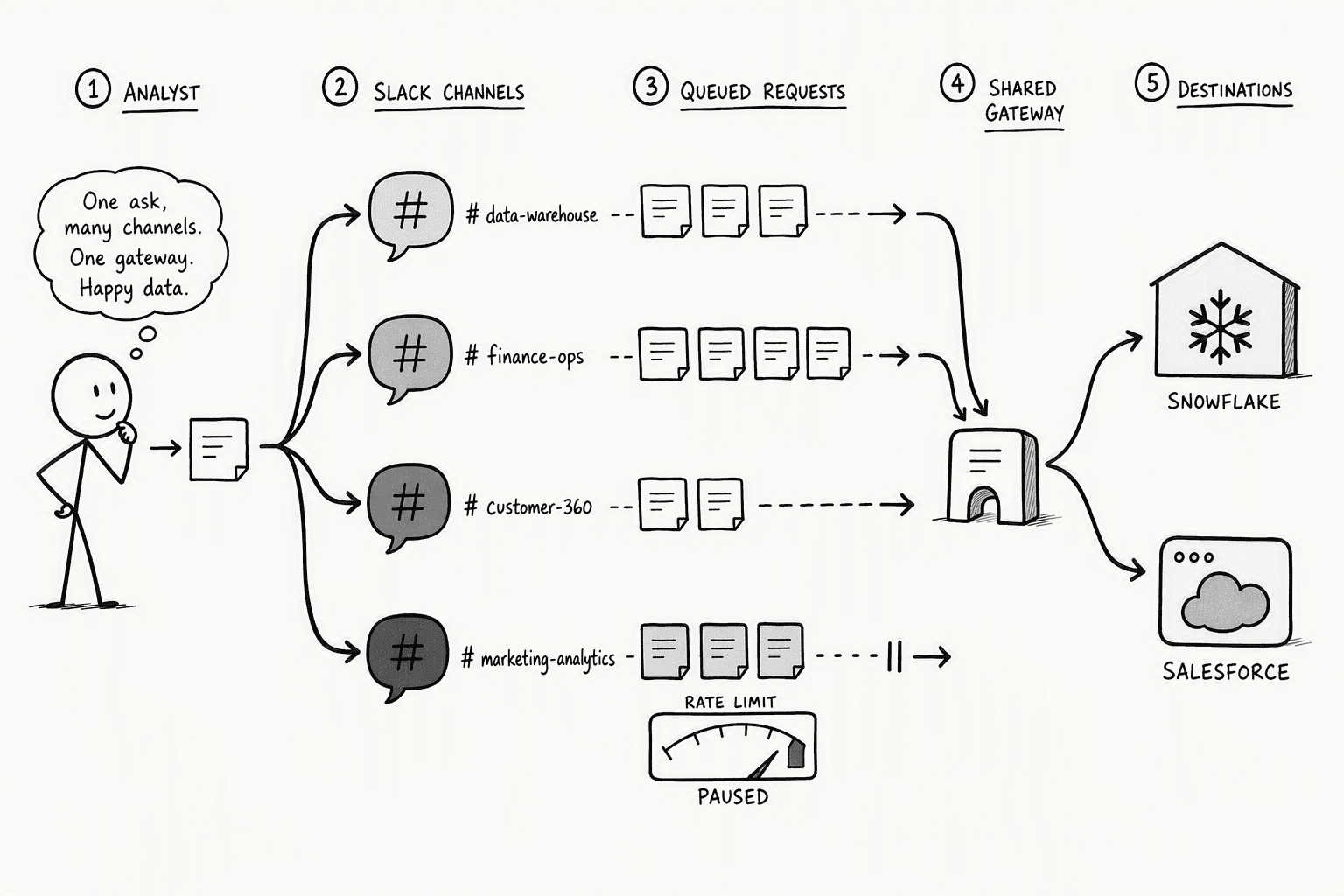
The first version works beautifully when one analyst asks questions in a private channel. Five account executives asking concurrent questions in five different channels is a different problem.
A single-user copilot follows one thread and one set of credentials. A multi-player AI agent must handle session isolation, concurrent API requests, and rate limits across Snowflake and Salesforce simultaneously. You need to move from a linear execution model to one that queues and prioritizes independent sessions.
- Slack session isolation: Each thread maps to a distinct agent session with its own context window so Acme Corp's health query and Globex Inc.'s pipeline analysis do not contaminate each other. In Azure Logic Apps, this is handled by the agent workflow's built-in session tracking: each inbound Slack message triggers a new workflow instance with its own conversation ID.
- API rate limit throttling: Snowflake and Salesforce both enforce concurrent query and API request caps. If eight users trigger a Snowflake query in the same minute, you will hit those limits unless you throttle at the agent layer. The fix is a queue with configurable concurrency: set the Logic Apps workflow's concurrency control to match the API limits of Snowflake and Salesforce explicitly.
- Cost budgeting: Budget for the model inference cost per cycle, typically $0.01 to $0.03 per 1,000 tokens for GPT-4 class models, plus three connector executions per cycle. The infrastructure scaling is secondary to the governance and isolation design. If you get that right, the agent moves from a personal tool to a company platform that respects every permission boundary you defined in Step 2.
Conclusion
Connect Slack, Snowflake, and Salesforce to a single AI agent through a standard enterprise pattern on Azure Logic Apps. You get single-tenant deployment, OAuth-based authentication, plan-based execution, and explicit human-in-the-loop governance. The agent reasons inside a determinate Think-Act-Learn cycle and leaves an audit log that compliance and security teams can inspect.
Scale it patiently by isolating sessions and respecting API limits, and a single-thread assistant becomes company-wide infrastructure. The data stays where it is. Your team gets one thread that knows all three systems.
Frequently Asked Questions
What is the securest way to connect Slack, Snowflake, and Salesforce to one AI agent without moving or exposing my data?
Provision a single-tenant Azure Logic Apps deployment and use managed identities with OAuth for every connection. Raw credentials are never stored in the agent loop. Each platform authenticates through its own OAuth flow, scoped to the minimum required permissions. Data stays in place and the agent only orchestrates actions across them within your isolated environment.
How does plan-based execution in an AI agent ensure deterministic and accurate workflows across SaaS apps?
Plan-based execution uses a structured Think-Act-Learn cycle. The agent reasons about the natural-language request, selects the appropriate tool like Snowflake or Salesforce based on context, acts, and then evaluates the result before proceeding. This contrasts with brittle static automation that follows a fixed path and fails silently when inputs vary.
What are the key steps to have an AI agent query Snowflake, act on Salesforce, and post in Slack in a single workflow?
The loop executes through four sequential steps while preserving context for follow-up exchanges:
- Parse the Slack request for intent and entities.
- Generate and run a scoped Snowflake SQL query based on the parsed intent.
- Evaluate the result and decide on a Salesforce action, such as creating a task or updating a record.
- Compose a summary and post it back into the originating Slack thread.
How can enterprise teams govern and audit an AI agent's actions across Slack messaging, Snowflake analytics, and Salesforce customer records?
Enable Azure’s built-in context management to log every tool invocation, token consumed, and model decision. Implement naming conventions and distinct Development, Testing, Production environments. Involve Security, Compliance, and Legal from the start to document data residency and retention policies.
What makes a multi-player AI agent different from a single-user copilot for company-wide operations linking communications, data warehousing, and CRM?
A multi-player agent handles concurrent sessions with full isolation so one user’s context never leaks into another’s query. It respects per-user permissions at the data layer and includes a queuing mechanism to throttle requests under Snowflake and Salesforce API rate limits. A single-user copilot follows one thread with linear execution and cannot safely scale across teams.
How much does it cost in 2026 to run an AI agent that connects business SaaS tools, and what drives that cost?
Cost is driven by model inference and connector execution fees. Each Think-Act-Learn cycle consumes tokens based on the LLM deployed, typically $0.01 to $0.03 per 1,000 tokens for GPT-4 class models. The workflow incurs three connector actions per cycle, Snowflake, Salesforce, Slack, so every user request adds both token cost and per-execution fees.
Sources
- Workflows with AI Agents and Models - Azure Logic Apps - learn.microsoft.com
- Connecting Agentforce with Snowflake Data via CData Connect AI MCP Server - www.cdata.com




