
23 Nov, 2026
•
8 MIN READ
Where to Store Context Prompts for Different AI Models
Introduction
Key Takeaways
- Match the store to the prompt's lifecycle: keep rarely changed instructions in code, a handful of prompts in config files, and move to a versioned prompt store once several people edit prompts.
- Keep system prompts away from user data: a system prompt in the same database as user data can be rewritten through an injection attack.
- Store a variant for each model: version prompts together with the model and parameters they were tested on, and re-test before switching models.
- Order your context for caching: put static content first and dynamic content last, and don't change tools or models mid-session.
- Use a store of record for facts: similarity search finds relevant facts, but only an authoritative store can say which one is current.
What Is Context Engineering and How It Differs from Prompt Engineering
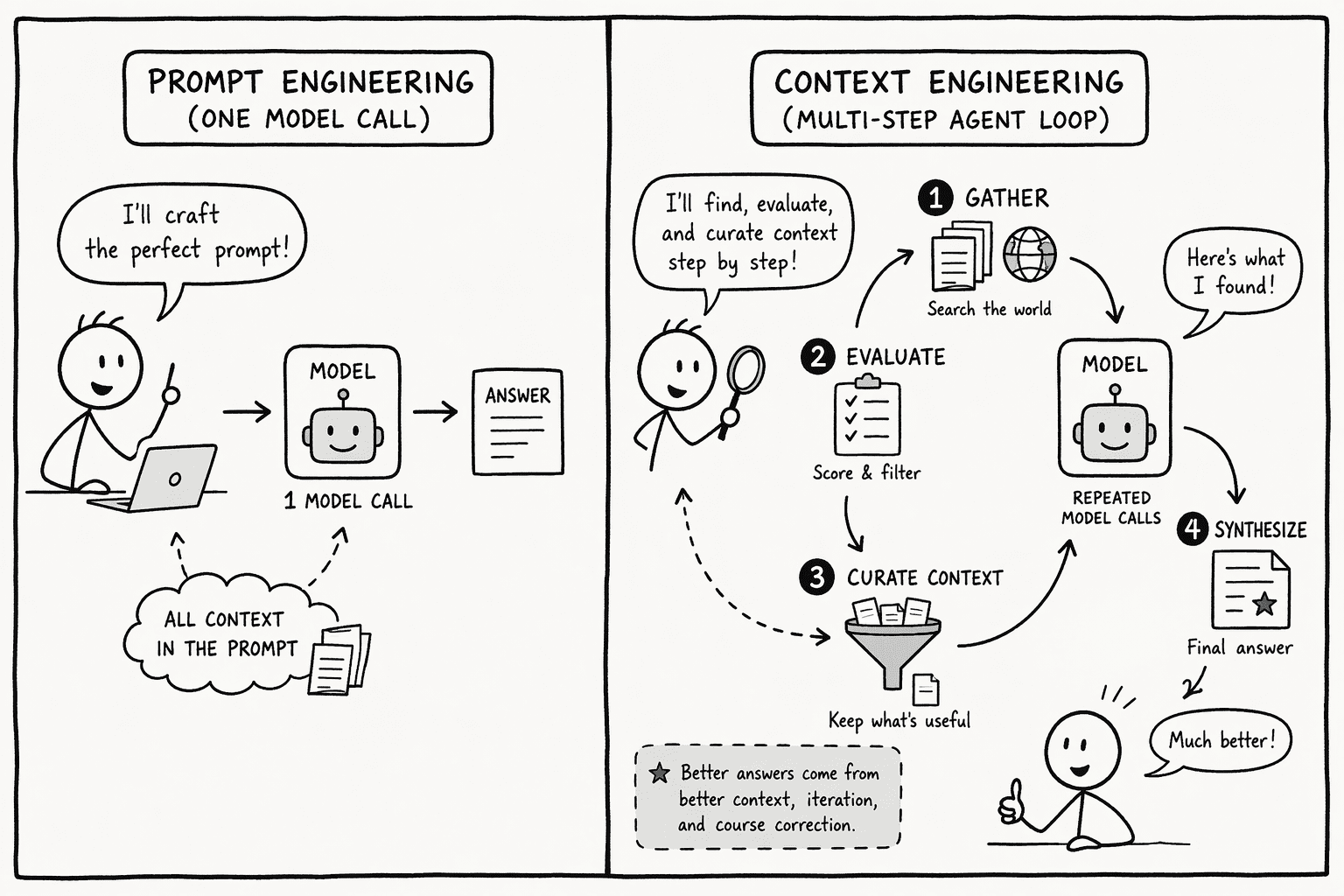
Where to Store Context Prompts: Code, Config Files, or a Database
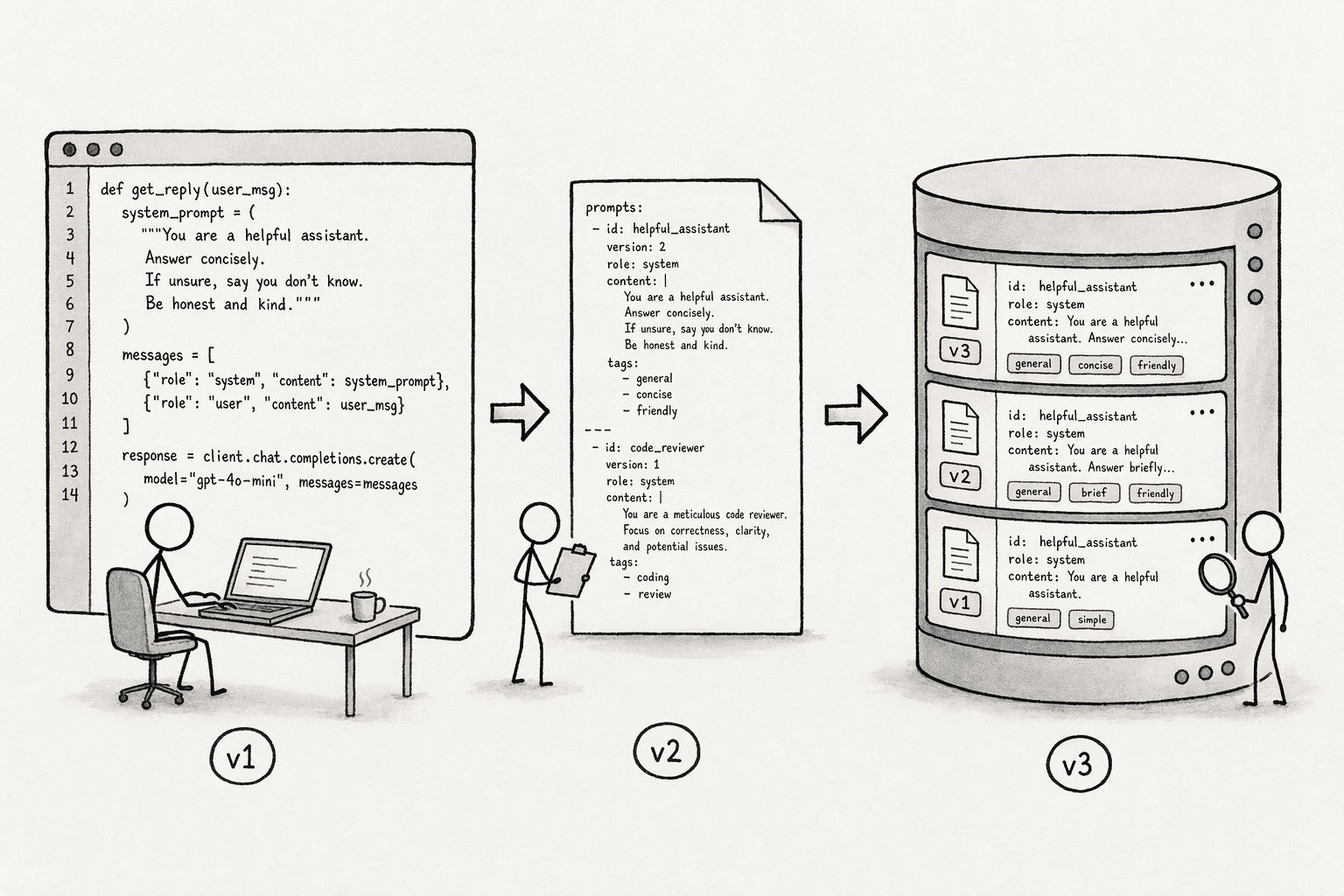
In Code
- Best for: static instructions that rarely change and are owned by engineers.
- Strengths: Git-native versioning, commit history, and code review on every change.
- Trade-offs: every prompt change needs a deploy, and non-engineers can't edit prompts.
In Config Files
- Best for: a small set of prompts that engineers and reviewers tweak occasionally.
- Strengths: easy to edit, Git-tracked, and simple to template per environment or tenant.
- Trade-offs: changes usually need a restart or reload, and free-text diffs of long prompts are hard to review.
In a Database-Backed Prompt Store
- Best for: teams with many prompts, frequent changes, and non-engineers (PMs, domain experts) who need to edit.
- Strengths: in tools like Langfuse, every save creates a new immutable version, and labels such as "production" point to exactly one version. Changes go live without a deploy.
- Trade-offs: you add a runtime dependency, so you need client-side caching and a fallback if the store is unavailable.
Keep System Prompts Away From User Data
- Store system prompts in a separate store or storage layer from user data.
- Require review before any change reaches production. In Git, that's a pull request. In a prompt store, it's an approval step before a version gets the production label.
- Verify prompt integrity at startup or in CI, for example with checksums of your prompt files.
How to Store Prompts for Different AI Models
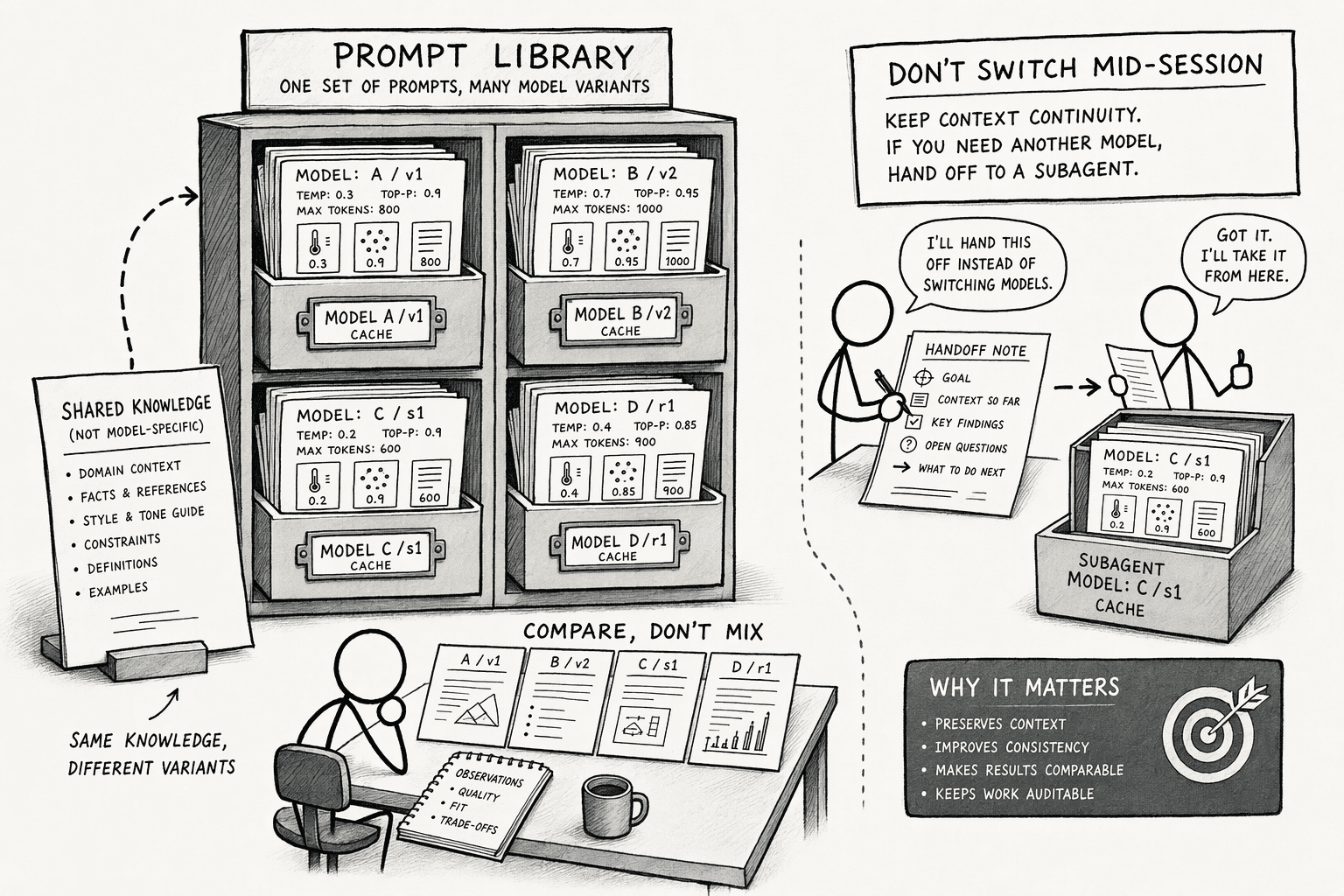
- Keep a variant for each model. Store separate versions of the same prompt for each model you use, either as separately named prompts or as clearly labelled variants, so a change for one model can't break another.
- Version the prompt with its model and parameters. Save the model ID, temperature, and other settings with the prompt version they were tested on. A prompt is only "known good" for the model it was tested against.
- Re-test before you switch. When a new model version ships, run your evaluations on it first, then move the production label only once results hold.
- Keep shared knowledge model-agnostic. Business definitions, procedures, and data mappings shouldn't be buried inside a model-specific prompt. Store them once and inject them into whichever model runs the step.
- Don't switch models mid-session. Prompt caches are unique to each model, so switching mid-conversation forces the cache to rebuild. If you need a different model for part of a task, use a subagent and pass it a handoff message.
What Lives in an Agent's Context and Where Each Piece Goes
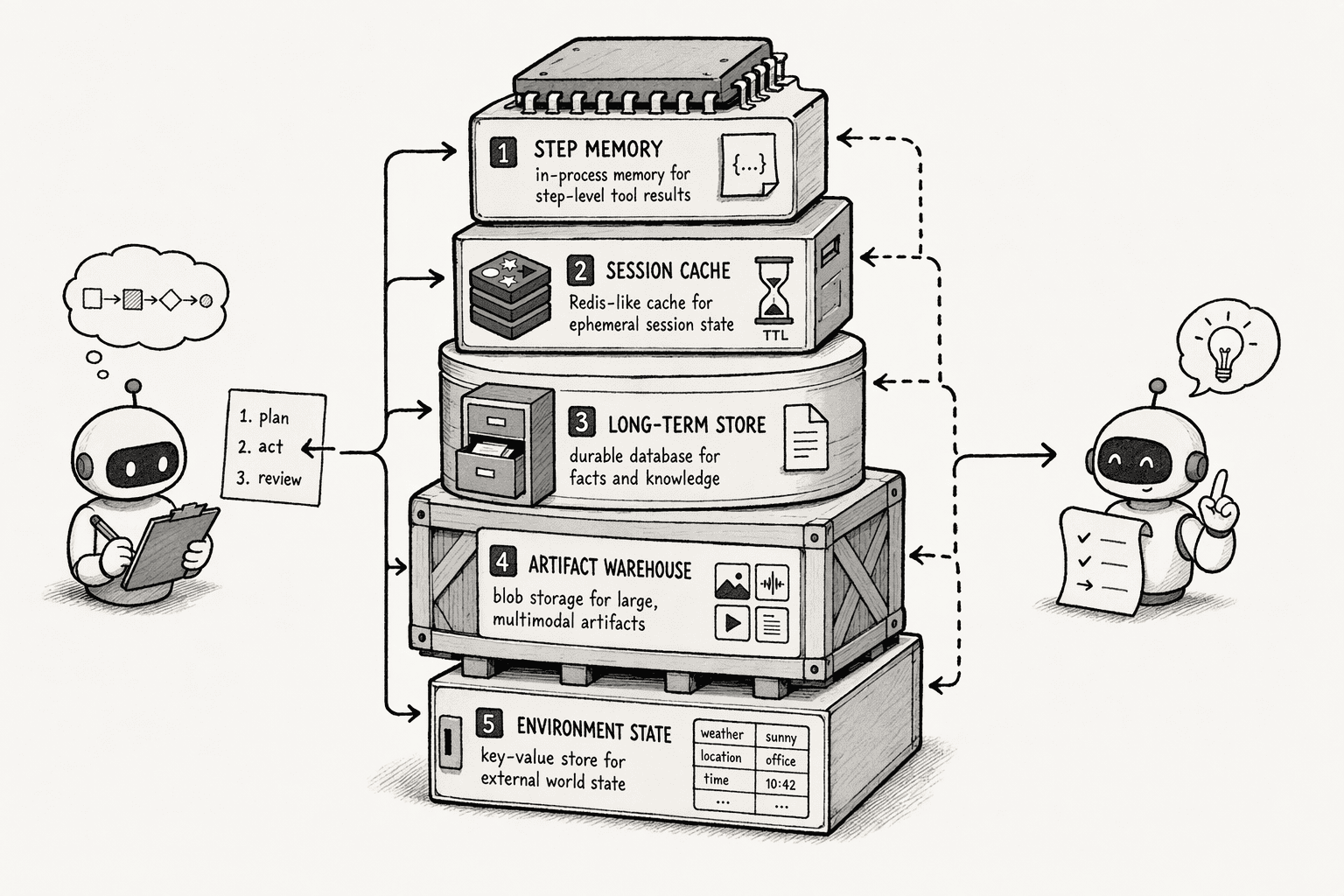
- Step-level tool results: outputs that matter for seconds or minutes. Keep them in process memory and discard them after the step.
- Session state: conversation turns, task history, and checkpoints that last minutes to hours. Use Redis or a managed cache with TTL expiry, and let it expire when the task ends.
- Long-term facts: user preferences, roles, and organizational knowledge that last months. Use a durable store of record, such as Postgres, that can replace outdated facts. A vector index can sit on top for retrieval, but it shouldn't be the source of truth.
- Large and multimodal artifacts: images, audio, video, and large documents. Put them in blob storage and reference them by URI or key instead of sending them inline.
- Environment state: the current plan, step index, and active constraints. A lightweight key-value store is enough.
How Your Storage Choices Affect Caching, Versioning, and Recovery
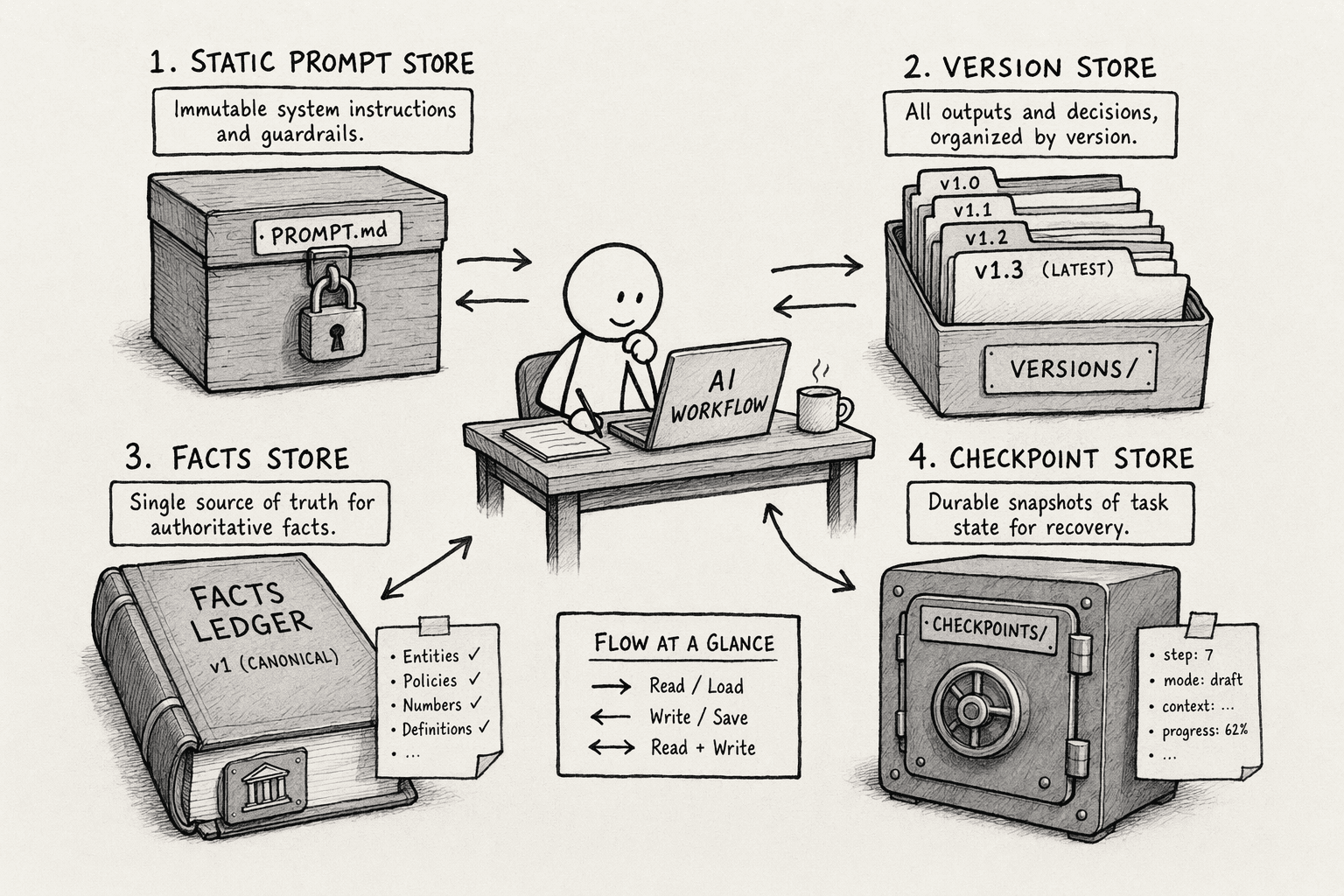
- Store static and dynamic context separately. Keep system prompts and tool definitions apart from session context, so every request starts with the same stable prefix and caches well. Keep timestamps out of static prompts.
- Store every prompt change as a new version. Never overwrite a prompt in place. Use labels like "production" to point to the live version, so a rollback is just moving the label back.
- Keep facts in a store of record. Similarity search can't tell which version of a fact is current, so keep one authoritative store that overwrites outdated values. In PromptQL, bots propose updates to the shared wiki, your team approves them, and every change is versioned and traceable to its source.
- Store task state outside the session. Write the plan, current step, and key outputs to a durable store every few steps, so a failed task resumes from the last checkpoint. In PromptQL, teammates work in the same bot, not a copy, so anyone can pick up where the work left off.
Conclusion
Frequently Asked Questions
Should you store a separate prompt for each AI model?
Can system prompts live in the same database as user data?
When should you move prompts out of config files?
Does prompt caching carry over when you switch models?
Where should an agent's long-term memory live?
Sources
- Prompt management - Generative AI Lens - docs.aws.amazon.com
- Lessons from building Claude Code: Prompt caching is everything / claude.dev Blog - claude.com
- How to organize, version, and test hundreds of prompts - Langfuse - langfuse.com
- agentic-ai-defense-checklist/docs/03-prompt-integrity.md at main · janrummel/agentic-ai-defense-checklist · GitHub - github.com
- Prompt caching | OpenAI API - developers.openai.com
- Context Memory - NanoGPT API Documentation - docs.nano-gpt.com
- Create a context cache | Gemini Enterprise Agent Platform | Google Cloud Documentation - docs.cloud.google.com
- Context Engineering for AI Agents and Where Memory Lives | Aerospike - aerospike.com