
24 Nov, 2026
•
9 MIN READ
Can an AI Agent Wake Up on Its Own When a Stripe Dispute or Support Ticket Comes In?
Introduction
Key Takeaways
- Agents can wake on events: an agent platform can listen for a Stripe webhook like
charge.dispute.createdor a new support ticket and start working immediately. - The core requirement is a webhook endpoint: Stripe sends a signed event to a URL, and your agent platform verifies it before the agent acts.
- Security comes first: verify every signature, reject stale timestamps, and skip duplicate event IDs.
- Humans approve what matters: let the agent gather evidence and draft responses, but require approval before it submits anything or moves money.
- PromptQL handles this end to end: it wakes on webhooks, tickets, and schedules, works with a real user's permissions, and asks for approval before writes and external calls.
How an AI Agent Wakes Up on a Stripe Event
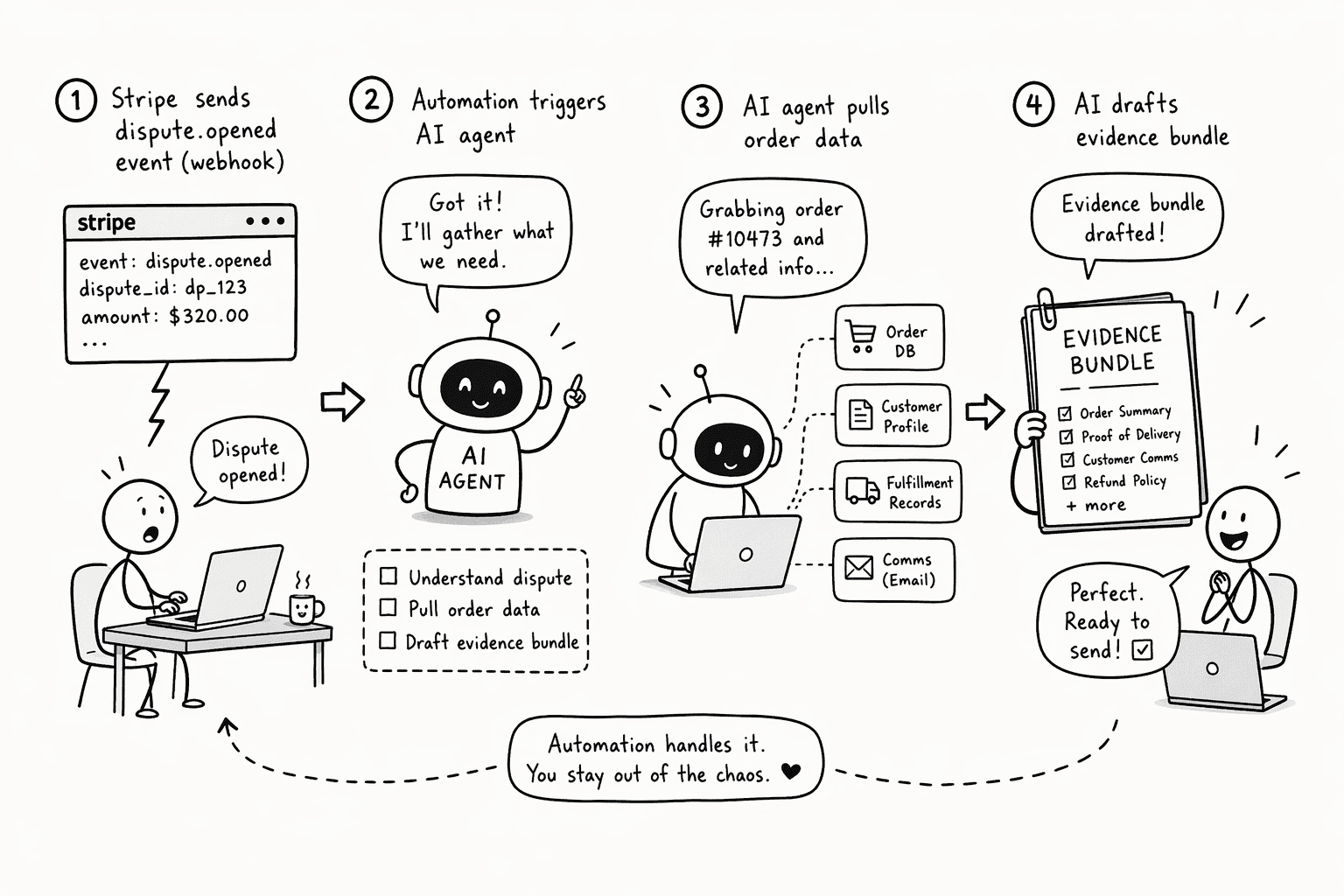
- Look up the order and customer record.
- Pull the proof of delivery or usage logs.
- Draft an evidence summary and a response.
- Post everything to your team for review.
What About Support Tickets?
Technical Requirements for an Event-Driven Agent
- A publicly accessible HTTPS endpoint: Stripe requires registered webhook endpoints to be publicly accessible HTTPS URLs. Your agent platform usually provides this URL.
- A signing secret: when you create the endpoint, Stripe generates a signing secret that starts with
whsec_. The platform uses it to confirm each event really came from Stripe. - The right event subscriptions: subscribe only to the events your agent needs. Stripe recommends against listening to all events because it puts unnecessary strain on your server.
- Access to your data: the agent needs to reach your order system, support tool, and Stripe account to gather evidence. Give it only the access it needs.
How Real-Time Event Monitoring Works with Stripe and AI Agents
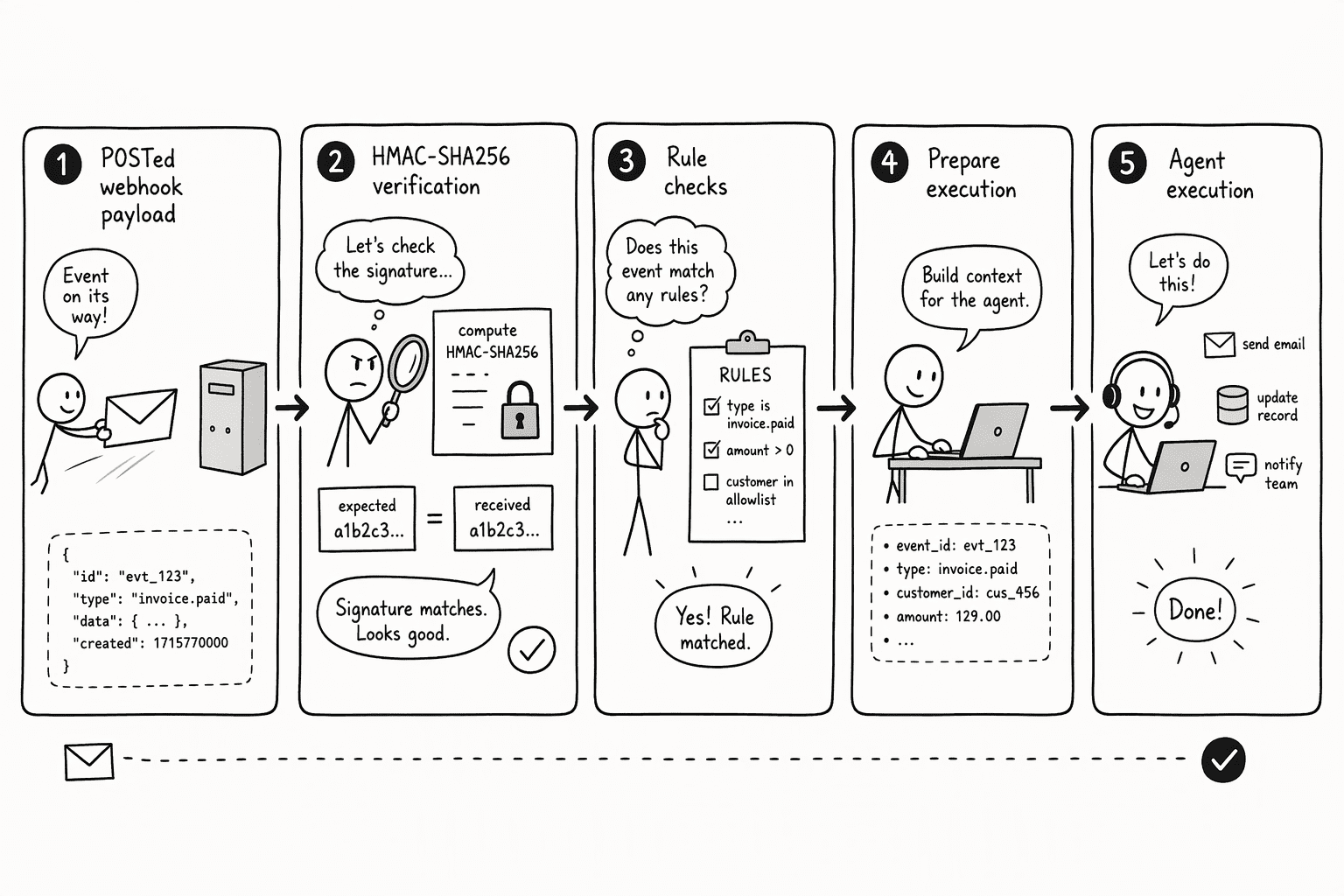
- Stripe POSTs a JSON payload to your registered webhook URL.
- The platform verifies the
Stripe-Signatureheader. Stripe signs each event with an HMAC using SHA-256, built from the payload, a timestamp, and your signing secret. If the signature doesn't match, the platform drops the request before any agent logic runs. - The platform checks the timestamp. Stripe's libraries default to a five-minute tolerance, so a payload captured and replayed later gets rejected.
- The platform checks the event ID. Stripe may deliver the same event more than once, so the platform logs processed event IDs and skips duplicates.
- The platform routes the verified event to the right agent, which runs your instructions.
Ways to Set Up an Event-Driven Agent for Stripe
| Dimension | PromptQL | Qoren | Cloudflare Agents |
|---|---|---|---|
| Approach | Multiplayer AI workspace with shared bots | Agent platform with Stripe triggers | Developer framework you build on |
| Wakes on | Schedules, webhooks, emails, tickets, and alerts | Stripe events you select or type in | Webhooks you route to your agent code |
| Setup | Connect your tools and describe the job | Connected integration with a restricted key, or a manual webhook with a whsec_ secret | Write the verification and routing code yourself |
| Security | Real user identity, credentials never exposed to the model, approval for writes | Verifies signatures, refuses events older than five minutes, skips retried event IDs | Verify the raw request before parsing it |
| Human review | Writes and external calls require approval | Agent replies with a summary in the delivery log | Up to you to build |
Security and Compliance for Agents Handling Financial Events
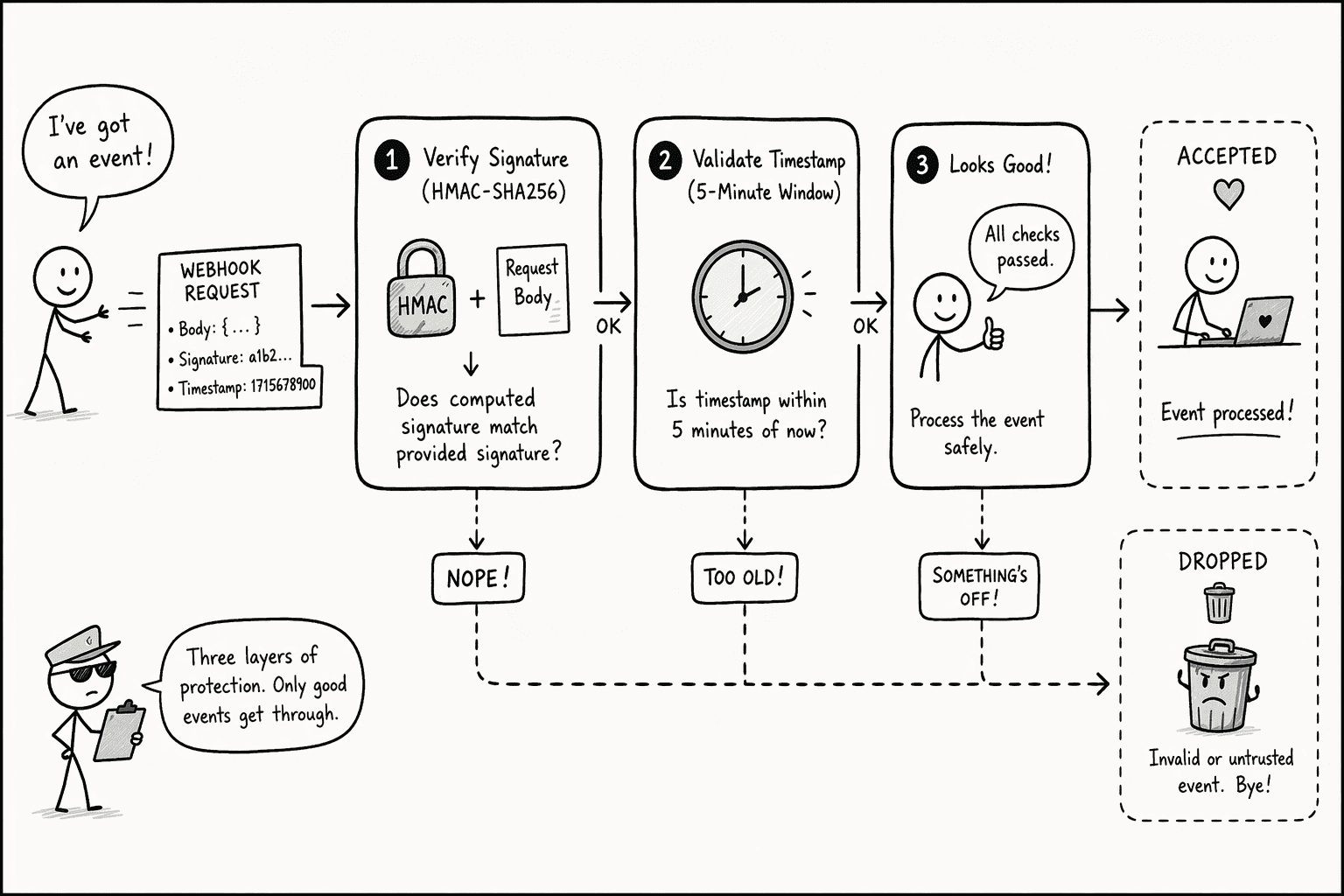
- Verify every payload: check the HMAC-SHA256 signature on the raw request body before parsing it. Stripe requires the raw body, and any change to it makes verification fail.
- Reject stale and duplicate events: enforce a timestamp tolerance and track processed event IDs.
- Control what the agent can see: the agent should act with a real user's permissions, never a shared admin key.
- Keep credentials away from the model: inject credentials at runtime so the AI never sees them.
- Require approval for writes: no agent should submit dispute evidence or issue a refund without a human signing off.
- Identity: the AI inherits a real user identity, and each query runs as the person who asked. Pages outside your access never enter the agent's context.
- Permissions: permissions are enforced at the data layer, not inside the model.
- Credentials: credentials are injected at runtime and never exposed to the model or to other users.
- Approvals: writes and external calls require approval, with a plain-language summary of what's about to happen.
- Sandboxing: all Python execution happens inside a WebAssembly sandbox, with only the standard library and a vetted set of packages.
- Data location: on PromptQL's BYOC option, which requires an Enterprise agreement, the data plane is customer-owned and lives in your AWS, GCP, or Azure account, with private connectivity options. Dedicated and BYOK stay in a PromptQL-managed cloud.
- Audit and compliance: audit logs show what was accessed and by whom, and PromptQL is certified for SOC 2 Type II and ISO 27001.
How to Set Up an AI Agent for Stripe Disputes
- Create a Stripe event destination: open the Webhooks tab in Stripe Workbench, click Create an event destination, and select the events you want, such as
charge.dispute.created. Enter the endpoint URL your agent platform provides, then copy thewhsec_signing secret. - Connect the endpoint to your agent platform: paste the signing secret into your platform, or use its connected Stripe integration if it offers one.
- Connect your data: give the agent access to your order system, support tool, and the evidence it needs, using a real user's permissions.
- Write the agent's instructions: describe what it should do when a dispute arrives. For example: "When a Stripe dispute comes in, find the order, pull the delivery confirmation, draft an evidence summary, and ask me to approve before submitting anything."
- Test with a sample event: run
stripe trigger charge.dispute.createdin the Stripe CLI or Stripe Shell, and confirm the agent runs your instructions and produces the expected output. - Go live: create the same event destination in live mode. Test and live mode use different signing secrets, so update the secret in your platform too.
Keeping a Human in the Loop for Multi-Step Disputes
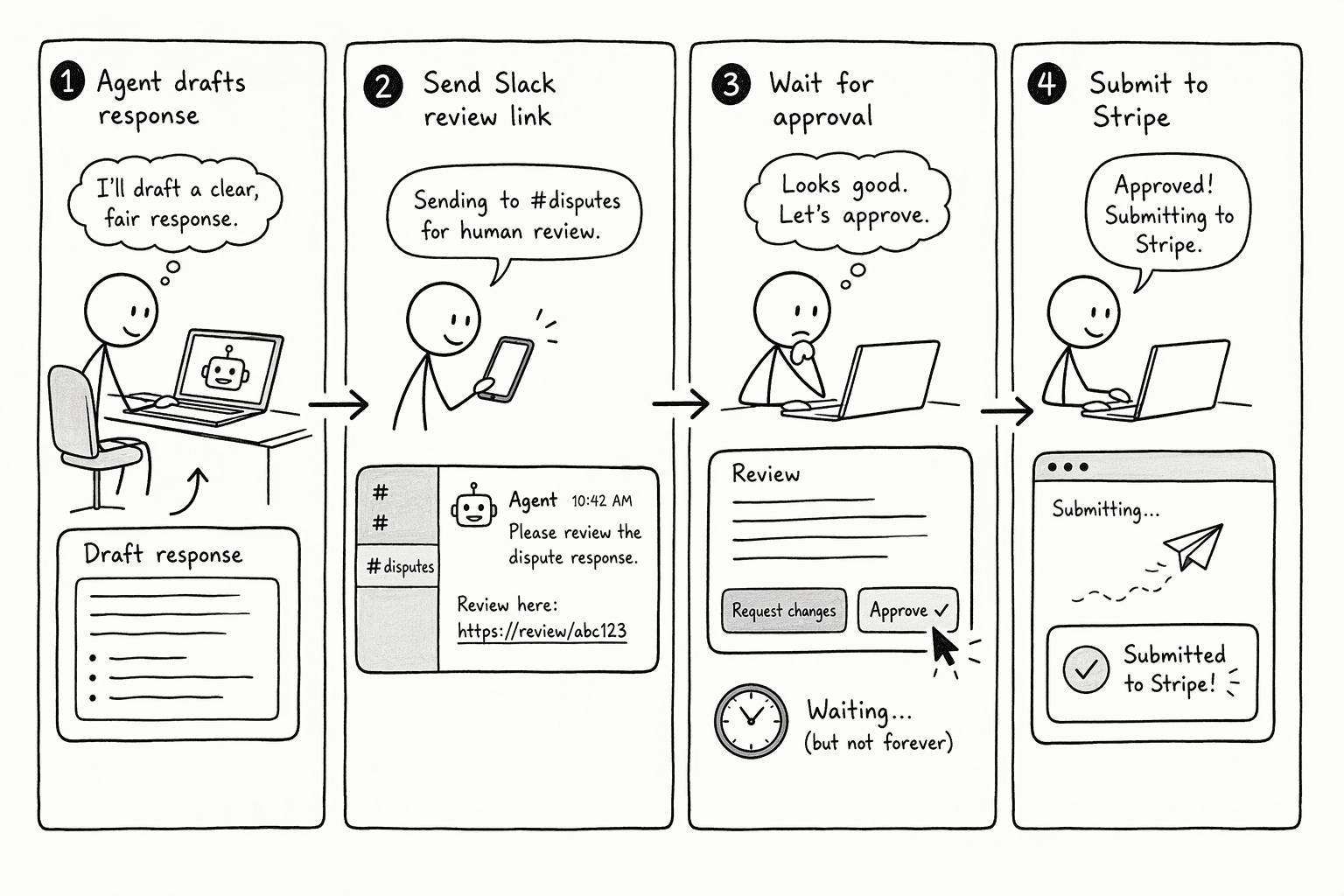
- A dispute arrives, and the agent wakes up.
- It pulls the transaction details, customer history, and any related support tickets.
- It drafts an evidence summary and a response.
- It pauses and asks for review, with a plain-language summary of what it's about to submit.
- You adjust the response and approve it, and the agent submits it to Stripe.
Conclusion
Frequently Asked Questions
Can an AI agent respond to Stripe disputes without human intervention?
What do you need for an AI agent to wake up on Stripe events?
How does real-time event monitoring work with AI agents and services like Stripe?
Which AI agent platforms can integrate with Stripe for dispute management?
What are the security considerations for letting an AI agent act on Stripe disputes?
How does PromptQL keep event-driven actions under control?
Sources
- Are pre-defined AI agents really the answer? Building accurate task-specific agents on the fly! - promptql.io
- Wake an agent from Stripe events | Qoren Docs - qoren.sh
- Webhooks · Cloudflare Agents docs - developers.cloudflare.com