Introduction
I onboarded in a haze of wiki tabs, stale Notion pages, and Slack DMs that went unanswered for hours. You have seen it too. The new person who wants to ship but spends three weeks hunting down a policy doc or the right MongoDB connection string.
That is the cost of fragmented institutional knowledge. It is not a minor friction point. 82% of organizations report that these silos disrupt critical workflows. Your new hires are walking into a maze where every answer hides behind a different login.
A company brain flips that. It is an AI-powered unified query layer that sits across your team's spread-out knowledge, wikis, databases, onboarding docs, and converts it into a single chat interface. New hires ask a question in plain English. The brain pulls the exact answer, respecting their security clearance down to the row level, without them ever needing to learn your database schemas.
You can build this with a specialized agent like PromptQL. It plugs into your actual fragmented reality, PostgreSQL, MongoDB, SQLite, DuckDB, mirroring the mess you actually have instead of asking you to restructure it first.
Here is the blueprint we used to stand it up, and how you can do the same.
Key Takeaways
The fastest path to cutting new-hire ramp time is a deterministic AI agent that gives plain-English answers from your real, fragmented systems, while enforcing role-based permissions on day one.
- Silos are the real enemy: 72% of organizations store data in disparate silos. You can solve this by aggregating across PostgreSQL, MongoDB, and document stores into one semantic layer.
- Don't trust a raw LLM with your data: Frontier models hit only 38% pass@1 accuracy on realistic multi-database queries. A specialized agent that executes deterministic, multi-step plans closes that gap.
- Security can accelerate access, not block it: Additive RBAC permissions with Lockdown Mode let a new hire query what they need on day one without touching PII or HR tables.
- Scaffold permissions to a 30-60-90 plan: Map data access to role-based profiles that progressively unlock as the employee moves from learning the office layout to owning a revenue number.
- Treat failed queries as your to-do list: Every blocked question or flagged approval is a signal that your brain is missing a piece of institutional knowledge.
Step 1: Aggregate and Connect Institutional Knowledge Across Your Fragmented Systems
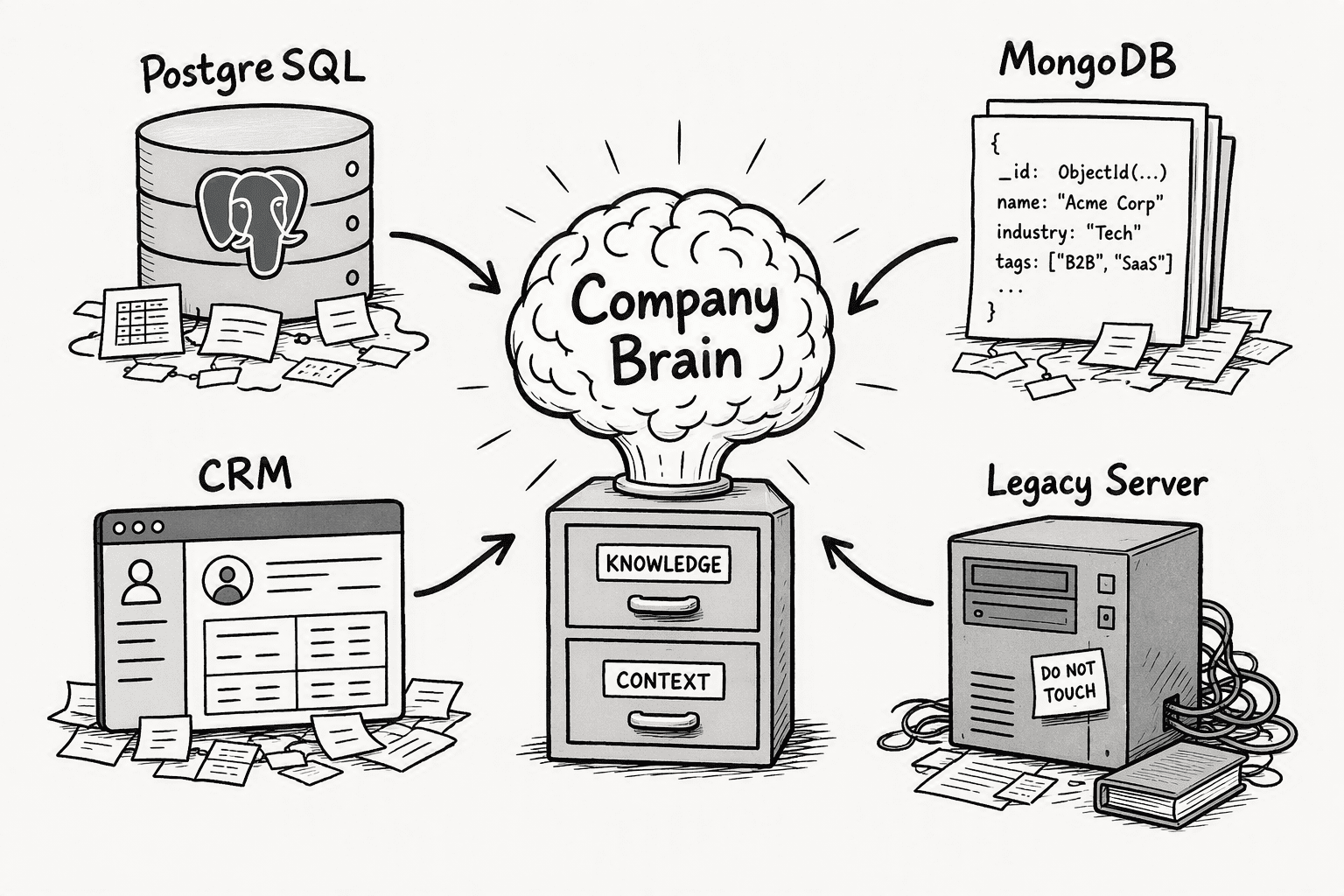
Your brain is only as useful as the mess it can swallow. Connect the real backends your team actually uses, even when the join keys are a disaster.
| Data Source | What It Holds | Why It Matters for Onboarding |
|---|
| PostgreSQL | Application schemas, user records, transaction tables | The new hire needs to understand product data structure without pestering a senior engineer. |
| MongoDB | User profiles, content stores, feature flags | Contains semi-structured tribal knowledge, feature rollouts, experiment configs, that is rarely documented elsewhere. |
| Internal wikis and PDFs | Policy docs, architecture decision records, runbook procedures | Unstructured text where the actual 'how we do things' lives; traditional keyword search buries it. |
| SQLite / DuckDB | Local analytics snapshots, offline sales data exports | Small, distributed datasets that get tossed around in Slack but never make it to a centralized dashboard. |
Start with at least two of these. The Data Agent Benchmark identified four properties that make real-world data queries genuinely hard: multi-database integration, ill-formatted join keys, unstructured text transformation, and domain-specific knowledge. Mirror that fragmentation immediately.
Your new hires are not asking clean, single-source SQL questions. They are asking 'what was the close rate on the beta cohort last quarter and which CSM owns them now,' and the answer spans your application database, a Google Doc, and a stale Salesforce export sitting on someone's desktop. Point the brain at all of it. Do not preprocess the data into a tidy semantic model first. That is the six-month project that kills momentum.
Step 2: Configure Granular, Role-Based Access with Additive Permissions
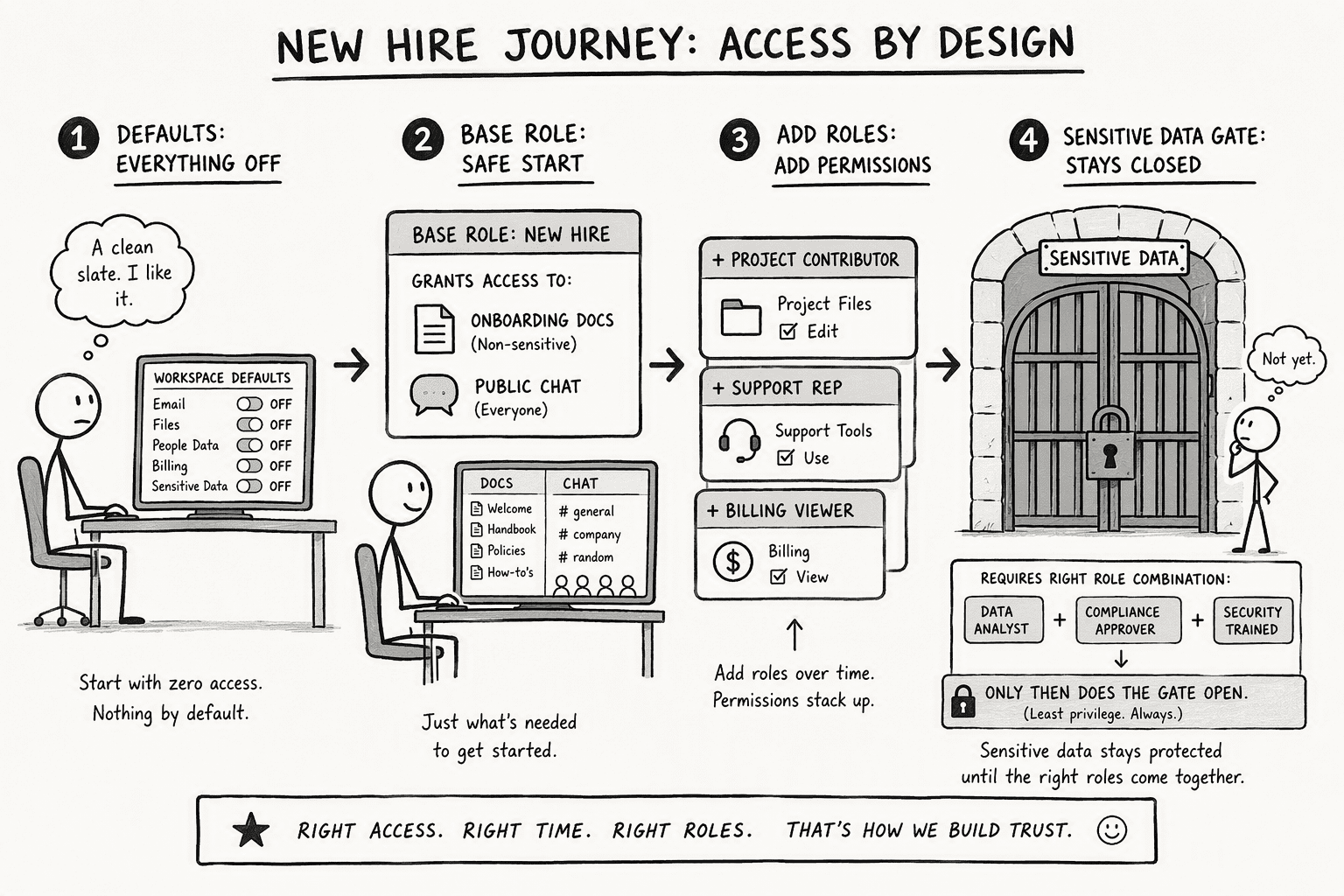
A company brain fails the compliance team in its first week if it hands a new hire financial data. You layer permissions before the first query runs.
- Set workspace-wide defaults to 'Off' for sensitive capabilities. Begin with a minimal base role that grants only read access to non-sensitive onboarding documentation and public slack channels.
- Create additive permission stacks for each role. When a member has multiple custom roles, their permissions combine additively: access granted by one role remains available even if another role is set to Off. This means you can layer a 'Sales-SDR' role on top of a 'New-Hire-Base' role, and the permissions accumulate cleanly.
- Group users and assign roles at the group level. A user can receive permissions from both direct role assignments and group memberships. Avoid assigning roles piecemeal to individuals; bulk-assign by cohort group like 'Q3-Onboarding-Cohort' so you can adjust access for the whole class at once.
- Toggle Lockdown Mode during the first 14 days. This restricts network-enabled capabilities in the brain. A brand-new hire should not be able to trigger side-effecting API calls or run write operations against production schemas. Let them explore and ask questions in a read-only, sandboxed view of the company data.
- Wait 30 minutes for propagation. Allow up to 30 minutes for role changes and group sync to propagate. Adjust permissions ahead of the cohort’s start date, not Monday morning at 9 a.m.
Step 3: Create Custom Roles Mapped to a 30-60-90 Day Onboarding Plan
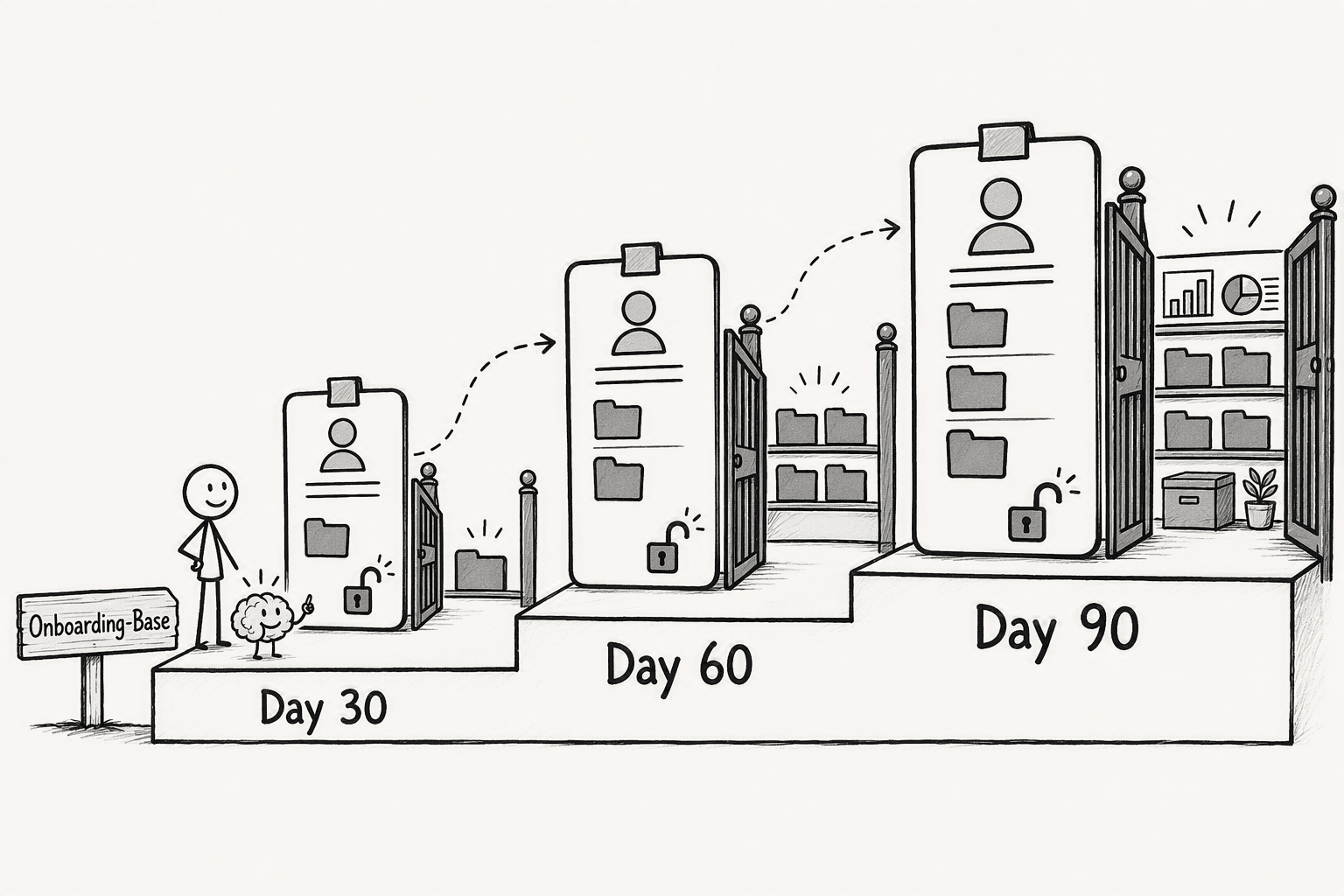
Most RBAC setups lock a new hire into a static permission bucket for months. That turns security into a binary gate, not a ramp. A Company Brain lets you scaffold access to what the employee needs at each milestone.
Map your roles to a 30-60-90 framework. In the first thirty days, the 'Onboarding-Base' role grants access to org charts, product architecture docs, and runbooks. They can ask the brain 'who owns authentication service' or 'show me the sprint planning template' and get a specific answer. Revenue dashboards and customer PII stay locked. They are learning the internal language.
At sixty days, move them into a 'Practitioner' role that adds read access to sanitized transaction schemas and sales pipeline data. The questions shift. A query like 'what is the current churn rate for sub-$10k accounts' now returns a real number. You prevent the scenario where a contributor builds a model on guesswork because the data was invisible.
By day ninety, permissions match functional ownership. The 'Full-Contributor' role unlocks sensitive customer data with approval gates, write access to specific internal datasets, and the ability to trigger operational queries. This is a practical schedule. Every thirty-day permission escalation should be templated in your RBAC config before the new hire's first day. A workspace owner assigns the sequence in advance.
Step 4: Deploy a Secure, Deterministic AI Agent as the Query Layer
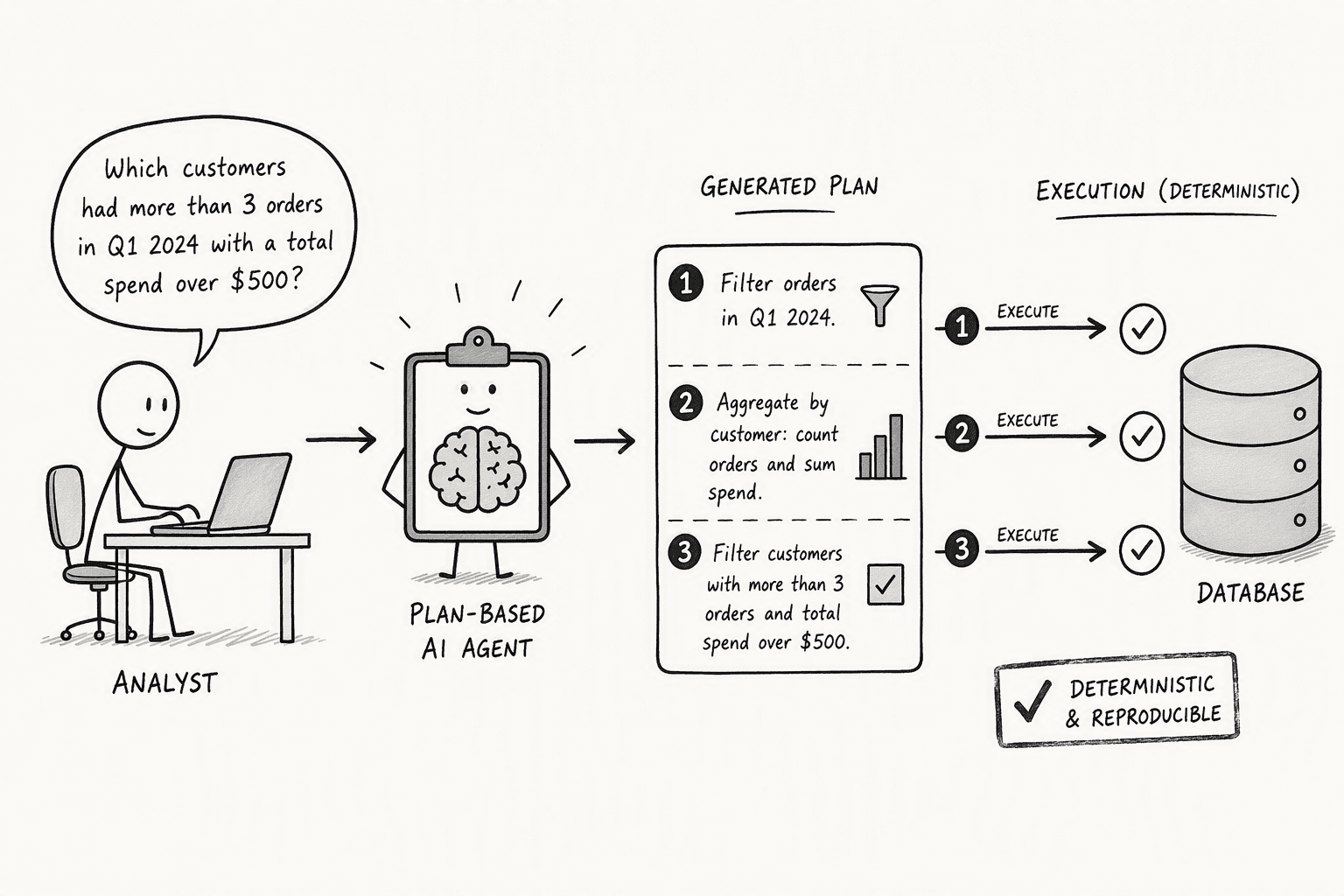
A raw chat interface on top of your database is a liability. You do not want a general-purpose LLM generating SQL queries with no plan. A specialized AI agent like PromptQL resolves this by using plan-based execution: it receives your natural-language question, generates a transparent multi-step plan, and executes each step against your databases deterministically.
The gap you are solving is not minor. The UC Berkeley Data Agent Benchmark showed that the best frontier model, Gemini-3-Pro, achieves only 38% pass@1 accuracy on realistic multi-database queries. These are tasks any data team member would handle, but an undirected model hallucinates join paths or mistransforms unstructured text fields.
A deterministic agent sidesteps this by never running as the AI itself. It acts with each user’s permissions, translating a question like 'calculate monthly revenue growth for the enterprise segment' into distinct retrieval, join, and calculation steps. The plan is referenceable. If the output is wrong, you can see exactly which step broke, instead of staring at a black-box hallucinated figure.
Under the hood, the Agentic Semantic Layer maps your internal language, terms like 'enterprise segment' or 'active trial', to the actual database schemas and document stores without requiring you to build a semantic model first. This is a hard technical distinction from text-to-SQL tools. Text-to-SQL converts English to SQL against a single, well-modeled database. Your problem is messier: you have PostgreSQL production tables, a MongoDB store of user experiments, and wiki pages describing your pricing tiers, all of which define 'enterprise segment' slightly differently. A proper query layer reconciles those differences across databases and unstructured text, all while respecting the user’s row-and-column level permissions.
Even with additive RBAC, some queries cross a line. You need a human-in-the-loop checkpoint that does not require you to block the whole brain for review.
Configure conditional approval gates that intercept flagged query intents. If a new hire with 'Practitioner' permissions asks the brain for a specific customer's contractual terms or a list of employee compensation bands, the agent pauses and routes that request to a manager for a manual sign-off before processing. The data remains behind the gate. The new hire is not stonewalled. They see that a request was raised, but sensitive PII and HR data never leak into a self-serve chat window.
This approval layer addresses the regulatory compliance objection directly. When SOC 2 or GDPR requirements demand evidence that data access was authorized, you have a trail: each sensitive query was confirmed by a named individual. The system logs the approval.
Sensitive reads and side-effecting actions can require explicit confirmation from the driver. Tie each approval gate to a specific data classification level, so 'Tier-3-Financial' queries require a different signer than 'Tier-2-Product' queries. Keep the gates narrow. You want the new hire answering 90% of their questions with zero friction, and pausing only on the 10% that genuinely require oversight.
Step 6: Train the Agent on Domain-Specific Queries and Validate with Real-World Benchmarks
Build a benchmark set of 30 to 50 natural-language onboarding questions drawn from real queries your team asks in Slack or Jira, then follow these steps to validate the agent:
- Include cross-system stretches: Pick questions like 'which customers on the Pro plan have not logged in for 90 days, and who is their assigned account manager', they touch multiple systems and joins that will break if keys are dirty. The DAB research identifies ill-formatted join keys and unstructured text transformation as two of the top four failure modes for AI data agents.
- Run the set and grade every answer: Watch for two silent killers, a stale wiki reference the brain treats as current fact, and a foreign-key mismatch from a CSV export nobody cleaned. Those failures expose the difference between a demo that impresses one viewer and an agent your team actually trusts.
Step 7: Launch, Monitor, and Iterate the New Hire Self-Service Experience
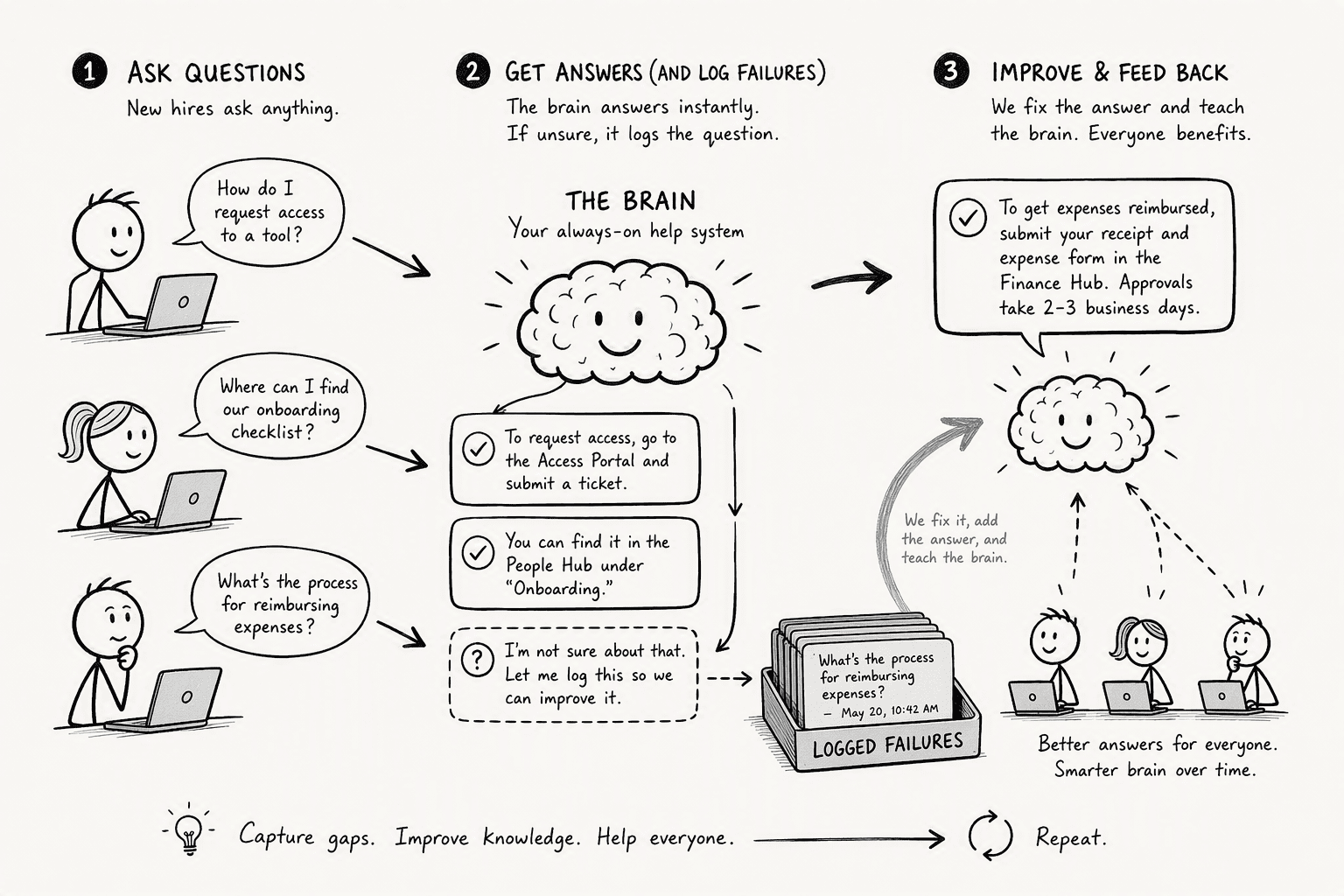
Flip the switch on a Monday morning. A new cohort joins and the brain is their first stop instead of a senior team member. The monitoring that matters is not uptime or latency. It is failed queries. Every question the brain cannot answer or flags for approval is a signal that your institutional knowledge is incomplete, or that a permission scope is too restrictive.
Treat those failures as your continuous-improvement backlog. If three new hires in their first week ask 'how do I request a staging environment,' and the brain returns nothing, you do not just ping the DevOps lead over Slack. You add that answer directly into the source wiki, and the brain ingests it on its next sync.
The goal is to steadily reduce the volume of direct human-to-human mentoring on reference questions. Self-service does not mean leaving people isolated. It means the mentoring time that remains is spent on context, judgment, and collaboration, not on naming the staging environment provisioning process for the fourth time this month.
Over a few months, the brain shifts from an onboarding accelerator into the company’s primary operational surface. OpenAI’s internal data agent serves thousands of employees querying 70,000 datasets totaling 600 petabytes. You scale this same principle down to your team: every answered question becomes a permanent, queryable asset. The organizational memory stops walking out the door every time an employee does.
Conclusion
The real shift isn't speed. It's that a company brain turns the hours your team spends answering the same config question again and again into a permanent asset you can query. Every fragmented wiki tab, every Slack thread you can't find later, those costs compound. A company brain stops that cycle.
You replace scattered information with a single prompt layer backed by additive RBAC, approval gates on sensitive data, and deterministic execution across your actual database spread. Start with two databases, a tight permission scaffold mapped to 30‑60‑90‑day role progression, and a benchmark set of onboarding questions pulled from real ticket logs.
The ramp time improvement registers quickly. But the longer-term effect is the one that sticks: the organization gets smarter with every new hire instead of starting over each time.
Frequently Asked Questions
What is a company brain in the context of employee onboarding?
A company brain is an AI-powered query layer that unifies an organization’s fragmented institutional knowledge, wikis, databases, documents, into one chat interface. For onboarding, new hires ask plain-English questions and get instant, context-aware answers drawn from the aggregated systems, without hunting across tools.
How can an AI agent accelerate new hire time-to-productivity?
By replacing slow manual mentorship for reference questions. A new hire asks the agent for schemas, policy details, or operational queries across databases and gets an immediate answer. This cuts the weeks-long back-and-forth in Slack and wiki tunnels that dominates early ramp time.
What is the measurable downside of using raw LLMs for enterprise onboarding queries?
Frontier models achieve only 38% pass@1 accuracy on realistic multi-database tasks in the UC Berkeley DAB benchmark. Raw LLMs hallucinate join paths, mis-handle unstructured text, and have no deterministic execution plan, making them unreliable for onboarding queries that require precise, trusted answers.
How does PromptQL enforce security and permissions when sharing institutional knowledge?
PromptQL uses additive role-based access control (RBAC) mapped to custom roles. Each user’s effective permissions are the union of all assigned roles.
How does the Agentic Semantic Layer help new hires understand business data without SQL?
It translates natural-language questions into transparent, multi-step operations across databases and unstructured text. The layer maps internal business terms like 'enterprise segment' to the actual schemas and documents, reconciling ill-formatted join keys and text transformation automatically so the hire never writes SQL.
Sources
- Essays — PromptQL - promptql.io
- Role Based Access Controls for ChatGPT Enterprise | OpenAI Help Center - help.openai.com
- Can AI Agents Answer Your Data Questions?A Benchmark for Data Agents - arxiv.org
- Manage permissions in the OpenAI platform - platform.openai.com
- Company Brain - www.company-brain.ai




