
18 Aug, 2026
•
10 MIN READ
How to Build a Knowledge Graph From Existing Data
Key Takeaways
- Defining the schema: You lock in a clear, upfront domain ontology with entity types, relationships, and attributes.
- Preparing data sources: You profile and categorize everything from SQL tables to raw text documents and existing knowledge bases.
- Mapping with an agentic layer: An AI layer reasons over database schemas, proposing mappings from tables and foreign keys to graph classes and relationships.
- Extracting with fine-tuned LLMs: You use specialized models for high-precision named entity and relation extraction from unstructured text.
- Populating the graph: You deterministically transform structured data and integrate third-party knowledge bases into clean triples.
- Resolving entities: You apply incremental clustering frameworks like FAMER to deduplicate records across sources.
- Validating the result: You move beyond structural checks to measure semantic coherence and operational reasoning quality.
What is a knowledge graph?
How to Build a Knowledge Graph From Existing Data
Step 1: Identify and Prepare Your Data Sources
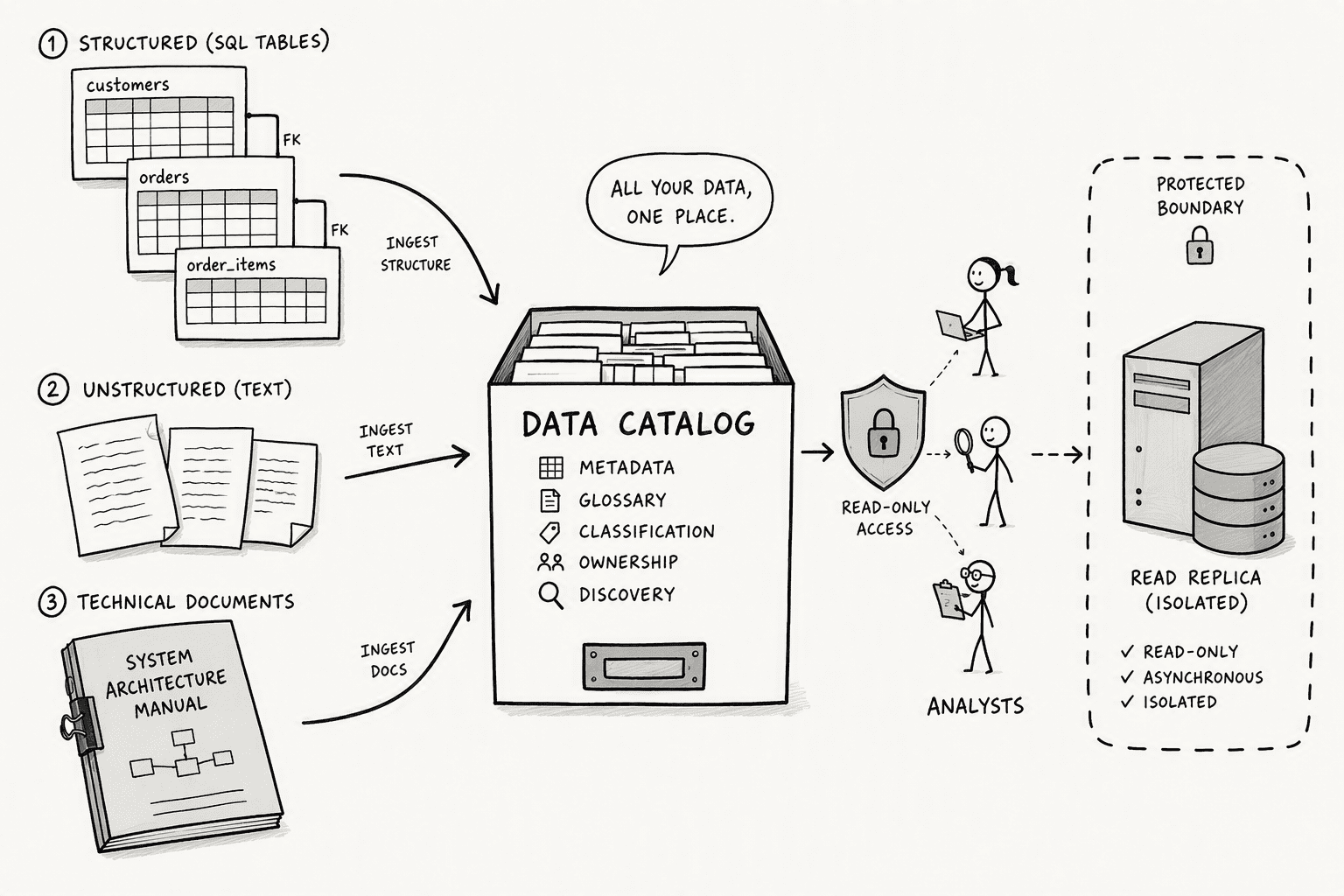
- Structured SQL tables: hold transactional and operational records governed by rigid schemas and foreign keys. For each SQL source, catalog the schema, identify key tables, and document all foreign keys. You need read-level credentials, not raw database credentials, you cannot expose a production database to an extraction process without read-replica isolation.
- Unstructured text: arrives as incident reports, email bodies, technical logs, and PDFs with no formal data model. Constructing knowledge graphs in specialized contexts presents unique challenges: highly distributed and dynamic knowledge, limited data accessibility, and domain-specific semantic complexity. Your reports contain technical codes and operational abbreviations that generic text parsers get wrong. Collect representative samples, extraction accuracy depends on seeing the actual variation in your text early, not after you've already picked the wrong model.
- Existing knowledge bases: like curated taxonomies, reference datasets, or public ontologies, can anchor your graph. Start with a blunt inventory. Profile each source for volume, freshness, and access.
Step 2: Define the Domain Ontology and Schema
Step 3: Map Sources to a Semantic Schema with an Agentic Layer
- Ingest the database catalog: Feed the agentic layer the table schemas, primary keys, foreign key relationships, and sample data from each structured source.
- Reason over the structure: Let the agent propose a preliminary mapping. Tables become node labels. Rows become nodes. Columns become node properties.
- Resolve foreign keys: Instruct the agent to analyze foreign keys and map them directly to graph relationships. Foreign keys are replaced with relationships to the other table, then removed as individual properties.
- Transform JOIN tables: Teach the agent to recognize bridge tables. JOIN tables are transformed into relationships, and columns on those tables become relationship properties.
- Publish the mapping contract: Output a machine-readable mapping file that the graph population engine in Step 5 executes deterministically. Reviewing this contract as a human takes minutes, not days.
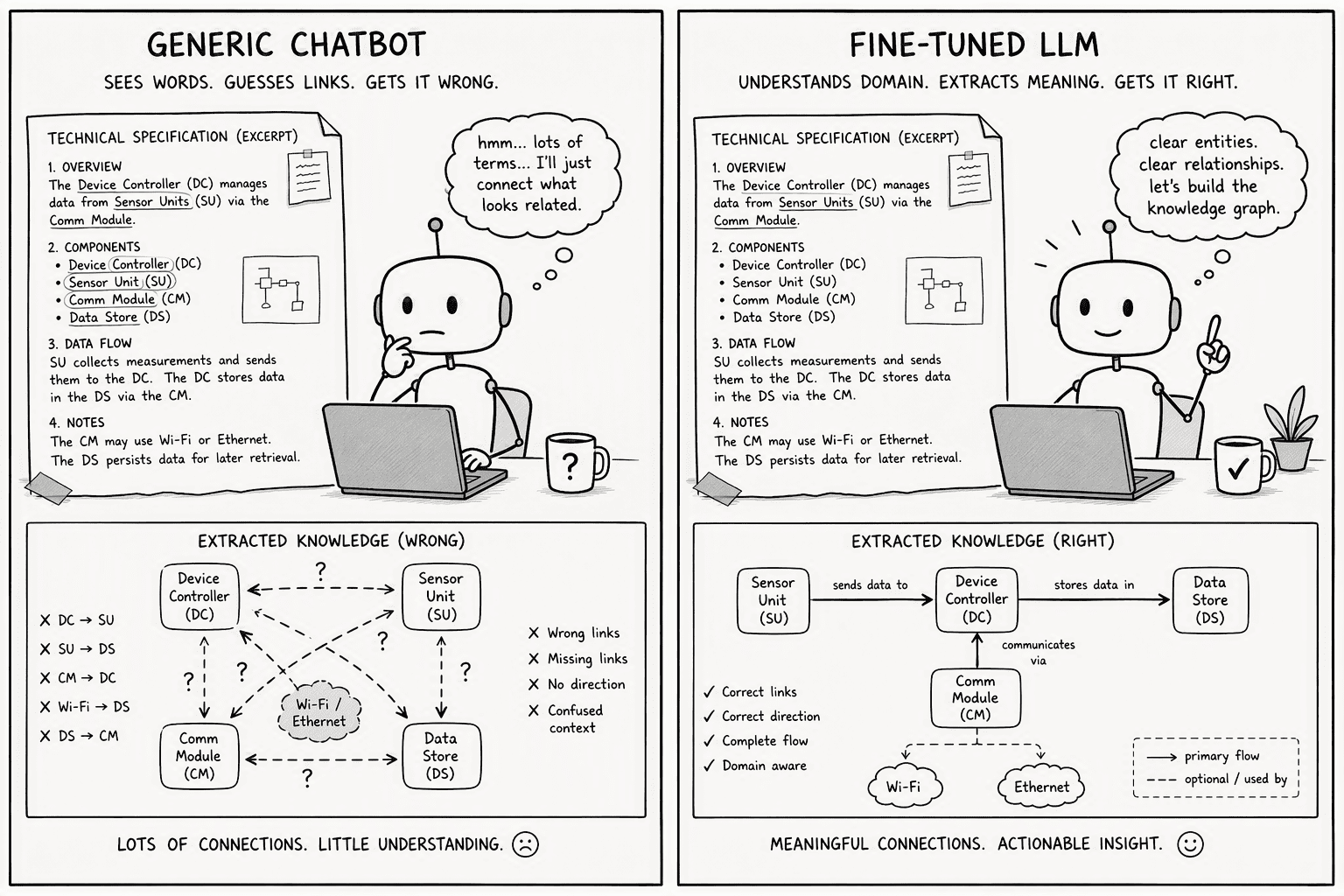
Step 4: Extract Entities and Relationships from Unstructured Text with Fine-Tuned LLMs
Step 5: Populate the Graph from Structured Data and Knowledge Integration Pipelines
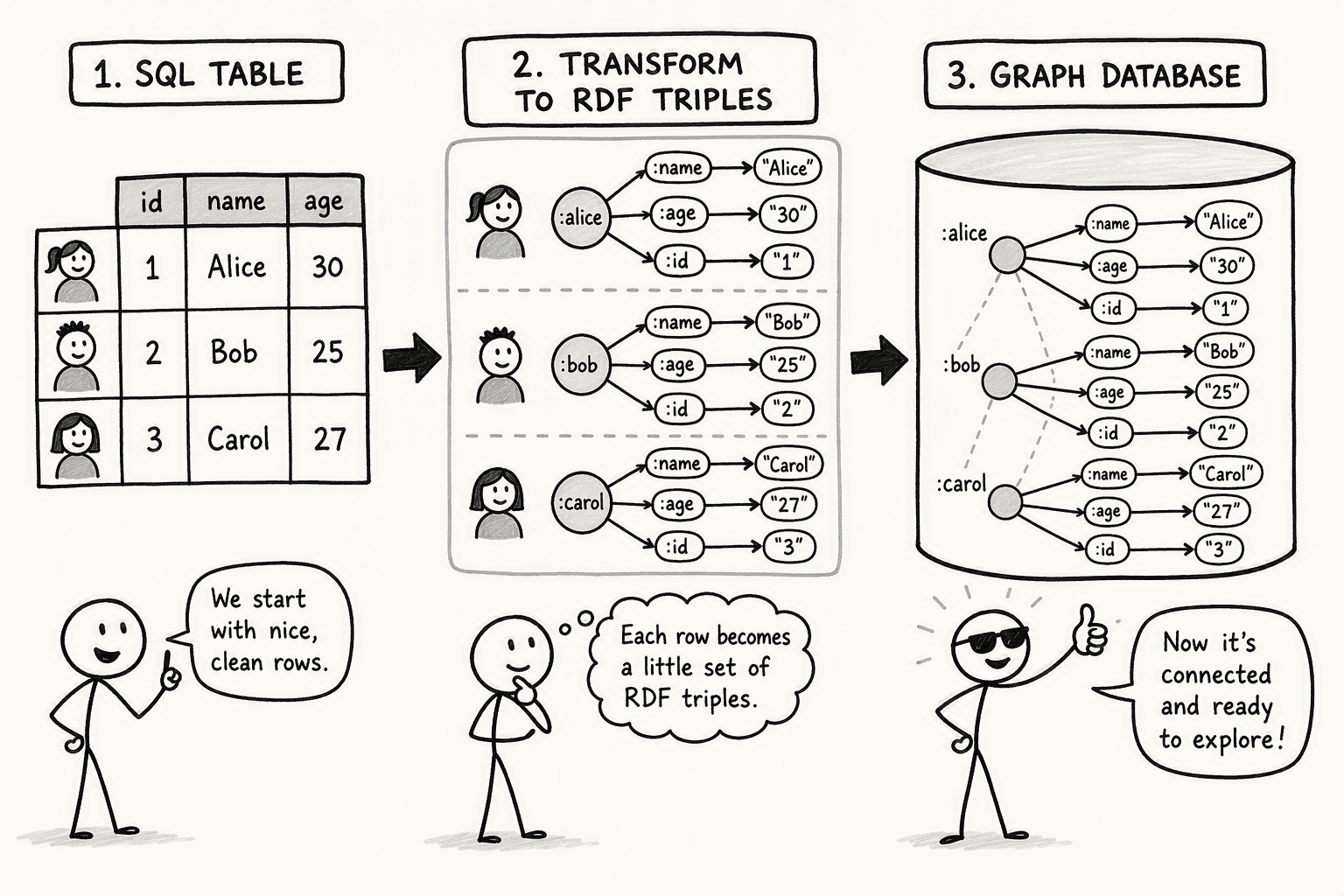
- Transform each mapped row to a node: for every row in a mapped table, create a node with the corresponding label, and assign non-key columns as node properties.
- Materialize relationships: for each foreign key relationship in the mapping, create an edge between parent and child nodes.
- Merge in the unstructured extraction output: take the triples extracted in step 4 and write them into the same graph, so structured and unstructured data land in one place instead of staying as two disconnected outputs.
- Ingest external knowledge bases: pull in any reference taxonomies or public authority data you profiled in step 1.
- Enforce the ontology: as each triple writes, validate that the subject type, object type, and predicate all conform to the schema from step 2. Reject anything that doesn't to a review queue instead of letting the graph quietly drift.
Step 6: Resolve entities and validate, on an ongoing basis
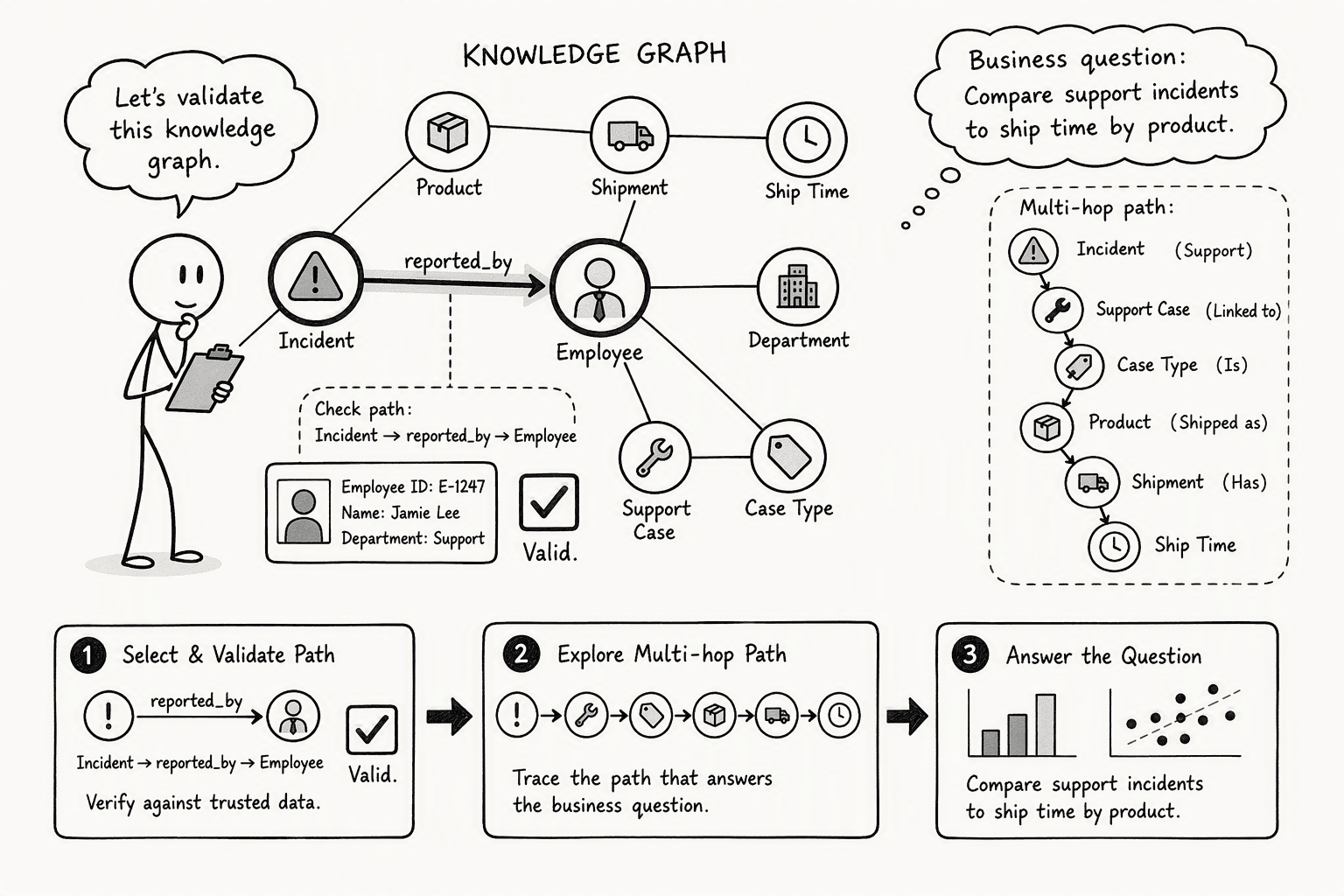
- Semantic coherence: check that inferred paths reflect logical domain constraints, for example, verifying that an "Incident reported_by Employee" path always connects to a node whose employee ID actually exists.
- Operational reasoning: pose complex business questions spanning three or more relationship types, like "which product lines generated the most support incidents but also had the shortest time to ship," to confirm the graph traverses and reasons correctly.
- Semantic coherence: Check that inferred paths reflect logical domain constraints, for example verifying that the path "Incident -> reported_by -> Employee" always connects to a node whose employee ID exists.
- Operational reasoning: Pose complex business questions spanning three or more step types, such as "Which product lines generated the most support incidents but also had the shortest time-to-ship?" to confirm correct graph traversal and business logic.
- Validation and use: Tools like metaphants provide a visual query interface for these reasoning tests; a validated graph immediately enhances semantic search, recommendation systems, and question-answering applications.
Common mistakes when building from existing data
- Locking the ontology before profiling the actual data, which produces a schema based on assumptions rather than what's really there
- Treating entity resolution as a one-time step instead of a live, ongoing capability that needs to run every time a source changes
- Letting the structured mapping pipeline and the unstructured extraction pipeline stay separate, so only part of your data ever actually makes it into the graph
- Checking only structural metrics, like node count, instead of semantic coherence and whether the graph can actually answer real business questions
The architecture decision you need to take
Conclusion
Frequently Asked Questions
What is a knowledge graph and how does it compare to a traditional database?
What are the main data sources you can use to populate a knowledge graph?
- Structured databases: SQL tables with transactional and operational records
- Unstructured text: reports, emails, and PDFs with no formal data model
- Pre-existing knowledge bases: curated taxonomies, reference datasets, or public ontologies
What is the step-by-step process for building a knowledge graph from structured data like SQL tables?
- Map entity tables to node labels: map each entity table to a node label and each row to a node with columns as properties
- Replace foreign keys with direct relationships: replace foreign keys with direct relationships to the target table
- Convert JOIN tables into relationship properties: transform JOIN tables from intermediary tables into relationship properties
How can you extract entities and relationships from unstructured text using AI or NLP?
- Fine-tuned LLMs: achieve substantial gains in relationship extraction accuracy on specialized documents where general-purpose models break down on technical codes and abbreviations
- Parsing trees with coreference: combining parsing trees with entity coreference resolution further improves ranking effectiveness
- Domain-specific terms: general-purpose models fail on technical codes and operational abbreviations present in specialized texts
What are the best practices for schema design and entity resolution when building a knowledge graph?
- Define ontology upfront: use strict entity types and relationships; do not let AI invent classes on the fly
- Use incremental clustering frameworks: frameworks like FAMER with n-depth reclustering repair outperform naive methods by fixing cluster quality regardless of source insertion order
What are the current leading tools, both open-source and commercial, for constructing knowledge graphs in 2026?
Sources
- Incremental Multi-source Entity Resolution for Knowledge Graph Completion - PMC - pmc.ncbi.nlm.nih.gov
- ETD | Hierarchical Entity Extraction and Ranking with Unsupervised Graph Convolutions | ID: b8515p57p | Emory Theses and Dissertations - etd.library.emory.edu
- The construction and refined extraction techniques of ... - www.nature.com
- Incremental Multi-source Entity Resolution for Knowledge Graph Completion | The Semantic Web - dl.acm.org
- [2101.06126] EAGER: Embedding-Assisted Entity Resolution for Knowledge Graphs - arxiv.org
- RDBMS & Graphs: Relational vs. graph data modeling - neo4j.com
- Create a Knowledge Graph with Oracle Autonomous Database and Property Graph Query Language - docs.oracle.com



