A team can have hundreds of well-written pages and still not have a searchable knowledge base. The gap usually isn't the content, it's that nothing was actually built to index, rank, and retrieve it by intent. A pile of documents with a search bar bolted on top isn't the same thing as a system built for retrieval.
This guide covers what actually makes a knowledge base searchable, the steps to build one, and how to avoid the mistakes that turn a promising project into a pile of unused pages.
Key Takeaways
- Searchable means indexed, ranked, and filterable, not just written down. A folder of good documents isn't a searchable knowledge base until it's structured for retrieval.
- Live, connected sources beat static pages. Pulling from chat history, CRM records, and databases directly keeps answers current in a way a page written once never can.
- Permissions have to scope results from the start, not get added later once more sources are connected.
- A planning step turns retrieval into reasoning, decomposing a question into targeted sub-queries so the final answer is built from what was actually retrieved, not filled in from a model's training data.
- An answer only one person can see gets asked again. Making answers shareable and reusable is what actually stops the same question from circulating through a different channel every few weeks.
- Staleness has to be tracked, not assumed away. A stale answer ranks just as high as a current one unless something is actively watching for drift.
What makes a knowledge base searchable
Being searchable isn't the same as being written down. It means content is structured in a way that a query can actually find, rank, and narrow down to the right result, not just stored somewhere and hoped for. A knowledge base is a deliberate, structured system, not a passive folder of documents someone hopes an AI or a search bar eventually discovers.
A few components have to be in place for that to actually work:
- Indexed, structured content, mapped so a query knows where to look, not just a folder of files sitting in a shared drive
- Search that tolerates typos and understands intent, ranking by relevance rather than requiring an exact keyword match
- Metadata and filtering, tags, categories, and dates, so results can be narrowed instead of dumped as one long list
- Permissions that scope results, so what someone finds depends on what they're actually allowed to see
- Visibility into gaps, tracking what people search for and don't find, not just what search successfully returns
How to build a searchable knowledge base
Step 1: Audit what exists and define the knowledge base foundation
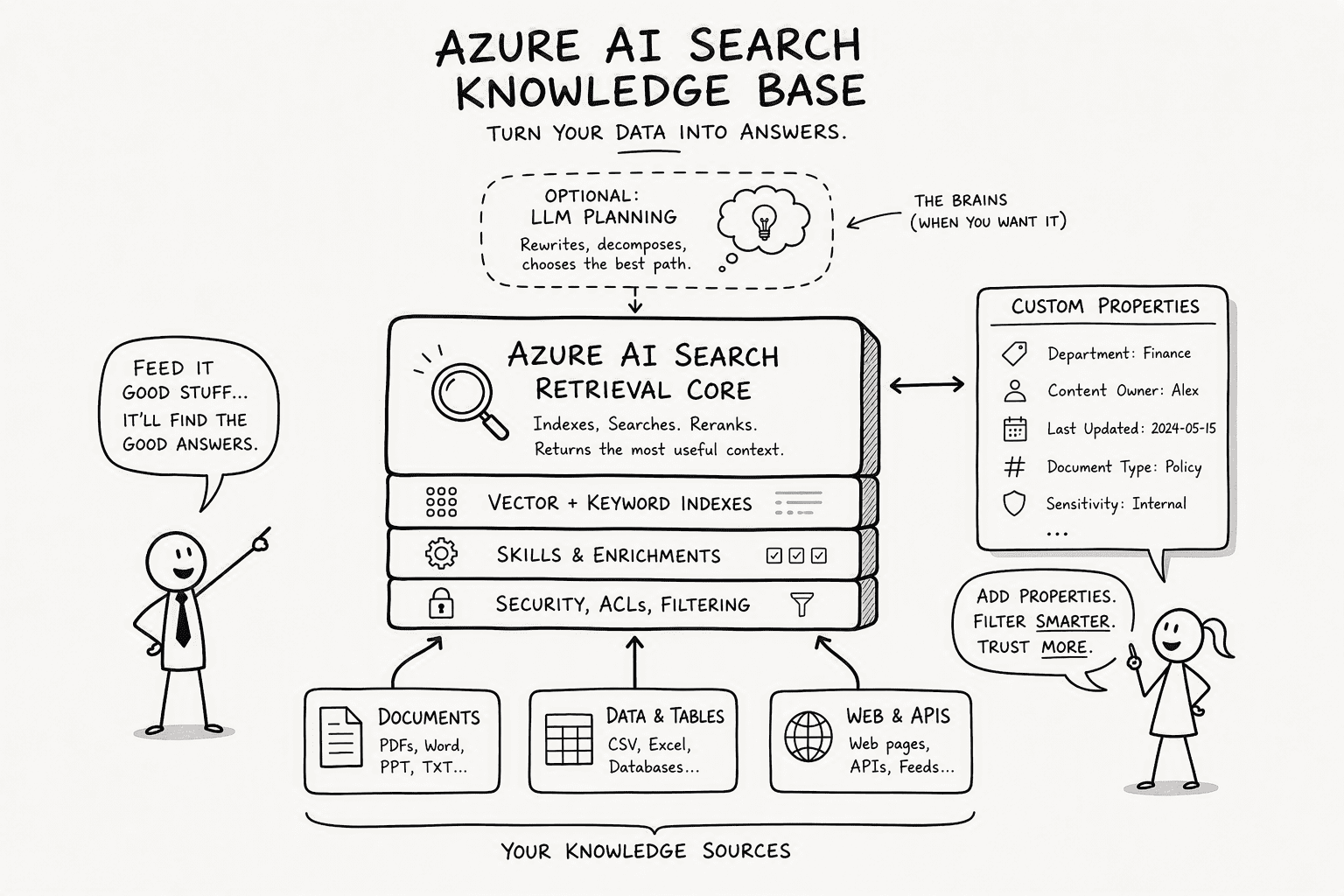
Start by cataloging where content already lives, docs, wikis, tickets, chat history, before connecting or building anything new. Once that's mapped, define the knowledge base itself as a real structure: what sources it draws from, how content is tagged and organized, and how it's governed. A knowledge base works best as a defined, top-level structure rather than a passive collection of documents, specifying its sources and routing logic before a single query runs against it.
A version-controlled source, a wiki, for example, makes a strong first foundation. Because a wiki is typically backed by version control, every change is a commit with an author, a message, and a timestamp, so any page can be viewed as it existed at a given point, compared against an earlier version, or reverted. That gives a structured, auditable source of truth to build everything else around.
Step 2: Orchestrate the Agentic Semantic Retrieval Layer
Decide between keyword, semantic, or agentic retrieval based on what's actually being indexed. Keyword search works fine for a small, well-labeled set of documents. The real jump in accuracy happens when a system reasons about where to look rather than searching everywhere and handing back a list.
Consider a common scenario: someone asks which pricing plan a customer is on. A conventional keyword search returns ten chat messages that mention "pricing" and eight CRM records with a plan field, and a person still has to sit down and reconcile them by hand. A system built to reason across sources instead recognizes that the current plan lives in one place and the negotiation history lives in another, pulls both, and returns a single synthesized answer instead of a pile of fragments to sort through manually.
You can use a tool like PromptQL to get this layer without stitching together SDK calls. PromptQL builds an agentic semantic layer on top of whatever knowledge sources you connect, including Slack, Salesforce, Google Docs, and Snowflake, and lets you guide it with a planning prompt.
Step 3: Connect and Secure Live Enterprise Data Sources
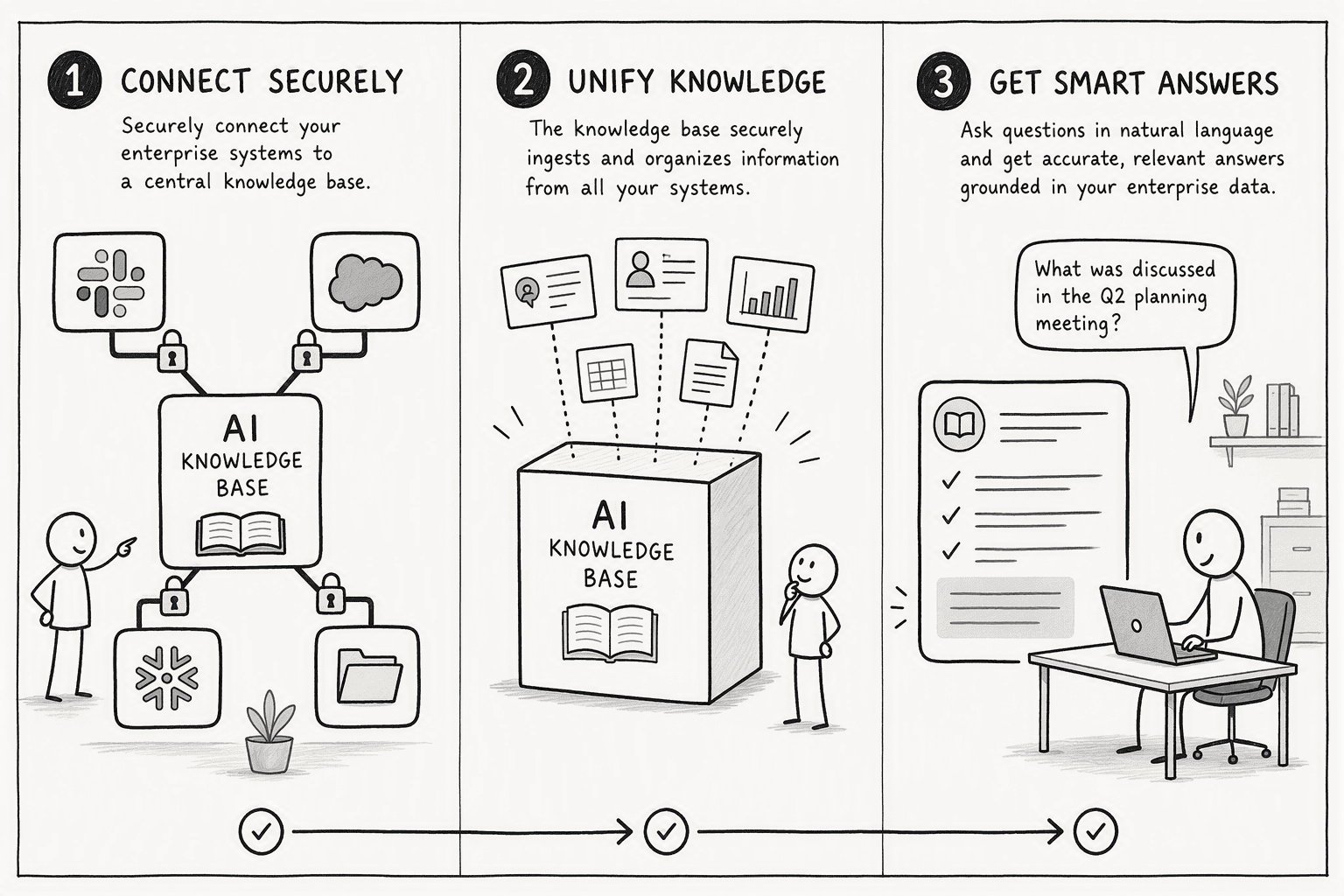
Connecting real, live sources, chat history, CRM records, a data warehouse, is where a knowledge base actually earns its value over a static document dump. But access needs to be scoped from the moment a source connects, using identity-based access tied to the person asking, rather than a shared credential the whole system uses indiscriminately. No raw database credentials should ever be exposed directly to the retrieval layer itself.
Step 4: Integrate AI Reasoning with a Custom Planning Prompt
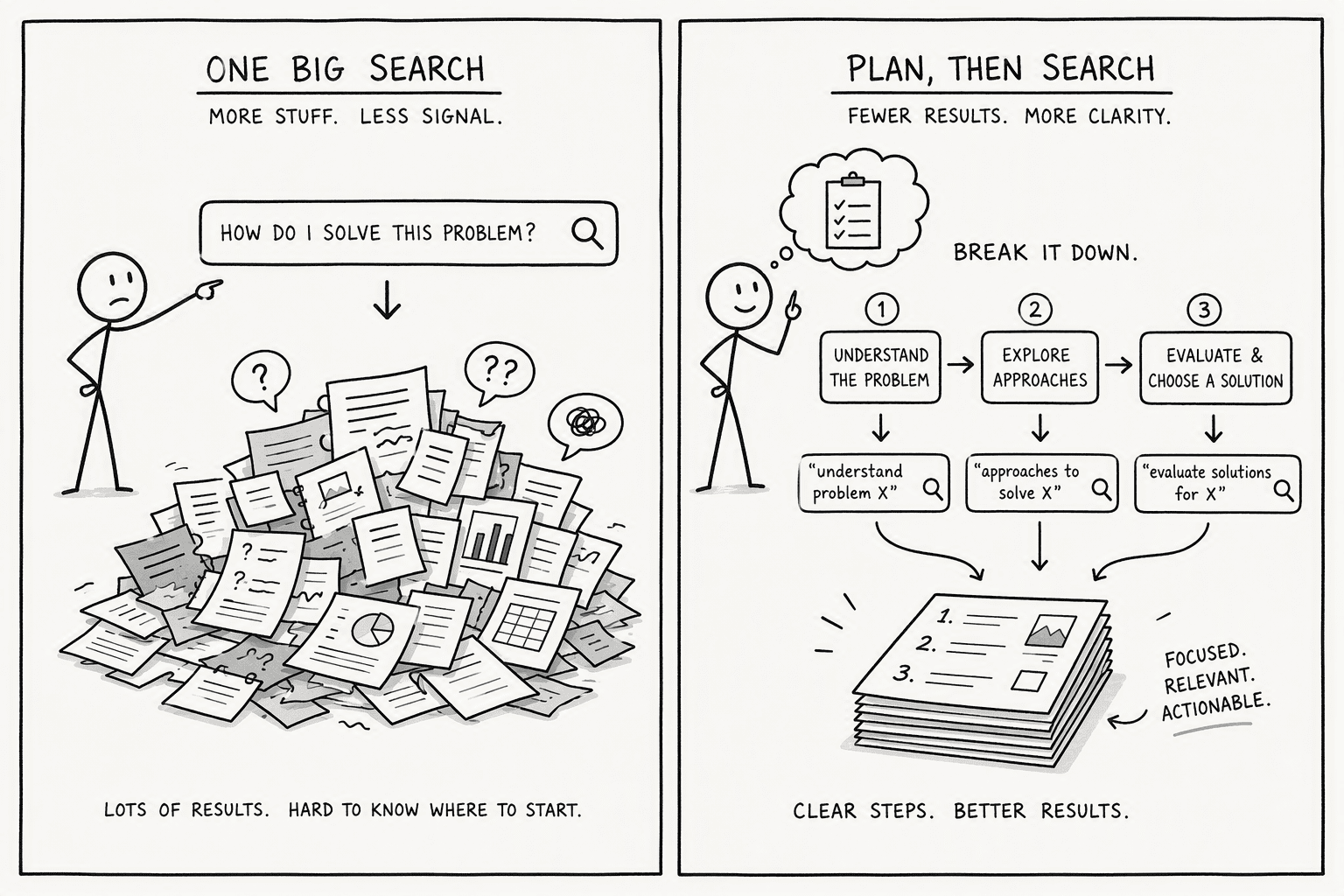
Retrieval without reasoning returns documents. Reasoning returns answers. The difference lives in a single configuration: a custom planning prompt.
The following table breaks down what changes when you bring a planning LLM into the knowledge base:
| Capability | Without Planning Prompt | With Custom Planning Prompt |
|---|
| Query handling | Single search across all sources | Multi-step plan that decomposes the query before any search |
| Source selection | Returns results from every connected source indiscriminately | Dynamically selects only the sources relevant to each decomposition step |
| Answer quality | A list of document snippets the user must reconcile | A synthesized answer drafted after all retrieval steps complete |
| Auditability | Hard to trace which fragment came from where | Each planning step is a retrievable, inspectable sub-query |
Step 5: Extend Access via Shared, Read-Only Knowledge Threads
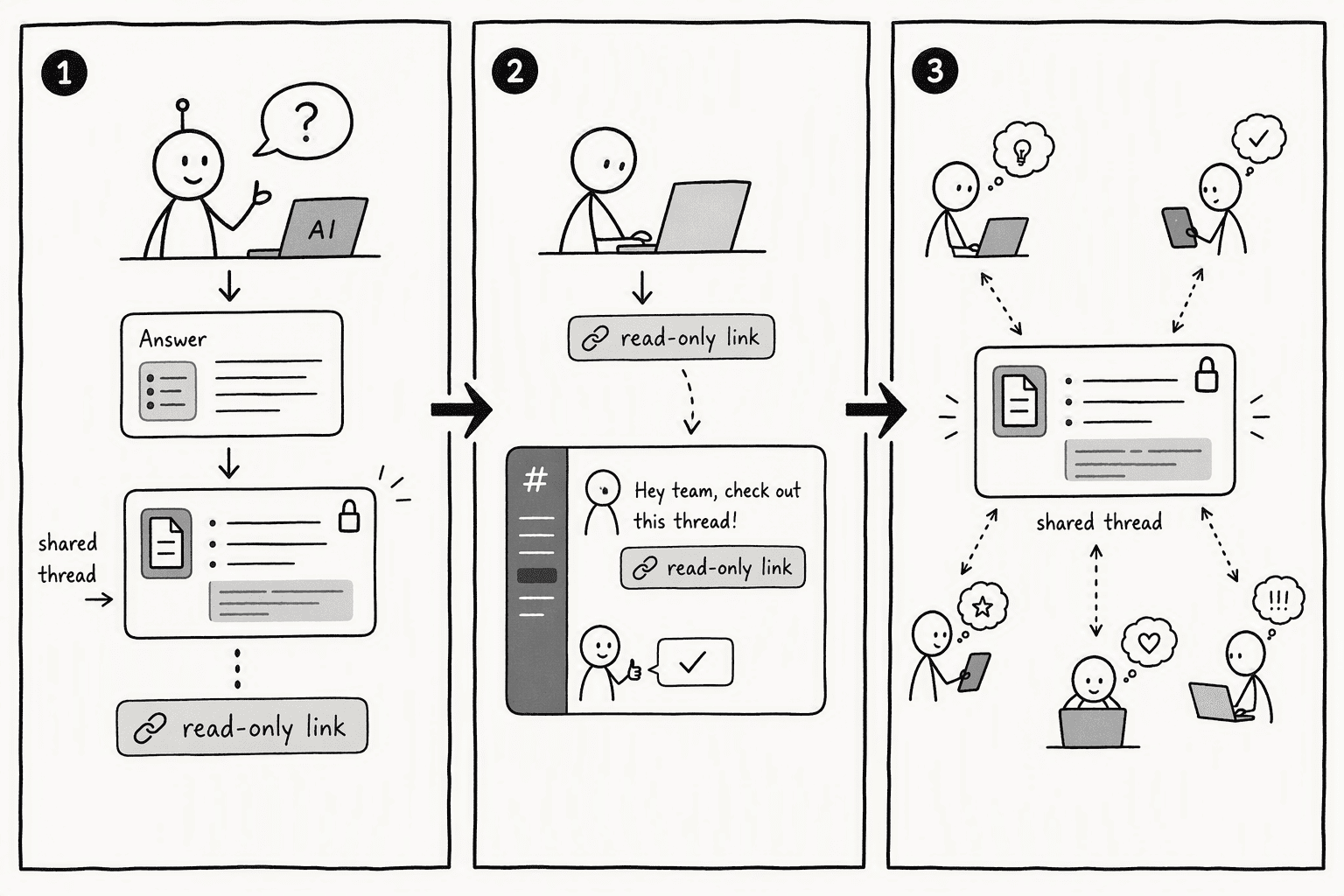
An answer that only the person who asked can see gets asked again by the next person who runs into the same question. A private query window helps exactly one person, that's a calculator, not a knowledge base. Distributing a synthesized answer as something shareable, a link, a pinned thread, turns a single query into something the whole team benefits from, instead of the same question circulating through a different channel every few weeks.
Step 6: Track what search fails to find, and keep content from going stale
Visibility into failed or empty searches shows what's actually missing from the knowledge base, not just what it already handles well. Pair that with a mechanism for content to get flagged or corrected as the underlying information changes, so search doesn't keep confidently surfacing an answer that used to be true.
Step 7: Measure Success and Govern for Production Reliability
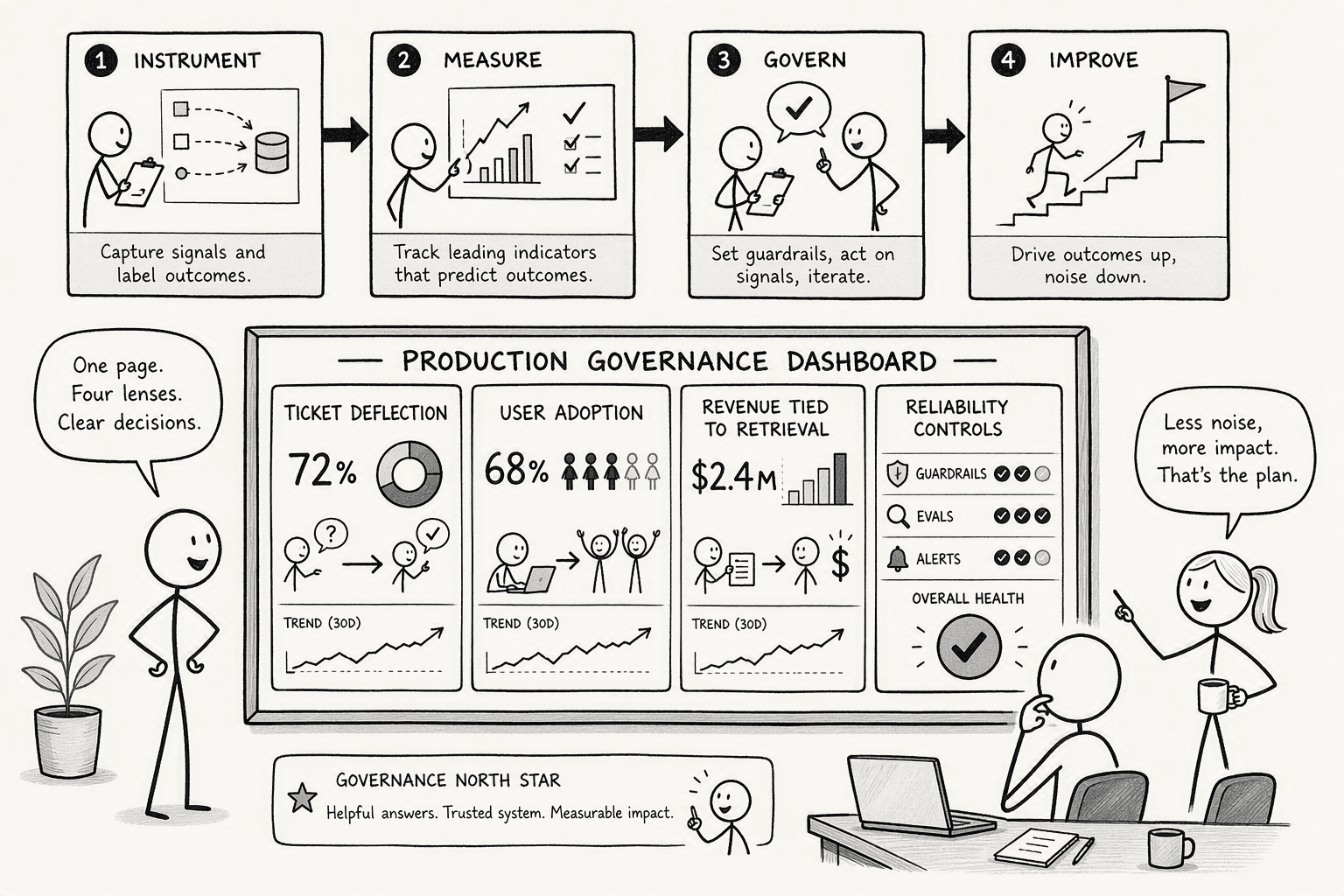
Most enterprise AI pilots fail because no one defined what success looked like before they turned the thing on. Here's the measurement and governance framework that keeps a knowledge base project from becoming shelfware:
- Track deflection, not dashboards: Measure IT ticket deflection rates and user adoption of the custom bot. Snowflake's Slack bot success shows up in reduced internal support load, not a vanity-metric dashboard.
- Tie revenue to retrieval: When Snowflake's corporate account executive Michael Westra reported that Slack Connect helped him increase his deal size threefold year over year, that wasn't attributed to "better communication." It was attributed to faster, more accurate retrieval of shared context. Link deal velocity to knowledge base adoption numbers.
- Ban preview APIs in production: The 2026-05-01-preview API explicitly warns that data processing may occur outside the compliance boundary. Use previews for evaluation. Use generally available releases for anything a paying customer touches.
- Own your responsible AI mitigations: Test applications thoroughly pre-production. Implement your own guardrails. A chat reply that disappears into scrollback is not use; a governed, tested, versioned answer is.
- Audit everything at the Git level: Because wikis are Git repositories, every AI-suggested change creates a commit you can review, compare, and revert. This turns the knowledge base into an auditable, continuously improving asset instead of a black box.
- Validate certifications explicitly: The company says PromptQL lists ISO 27001 and GDPR as compliance certifications. Validate those against your own audit requirements before provisioning any tenant.
Common mistakes
- Treating a knowledge base as a passive folder of documents someone hopes an AI or search bar will eventually discover, rather than a defined, structured system
- Letting answers live in a private query window that helps exactly one person, that's a calculator, not a knowledge base
- No visibility into what people search for and don't find
- Content that's searchable but not trustworthy, a stale answer ranks just as high as a current one if nothing tracks freshness
- No permission scoping, so search becomes an oversharing risk the moment more sources get connected
The easier way to do it
Building all of this in-house, indexing, ranking, live connections with proper permission scoping, a planning layer, staleness tracking, is a real, multi-part project, not something to bolt together over a weekend.
PromptQL is built around this problem directly rather than requiring a team to assemble each layer separately. It connects to sources like Slack, Salesforce, Google Docs, and Snowflake, and the underlying model is used only for planning and synthesis, never for generating a final answer straight from its training data, which keeps every answer traceable back to what was actually retrieved. When an answer gets shared, it can be distributed as a read-only thread with a single link, with no login required for viewers, directly addressing the "make answers reusable" step above. For teams with stricter data residency needs, PromptQL's enterprise tier offers a dedicated VPC or bring-your-own-cloud deployment option.
This same underlying approach, corrections and usage strengthening a shared knowledge base automatically instead of decaying in a wiki nobody reopens, is covered in more depth in how to build a company brain and how to add a context layer to an existing AI tool.
Conclusion
A knowledge base is only as searchable as it is structured, permissioned, and current. Indexing and a search bar are the last steps in the process, not the first, the real work is in auditing what exists, connecting it safely, adding reasoning on top, and making sure answers don't just help the one person who happened to ask.
Frequently Asked Questions
What's the difference between a knowledge base and a searchable knowledge base?
A knowledge base is any organized collection of information. A searchable one is specifically built for retrieval, with content that's indexed, ranked by relevance, and filterable by metadata, so a query actually surfaces the right answer instead of requiring someone to browse until they find it.
Does a searchable knowledge base require a dedicated search engine or database?
Not necessarily. Simple, well-tagged content can work with lightweight keyword search. Larger or more scattered content, spanning chat history, tickets, and multiple databases, generally benefits from a dedicated indexing and retrieval layer, since keyword matching alone breaks down once content lives across many disconnected sources.
How do you keep a knowledge base from surfacing outdated answers?
Pair search with a way to track staleness directly, flagging content that hasn't been reviewed recently, or better, generating answers from live, connected data rather than a static page that was accurate only on the day it was written. Corrections should also update the source permanently, not just the one answer someone happened to see.
What's the difference between a searchable knowledge base and a knowledge graph?
A searchable knowledge base is optimized for retrieving relevant content in response to a query. A knowledge graph goes a step further, modeling explicit relationships between entities so a system can reason across connections, not just retrieve isolated matches. The two overlap but solve slightly different problems, retrieval versus relational reasoning.




