Before a team can ask a single useful question of its data, someone usually has to spend a good chunk of their time tracing where everything actually lives. It's common for a business to manually map hundreds of fields across a dozen data sources every time it onboards a new customer or a new system, a process that can take weeks or months before even a single model gets deployed.
That's the specific problem an AI system built for automatic data mapping is meant to solve. This guide walks through how that actually works and how you can set it up yourself.
Key Takeaways
Building an AI that automatically maps your data is not a single product switch. It is a deliberately architected pipeline with specific safety and accuracy gates. Here are the must-haves:
- Planning layer first, querying second: The AI must inspect metadata and statistics, never raw rows, to propose an initial map without exposing sensitive data.
- Context is the accuracy lever: Ground the agent in your actual schemas, business metrics, and lineage. Generic models hallucinate; context-specific agents resolve.
- Conversation is the refinement interface: Iterate the map in natural language. Define joins, resolve ambiguities, and correct the agent with simple prompts.
- Granular access controls are non-negotiable: Enforce row-level, column-level, and source-level security per user identity before any query hits live data. Deep Data Security enforces least-privilege access for end-users and agents to prevent data exfiltration.
- Visualization closes the loop: The mapped semantic model must auto-generate live, interactive dashboards and charts that update with the source data.
- Bulk editing keeps it scalable: A conversation cannot tune 10,000 entity definitions. You need a spreadsheet-like interface for mass policy and definition updates.
What automatic data mapping actually means
Automatic data mapping means connecting to a warehouse, database, SaaS app, or API as it already exists, and having an AI introspect the schema to build a unified understanding of it, without moving or reshaping the underlying data.
No ETL pipelines, no staging tables, no prep work to make the data "AI ready" first. Done well, this takes minutes instead of weeks.
Traditional semantic layers weren't built for this kind of speed. They're typically rigid, centrally managed, and detached from how a business actually changes day to day, since a data engineer has to manually rebuild the model every time something shifts. An AI system built for automatic mapping needs to adapt as data and definitions evolve instead.
How an AI automatically maps and understands your data
Step 1: Create an AI Planning Layer That Discovers Without Direct Database Access
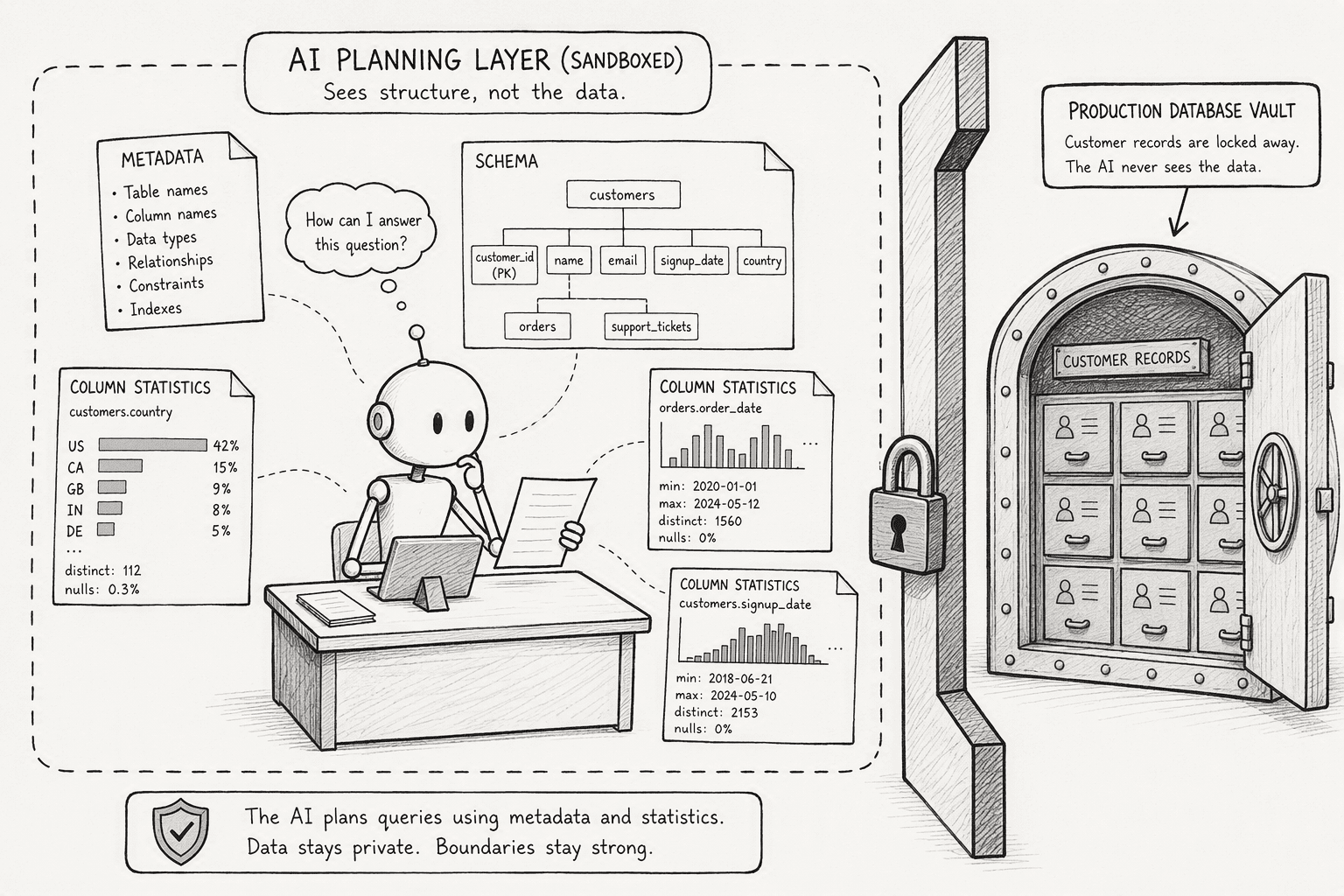
The safest way for an AI to understand your data is to never touch the raw rows in the first place. A planning layer works by reading schemas, table structures, and metadata, not customer records or transaction-level data, to build an understanding of how everything connects. Rather than generating a raw string to run directly, a well-built planning layer constructs a structured object for the underlying function to consume, the same principle Snowflake's own Cortex functions are built around. Because it's working from structure rather than content, this discovery step is fast and doesn't require exporting anything or building a pipeline first.
Step 2: Establish Granular, Identity-Aware Access Controls for Each Source
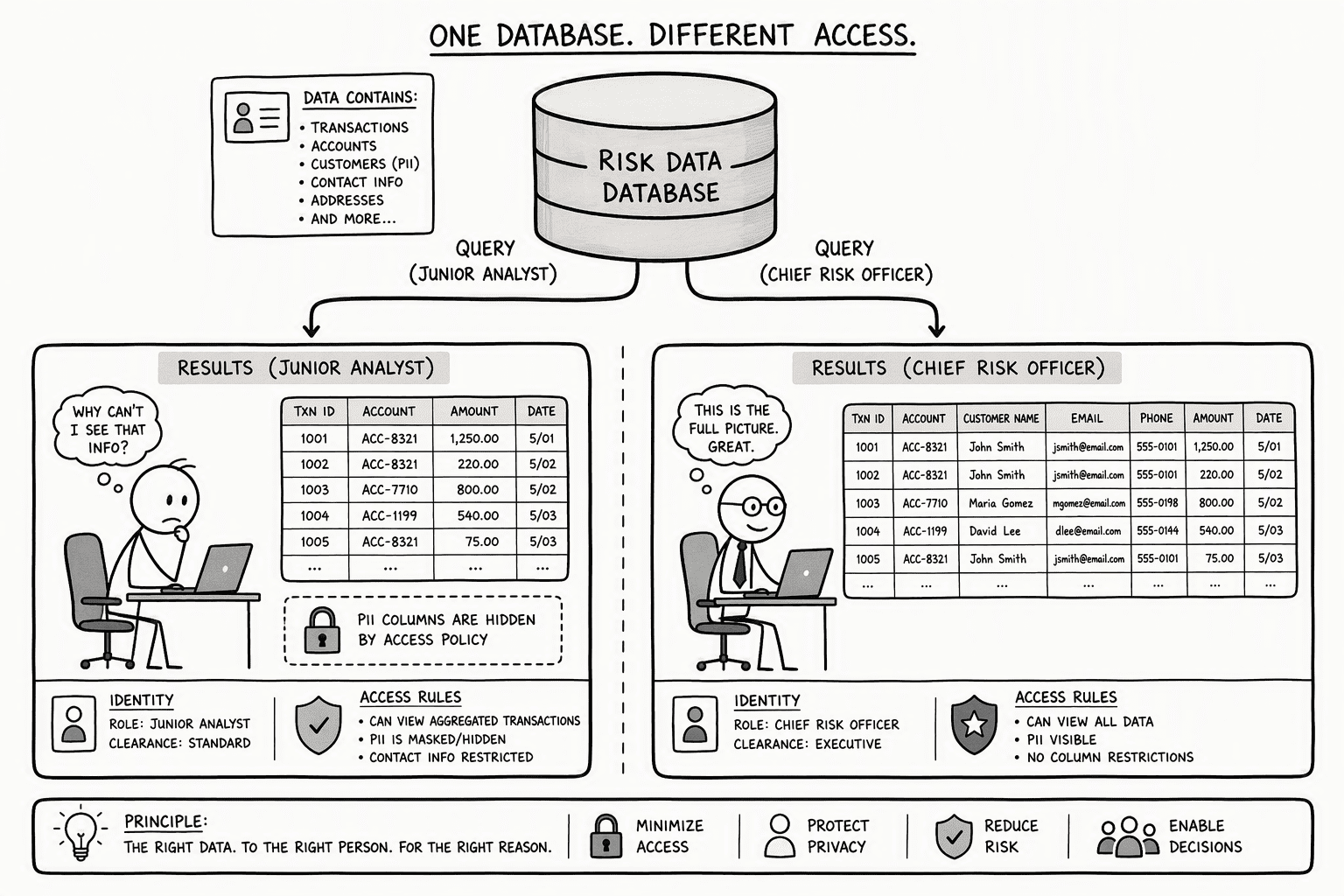
Access has to be decided before real querying starts, not after. That means permissions enforced at the data layer itself, down to the row and the column, so a person only ever sees what they're actually authorized to see, regardless of what the AI has access to more broadly. Fine-grained, database-layer authorization that evaluates access policies at runtime, rather than filtering results after the fact at the application layer, is the pattern that actually holds up here. Credentials shouldn't be exposed to the AI directly, and every access event should be logged, so there's a clear record of who touched what and when.
Getting this in place early matters: once your team starts asking real questions and validating results against live data, you want permissions already governing exactly what each query can touch.
Step 3: Build or Configure an Agent That Understands Your Existing Data Context
A schema tells you what data looks like. Context tells you what it means. Without it, an agent sees generic tables and columns, tablea joined to tableb. With semantic context, that same agent knows that a column represents customer churn, that a status field means something specific in your business, and how one entity actually relates to another in practice, not just in the schema.
Configuring this is closer to giving a new analyst a proper onboarding than it is to training a model. You provide the schemas, the key business definitions, documentation of how data actually flows between systems, and the known ambiguities that would otherwise trip up a generic system that hasn't been given the right context to work from.
Step 4: Use Conversational Prompts to Define and Refine the Data Map
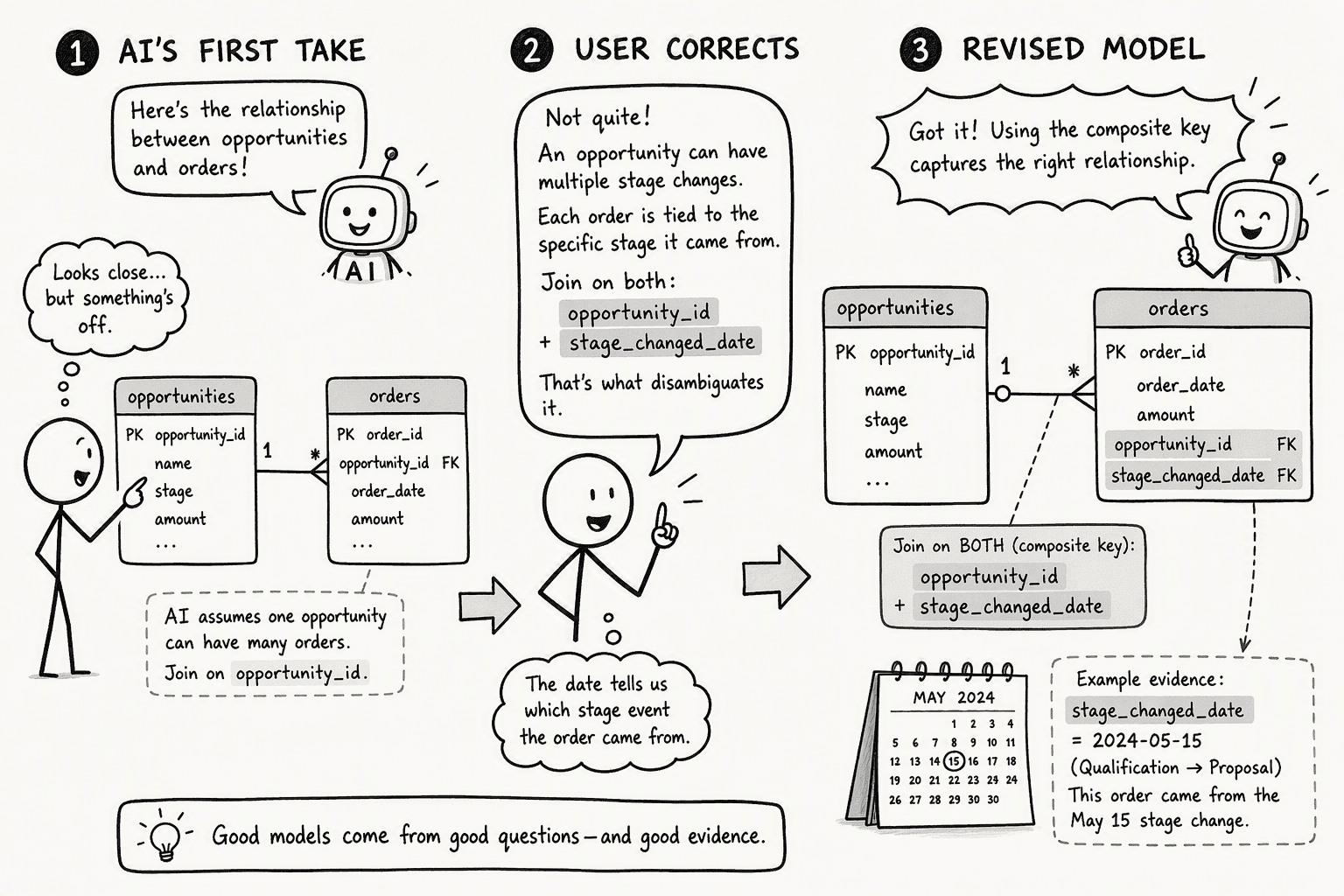
A first pass at understanding your data rarely survives contact with a real question. Someone on your team will know that two tables actually need a more specific join, or that a term means something narrower than the system assumed. The way to fix that isn't to rebuild the whole model, it's to say so directly: name what's wrong, explain why, and let the system adjust from there. Good refinement holds onto every earlier correction, so fixing one relationship doesn't undo progress made on another.
When something doesn't go as expected, a missing field, a null value, a mismatch, the system should adjust its plan and retry rather than failing silently or handing back a broken result.
Step 5: Generate Live, Interactive Visualizations from the Mapped Data
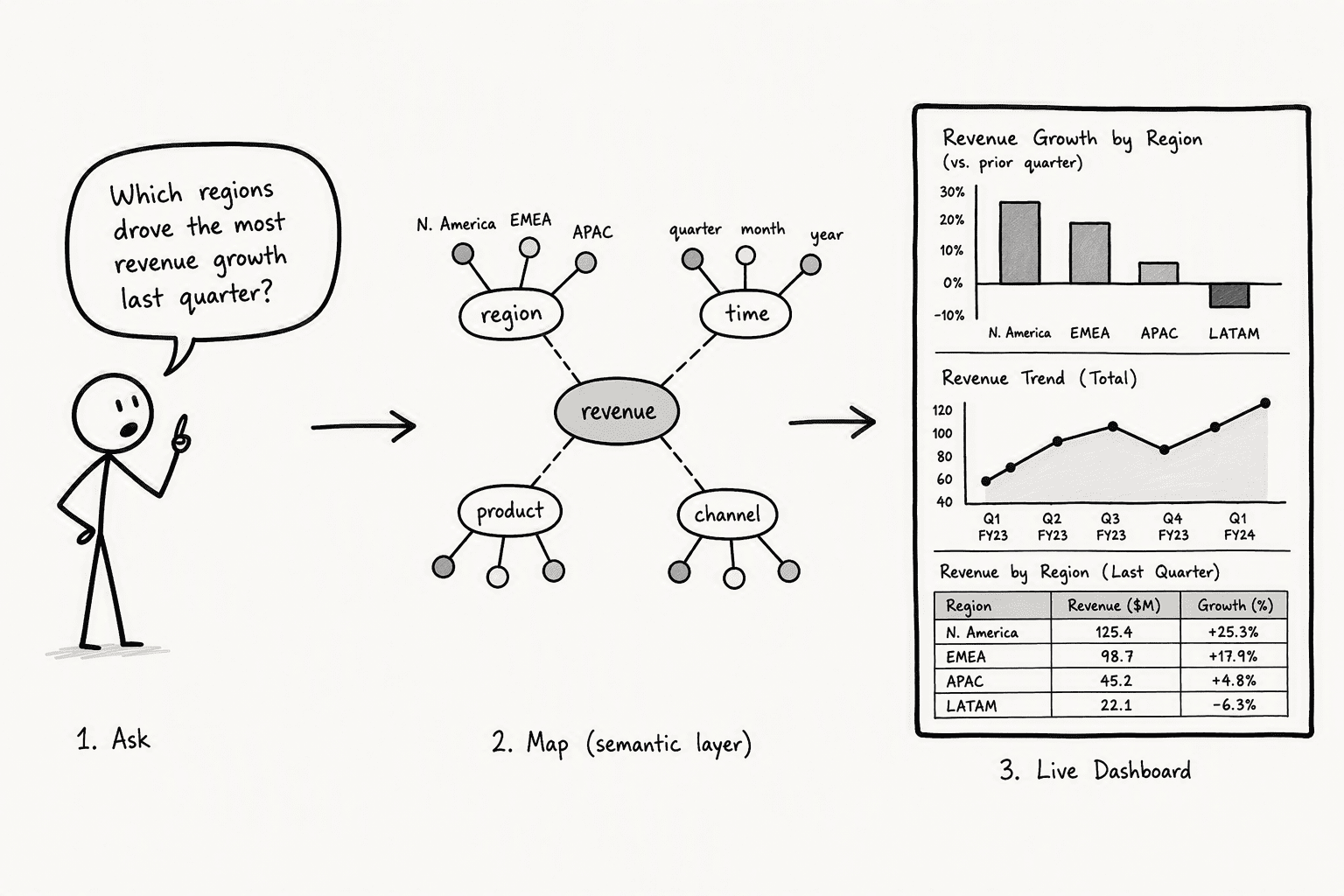
Once relationships are mapped and access is scoped, the natural next step is turning that understanding into something visual, a chart, a table, a report someone can actually hand to a stakeholder. The right format depends on the question: a trend over time calls for a line chart, a comparison across categories calls for a table, and a system that understands your data well enough should be able to make that call itself rather than asking you to specify it every time.
Step 6: Embed the Intelligent Map and Analysis into Shared, No-Login Threads
An answer that only one person can see doesn't do much for the rest of the team. Real value comes from distribution: dropping a finished analysis directly into the tool where the conversation is already happening, without requiring a login or a separate license just to view it. That analysis should stay traceable too, carrying a record of what it was based on and how it's changed since.
Step 7: Turn Mapped Understanding Into Reusable Artifacts at Scale
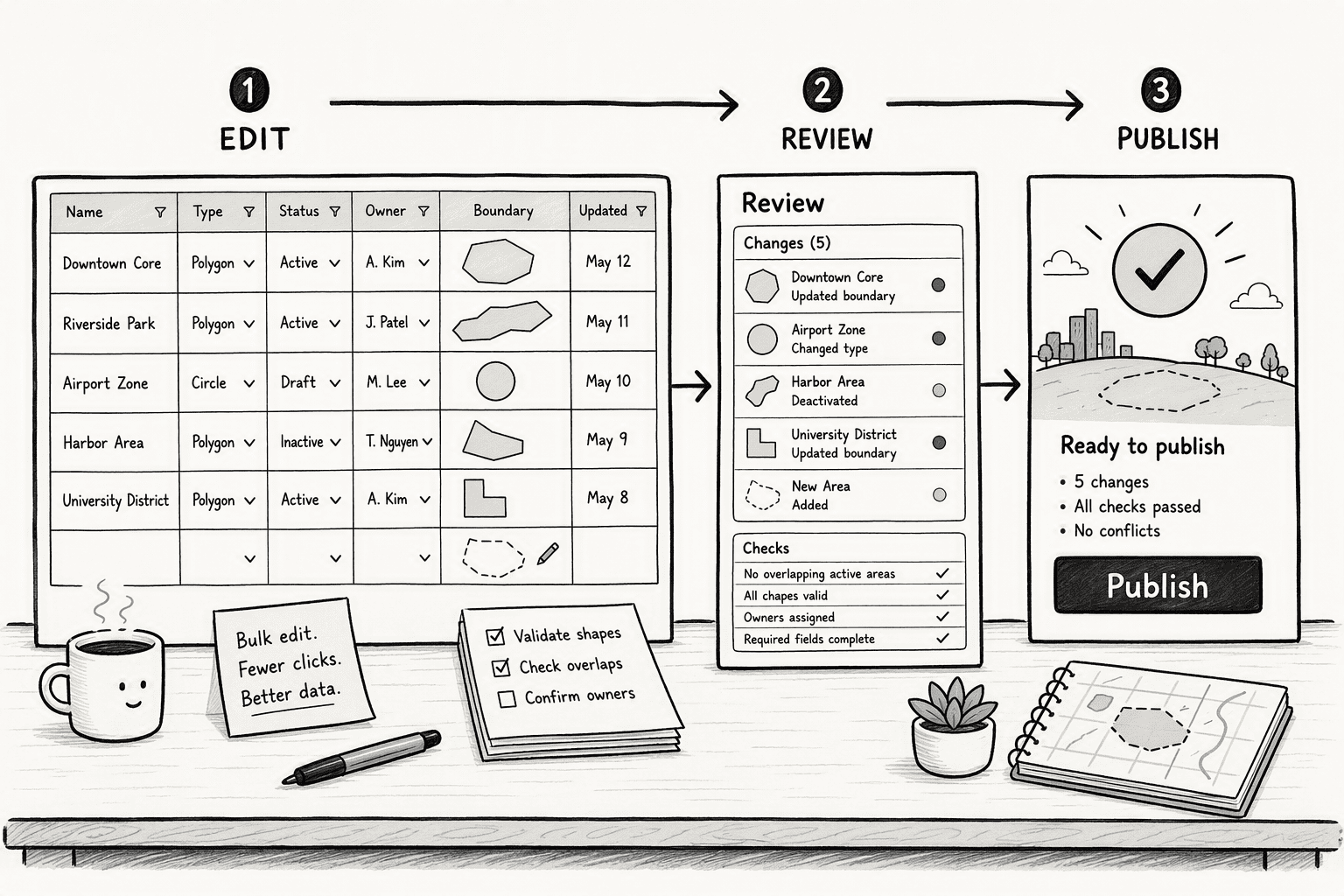
Once a workflow proves useful, rebuilding it from scratch the next time a similar question comes up is wasted effort. A recurring analysis should be something a team ships once and reuses indefinitely, not something one person quietly recreates every quarter. That's really the payoff of everything before it: mapping, context, and refinement are only worth the effort if what gets built compounds instead of resetting.
PromptQL: the easier way to do it
Building all seven of these pieces yourself, planning-only discovery, row-level access control, semantic context, conversational refinement, automatic visualization, shareable output, and reusable artifacts, is a real, multi-part system, not a weekend project.
PromptQL is built around this exact process. It connects to your warehouse, databases, SaaS apps, and APIs as they already exist, and introspects the schema to build a unified data graph without moving or reshaping your data, no ETL, no staging tables, no prep work. The underlying model is used only for planning, never for touching raw data directly, and access is enforced at the row and column level so nobody sees more than they're authorized to. You can add semantic context to your data model, or seed it from Slack, Google Drive, or GitHub, and refine any answer conversationally, with PromptQL adjusting its plan automatically when it hits a missing field or a schema mismatch. Results come back as board-ready dashboards and reports, shareable via a public link with no login required, and any recurring analysis can be shipped once as a reusable artifact for the whole team.
A credit union that used to spend weeks on manual taxonomy mapping per onboarding now does it in days, without any data migration, restructuring, or prep work to get their data "AI ready," which is also how PromptQL gets to near-perfect accuracy on enterprise data in the first place: getting this mapping step right before anything else.
See how PromptQL works on your own data, or get started with a guided setup today.
Frequently Asked Questions
What does it mean for an AI to map and understand my company's data automatically?
It means the AI inspects your schemas, column names, statistics, and query history to propose relationships between tables across sources like Snowflake and Salesforce, producing a live entity-relationship map. You refine that map conversationally, and the system uses it to answer business questions with the correct joins and definitions without a human pre-modeling every relationship.
How does an agentic semantic layer differ from traditional static semantic layers or knowledge graphs for data understanding?
A traditional semantic layer is a manually built, static model of metrics and dimensions. An agentic semantic layer is AI-discovered, metadata-driven, and conversationally refined. It re-scans for schema drift, surfaces ambiguities, and updates with corrections in real time rather than requiring a data engineer to re-model every change.
What steps are required to get an AI system to discover, map, and query my data without manual modeling?
Start with a planning layer that reads only metadata and statistics. Configure the agent with your schemas, business definitions, and lineage. Refine the proposed map conversationally. Enforce identity-aware access controls. Then connect the mapped model to a visualization and embedding layer that serves live dashboards and shared insights.
What are the biggest architectural or accuracy risks when letting an AI directly interpret enterprise databases and SaaS tools?
Hallucination from missing context is the primary accuracy risk; the AI must be grounded in your specific schemas and definitions, not generic knowledge. The architectural risk is giving the AI raw database access during discovery. A metadata-only planning layer prevents exposure of sensitive rows and keeps discovery costs low.
How do AI-driven data mapping tools handle access control and data privacy, especially for regulated US industries?
They enforce security in the database layer at query time using declarative SQL policies tied to user identity. Row-level and column-level access is evaluated per request, and cell-level masking prevents inference attacks. The AI map never bypasses existing role-based permissions; it applies them dynamically across every source.
What does it cost and how long does it take to deploy an AI that can understand complex data across sources like Snowflake, Postgres, and Salesforce?
Metadata-based discovery is cheap, typically pennies per scan because it runs against schema snapshots rather than production rows. Deployment time depends on the number of sources and the clarity of existing definitions. A planning layer and configured agent can produce a preliminary map in hours, with conversational refinement over days, not weeks.
Sources
- PROMPT | Snowflake Documentation - docs.snowflake.com
- Safely unleash AI on enterprise data with Deep Data Security - Oracle - www.oracle.com
- Power Holistic Customer Insights with Salesforce and Snowflake - www.snowflake.com
- 2026 Q2 Interactive Map Release Notes – Concept3D Help - help.concept3d.com




