Seven people can collaborate in one thread, every question asked, every decision made, and every dead end explored immediately visible to the next person who needs it. Nobody has to ask "where's the file," because the context was never locked inside a single, private chat history. This is multiplayer AI, and it fixes the specific mess single-user assistants create.
Single-user AI tools like ChatGPT and Claude are, by design, socially isolated. They treat every person as a universe of one. A colleague's two-hour deep dive on a vendor analysis is invisible to everyone else. The marketing team's refined prompt for campaign copy is buried in someone else's history. Every new team member walks into an empty room, forced to rebuild context from scratch. Conversational AI has become the most widely adopted interface for large language models, yet nearly every architecture assumes a single user context, ignoring the reality that enterprise work is fundamentally collaborative. That disconnect is costly, and it's what multiplayer AI is built to fix.
Key Takeaways
- Multiplayer AI defined: a multiplayer AI agent that multiple users interact with simultaneously, drawing on a common context of long-term and short-term memory rather than treating each user in isolation
- Shared memory fabric: the foundational mechanism that synthesizes past organizational knowledge (long-term) and ongoing team conversations (short-term) into coherent, collaborative responses
- Integrated security via RBAC: enterprise safety is maintained by enforcing role-based access control within the agent's runtime, restricting data access and actions based on the user's specific role
- Deterministic execution: enterprise-grade agents shift from probabilistic, generative text toward plan-based, transparent workflows to guarantee auditability and safety
- Real-world application: concrete implementations now exist that combine shared memory, RBAC, and deterministic plans to let teams query data and onboard new members with persistent, secure context
What is multiplayer AI?
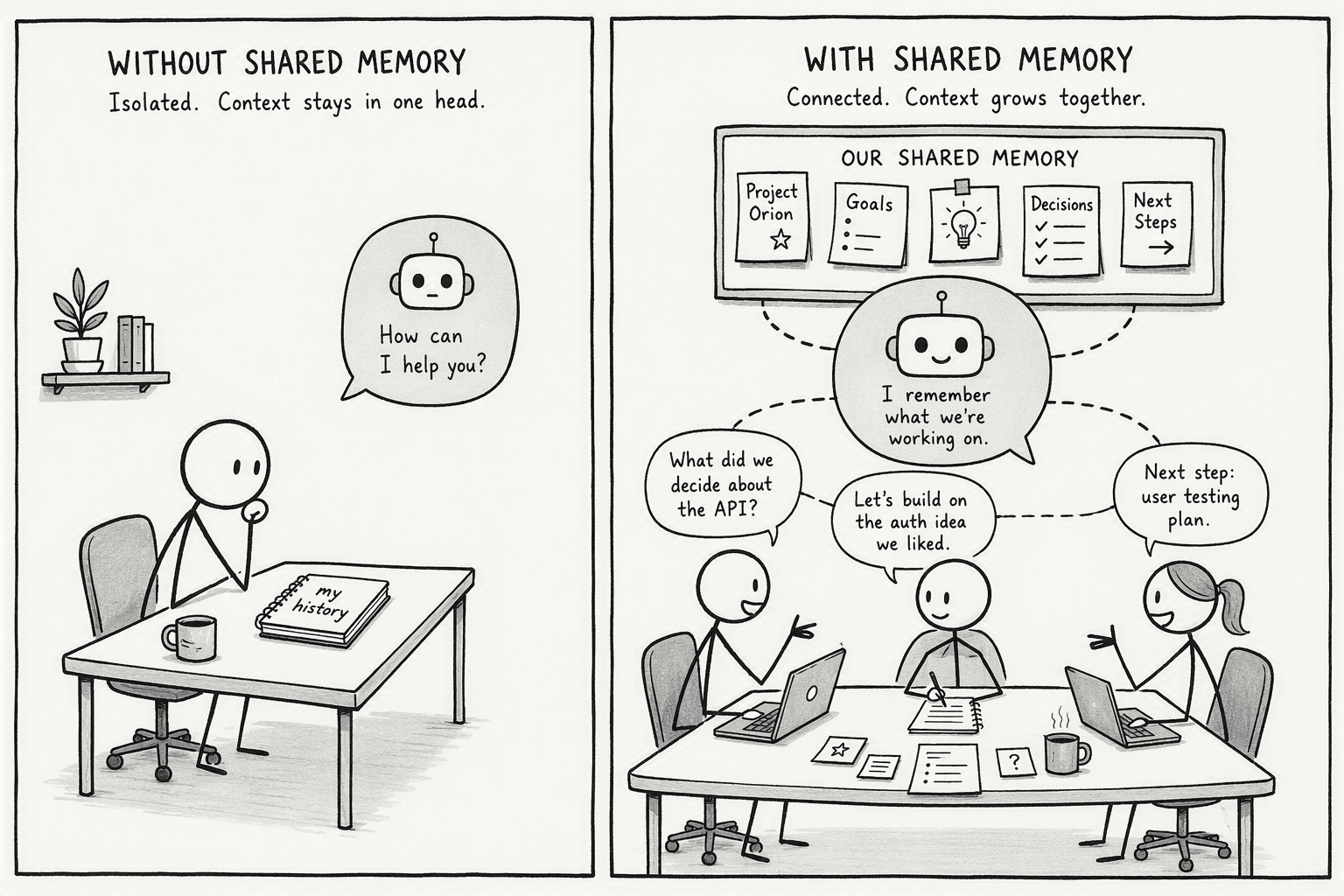
Multiplayer AI is a shared agent that maintains a collaboratively accessible memory, combining past institutional knowledge with active, multi-user conversations. It's the jump from a private diary to a team's operational command center.
A standard single-user assistant like ChatGPT or Claude operates in a vacuum, with access only to one person's isolated history. A multiplayer agent builds a common context from multiple people instead. When someone asks about something a colleague already resolved in a different thread last week, the agent already knows, that connective tissue simply doesn't exist in a siloed tool. This shift from isolated to shared context changes the fundamental unit of value: a single-user assistant improves personal productivity, while a multiplayer agent improves organizational intelligence.
Multiplayer AI is a persistent intelligence layer, not a chatroom with a bot sitting in it. It treats memory as a structured, durable asset, not a session that resets the moment someone closes a tab, agents that work with one user are demos, agents that work with a whole team are products.
What makes AI genuinely multiplayer?
A few properties consistently separate genuine multiplayer AI from a tool that merely lets several people use the same account:
- A shared memory fabric, not isolated recall: Tiwari and Gupta's 2026 research frames the emerging need directly, systems that generate and maintain context from many individuals, and even other autonomous agents, synthesized into one coherent response rather than kept in separate silos, the same underlying thesis behind why PromptQL treats multiplayer as the only durable answer.
- Corrections propagate to everyone, not just one session: If someone spends an afternoon establishing that a metric excludes a specific subsidiary, that finding has to update the shared pool immediately, so the next person who asks a related question doesn't get contradicted by a stale figure.
- Access follows the actual person, not a shared bot identity: The core rule is that the agent acts with each user's permissions. A viewer shouldn't be able to trigger a sensitive action, and someone without clearance to see a board deck's financials shouldn't be able to surface them just because they're in the same shared thread as someone who can.
- Execution is deterministic and auditable, not generative guesswork: An enterprise agent with many people relying on it can't operate on probabilistic, one-off text generation. It has to build a transparent plan, run it the same way every time, and produce the same answer for the same question regardless of who asks or when.
- Onboarding is instant, not a rebuild from zero: A new team member dropping into an existing shared thread should inherit the project's full history immediately, rather than starting from an empty room and re-asking questions someone already answered weeks earlier.
How multiplayer AI differs from single-user assistants
The clearest way to see the difference is in how memory is structured. Tiwari and Gupta's memory fabric framework splits an agent's memory into two pools: a long-term knowledge base drawn from documents, decisions, and verified facts, and a short-term pool that processes the stream of ongoing, cross-functional conversations. A multiplayer agent synthesizes both pools to answer coherently, no matter who's asking or which thread they're asking from.
A single-user tool has no equivalent structure, because it was never designed to reconcile more than one person's context in the first place. Even tools that add a shared entry point to a group chat often keep memory siloed per channel rather than genuinely shared across a team, which isn't the same thing as real multiplayer AI. That gap matters most around security. If everyone technically has access to a shared agent, the natural question becomes who can actually see what. The answer is role-based access control built directly into the agent's runtime, rather than bolted on as an afterthought:
| Unauthorized shared agent | Multiplayer AI with RBAC |
|---|
| Data visibility | Unrestricted exposure across all participants, real risk of sensitive data leakage | Access scoped to a user's predefined role, a VP sees financials, a contractor does not |
| Operational power | Any user can trigger high-impact actions (writes, deletions, API calls) | Only authorized roles can execute side-effecting actions |
| Auditability | Actions logged as generic "agent" activity with no traceable accountability | Full provenance tracking back to a specific user identity |
| Prompt injection defense | A compromised prompt can expose the entire shared memory without restriction | The agent parses commands within a user's permission boundary, walling off pools their role doesn't scope to |
Scoping privileges down to the row and column level in a database query is what actually stops an authorized user in one department from accidentally exposing another department's data. Personal access rights get respected natively, the agent never sees what a given person isn't allowed to see in the first place.
How PromptQL implements multiplayer AI
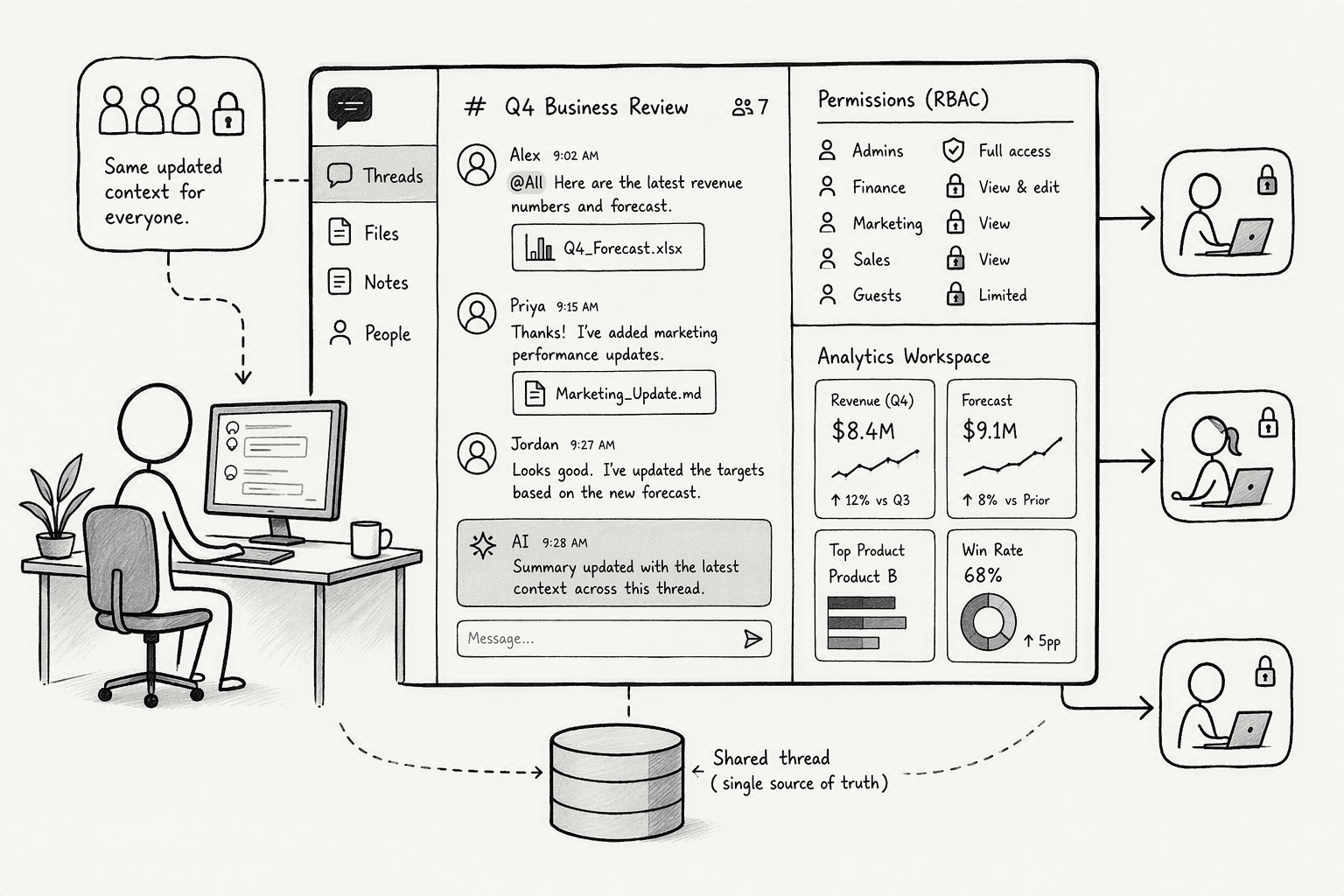
PromptQL applies the multiplayer model directly to enterprise data, creating a company-wide AI coworker where shared context and security are the actual product, not an afterthought bolted on top.
- Shared threads and a shared brain: The agent functions like a multiplayer Claude or ChatGPT, but with shared threads and a shared brain. Correct a metric definition once, and the update sticks for every user in real time.
- User-authorized permissions: Permissions are enforced deterministically at the data layer, acting with each individual user's credentials. The AI never exposes raw database credentials and respects row- and column-level security.
- Plan-based analysis: Instead of generating fluent-sounding text, PromptQL writes and runs code in a secure cloud sandbox against existing data infrastructure, producing deterministic, referenceable outputs that can be audited step by step.
- Instant onboarding and tagging: Inside a workspace connected to tools like Slack, tagging the agent drops a new hire straight into a project's existing thread, with the relevant context already synthesized, no local setup required.
- Bring your own cloud: The agent can be deployed in a customer's own VPC or on-prem, so data doesn't leave the environment unnecessarily, addressing the compliance concern that kills most enterprise AI pilots before they start.
Conclusion
Single-user AI hits a ceiling the moment a whole team tries to run on it. Sharing screenshots of a private chat session with a colleague isn't a workflow, it's a sign the tool wasn't built for teams in the first place.
Multiplayer AI closes that gap: a shared memory fabric everyone can read and write to, role-based permissions that actually enforce who sees what, and a deterministic plan the system follows instead of improvising. The result stops behaving like a rented, private brain and starts acting like company infrastructure, the same shift covered in more depth in how humans and AI agents can actually work together.
Frequently Asked Questions
What is multiplayer AI and how does it differ from a single-user AI assistant?
Multiplayer AI is a shared agent that multiple users interact with simultaneously, drawing on a common context and memory. Unlike a single-user assistant, which isolates interactions to one person's history, it maintains short-term and long-term memory pools that are collaboratively accessible, ensuring the entire team gets the same coherent answer.
How does multiplayer AI handle permissions and access control when multiple users share the same agent?
It integrates Role-Based Access Control (RBAC) into the agent’s runtime. The system enforces permissions based on each user's identity, restricting which data the agent can access or act upon. This prevents data leakage by ensuring a viewer cannot trigger sensitive actions or see data meant only for a specific role.
What are the primary use cases or benefits of a multiplayer AI agent in a business or enterprise setting?
Key benefits include instant onboarding of team members with pre-loaded project context, consistent responses to data questions across departments, and enforced compliance via role-based permissions. It eliminates the productivity drain of constant context re-building and reduces errors caused by conflicting information in siloed chats.
What architectural approaches such as shared threads or shared memory enable multiplayer AI to work coherently across users?
The "memory fabric" concept is key. It synthesizes long-term memory (past institutional knowledge) and short-term memory (ongoing multi-user conversations). The agent pulls from shared memory pools and threads to prevent contradictory statements, ensuring that corrections by one user immediately update the agent's context for everyone else.
How do emerging platforms like PromptQL implement multiplayer AI for enterprise data and analytics?
PromptQL implements it by connecting to a team's existing data infrastructure through a user-authorized model, where the agent acts with each user's permissions. It uses plan-based execution to run deterministic code instead of hallucinating text, stores corrections in a shared brain, and deploys inside the company's own cloud or on-prem environment.
Sources
- PromptQL | Multiplayer AI with shared context. - promptql.io
- Designing an Auth model for Multiplayer AI - promptql.io
- Securing AI Agents: Implementing Role-Based Access Control for Industrial Applications Aadil Gani Ganie, UPV Universitat Politècnica de València Email: [email protected] - arxiv.org
- A memory fabric for conversational AI agents enabling shared and persistent multiuser memory - UTMB Health Research Expert Profiles - researchexperts.utmb.edu
- Managing user access with Role-Based Access Control (RBAC) - docs.cloudera.com




