Customers in a shared Slack channel ask the question as soon as it occurs to them, and a person is right there to answer it. Pointing them at documentation rarely closes the gap.
In a Gartner survey of 5,728 customers, only 14% of customer service issues were fully resolved in self-service, and only 36% even when customers called the issue very simple, so the repeat questions keep landing in the channel.
This guide covers why customers keep asking in shared channels and six ways to reduce the queries, from finding out what they ask to keeping every answer up to date.
Key takeaways
- Docs alone don't stop the questions: Customers ask in the channel because it is faster than searching, so answers have to be where they ask.
- Count the repeats before fixing them: Repeat questions drive much of the volume, so count them first and start with the costliest.
- Answer once, in the customer's words: A pinned guide with question-style headings and the answer first is easier to find and reuse.
- A bot can answer repeats, with limits: It should answer only from approved sources, cite them, and hand off to a person when it can't.
- Every answer should feed the next one: Corrections and handoffs should update the shared source, so the same question stops coming back.
Why customers keep asking in shared channels
Customers don't ask out of laziness. Four things make the shared channel the path of least resistance:
- Asking is the easiest path: A person is right there, and the channel answers faster than a search through documentation does.
- Past answers are buried: Earlier answers sit in old threads, so neither customers nor the team can find them quickly.
- Documentation doesn't match how customers ask: The most common reason self-service fails is that customers could not find content relevant to their issue.
- Nobody owns the channel: Without a named owner and response times, customers repost or ask someone else, which multiplies the questions.
How to reduce customer queries in shared Slack channels
The six steps below cut the repeats first, then make the answers easier to find, and finally keep them current:
1. Find out what customers ask
Review the last few months of channel history, and sort the questions into groups such as how-to, status, access, bugs, and billing. Count the repeats, and note who answered each one and how long it took, since a repeat that always pulls in a senior engineer costs more than one the support team answers in a minute. Start with the 10 repeat questions that cost the most.
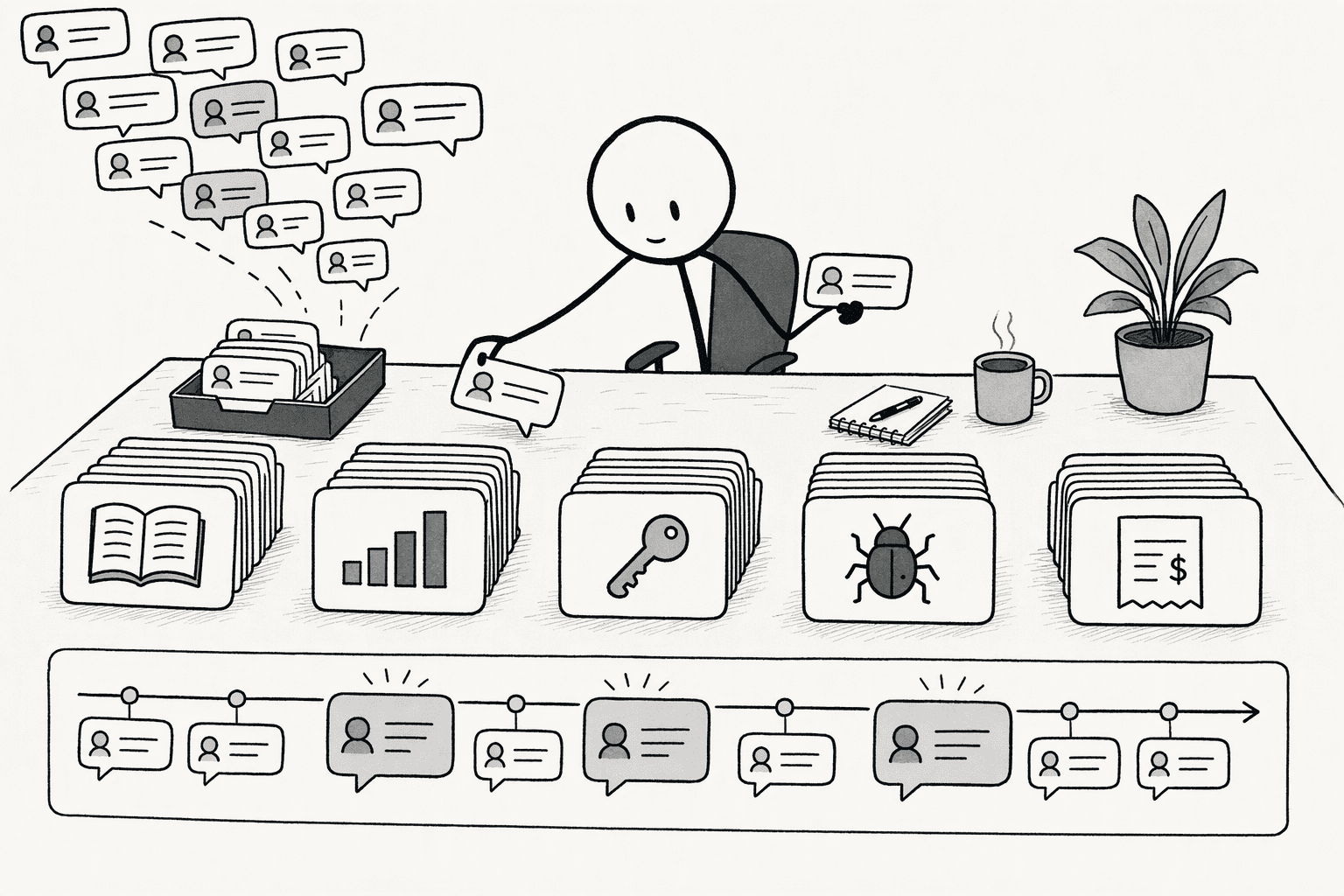
2. Answer the top questions once, where customers can find them
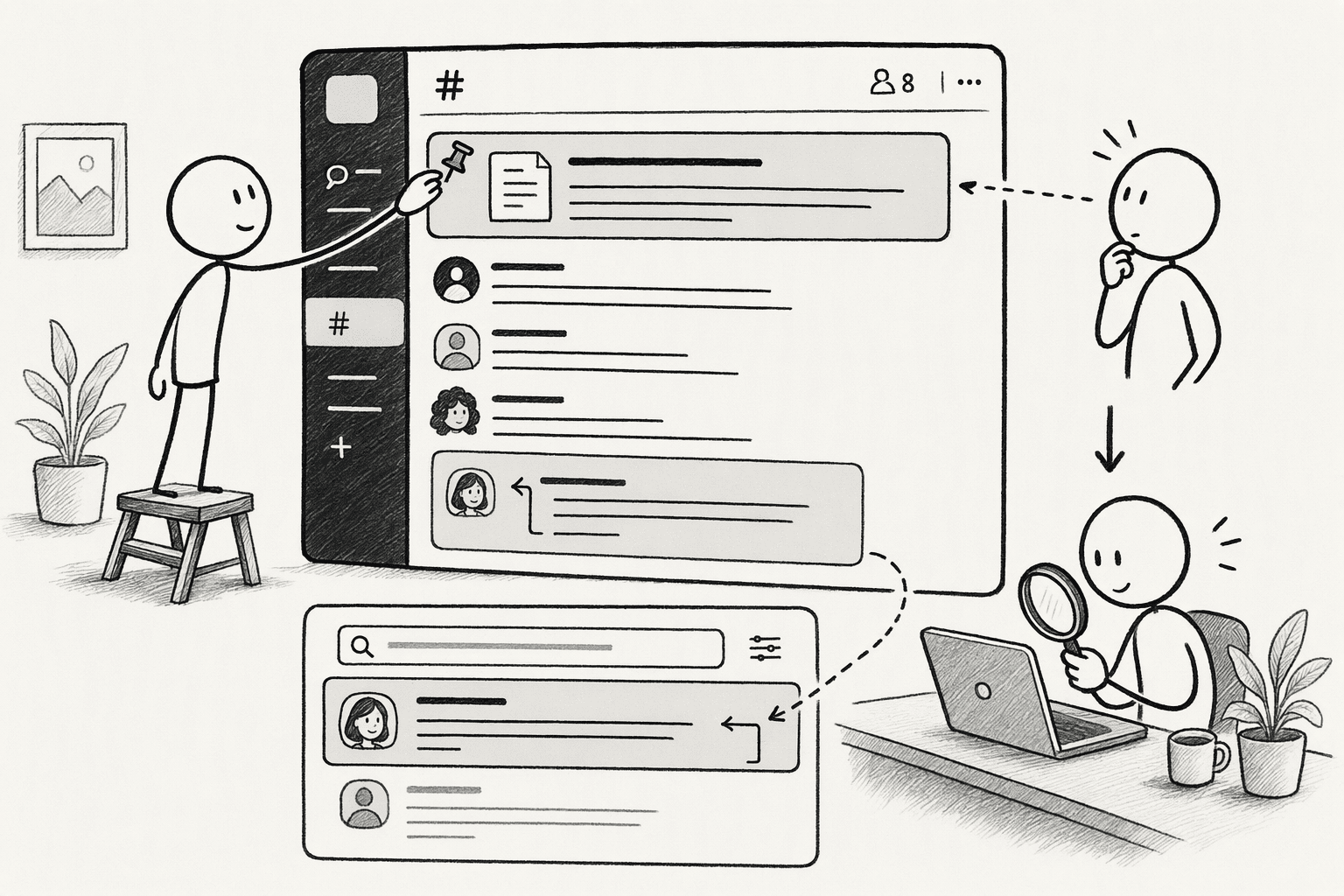
Write each answer in the customer's own words, under a heading that names what they will ask, with the answer directly beneath it. A quick test is whether a customer could find it by searching for the words they actually used. Pin the guide in the channel and link to it in every reply, so customers learn where answers live and the team stops retyping them.
3. Put an answering layer in the channel
A bot can answer the repeats, if it is set up carefully. Have it answer only from approved sources and cite them, label its answers as bot answers, and give it a clear rule for when it can't find a sourced answer: say so, and bring in the right person with the customer's question and the context already attached. Keep a person reachable, because a wrong answer in a customer-visible channel costs more than a slow one.
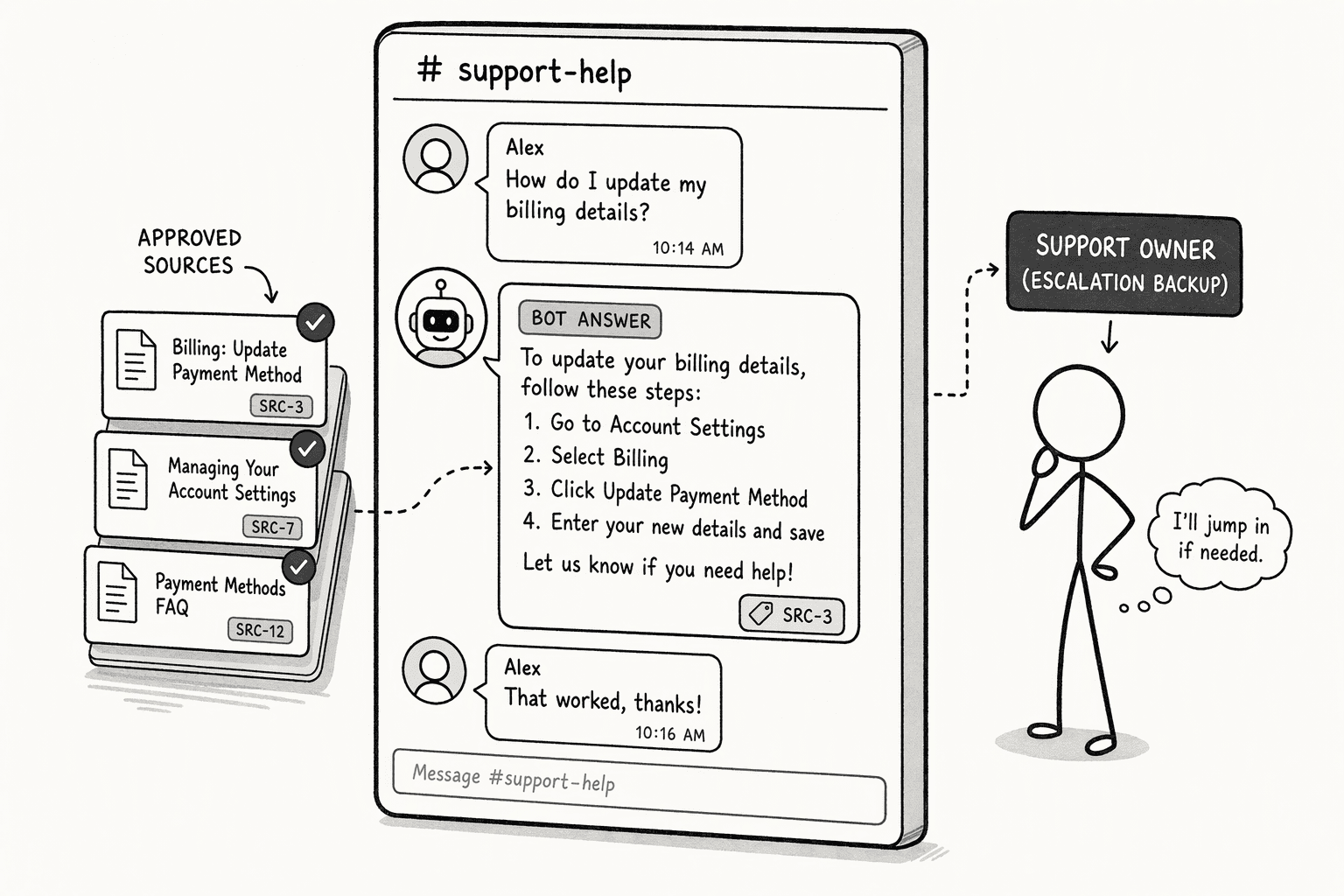
PromptQL's Tag is built for this case. Your team can tag it in a shared customer channel to answer a customer's question instead of answering by hand, and you can optionally let customers tag it directly, a choice you turn on per channel. Either way it stays scoped to that customer's own data, so they can't see other accounts or internal context.
4. Prevent questions before they're asked
Many questions arrive because customers don't know what has changed. Post incident and release updates in the channel before customers have to ask, give new customers an onboarding checklist, and share a regular digest of open items. Each update that answers a question in advance is one fewer question later.
5. Set expectations and route what's left
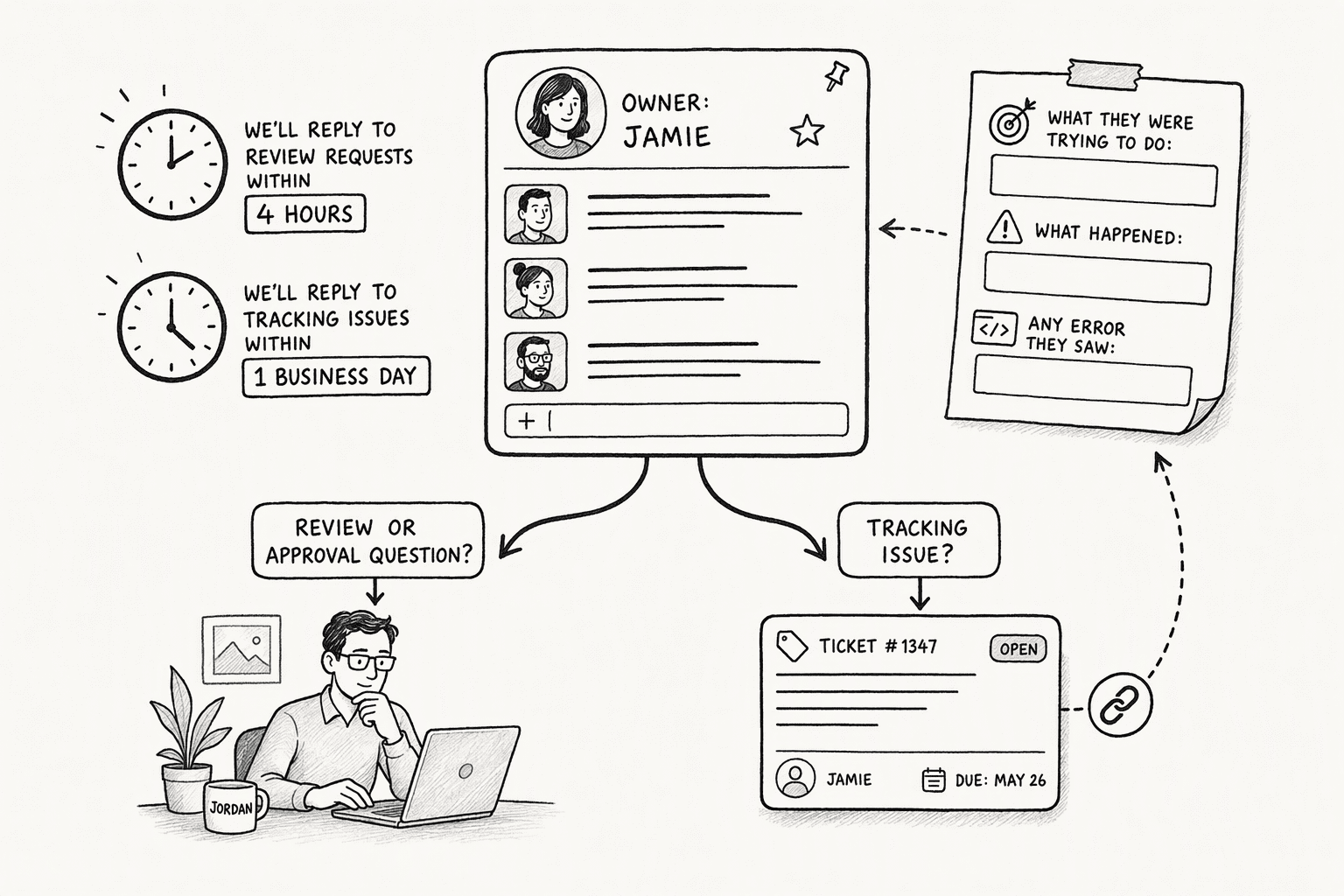
Name an owner for each channel, state the response times the team commits to, and give customers a template for asking, such as what they were trying to do, what happened, and any error they saw. Route by type: questions that need review or approval go to a named person, and issues that need tracking move to a ticket, with a link back to the thread.
6. Measure and keep the answers current
Track the repeat rate, the time to first response, the direct messages to the team during business hours, how many questions were answered without a person, and how often the bot handed off and why. Treat every handoff as a sign of a gap in the answers, and draft the missing answer for a person to review before it is published.
In PromptQL, a correction made once is captured as a human-reviewed, cited wiki entry with revision history, so the next answer starts from it.
Conclusion
Treat each shared channel as a loop in which every answered question makes the next one unnecessary. Count the repeats, answer them once in a place customers can find, let a bot handle what it can source, and send every correction back into the shared answers.
PromptQL fits that loop: your team tags it into the customer channel, customers can be given access to it per channel, scoped to their own data, and each correction becomes a cited entry for the next question.
Frequently Asked Questions
What types of customer queries are most common in shared Slack channels?
Most noise comes from three to five repeat archetypes:
- Document lookups: requests like "Where is the ?"
- Procedure inquiries: questions such as "What is the process for ?"
- Access or status lookups: checks on permissions or current state
- Partners rarely ask novel strategic questions; they usually need pointers to existing resources that reside in your Google Drive or Confluence.
How do you keep internal information out of a customer channel?
Scope the bot to the customer's own data and to approved sources, and keep internal context out of anything it can read there. Remember that a reply in a shared channel is visible to everyone in it, so sensitive answers belong in a private conversation.
What role can an AI assistant play in automatically answering and reducing customer queries in shared channels?
A deterministic AI assistant plays the role of a first-line resolver. It executes auditable plans against live databases and connected documents like Notion or Confluence. It does not guess.
How do you build a shared, searchable knowledge base that integrates with Slack to deflect questions?
Transform narrative-style documents into structured fields with clear headings. An AI co-worker can then ingest pages as a single source of truth. The integration targets specific text blocks rather than hallucinating answers, making the information searchable and citable directly inside Slack messages.
What metrics should you track to measure success in reducing customer queries over time?
Monitor the following metrics to track effectiveness:
- Direct message volume to the operations team
- Bot resolution rate versus total channel posts
- Average time saved per user (an internal Slack analysis found potential savings of 97 minutes)
- Watch the handoff ratio to spot knowledge gaps.
How many questions can a bot take off the team?
It depends on how repetitive your channel is and how complete your answers are, so measure it rather than assume a figure. Gartner's survey found that self-service resolves few issues end to end, so expect a bot to handle the repeats it can source, not everything.
Sources
- Top 10 Strategies for Increasing Productivity at Work | Slack - slack.com
- Ultimate Guide to Slack Workflow Customization - Slack-First AI Answer Agent for Enterprises ∙ Question Base - www.questionbase.com
- Slack AI Features & AI Assistants | Slack - api.slack.com
- Build AI Agent Bots with PromptQL by Hasura in Minutes - medium.com