Your team lives in Slack. Your answers live in a warehouse, a CRM, and a dozen other SaaS tools that don't talk to each other. So people toggle tabs, copy-paste numbers into a channel, and hope the figure they just posted is still current by the time someone reads it.
An AI agent inside Slack is the fix for that specific gap, an assistant that can actually reach your real data and answer a business question where the conversation is already happening. Here's how to set one up properly.
Key Takeaways
Here is the six-step arc, compressed for the operator who needs to know where the hard decisions sit:
- Architecture choice right away: Decide between Agentic and Enhanced RAG based on query complexity. Complex, multi-step questions are the only ones that justify the iterative overhead of Agentic RAG.
- Security is the real bottleneck: Never expose raw database credentials to the AI. The metadata-layer approach keeps the model blind to connection strings while enforcing the user's native permissions.
- Slack's agent scaffolding is ready: Casey is framework-agnostic and can use the Claude Agent SDK, OpenAI Agents SDK, or Pydantic AI framework. The CLI does the heavy lift on wiring Socket Mode and events.
- Governance before launch: Ship with a human-in-the-loop approval gate for any write-back action and audit every data access. An unexplainable answer in a regulated industry is the same as no answer.
How to set up an AI agent in Slack to answer business questions
1. Establish your development environment and Slack app foundation
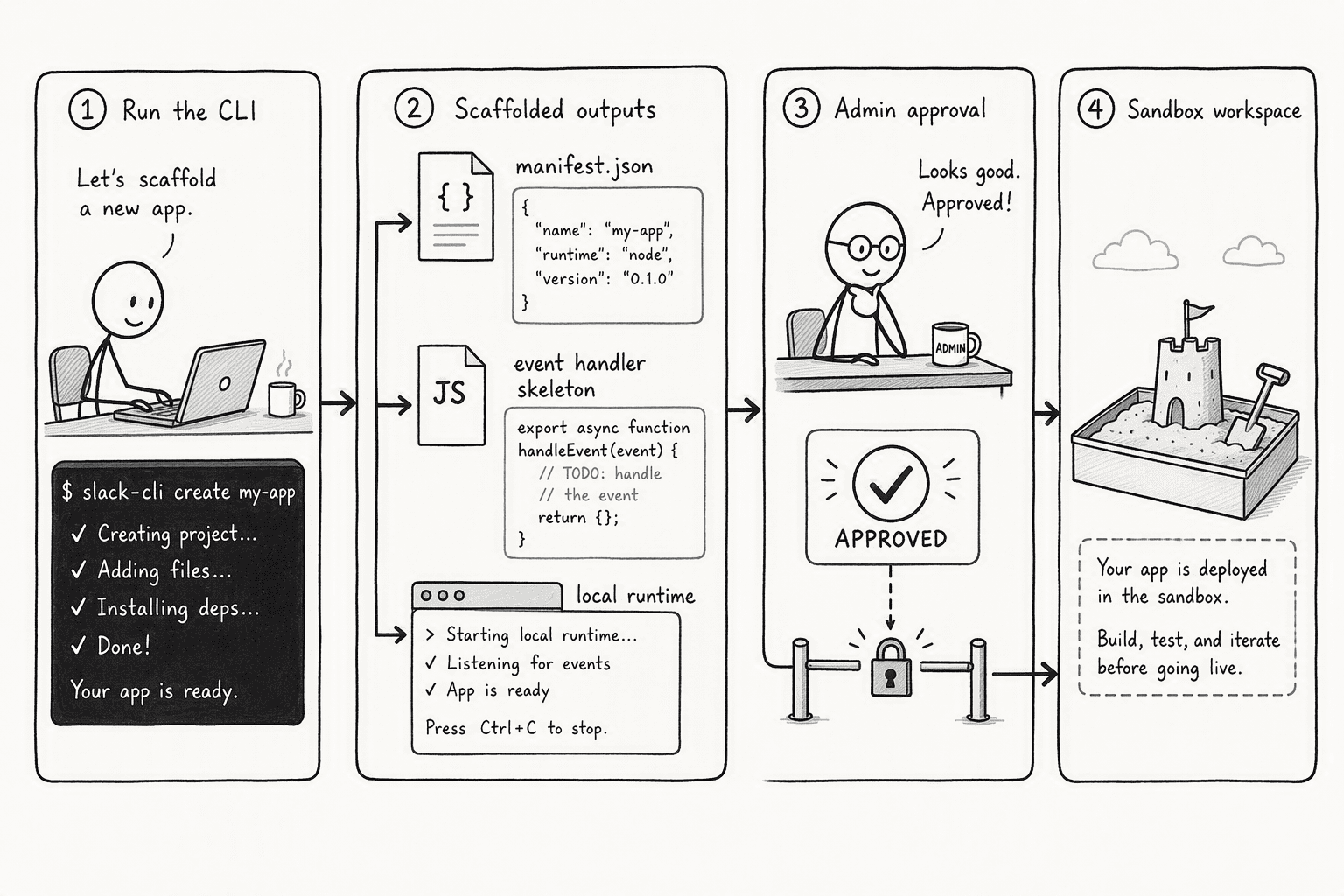
Before connecting any data, set up the app itself inside Slack. You'll need admin approval to create an app in a real workspace, and a sandbox is worth grabbing if you plan to test against production data later.
Slack's own developer documentation provides a starting scaffold rather than requiring you to build event-handling and message-parsing logic from scratch, a working starting point you replace piece by piece rather than a blank file.
2. Configure secure connections to your actual business data
This is where most setups actually get hard. Route the agent through a layer that sits between it and your real data stores, rather than handing it raw database credentials directly.
Access should be scoped per person, so the agent only ever returns what the specific individual asking is authorized to see, not everything the agent itself technically has a connection to. Getting this right the first time matters more than almost anything else in this list, since designing the permission model correctly from the start is far easier than retrofitting it after real questions are already being asked.
3. Build the agent's core reasoning and tool-use logic
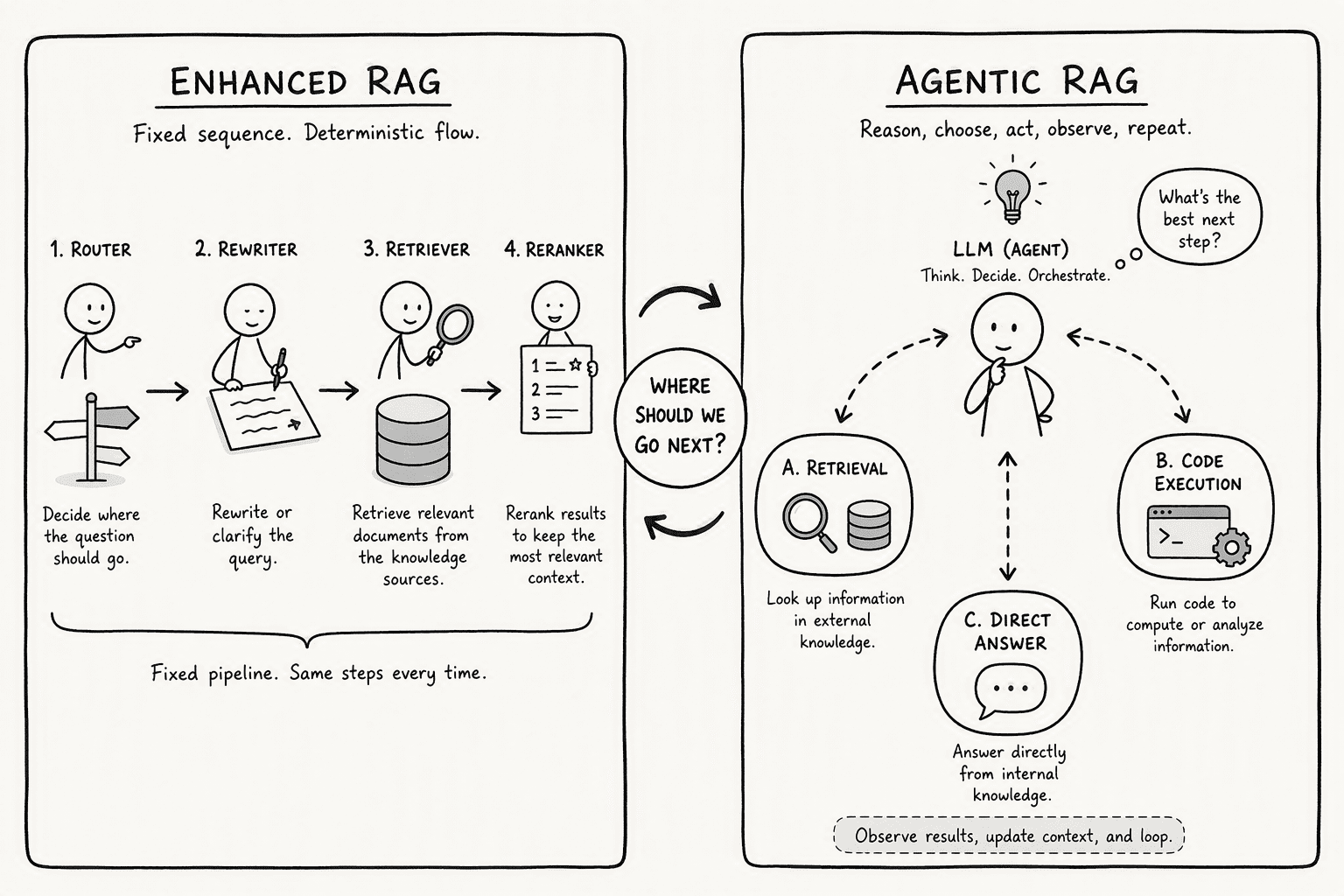
Decide how the agent actually handles a question. A fixed, predictable retrieval path works well for high-volume, structured questions, "show me Q3 revenue by region." An iterative reasoning loop, where the agent decides what to check next based on what it's already found, is worth the added overhead only for questions that genuinely span multiple data sources, "why did margin dip in the Midwest last week."
Start with the simpler, fixed path and only add iterative reasoning where the questions your team actually asks demand it. Getting this step wrong is a common reason naive retrieval setups produce a confident, plausible-sounding wrong answer instead of flagging that something doesn't add up.
4. Connect the agent to Slack and test it locally before going live
Wire the agent to respond to a mention or another defined trigger, then run it somewhere you can iterate quickly before it touches a real channel. Test with a question you already know the answer to from your connected data. Just as important: test as a different user and ask the same question, to confirm permission enforcement actually holds rather than just checking that the agent responds at all.
5. Design for how people actually talk in Slack, not like a search bar
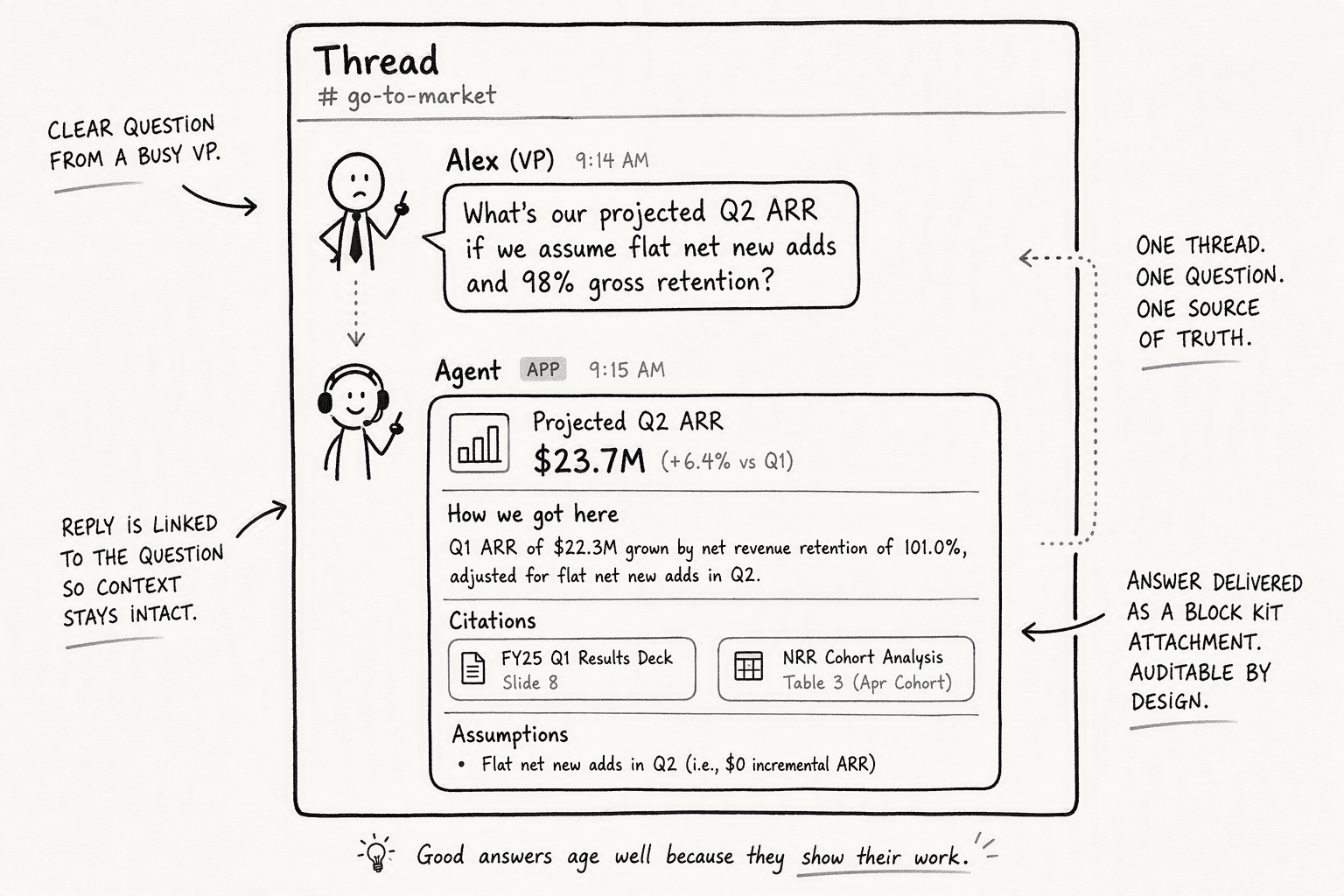
Handle thread context, so a follow-up like "what about the East Coast" gets understood as a reference to the analysis from a few messages earlier, not a brand-new question with no memory of what came before. Use rich formatting, a small table, a chart, for data-heavy answers rather than a wall of text nobody wants to read. And have the agent ask a clarifying question when a term is genuinely ambiguous, "revenue" can mean different things depending on who's asking, rather than guessing and running with it. A short confirmation step for ambiguous questions is generally a low-cost way to avoid a wrong answer quietly derailing a thread.
6. Deploy with monitoring and governance built in, not bolted on after
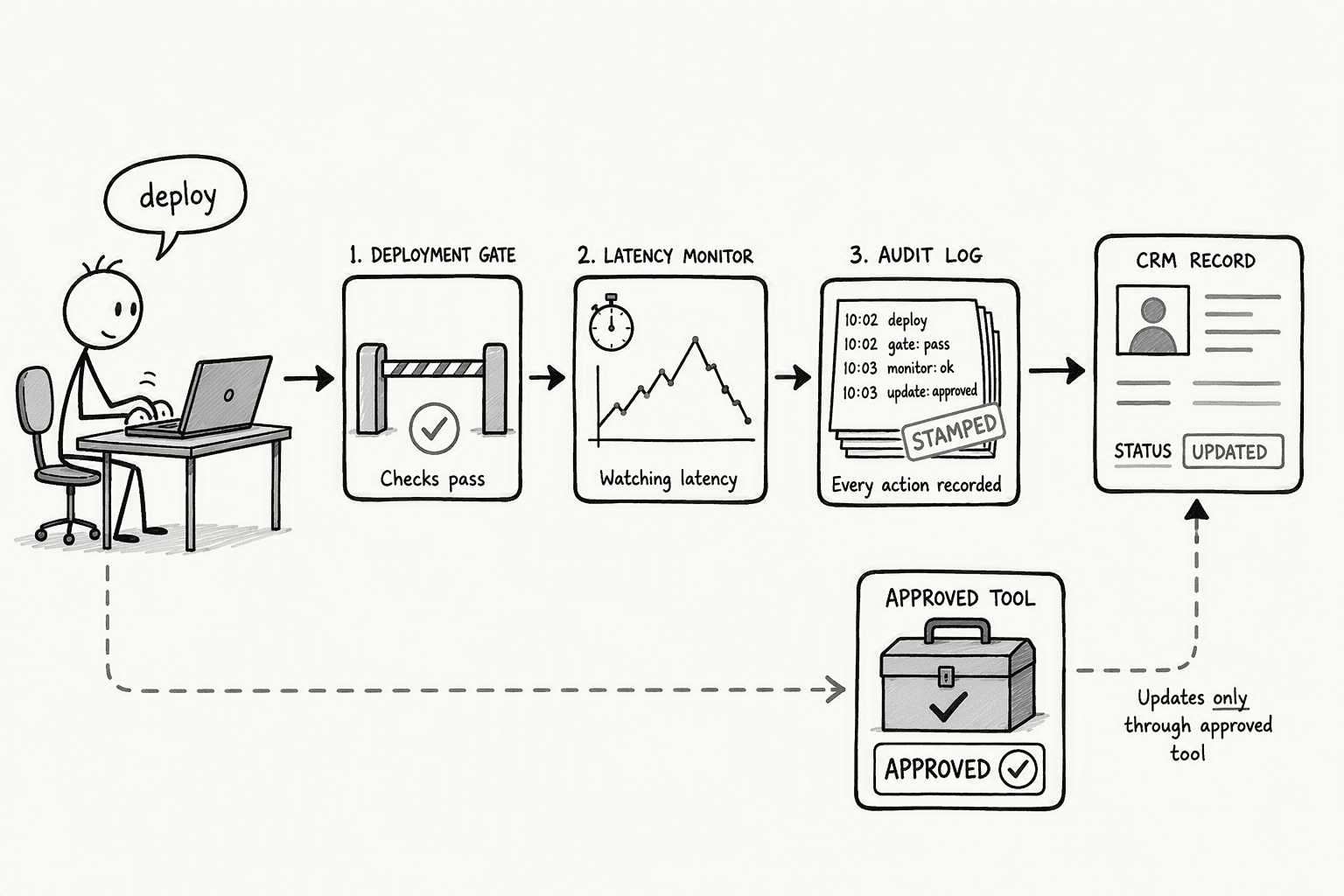
Log every data access. Gate any write-back action, anything that updates a CRM record or triggers a downstream system, behind explicit human approval before it executes. Watch for signs of degraded retrieval quality once real usage starts, a sudden jump in latency or a spike in vague answers is often a sign the agent is running more retrieval passes than it should. For regulated data specifically, keep the entire path inside a deployment boundary your compliance team has already approved.
The easier and faster way to do this
Everything above is a real system to build, six genuine pieces of engineering and process work. With PromptQL, most of it is already handled.
There are two real ways to get PromptQL working in Slack, and most teams end up using both:
- Connect Slack as a data source. Inside PromptQL, add Slack as an integration and complete the OAuth flow. Slack becomes a normal, queryable source from that point on, so a question like "what did customers say about onboarding last week" gets answered directly from real Slack history, no custom event handler or reasoning loop to write.
- Add PromptQL Tag to a channel. One AI agent for the whole company, living directly in the workspace. Tag it in any channel and it works alongside the team, acting with each person's own permissions rather than a shared bot identity, so the permission-scoping work from Step 2 above comes built in rather than something you architect yourself.
Every answer still shows its sources and the assumptions it made, so if something's wrong, it gets corrected once, and that correction becomes shared, cited context for the whole team afterward, the same underlying principle behind why a static, siloed bot never actually becomes a company's shared source of truth.
Connect Slack to PromptQL, or see how PromptQL Tag works in your own workspace.
Conclusion
Setting up an AI agent in Slack from scratch means solving six real problems: a working foundation, secure and scoped data access, the right reasoning approach for your actual questions, reliable Slack integration, an interaction style that fits how people actually talk in a channel, and governance that holds up under real use.
None of that is optional if the goal is an agent people can actually trust with a real business question. The difference is whether your team builds all six pieces themselves, or starts from a foundation where most of them are already in place
Frequently Asked Questions
What are the prerequisites before connecting an AI agent to a Slack workspace with business data?
You need admin approval to install an app on the target Slack workspace, the Slack CLI installed and authenticated, and at least one accessible data source with defined read-only credentials. A sandbox workspace is strongly recommended for testing before connecting real business data.
How does an AI agent like PromptQL securely connect to Slack and enterprise data sources?
PromptQL uses a metadata-access layer that reads from Slack, Snowflake, Postgres, and other SaaS tools without exposing raw credentials to the AI. Access is scoped per user, so the agent sees only what the person asking is permitted to see.
What are the step-by-step instructions to configure an AI agent in Slack for answering company queries?
Install the Slack CLI, scaffold the agent template, configure a metadata-layer data connection with user-scoped permissions, wire an event handler for @mentions via Socket Mode, test locally with `slack run`, add Block Kit response formatting, and deploy with governance controls.
How do AI agents for Slack compare to conventional chatbots or RAG approaches for business analytics?
Conventional chatbots rely on fixed knowledge bases and fail on live data. Enhanced RAG runs a fixed retrieval pipeline suited to predictable queries. Agentic RAG lets the LLM iteratively decide when to retrieve, which is key for complex, multi-step business questions spanning multiple data sources.
What are the common pitfalls when setting up an AI agent in Slack for enterprise environments?
The biggest pitfalls are exposing raw data credentials to the model, skipping the permission-scoping layer, and failing to build a human-in-the-loop approval gate for any write-back action. Deploying without audit logging is a non-starter in regulated industries.
What pricing, infrastructure, and deployment options exist for a business-grade AI agent in Slack?
Deployment options include single-tenant VPC, bring-your-own-cloud, and on-prem. PromptQL offers month-to-month billing with at-cost model pricing at $0.14 per OLU and enterprise plans with forward-deployed engineering support. The Slack agent framework itself is free to deploy via the Slack CLI.
Sources
- PromptQL | Multiplayer AI with shared context. - promptql.io
- Quickstart: Creating a Slack agent | Slack Developer Docs - docs.slack.dev
- Is Agentic RAG worth it? An experimental comparison of RAG approaches - arxiv.org
- Work with AI agents in Slack | Slack - slack.com




