The decision that actually matters usually happens in a Slack thread, a debate gets resolved, a root cause gets found, a final call gets made. Then the thread scrolls down, gets buried under the next hundred messages, and the knowledge inside it effectively disappears. Six months later, someone asks the same question, and nobody can find the answer that already exists, somewhere, in a thread nobody remembers the name of.
This guide covers how to actually turn that scattered knowledge into something searchable, and where most manual attempts at this quietly fall apart.
Key Takeaways
- Slack search finds keywords, not answers. A resolved thread and an unresolved one look identical to a text search, so finding the actual conclusion means reading the whole thing.
- Knowledge is scoped to whoever was in the room. If someone wasn't in the channel when a decision got made, they have no way to discover it happened at all.
- Manual wiki efforts fail within weeks, not because people don't care, but because remembering to copy a resolved thread into a separate tool is an extra step that quietly stops happening.
- The fix has to respect existing permissions. A searchable wiki that surfaces private-channel content to people who couldn't see it in Slack is a worse outcome than the scattered-knowledge problem it was meant to solve
Why Slack threads make a bad wiki on their own
Slack is built for velocity, not recall. A few specific problems show up consistently once a team tries to treat it as institutional memory:
- Search finds keywords, not answers. A thread with 200 replies might contain a genuine, hard-won decision, three senior engineers finally agreeing on a root cause, or it might be entirely about lunch orders, and from the outside, keyword search can't tell the difference. Finding the actual answer means someone has to remember which thread, roughly when, and then read through the whole conversation to find the two sentences that mattered.
- Knowledge is scoped to whoever happened to be present. A new hire, a different team, or someone who joined the channel after the fact has no way to even know the decision exists.
- The same question gets asked and re-answered indefinitely. Without a way to surface the original answer, people keep re-solving problems that were already solved.
- Settled decisions occasionally get re-litigated, simply because nobody could find the original reasoning behind them.
How to turn Slack threads into a searchable wiki
- Pick your decision-heavy channels first: Start with 2-3 channels where real calls get made, not every channel in the workspace. A general engineering or leadership channel beats a social or watercooler channel for this.
- Connect the workspace as a live source, not a one-time export: Authenticate once, and let the system read new messages as they come in, rather than manually pasting threads into a doc whenever something important happens.
- Set a rule for what counts as "resolved." Decide on a concrete signal, a thread gets a specific reaction, someone states a final call explicitly, a thread crosses a reply count, so capture isn't guessing at every single message.
- Pull out the answer, link back to the thread: For each thread that meets your rule, write down the actual conclusion in one or two sentences, then link it to the original thread so anyone can go verify the full context.
- Tag each entry with its source and date: Attach who was involved and when it happened to every captured entry, so six months later nobody has to guess whether it's still current or who to ask if it's unclear.
- Mirror your existing channel permissions exactly: If someone isn't in a private channel, don't let their wiki search surface anything pulled from it. Test this directly, before it goes company-wide, not after.
- Set a review trigger for outdated entries: Pick a cadence, monthly, quarterly, or tied to a business change, and flag entries tied to that context for a re-check, so a superseded decision doesn't sit there looking current.
- Test it with a real question before rolling it out broadly: Ask something you already know the answer to, confirm it returns the right thread and the right conclusion, before pointing the whole team at it.
Step 1: Understand What a Searchable Slack Wiki Is and How It Preserves Institutional Knowledge
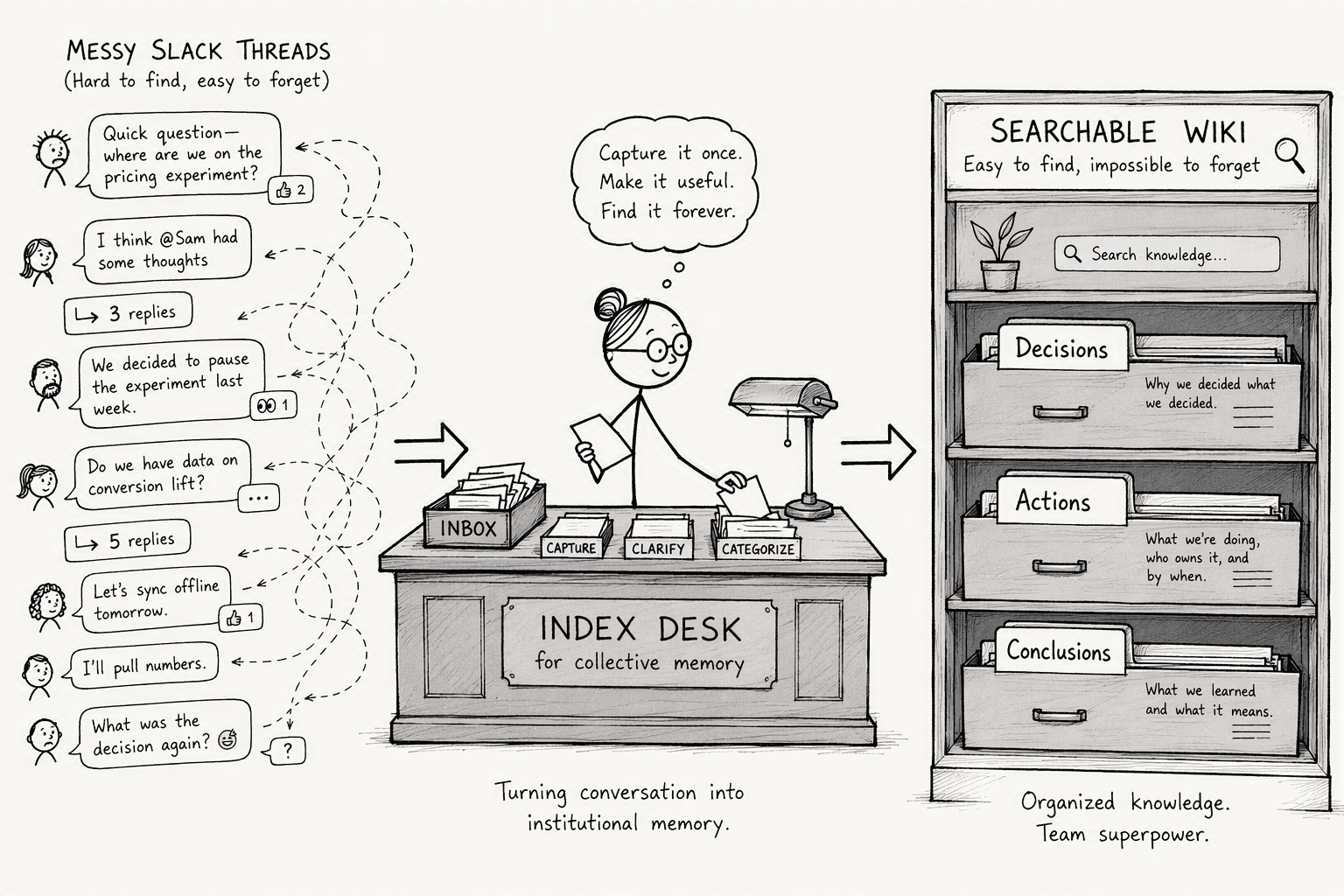
A searchable Slack wiki extracts decisions, action items, and conclusions from threaded discussions and organizes them into a structured body you can actually query. Think of it the way you'd think about a librarian: it knows where everything lives and hands you the right answer when you ask.
When institutional knowledge lives only in Slack threads, it creates three persistent problems:
- New hires spend weeks hunting context that nobody remembers how to find.
- Repeated questions clog channels, wasting everyone's time.
- Decisions get remade because the original reasoning is invisible.
In 2021, 18% of remote workers reported 'information overload' while 8% were overwhelmed by the volume of data and apps to check daily. A structured knowledge base centralizes that scattered information so that onboarding time drops and repetitive questions stop before they start. Information scatter is the hidden tax. A wiki built from threads answers the question once. And for the new hire who finally finds the engineering decision from last March without DMs and channel-hopping, a wiki does more than save time. It makes the whole company feel like it has a memory.
Step 2: Authenticate PromptQL with Your Slack Workspace and Respect Existing Permissions
First, sign into PromptQL and initiate a Slack workspace connection. The integration uses the Slack API with a deliberately narrow OAuth scope: it reads the threads and channels you explicitly designate, nothing more, and writes structured entries into your PromptQL instance.
Under the hood, the permissions model follows three rules:
- Simple inheritance: PromptQL acts with each user's current Slack workspace role.
- Channel-level visibility: If you cannot see a private channel in Slack, the extracted knowledge from that channel never surfaces in your wiki view.
- No extra configuration: There is no shared bot credential with broad access and no separate permission layer to configure. The tool mirrors what already exists.
One security note worth surfacing: no raw database credentials are ever exposed to the AI during this process and data is processed without being stored on external servers unless you explicitly configure that path.
This design sidesteps the credential problem that multiplayer AI setups typically cause, where the agent runs under a single service account and suddenly sees everything. PromptQL's agent instead operates as whoever is driving it. Their identity, their permissions.
The easier way to do it
Every step above is real, necessary work, and most of it is exactly the kind of thing that quietly stops happening a few weeks into a manual effort. PromptQL handles most of it directly.
Connecting Slack as a live source is a few clicks, not a build: add Slack as an integration, complete the OAuth flow, and Slack becomes a normal, queryable source from that point on, no custom pipeline required. Deciding what counts as "resolved" happens naturally rather than against a manual rule someone has to define upfront, corrections and decisions get captured as human-reviewed, cited wiki entries as the conversation actually happens. Attribution and dating come built in too, every captured entry carries version history and notifications by default, an internal wiki with a real audit trail rather than something to manually tag.
Permissions work the same way. Access is enforced at the data layer using the permissions that already exist, and visibility can be scoped further, a customer-specific thread, an internal-only thread, a confidential thread, without a second system to keep in sync. And staying current isn't a scheduled chore: when something changes, the entry gets corrected directly, and the fix sticks for everyone going forward instead of waiting for a quarterly review to catch it.
What's still worth doing yourself is picking the right channels in the first place, and testing the result with a real question before rolling it out broadly, no tool replaces judgment about where the real decisions actually happen.
Conclusion
A searchable wiki built from Slack threads is only as good as the discipline behind capturing it, deciding what counts as resolved, attributing it properly, keeping permissions intact, and catching it when something goes stale. That's a real, ongoing job if it's done by hand. The difference isn't whether the work needs doing, it's whether a person has to remember to do it every time, or whether it happens as a natural byproduct of the team's conversations continuing to happen where they already do.
Frequently Asked Questions
What does it mean to turn Slack threads into a searchable wiki, and why would a team do it?
It means automatically extracting decisions, conclusions, and action items from threaded Slack conversations and organizing them into a structured, queryable knowledge base. Teams do it to stop losing institutional knowledge, reduce repetitive questions, and speed up onboarding.
How can PromptQL connect to Slack and automatically convert threaded conversations into structured documentation?
PromptQL connects via the Slack API using OAuth scopes that respect your workspace roles. It monitors designated channels, parses threaded dialogues with plan-based extraction, and outputs categorized entries into a wiki without any manual copying or tagging.
What specific steps are involved in setting up PromptQL to capture, organize, and search Slack threads?
Authenticate PromptQL with Slack, select the channels and threads to monitor, set a rescan interval, and activate. The engine then processes conversations automatically against structured extraction plans and populates a searchable wiki.
What are the accuracy and permission guarantees when using PromptQL to extract knowledge from Slack?
PromptQL inherits existing Slack user and channel permissions, users see only what their role allows. Plan-based execution uses deterministic extraction steps rather than open-ended generation, which reduces hallucination risk compared to raw AI summarization.
How does plan-based execution compare to other Slack-to-wiki or AI note-taking tools?
Plan-based execution extracts decisions through structured logic steps rather than raw transcript summarization or keyword search. This approach reduces invented information, enforces workspace permissions, and supports both semantic and structured querying where other tools offer only full-text search.
What deployment and pricing options exist for PromptQL in 2026?
PromptQL offers a free tier for fewer than 10 users, a Pro plan at $29 per user per month with unlimited channels, and Enterprise with dedicated infrastructure for on-premises or BYOC deployment. A 14-day free trial is available across tiers.
Sources
- PromptQL | Multiplayer AI with shared context. - promptql.io
- Guru & Slack Integration | Slack Marketplace - api.slack.com
- TheGist taps AI to summarize Slack channels and threads | TechCrunch - techcrunch.com
- PromptQL | Multiplayer AI with shared context. - www.promptql.io




