Imagine you're a marketing ops lead about to launch three AI-optimized email sequences. The segments are clean, the copy is sharp, and the timing is tight. You connect an AI agent to your CRM and your marketing automation platform (MAP) and switch it on.
Within two days, replies start coming in. A customer asks why they got a discount on a product they already bought. A lead is routed to the wrong region. A prospect receives competitor comparison content meant for another vertical. The AI didn't break anything. It read two conflicting versions of the same customer, picked one, and repeated the mistake hundreds of times.
This is easy to run into. Fortune 1000 marketing organizations typically operate 50 to 100 martech tools, and each one holds a slice of the truth about a customer. Meanwhile, only 65% of marketers say they have high-quality data about their target audience, so about a third don't. HubSpot's 2026 guide also reports that 86.4% of marketing teams now use AI somewhere in their workflows. Put those together and the risk is clear: AI scales whatever your data says, right or wrong.
The fix is to rebuild the data foundation beneath the AI. This guide walks you through five steps: diagnose the root causes, unify identities, put a governed access layer between your AI and your systems, audit conflicts, and run AI workflows on live data you can trust.
Key Takeaways
Here is what to know before you start:
- The root cause is fragmented records, not bad intent: Your CRM and MAP each keep their own customer record, and AI inherits every contradiction between them.
- Unified identity comes first: Map your buying committee and your main signal types into a common data model before AI touches a record.
- Governance belongs in an access layer, not a prompt: Middleware between your AI and your systems resolves conflicts and enforces rules before the model reads or writes data.
- Permissions should follow the person: Field-level and row-level controls keep privileged CRM data out of public campaign segments.
- Audit conflicts as they happen: Automated alerts and human review catch moments when your CRM and MAP disagree, and let you trace each decision back to its source.
What Is CRM and Marketing Automation Data Conflict?
CRM and marketing automation data conflict happens when your CRM and your MAP hold different values for the same contact, account, or deal, and nothing decides which one wins.
A contact can be a "closed customer" in your CRM and an active "nurture lead" in your MAP at the same time. When an AI agent reads both, it has no rule for choosing, so it guesses. Here's how you stop it from happening.
Step 1: Diagnose the Root Causes of CRM and MAP Data Conflict
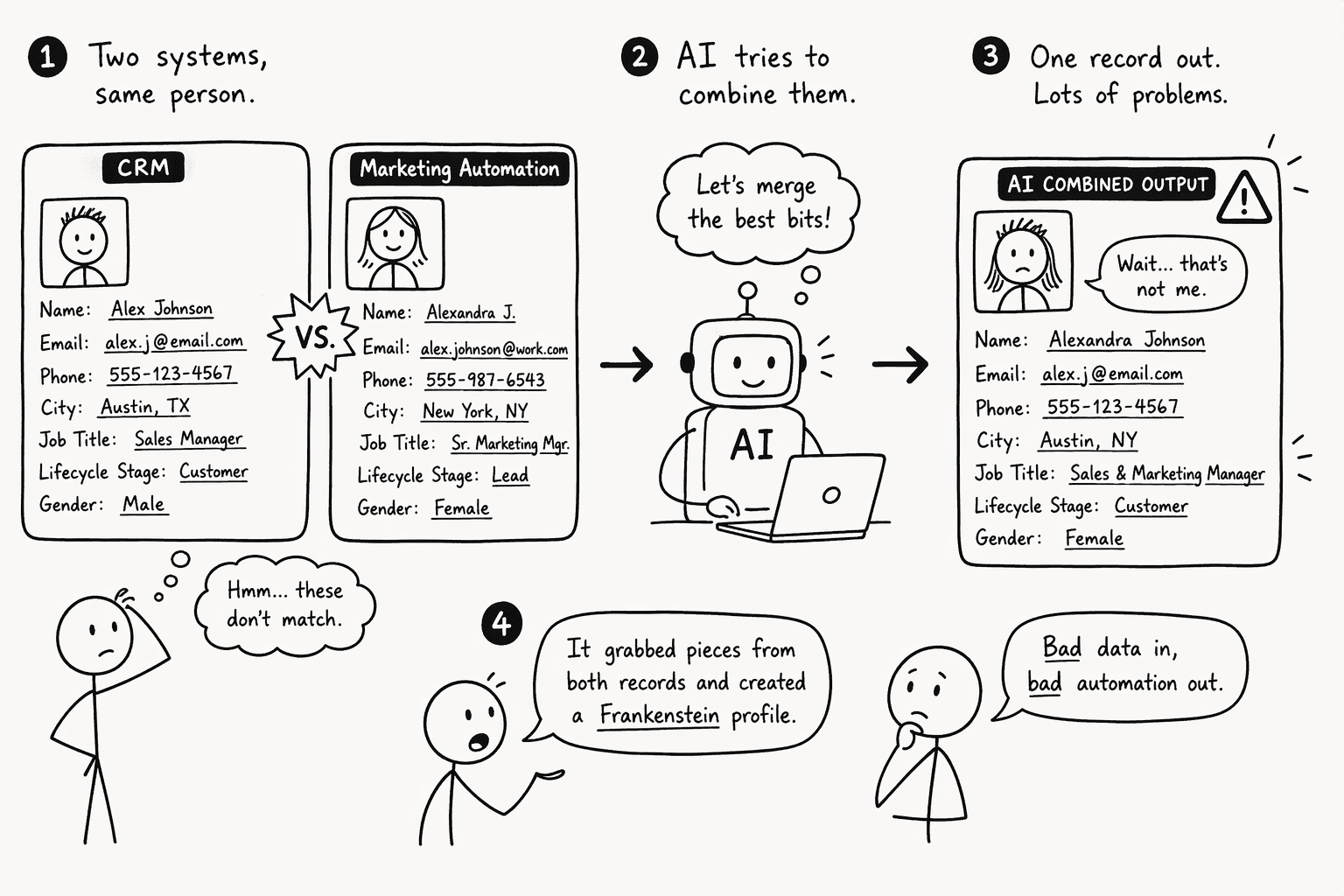
Start by understanding why the conflict exists. Your CRM and your MAP each maintain their own version of the same customer. They update on different schedules, use different field names, and are rarely reconciled before an AI reads from both.
One system sees a lead in qualification. The other sees a closed customer. Neither is wrong inside its own silo, but an AI that combines the two produces an answer neither team would stand behind.
The scale of your stack makes this worse. With dozens of tools each enriching, tagging, scoring, and segmenting contacts on their own, your "single source of truth" turns into one database competing with many others. The AI sees "lead" in one system and "customer" in another and has no rule for which label controls.
To see your own gaps, trace the flow of one real contact:
- Pick one contact and follow the record from first touch to closed deal.
- Timestamp the last update to each key field in every system that holds it.
- Note which direction each sync runs and which fields aren't mapped at all.
- List every mismatch you find, such as a deal marked closed-lost in the CRM while the MAP keeps sending product emails.
Step 2: Unify Customer Identities with a Common Data Model
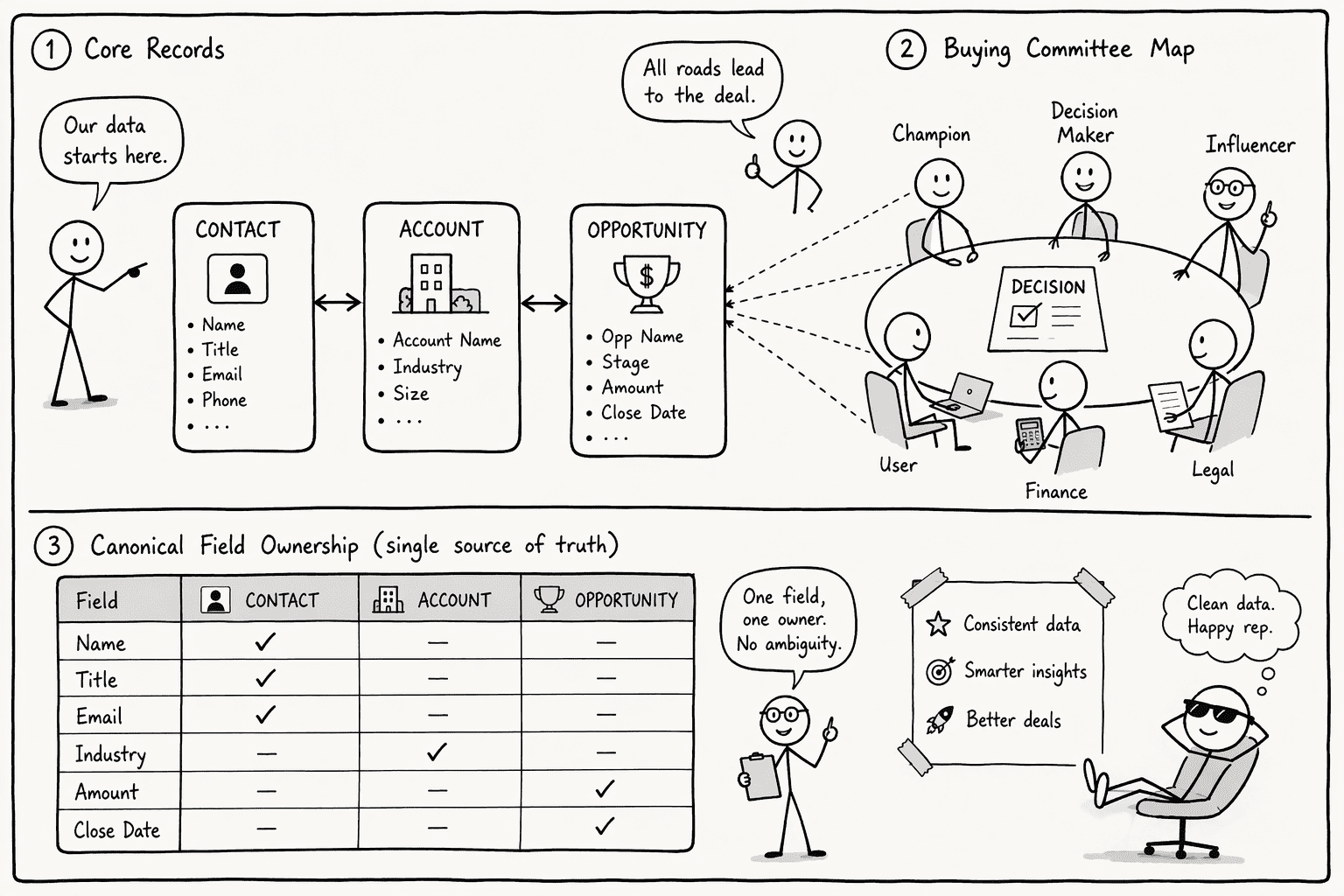
Identity resolution has to work before any AI touches your go-to-market data. Without it, the AI treats one person as several, which inflates audience counts and skews models.
A common data model gives you one definition of a contact, an account, and an opportunity across every tool. It also means agreeing on a canonical source for each field. For example, your CRM owns deal stage and your MAP owns email engagement.
Build the model around the main signal types:
- Demographic data: contacts and job titles.
- Firmographic data: company size and industry.
- Technographic data: the tools an account runs.
- Event-triggered signals: executive hires or funding rounds.
- Intent data: signs that an account is actively researching.
Then map the buying committee. Enterprise B2B deals involve 6 to 10 stakeholders across procurement, finance, IT, and the business unit, yet most CRM records capture one champion and leave the rest unlinked. Before you enable any AI campaign workflow, link the full committee and tag each person's role:
- Champion
- Economic buyer
- Technical evaluator
- End user
This matters because segmentation only works on accurate data. HubSpot reports that 93.2% of marketers say personalized, segmented experiences drive more leads and purchases. An AI segmenting on a broken record can't deliver that.
Step 3: Add a Governed Data-Access Layer Between Your AI and Your Systems
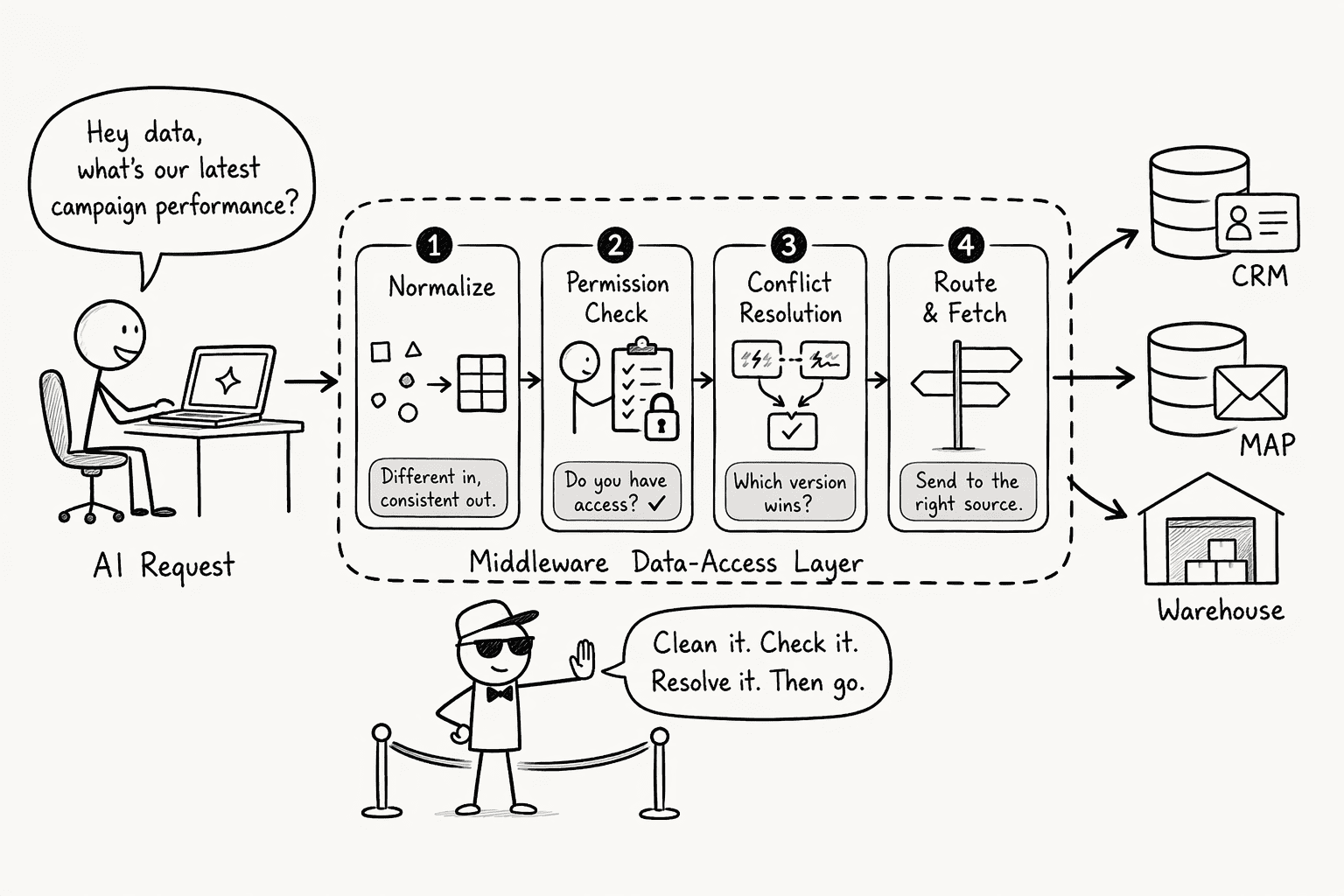
A common data model fixes the meaning of your data. It doesn't solve the run-time problem of an AI agent querying a CRM, a MAP, and a data warehouse at once and stitching the results together on the fly. A data-access layer closes that gap. It is middleware that resolves conflicts and enforces rules before the model sees a record.
A good access layer does four things:
- Normalizes identities in real time, so the AI queries one resolved customer view.
- Applies field-level precedence rules, so if your CRM says "negotiation" and your MAP enrichment says "awareness," the layer resolves it by the policy your business set.
- Enforces access boundaries, so privileged data never reaches a public campaign.
- Logs every access, which makes the audit in Step 4 possible.
Governance should live in this layer, not in the prompt. You write the rules once, and every AI workflow inherits them. A prompt that says "ignore sensitive fields" is a request. A control at the data layer is a guarantee.
Here is how to lock down the boundaries:
- Classify each CRM field as privileged, internal, or public. Treat internal notes, pricing concessions, and legal flags as privileged. A campaign workflow should never read them.
- Define access scopes for each AI workflow. A segmentation workflow might get read access to MAP engagement fields and a short list of CRM status fields, and no access to opportunity details or account health scores.
- Apply field-level masking and row-level filtering at the access layer, not in the model prompt.
- Alert on any boundary crossing. If a campaign workflow reads privileged CRM data, you want to know at the moment of access, not after the campaign fires.
- Test with synthetic data before production. Run a workflow against a test contact marked "do not contact" and confirm the layer blocks the read. If the model gets through, your rules have a gap.
PromptQL is built around this idea. It connects to your warehouses, databases, and SaaS apps, and it uses a user-authorized access model: it acts with the permissions of the person triggering the bot, enforced at the data layer. A teammate's credentials don't become yours, so a bot can't reach records the person asking isn't allowed to see.
Step 4: Audit AI Decisions When Your Systems Disagree
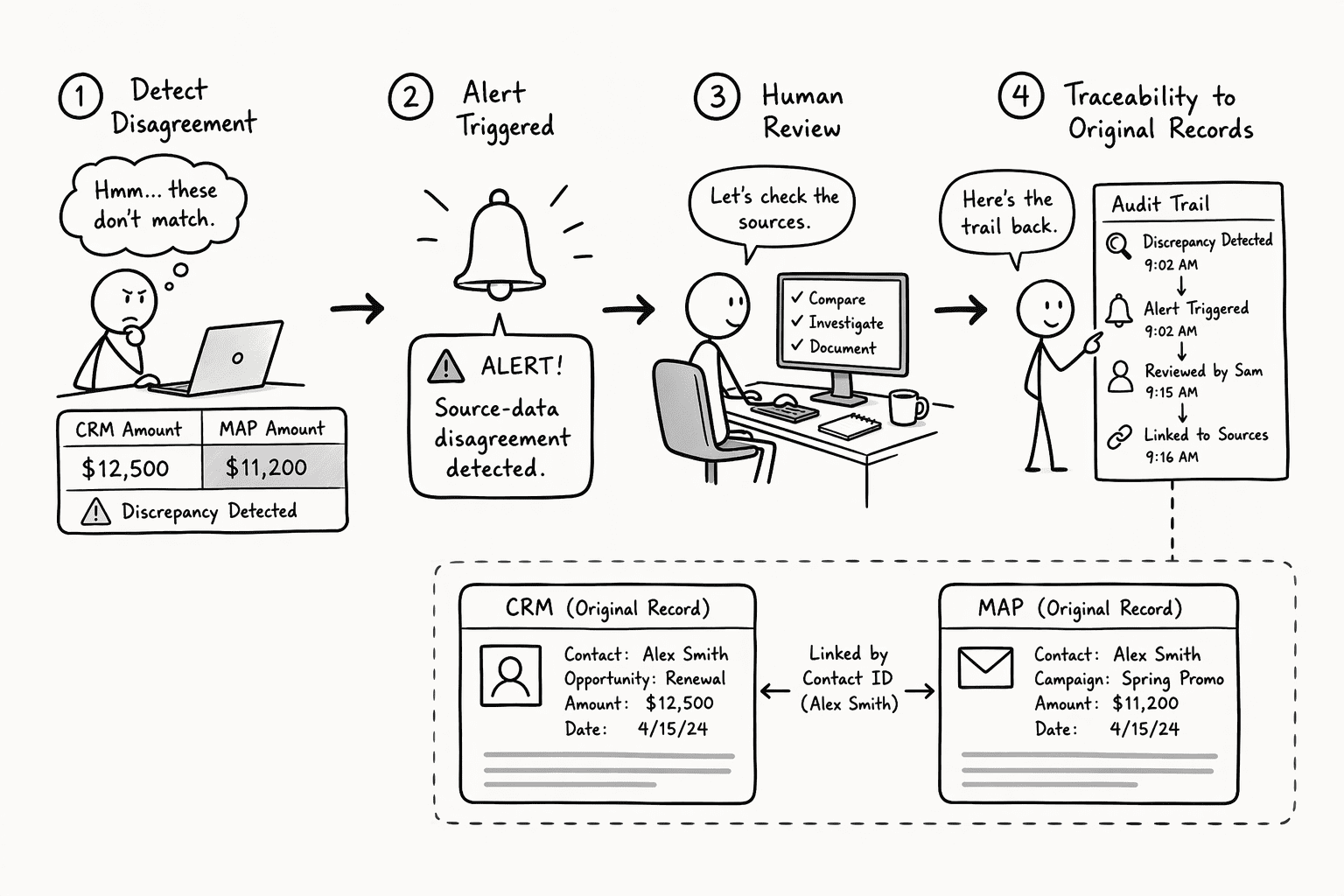
Once the access layer resolves two conflicting signals, you need a record of what happened and why. A log buried in a database that nobody reads won't help. What works is an automated alert that fires when a disagreement crosses a threshold, plus a human review that traces the AI's decision back to the source records.
Design the triggers around business impact:
- Rank conflicts by revenue risk. A "closed-lost" status in your CRM paired with "high intent" in your MAP could mean the AI suppresses a re-engagement campaign for a prospect who is buying again. Or it could pitch new-business pricing to a current customer.
- Require review for high-stakes fields. Any conflict involving deal stage, contact status, or a revenue field gets a mandatory review before the AI can act.
- Batch the rest. Lower-stakes disagreements get flagged for a periodic review.
Keep the process light enough to run daily. A good audit view captures the exact records where systems diverged, shows what each source reported, and lets a revenue operations manager approve or override the AI's resolution in under five minutes. Governance that demands hours of review per alert collapses within a week.
Start with three trigger conditions, and add more once your team can clear those in under ten minutes per incident.
Step 6: Operationalize Trustworthy AI Workflows on Live Business Data
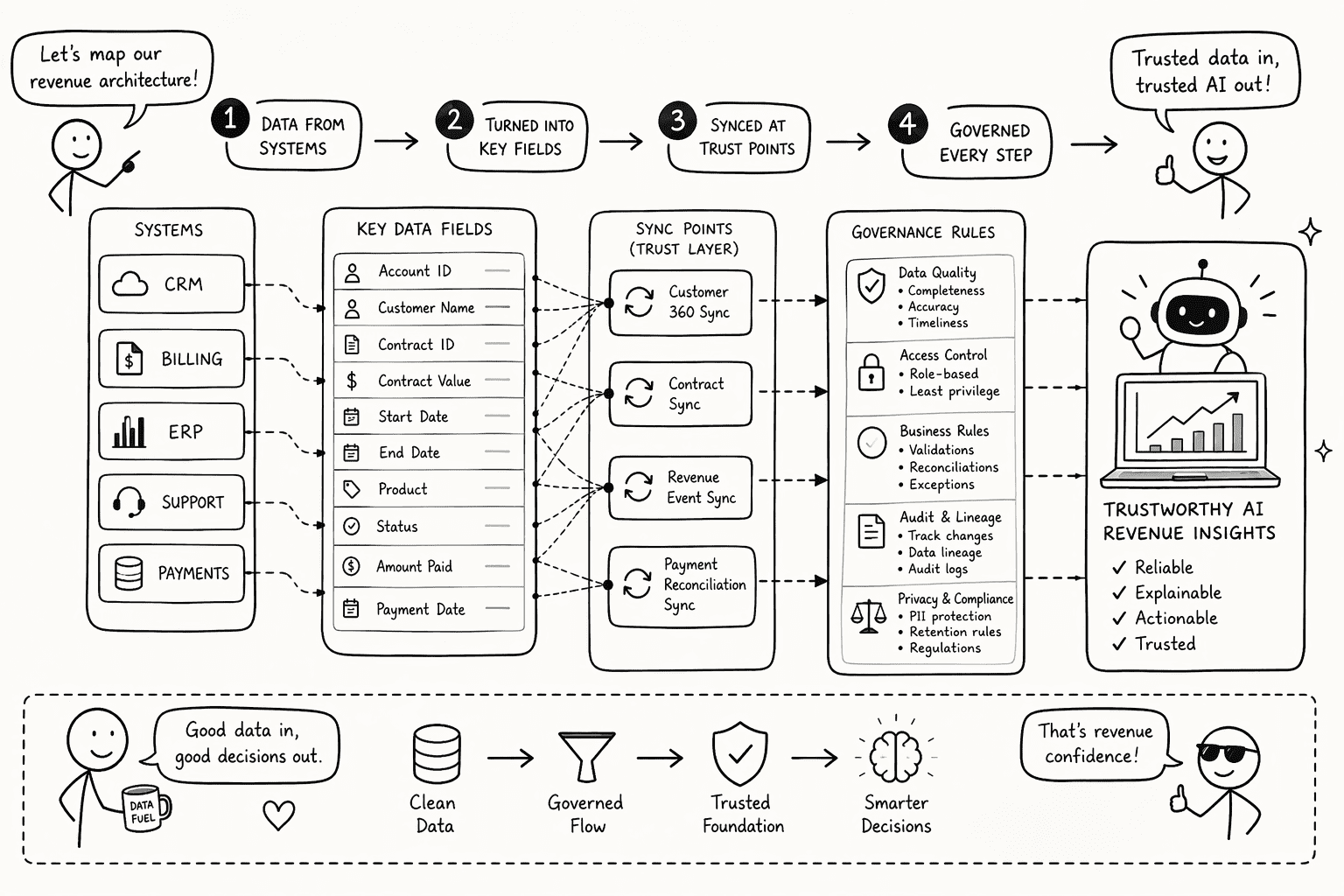
Start with strategy, not technology. Before you connect the first model, decide what AI can do on its own and what needs human approval. Ask: "What boundaries do we need this tool to respect, and can we prove it does?"
Next, build a revenue architecture map: a blueprint of every system, field, sync, and governance rule across your revenue stack. It shows what the AI needs to read and what it must never touch.
Then hard-code those policies into your access layer from Step 3, and connect AI agents to that layer, never directly to raw source systems. This table shows what separates a trustworthy setup from a risky one:
| Decision dimension | Trustworthy approach | Risky approach |
|---|
| Data source connection | Through a governed access layer that resolves identities and enforces rules | Directly to CRM and MAP APIs with no conflict resolution |
| Access model | User-authorized: the AI inherits the permissions of the triggering user | Shared credentials or an unrestricted service account |
| Privileged data handling | Field-level and row-level filtering enforced before the AI reads | A prompt telling the model to "ignore" sensitive data |
| Autonomous action scope | A clear policy on which actions run automatically and which need approval | Broad permissions with no action-level governance |
| Conflict auditing | Automated triggers based on revenue impact, with human review | No flagging when source systems disagree |
| Deployment environment | A data plane in your own cloud account | A vendor-hosted setup where you have no say over where data lives |
PromptQL covers several of these rows. Its security architecture splits a control plane for auth and observability from a customer-owned data plane that lives in your AWS, GCP, or Azure account, so conversation history, credentials, and your team's knowledge base stay in your cloud. PromptQL Tag, its company-wide agent, also syncs its user directory and privileges from your identity provider over SCIM, including Microsoft Entra ID, Okta, and Google Workspace. When you deactivate someone in your identity provider, their access is revoked, and every bot action stays attributable to the person who asked for it. Your directory stays the source of truth. The result is that you can run AI workflows on live business data without treating governance as an afterthought.
Conclusion
Stopping CRM and marketing automation conflicts before they poison your AI campaigns means rebuilding the foundation so the AI reads only resolved, governed records.
Here is the short version:
- Diagnose the silos. Trace one contact end to end.
- Unify identities. Use a common data model that covers the full buying committee.
- Add a governed access layer. Enforce field precedence and privilege boundaries there, not in prompts.
- Audit conflicts. Alert on high-risk disagreements and review them fast.
- Operationalize. Connect AI only through the governed layer, with clear rules for what it can do alone.
Every month you wait, the AI keeps amplifying the errors already sitting in your stack. Start with Step 1 this week.
Frequently Asked Questions
What causes CRM and marketing automation data to conflict during AI-optimized campaigns?
Each system keeps its own customer record, with different fields, update schedules, and statuses. When an AI reads both, it finds contradictions, such as a contact marked "closed-lost" in your CRM but "nurture" in your MAP, with no built-in rule for which to trust.
How can I unify customer identities across my CRM and marketing automation platform?
Build a common data model that names one canonical source for each field. For example, your CRM owns deal stage and your MAP owns email engagement. Then map the full buying committee of 6 to 10 stakeholders and resolve each contact once across every system before the AI queries it.
What is the role of a data-access layer in preventing AI from using conflicting records?
A data-access layer sits between your AI agents and your source systems. It resolves identity conflicts, applies precedence rules when systems disagree, enforces field-level governance, and logs every access. The AI reads one resolved view instead of raw, conflicting fragments.
How do I audit AI-driven campaign decisions when source data from CRM and MAP disagree?
Set threshold-based alerts on conflicts that affect revenue, such as mismatched deal stages, contact statuses, or revenue fields, and route them for human review. Capture what each source reported and log how the conflict was resolved so the decision is traceable.
What architecture keeps an AI agent from mixing privileged CRM data with public campaign segments?
Enforce field-level and row-level access controls at the data-access layer, not in the prompt. The AI should inherit a real user identity with bounded permissions, as with PromptQL's user-authorized model, instead of a service account with broad access.
How are teams operationalizing trustworthy AI workflows on live business data in 2026?
They decide in advance which AI actions run automatically and which need human approval. They map every system, field, and governance rule, then connect AI only through a governed access layer, often running in their own cloud account.
Sources
- AI Analyst pyramid of needs - promptql.io
- Trusted answers to urgent questions – instantly. - promptql.io
- 9 Root Causes of Enterprise CRM Failure in F1000 - www.pedowitzgroup.com
- Obstacles in marketing automation and how to fix them [2026] - blog.hubspot.com