Introduction
Imagine marketing just added your biggest client to a shared Slack channel and asked you to wire up the new AI support bot. You know exactly where your engineering chatter lives: architecture decisions, unannounced roadmap items, half-finished security post-mortems. Plugging a large language model into that same workspace without an airtight boundary feels like handing over a master key.
The tension is real. You want the bot to answer billing questions instantly at 2 a.m., but you cannot afford to have it repeat a snarky thread about contract loopholes or expose a snippet of proprietary code it gobbled up from a random search. Slack's Marketplace guidelines say AI apps should not make consequential decisions without human review, and Slack states that customer data is never used to train LLMs.
A layered architecture works best: identity-aware permissions, a sandboxed compute runtime, and a hard mechanical block on auto-posting. That last piece, the send gate, stops a single word from reaching a client until an explicit human tap.
This guide sequences five controls. Skip one, and you are gambling. Build all five, and you get a bot that handles customer questions while keeping your internal threads, code, and strategy locked inside the business.
Key Takeaways
The security blueprint for a customer-facing Slack bot chains five layers that each block a specific failure mode. Skip one, and either a provider retains your data or a bad answer reaches a client channel uninspected.
- Identity-aware scoping: Bind the bot's universe to the requesting user's exact channel membership. Slack's own AI features only use Slack data that members have access to at the time of request, and customer data is never used to train third-party LLMs.
- No-retention LLM execution: Require that prompts and outputs are not logged, retained, or used for training by any LLM provider you use. Slack says its own prompts and outputs are not logged or visible to LLM providers, so hold your providers to the same standard.
- User-authorized model: Swap a bot-wide master token for a session token tied to the specific human making the request. That keeps the bot from peeking across channel boundaries.
- Mechanical send gate: Hold drafted replies in a private message or modal and require an explicit human click to publish. Auto-posting is the single fastest route to leaking a hallucination into a shared channel.
- Complete audit trail: Log every prompt, response, approving user, timestamp, and channel for SIEM export.
Step 1: Enforce Identity-Aware Permissions Through Slack Scopes and Channel Membership
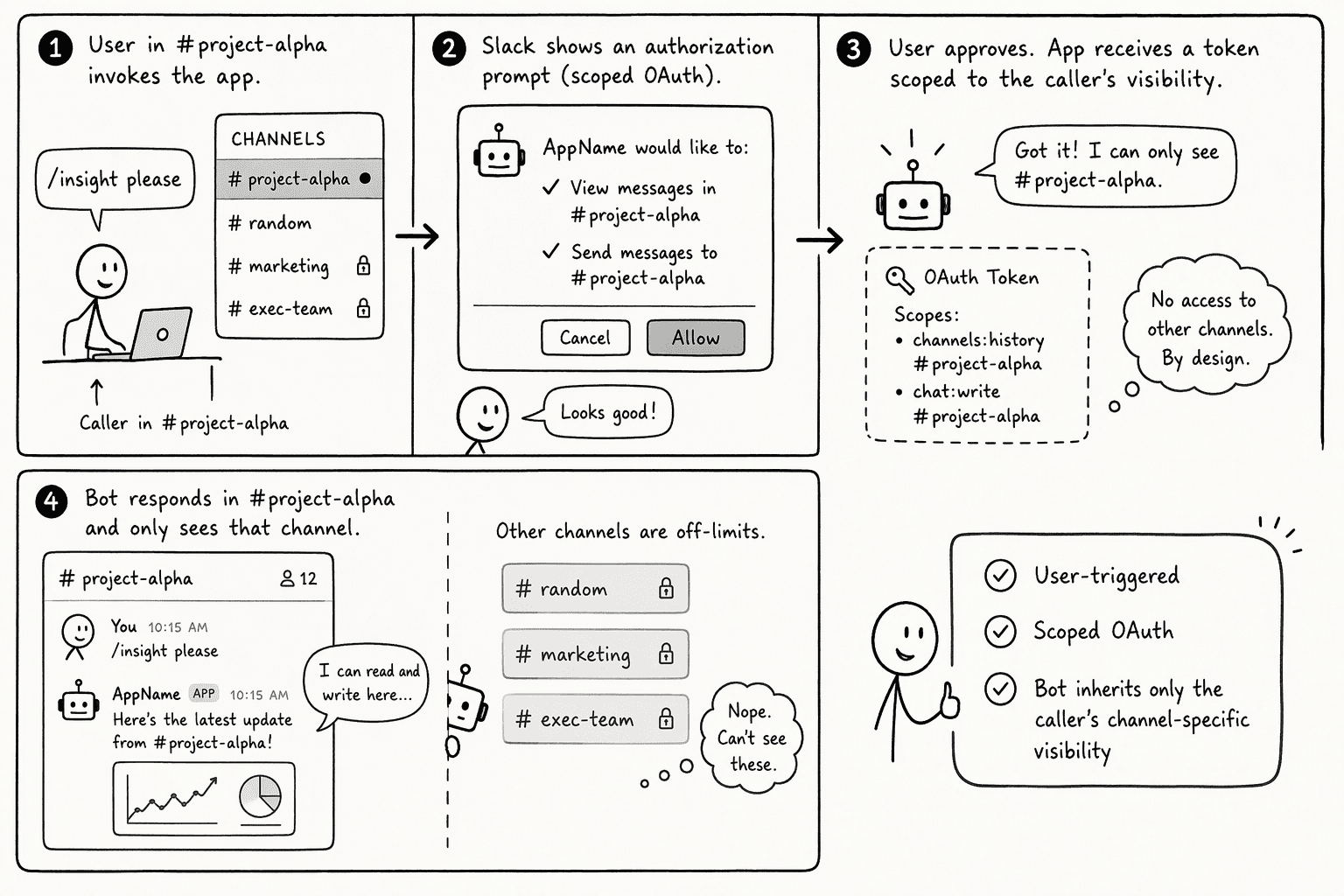
The single highest-use rule: your bot should never inherit blanket workspace visibility. It must operate strictly within the channel membership of whichever human triggered it.
Slack's OAuth scopes give you the knife to carve this boundary. Do not grant channels:history across the whole workspace. Instead, derive the bot's viewport from the calling user's existing permissions.
Slack offers three authentication strategies for MCP server connections: OAuth 2.0 with PKCE, which is the primary model for third-party servers, Slack identity-based auth for internal or Slack-first servers, and static headers, which are available for internal and testing use only.
Whichever you choose for production, pick the option that ties access to the requesting user, so the bot inherits exactly what the account exec or support rep can already see, no more.
Read-only scoping matters just as much. Slack scopes cannot by themselves limit a bot to channels where the requesting user is a member, so enforce that check in your app logic, and request only the write access you need for the send gate workflow you will build later.
Slack's data security guidance for agentic apps suggests documenting a scope policy with three tiers: low-risk scopes like commands and chat:write that are always allowed, more sensitive scopes like channels:history or users:read that need a manual review, and high-risk scopes like admin that are reserved for the most trusted internal applications. Following that tiered template keeps your app from hoarding unnecessary read access.
Plan for Slack's rate limits too. Since May 2025, commercially distributed apps outside the Marketplace get 1 conversations.history call per minute at 15 messages per request, for new apps and new installs of existing apps. Internal customer-built apps are not affected. If your bot is commercially distributed, design retrieval to fetch only the channel and thread the user is in.
Step 2: Architect AI Computations Inside a Sandboxed, Zero-Retention Environment
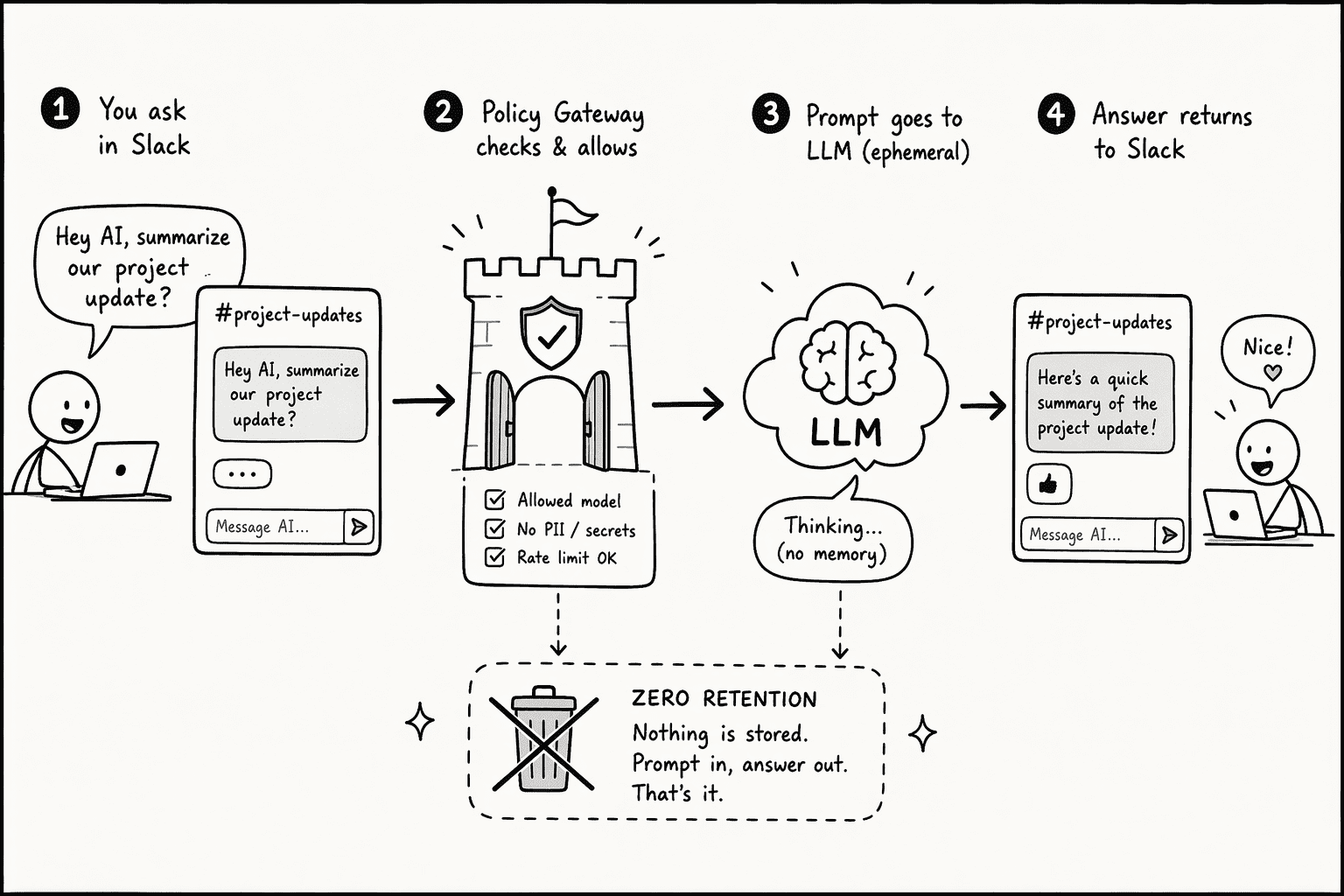
Getting the permissions right inside Slack solves half the problem. The other half is what happens after the prompt leaves the channel and hits a large language model.
If the inference engine retains, logs, or trains on that payload, you have created a data drain outside the workspace perimeter.
Slack sets the pattern for its own AI. It says prompts and outputs are not logged or visible to LLM providers, and that LLMs do not retain information once the request has been processed.
Slack's Marketplace guidelines also list apps that use Slack data to train LLMs as unsuitable. Its MCP servers follow the same governed path: they run as a capability of a Slack app, so no server enters a workspace without explicit admin sign-off, and connecting triggers an OAuth flow.
For your own bot, ask the same of every LLM provider: written terms that prompts and outputs are not logged, retained, or used for training. Route every customer-facing query through a proxy that enforces those terms, so your prompts are not sitting in a store you do not control.
If your bot runs code, sandbox that too. In PromptQL, Python runs in a WebAssembly sandbox with no access to the host filesystem, network, or system calls, and credentials are injected at runtime so they are never exposed to the model.
Step 3: Implement the User-Authorized Model to Gate All Data Access
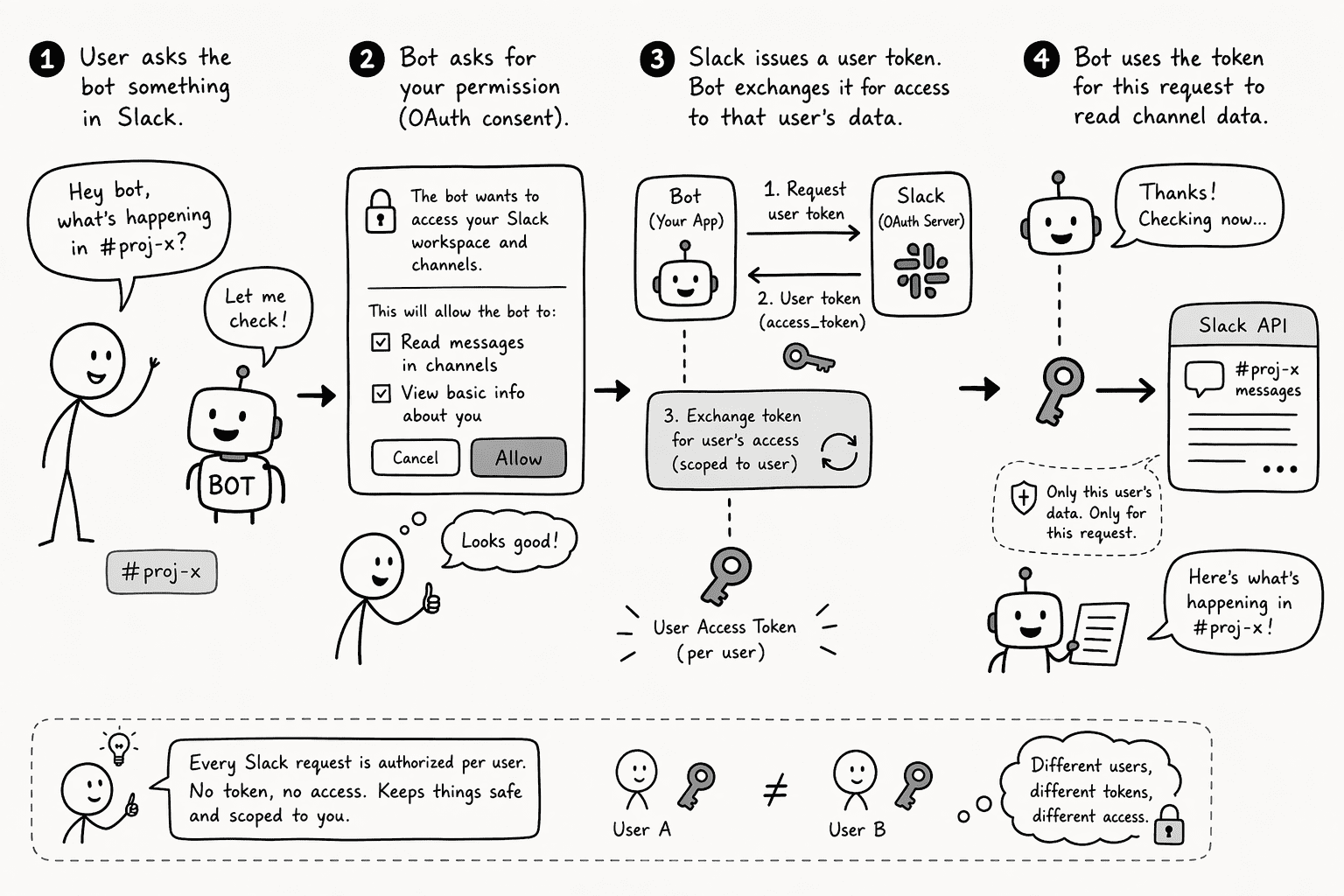
Sandboxing the LLM solves the compute side, but there is still a subtle attack vector sitting in the token itself. A bot configured with a single, long-lived bot token can become what security engineers call a confused deputy: the finance team's channel data ends up inside the same session context that serves a customer transcript because the bot itself does not differentiate who is asking.
The fix is the user-authorized model. Upon a Slack interaction, the bot initiates an OAuth flow that returns a token scoped to the specific human who typed the question. That means when the support rep in #client-acme-support triggers the bot, the resulting session has zero visibility into #internal-m-and-a-discussion.
PromptQL works this way. It acts with each user's permissions, and users cannot ask the bot to access another user's data. This architecture converts the bot from an all-seeing entity into a narrow delegate, and it closes off the class of breach where a customer support agent accidentally queries a finance channel through a multiplayer AI interface.
Binding the token to identity means the bot inherits any backend data-gate policies the user already carries.
In PromptQL, permissions are enforced at the data layer, not by the model, so a prompt injection cannot bypass them. If the user does not have permission to see unreleased pricing, the bot cannot recite it, because the underlying query runs as that user.
Step 4: Configure the Send Gate and Mandatory Human Approval Workflows
Even with perfect identity scoping, models hallucinate. The moment the bot auto-posts a plausible-looking but entirely fictitious API deprecation notice into #client-enterprise-support, you have a trust incident that takes weeks to unwind.
A send gate is your safety net. When the bot crafts a reply, hold it as a draft in a private message or modal visible only to the assigned human reviewer. The message never touches the customer channel until a person reads it, maybe edits it, and physically hits "Send."
Slack points the same way for its own MCP tools: it says write and delete tools will require explicit, per-action user confirmation, which matches the approval workflow you are layering in here. The Marketplace guidelines add a blunt principle for AI apps: do not let the model make a consequential decision without human review.
The mechanical implementation is straightforward with Slack's interactive endpoints. Post the draft to the reviewer as a regular message in a DM or a private review channel, with Approve and Edit buttons. Then, on "Approve," call chat.postMessage with the final text to the customer channel. Avoid chat.postEphemeral for the draft, because ephemeral messages are not guaranteed to be delivered and cannot be recovered after a reload or restart, and they cannot be updated with chat.update. A pending approval could simply vanish. No automation can leapfrog that gap.
Step 5: Enforce Audit Trails, Compliance Certifications, and Regulated-Industry Controls
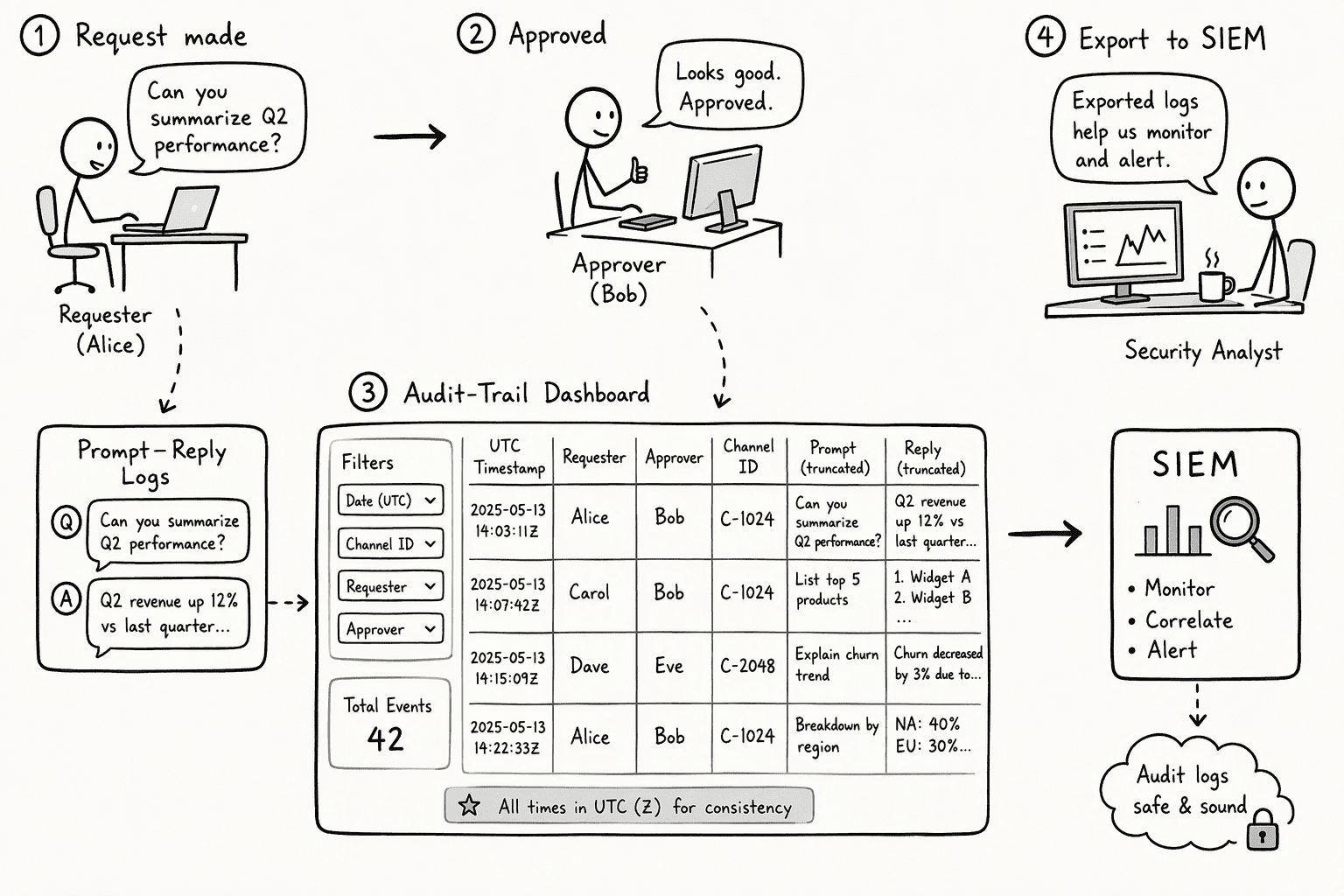
Adding the send gate makes the bot safe to operate. Turning it enterprise-grade requires auditable proof of every decision.
- Log the full prompt-reply pair alongside the requesting user's identity, the approving human's identity, the channel ID, and a UTC timestamp. Export this to your SIEM so security operations can trace any anomalous exposure back to a single interaction.
- Publish a public security page that documents data handling, subprocessor relationships, and the retention policy for AI inputs and outputs. A prospect's infosec team is likely to ask for this page during a vendor review.
- Restrict scopes to the documented tiered policy. By default, any member can install an app, so turn on Slack's Require App Approval setting to make new installations need admin sign-off. Then use the Slack CLI to audit all apps and their scopes and flag any using high-risk permissions.
- Store app secrets outside the codebase entirely. Slack's security docs say to never hardcode tokens in source code. Use
.env files guarded by .gitignore in development, and in production rely on a dedicated secrets manager such as GitHub Actions Secrets, AWS Secrets Manager, or HashiCorp Vault.
Step 6: Compare Deployment Architectures and Pricing Models Across Leading Options
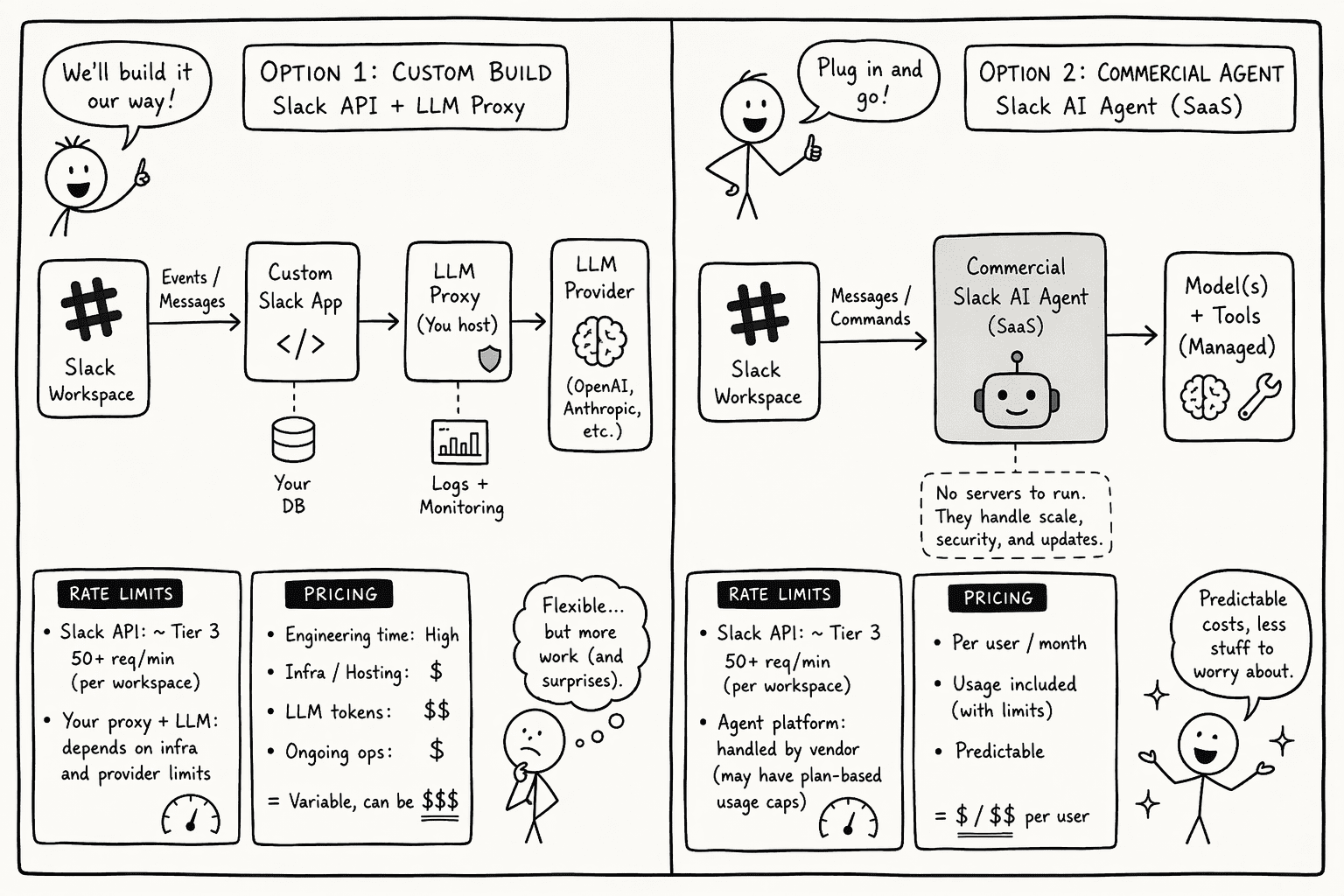
Once the control layers are designed, the practical question is build versus buy.
Building a proxy on top of the Slack API plus your own LLM sandbox gives you maximum control, but you own every control described in this guide.
If the app is commercially distributed outside the Marketplace, the limit of one conversations.history call per minute at 15 messages per request can also bottleneck a busy support channel.
| Dimension | Build with Slack API and a custom LLM proxy | Buy a ready-made agent (PromptQL Tag) |
|---|
| Data residency | You choose and run the proxy and the LLM provider region | BYOC, Dedicated, and BYOK data plane options for Enterprise |
| Access model | You implement the user-authorized token exchange | Acts with each user's permissions |
| Approvals | You implement the send gate yourself | Writes and external calls require approval, with a plain-language summary of what is about to happen |
| Code sandbox | You build and maintain it | Python runs in a WebAssembly sandbox with no access to the host filesystem, network, or system calls |
| Dimension | Build with Slack API + Custom LLM Proxy | Buy a Commercially-Distributed Slack AI Agent |
|---|
| Rate limits | 1 req/min, 15 objects/req for commercially distributed apps outside the Marketplace (new apps and new installs since May 2025); internal apps are not affected | Marketplace-approved apps are not subject to that reduced cap |
| Send gate implementation | Manual draft in a DM or private review channel, then \chat.postMessage\ | Native draft-approval-publish built into the product UI |
| Data residency | You configure the proxy and LLM provider region | BYOC or dedicated VPC options available at Enterprise tiers |
| Pricing model | LLM tokens + compute cost + engineering time | Per-user pricing, starting at $40 per user per month on Team and $1,000 per month on Enterprise, with usage measured in OLUs |
| Access model | You enforce user-authorized token exchange | Inherits the requesting user’s identity within a governed data plane |
Conclusion
Security for a customer-facing Slack bot comes down to a tight chain of controls. Get the sequence right, and you close off whole classes of risk before they turn into leaks. The stack reads top to bottom: identity-aware scopes stop lateral movement across channels.
A no-retention setup keeps your prompts out of provider logs and training data. User-authorized tokens kill confused-deputy attacks by ensuring the bot acts only with the permissions of the specific human who asked, and a mechanical send gate sits at the exit, holding every reply for human approval before it reaches a client channel. An audit layer wraps the whole thing in a trail an external assessor can actually follow.
If you can instrument only one control today, build the send gate. It catches the widest range of leakage, real data and fabricated, and it buys you the time to harden the upstream permissions without an incident already in flight.
Frequently Asked Questions
How can a Slack bot use a user's real identity to enforce existing data permissions without exposing internal data?
The bot requests an OAuth token scoped to the specific human who triggered the interaction, not a workspace-wide master token. This inherits the user's channel memberships and the permissions the user already carries, so the bot sees only what that person can already see and cannot drift into internal-only channels.
What architecture separates customer-owned data from AI computation and how does it prevent data exposure?
A split-plane design separates a control plane (identity, provisioning, billing, and lifecycle management) from a data plane where workloads and customer data live. With BYOC, which requires an Enterprise agreement, PromptQL runs the data plane in your own AWS, GCP, or Azure account, so conversation history, wiki content, metadata, and credentials stay in your cloud.
How does a sandboxed execution environment for Python code prevent data leaks when answering customer questions?
A sandbox like PromptQL's WebAssembly runtime gives the code no access to the host filesystem, network, or system calls. Only the Python standard library plus a fixed set of packages (numpy, pandas, openpyxl, and reportlab) is available, and dynamic installs are blocked. The model cannot reach internal services or exfiltrate data through code because the boundary is enforced at the runtime level, not by prompt instruction alone.
What is the user-authorized model and how does it apply to Slack bots accessing company data?
The user-authorized model replaces a bot-wide master token with a per-session token tied to the individual Slack user who initiated the request. This prevents a confused-deputy scenario where a support rep's query accidentally surfaces data from a channel the bot has access to but the rep does not.
How do audit trails and approval workflows prevent sensitive information from being shared through a Slack bot?
A send gate holds every AI-drafted reply in a private view until a human approves it, blocking hallucinations from auto-posting. Simultaneously, an audit log captures the prompt, the response, the approving user, the channel, and a timestamp, providing a traceable chain that security operations can export to a SIEM for review.
What certifications and security controls should a Slack bot integration have to safely handle customer data in regulated industries?
Look for independent compliance and control over where your data lives. PromptQL is SOC 2, has GDPR and ISO 27001 compliance with dedicated VPC and BYOC deployment options, and offers HIPAA-ready access controls. Whatever vendor you choose, ask for its current reports and confirm they cover the data you will handle.
Sources
- PromptQL Tag | The company-wide AI agent for Slack - promptql.io
- Security best practices | Slack Developer Docs - docs.slack.dev
- How Slack Keeps MCP Secure | Slack - slack.com
- Data & security best practices for agentic Slack apps | Blog | Slack Developers - slack.dev
- Slack Secrets Found In AI Logs - FireTail's Documentation Hub - docs.firetail.ai