
28 Sep, 2026
•
11 MIN READ
Can Jev and an LLM Work Together in One Workflow?
Key Takeaways
- A Jev and LLM workflow uses Jev for bounded decisions and an LLM for open-ended text, with your code passing results between them.
- Jev decides and the LLM writes. Neither model has to do the other's job.
- Jev can screen most of your volume cheaply, so your LLM only sees the hard minority of cases.
- Your code owns the final action. Jev's confidence scores tell it when to act, when to escalate, and when to ask a person.
Why Jev and an LLM Belong in the Same Workflow
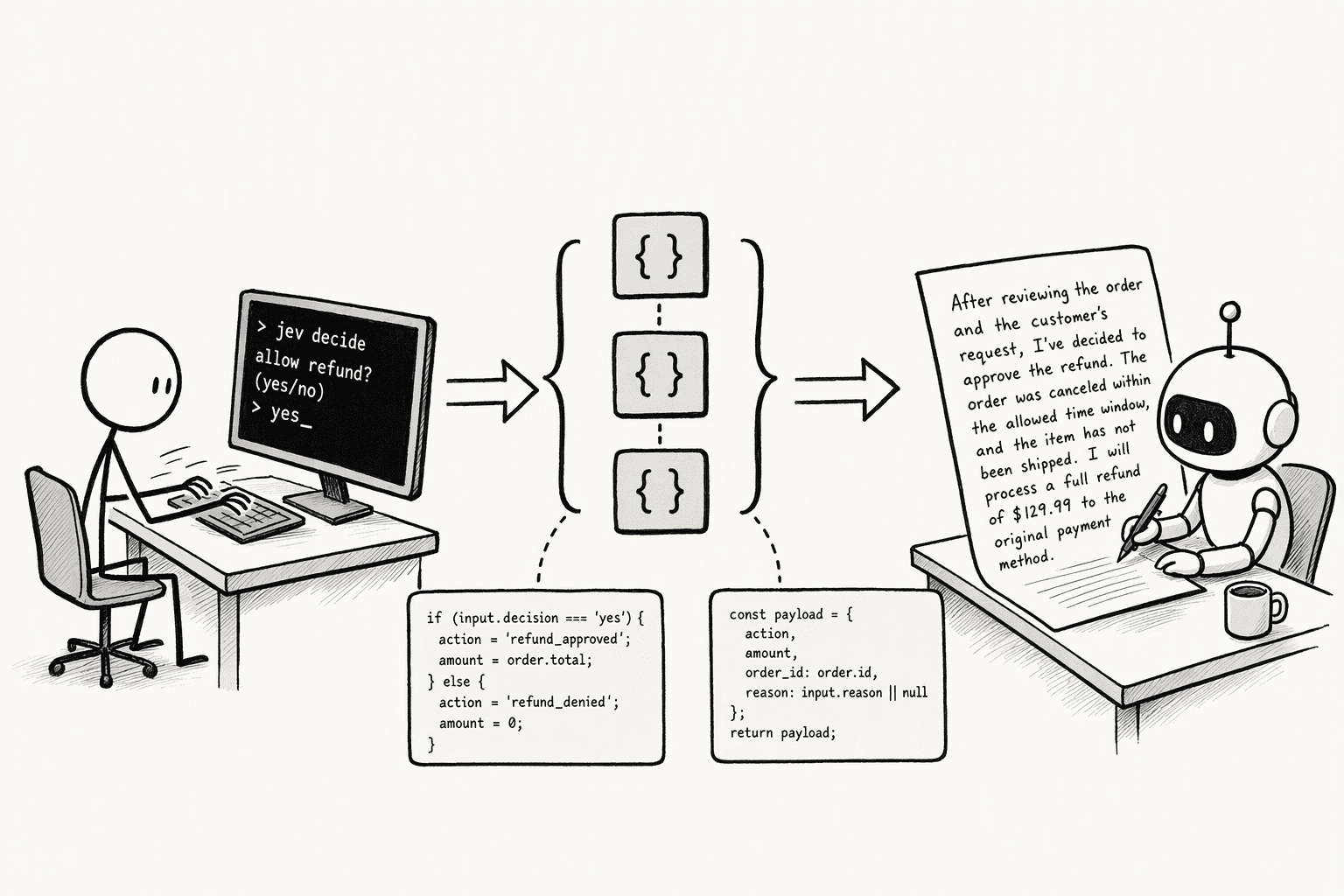
- Each model does its own job: Jev answers closed questions with a fixed set of possible answers. Your LLM writes replies, summaries, and explanations. When you split the work this way, neither model gets stretched past what it does well.
- You cut cost and wait time: TypeSafe prices Jev at $0.042 per million input tokens, with output tokens free. It reports end-to-end response times of 70 to 500 milliseconds, compared with 3 to 329 seconds for frontier LLMs in the benchmark it cites.
- You get a clear signal for handoffs: Every Jev answer comes with a calibrated probability. A low score is a simple, reliable trigger to pass the case to your LLM or a person.
- Your rules stay in your code: Thresholds, permissions, and retries live in your application, so you can change a business rule without rewriting a long prompt.
How Jev and an LLM Work Together
1. Jev Triages, Your LLM Handles the Hard Cases
- Jev classifies each item, such as a support ticket, email, or chat message, and scores it for urgency or complexity.
- Your code handles clear, simple cases directly, like tagging or routing to a queue.
- Anything complex or low-confidence goes to your LLM or a human reviewer.
2. Jev Picks Which LLM Runs the Task
- You define a few model options, such as a fast, low-cost model and a more capable one, with plain-language criteria for each.
- Jev reads the incoming request and picks the option that fits.
- The chosen LLM runs the task. LangChain's model-routing middleware uses Jev in exactly this way.
3. Your LLM Writes, Jev Checks the Answer
- Your LLM drafts an answer, summary, or reply.
- Jev checks the draft against your criteria. For example, a yes/no question (TypeSafe calls this type a Noul) can test whether each claim is supported by the source.
- Drafts that pass move on. Drafts that fail get flagged, retried, or sent to a stronger model or a person.
4. Jev Guards Your Agent's Actions
- Your LLM agent proposes a tool call.
- Jev scores the call for risk, such as deleting data or leaking secrets.
- Your code blocks risky calls or asks for approval before they execute. LangChain's AutoModeMiddleware follows this pattern.
5. Your LLM Prepares the State, Jev Decides
- An LLM or vision model turns raw input, like a long thread or an image, into clean, focused text.
- Jev answers several policy or classification questions about that text in a single call.
- Your code applies thresholds to decide what happens next.
6. Jev Decides, Your LLM Explains
- Jev returns a decision along with its probabilities.
- Your code passes that decision, plus the relevant context, to your LLM.
- The LLM writes a short explanation or reply for the person who needs it.
How to Build a Jev and LLM Workflow

Step 1: Split Your Workflow Into Decisions and Generation Steps
- Write down every step the workflow takes, from the moment input arrives to the final action.
- Mark a step "decision" if it picks from known options, rates something on a scale, or answers yes or no.
- Mark a step "generation" if it writes, summarizes, or explains anything in words.
- For each decision step, note which Jev question type fits: Choice to pick one option, Score for ordered levels, or Noul for yes or no.
Step 2: Clean and Trim the State Before It Reaches Jev
- Strip out anything unrelated to your questions, such as email signatures, legal footers, or old messages in a thread.
- Do any math, counting, or date comparison in code first, then send Jev the result. For example, send "invoice is 45 days overdue" in place of two raw dates.
- If the state comes from a long LLM transcript, have your LLM summarize it first and keep the summary well under Jev's 32,000-token state limit.
Step 3: Write Typed Questions and Ask Them All in One Call
- Give each question a short ID for your code, such as
is_urgentorcategory. - Write the full question in the instructions field, since the ID isn't sent to the model.
- For Choice and Score questions, add a one-line description for each option or level so Jev knows where the boundaries are.
- Put every independent question you might need into one request, even ones that only matter for some inputs.
Step 4: Set Confidence Thresholds in Code
- Set an "act automatically" cutoff for each decision, such as 0.9 and above.
- Set a middle band, such as 0.6 to 0.9, that sends the case to your LLM for a closer look.
- Send anything below the middle band, or anything high-risk, to a person for review.
- Store your cutoffs in a config file so you can adjust them without changing your code.
Step 5: Pass Jev's Answers to Your LLM as Context
- Add Jev's answers and probabilities to the top of the LLM's prompt, such as "Category: billing (0.94). Urgent: yes (0.97)."
- Tell the LLM which decisions are final and shouldn't be revisited.
- Give the LLM one narrow task, such as "Draft a reply that acknowledges the urgency and explains the next step."
Step 6: Test the Full Workflow Against Labeled Examples
- Pull 100 to 200 real examples and record the correct outcome for each.
- Run them through Jev alone, your LLM alone, and the full combined workflow.
- Compare accuracy, total cost, and escalation rate for each setup.
- Adjust your thresholds from Step 4, then pin the Jev version you tested with, such as
jev-1.13.0, so a future release doesn't change your results.
Limitations of Running Jev and an LLM Together
- A wrong route hides hard cases: Jev can still pick a wrong answer from your allowed options. If that happens at the triage step, your LLM never sees the case that needed it.
- LLM output can be too long for Jev: Jev accepts up to 32,000 tokens of state on the current version, according to Pydantic AI's Jev docs. Long LLM transcripts must be compacted first, and that summary has to come from an LLM, since Jev can't write.
- Injected text can move Jev's answer: Instructions hidden in user input or LLM output can steer Jev. Keep deterministic checks in place alongside any Jev guardrail.
- Explanations can drift from the decision: Jev doesn't explain its reasoning, so when your LLM explains a Jev decision, it's giving its own interpretation. Label these explanations accordingly in high-stakes settings.
- Thresholds need ongoing tuning. Your escalation cutoff decides how much work reaches the LLM. Set it too low and you miss errors. Set it too high and your costs climb back up.
- Model updates on either side can shift results. The jev-latest alias moves with each release, which can change the numbers behind a threshold you've tuned. Pin a specific Jev version once your thresholds are set, and retest whenever you update either model.
How PromptQL Runs Jev and LLMs in One Workflow
- You describe the goal in plain English. The bot works out which steps are decisions and which need text.
- Jev screens the volume. It classifies, scores, and flags items in bulk with confidence scores attached.
- The LLM writes the output. It turns Jev's decisions into shortlists, summaries, drafts, or dashboards built inside a multiplayer AI thread.
- Your team reviews in one thread. Everyone sees the same work and corrects what they know is wrong.
Conclusion
FAQs
Frequently Asked Questions
What does it mean for Jev and an LLM to work together in a single workflow, and what roles does each play?
How does plan-based execution enable a deterministic agent and an LLM to collaborate reliably on data tasks?
What security and governance benefits exist when a deterministic agent works alongside an LLM in an enterprise workflow?
What are the practical steps for setting up a workflow where a deterministic agent and a reasoning LLM share context?
- Define your multi-step workflow as a YAML blueprint.
- Declare each LLM task as a named agent step with a specific prompt, model, and context mode.
- Use Jinja2 expressions for deterministic conditional routing between steps.
- Add script steps for non-LLM tasks.
- Deploy and monitor the entire workflow via a real-time dashboard.
How does an Agentic Semantic Layer help an LLM and AI agent work from the same business language?
How do businesses measure accuracy and cost when running AI agents and LLMs together in production?
- Accuracy: measure by final pass rate on complex, multi-step benchmark tasks (like the 35.56% TravelPlanner result).
- Cost: measure by tracking token spend per step, with deterministic routing eliminating LLM decision-loop overhead.
- Governance: measure by logging every context boundary transfer and verifying zero sensitive data leaks across agent steps.
Sources
- [2508.02721] Blueprint First, Model Second: A Framework for Deterministic LLM Workflow - arxiv.org
- Conductor: Deterministic orchestration for multi-agent AI workflows | Microsoft Open Source Blog - opensource.microsoft.com
- CI-Work: Benchmarking Contextual Integrity in Enterprise LLM Agents - www.microsoft.com
- PromptQL | Team AI with a wiki - promptql.hasura.io



