As more routine decisions move to AI, such as routing a ticket, flagging a payment, or approving a request, the questions that follow get harder to answer. Why did this item go where it did? Who looked at it? What changed when the numbers shifted? Those are governance questions, and they matter most when the decisions are made thousands of times a day.
Jev is a useful case to look at, because TypeSafe AI built it for exactly this kind of repeated decision. It returns a choice, a score, or a yes/no probability for each question, with a probability attached to every answer, and that probability is what a governance process can hang a threshold or a review on. What it doesn't do is govern. Thresholds, review queues, records, and access control are left to the application around it.
This guide covers what Jev provides, what it leaves to you, and how to build governance and human review around it.
Key takeaways
- Signals, not governance: Jev supplies typed answers and probabilities, and the application supplies the governance.
- Risk and timing: Oversight is set by the cost of a wrong answer and by whether a person looks before an action runs or only after.
- Queue design: A review queue that is too wide gets rubber-stamped, so queue size, context, and sampling matter.
- Audit and change control: The audit trail, the version pin, and the approval of threshold and wording changes are yours to build.
- Data terms: The terms for what is sent to TypeSafe need checking before any production data is.
What Jev provides and what it leaves to you
Jev is one component in a decision process, and it is clear about what it contributes.
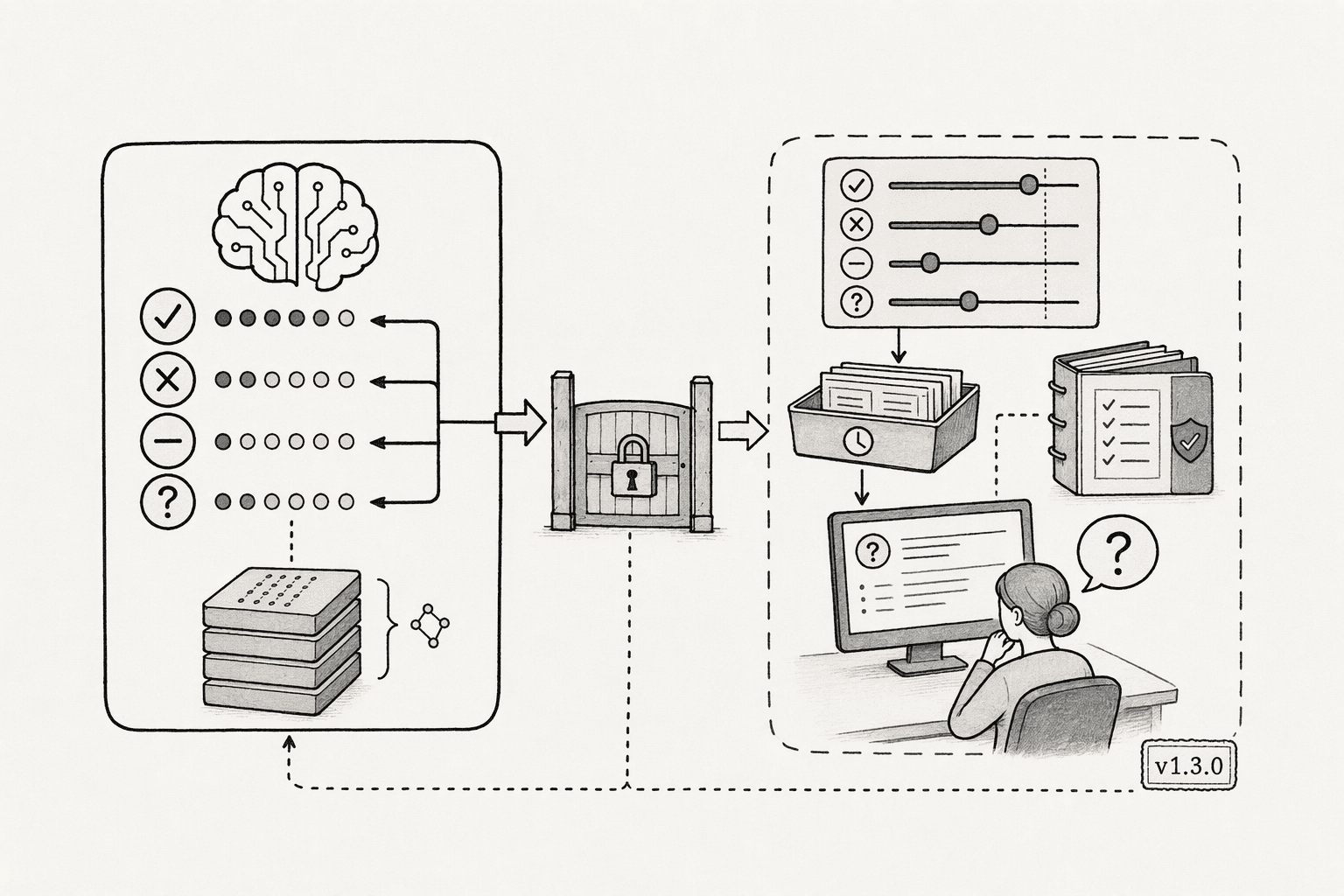
What Jev provides:
- Closed, typed answers: It can't return a label outside the list a team defines or a malformed answer, so there is no free text to police.
- Probabilities on every answer: TypeSafe's docs say Jev is trained to return calibrated decisions, which is a vendor claim to confirm on your own data, since confidence describes how sure the model is and not whether it is right.
- One set of weights: The same weights serve every account, with no fine-tuning on customer data, so behavior doesn't differ from customer to customer.
- Documented data terms: TypeSafe says it doesn't train on customer requests or responses and offers zero data retention to enterprise customers.
What Jev leaves to you:
- Thresholds: It reports confidence, and the application decides what to automate.
- Review queues: Routing uncertain items to a person is application code.
- Audit logs: A team's own record of what was asked, answered, and decided has to be kept by the application.
- Access control: It sees only the text it is sent, and who may send what, or see the results, is decided elsewhere.
- Explanations: It returns probabilities, not reasons, so a written rationale needs a person or a general LLM.
- Change control: A new model version or an edited question can change results, and approving that is a process the team owns.
How to build governance and human review around Jev
Five practices cover most of what a decision process needs around a model like Jev.
1. Set oversight by risk, and decide when a person looks
Set how much review a decision gets by what a wrong answer costs, not by confidence alone, and decide whether a person approves before the action runs or the decision is logged and sampled afterward.
Approval can be scoped to one decision, a batch, or a standing policy for low-risk routes. TypeSafe suggests starting with automatic action above 0.9 and human review below 0.5, as noted in our article, Jev vs LLMs.
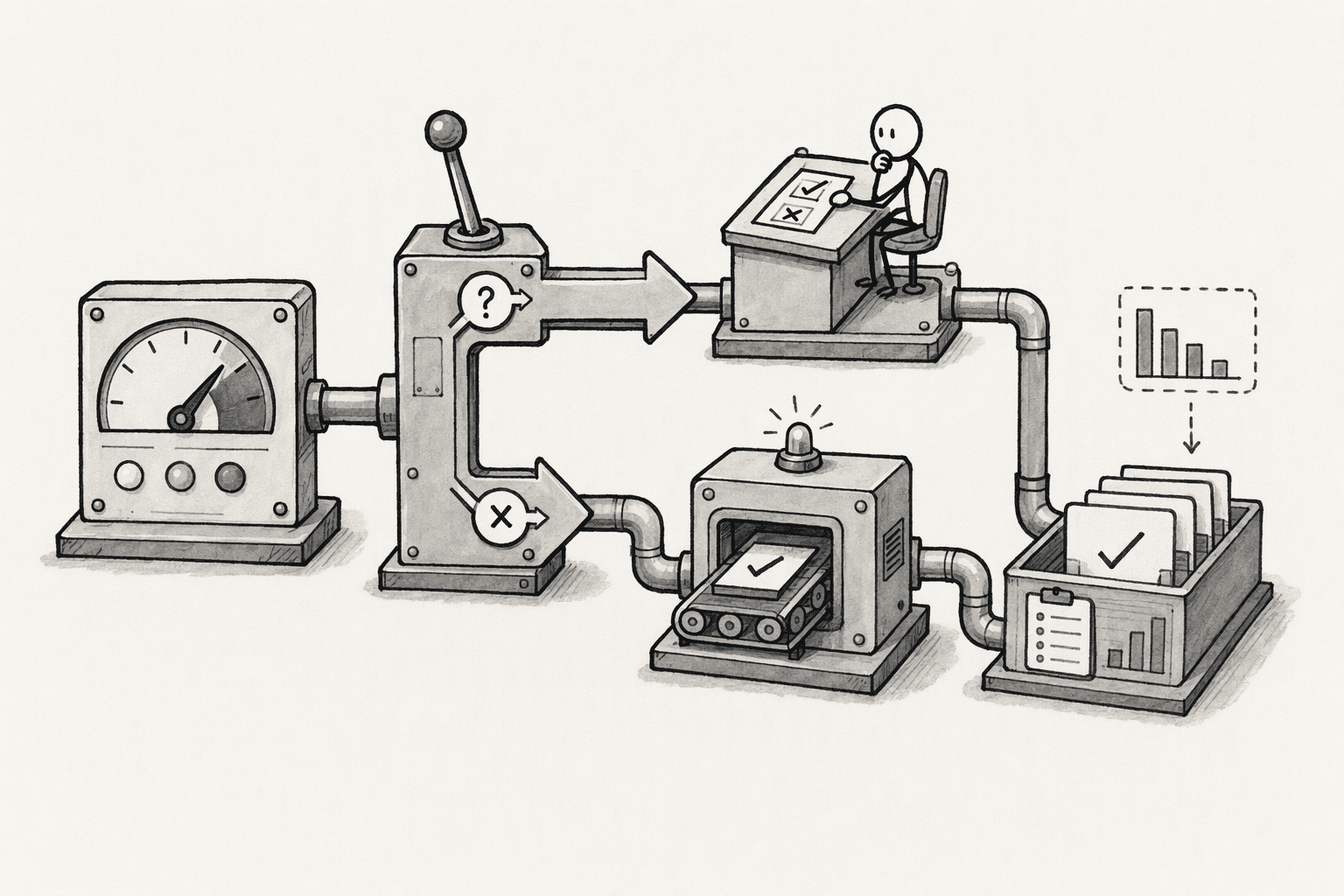
2. Design the review queue so it works
Show reviewers the input, the answer, and the probabilities, let them override with a reason, and route items to people who can judge them. Keep the queue small so it isn't rubber-stamped, sample some confident answers too, and track how often reviewers overturn Jev.
3. Keep an audit trail that can replay a decision
Log the input or a redacted copy, the question wording and its version, the answers and probabilities, the model version, the threshold, and any human action.
Jev can't explain itself, so this record is the explanation. Treat question wording as policy, since TypeSafe's documentation says Jev answers the literal question written, as a security write-up notes.
4. Control change and roll out in shadow mode first
Pin the model version instead of the alias, re-test before upgrading, and approve threshold and wording changes like any other change.
Run Jev in shadow mode beside the current process before enforcing it, and fail toward a person when confidence is middling or the API is down.
5. Check the data terms before sending anything
Jev is a hosted API, so every request sends text to TypeSafe. Its docs say it isn't trained on customer requests or responses and that enterprise customers can get zero data retention, while one third-party summary reports US operation with no documented EU region and another reads the privacy policy as keeping data as long as reasonably necessary.
Redact personal data, send only what a decision needs, and get the data processing agreement and your own data protection review in place first.
How PromptQL supports human review of Jev's decisions
PromptQL isn't an approval system for decisions made inside an application, and it doesn't replace the review queue described above. What it can do is run the review of Jev's results in one place.
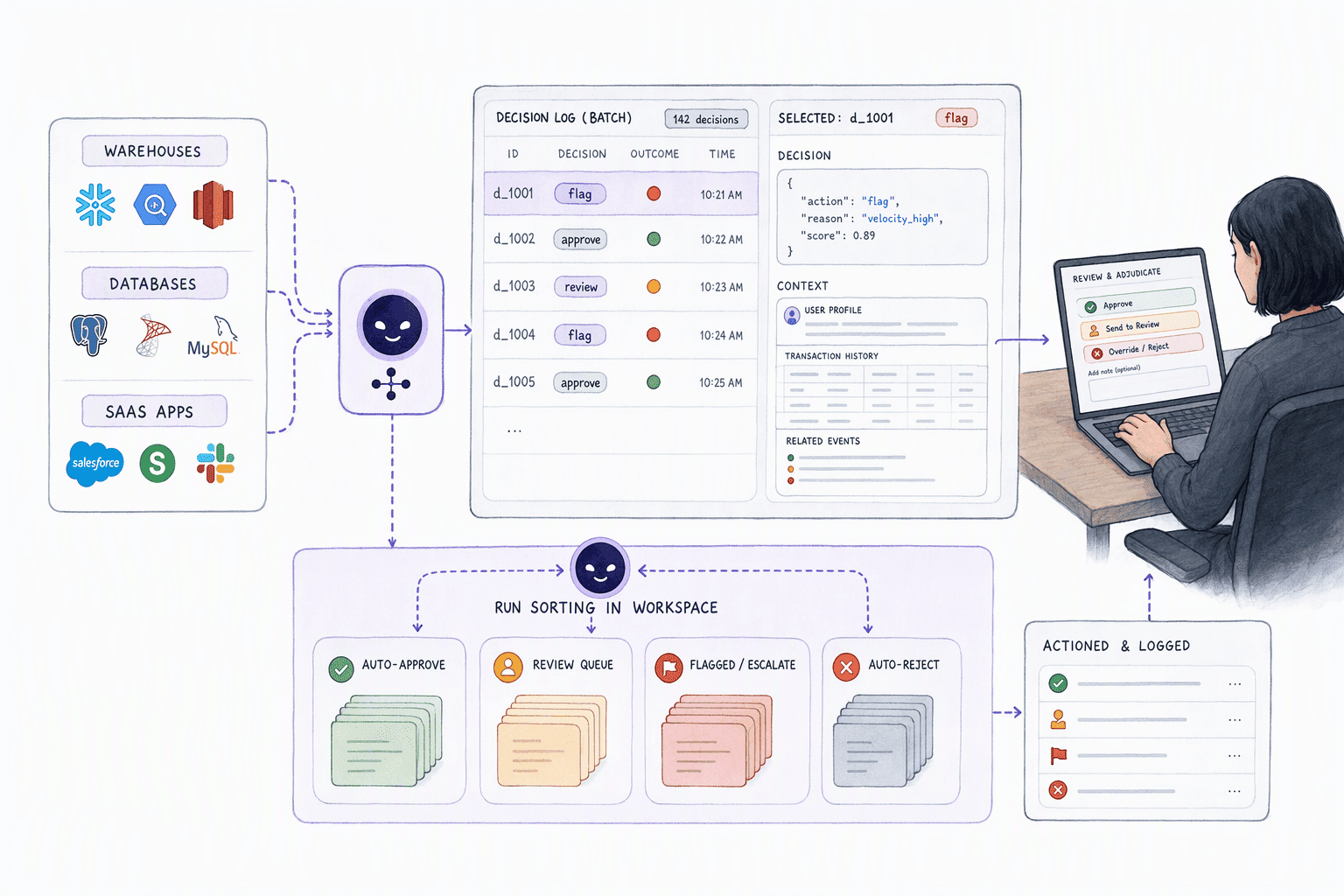
PromptQL connects to warehouses, databases, and SaaS apps, so a batch of Jev's decisions, or the log of what an application decided, can be reviewed with the context around it. In workspaces where Jev has been provisioned, it can also run the sorting, as laid out in using Jev without writing code.
- Flagged results reviewed in a shared thread: Low-confidence items come first, and teammates can be invited in to correct the criteria, then the setup is reused for the next batch.
- Approval for sensitive operations: An administrator approval workflow covers sensitive operations such as data exports, with approve or deny decisions and notes.
- Access that follows the person: Permissions are enforced at the data layer using the access of the person asking, and every action is logged.
- Corrections that stick: When a reviewer explains a correction, it can be captured as a cited, versioned wiki entry, so the next review starts from it.
These govern what PromptQL itself does with data. They don't gate decisions made inside an application, which is why the queue, the log, and the approvals above stay in the application.
Conclusion
Governance for an automated decision isn't one feature. It is a set of habits around the decision: oversight matched to risk, a review queue people can actually work, a record that can replay what happened, deliberate change, and clear terms for where the data goes. A model can supply a probability for each of those habits to build on, but it can't supply the habits. Teams that treat the model as one component in a governed process, not as the governance itself, are the ones that can explain a decision when someone asks.
Frequently Asked Questions
Does Jev explain its decisions?
No. It returns an answer with probabilities and no written reason. The explanation of what happened comes from the application's record of the input, the question, the answer, and the human action, and a general LLM can draft a rationale where one is needed.
Can Jev decide without human review?
For low-risk decisions it can, with thresholds set from tests on real data. Confidence says how sure the model is, not whether it is right, so higher-risk decisions keep a person in the loop at any confidence, and some confident answers should be sampled for review.
Where does the data go?
Jev is a hosted API, so requests go to TypeSafe. Its docs say it doesn't train on customer requests or responses and that enterprise customers can get zero data retention. Third-party summaries report US hosting with no documented EU region, so check the data processing agreement and retention terms before sending personal data.
How do you audit a Jev decision?
From the application's own log: the input or a redacted copy, the question and its version, the answers and probabilities, the model version, the threshold, and any human action. Pinning the model version keeps results comparable over time.
What happens if Jev is down?
The application decides, so the safe default is to fail toward a person: save the item first, send it to a review queue, and process it when the service returns. Letting an item proceed automatically with no answer is the thing to avoid.




