Most of the AI calls inside your software don't need an essay. They need an answer: which team owns this ticket, whether a tool call is safe, whether a lead is worth chasing.
The usual approach is to ask a large language model for a paragraph and then parse it into something your code can use. Each call takes seconds, costs output tokens and sometimes even returns broken JSON that needs a retry. Multiply that by thousands of decisions a day, and both the waiting and the bill grow fast.
Jev solves this by taking a different route. It's a model built to return decisions and nothing else. In this guide, you'll learn what Jev is, how its decision model works, what it can and can't do, how to get access to it today.
Key takeaways
- Jev is TypeSafe AI's first "System One" model, built to return typed decisions such as choices, scores and yes/no probabilities instead of text.
- You send it your data and a set of questions, and it answers all of them in one pass, typically in 70 to 500 milliseconds, with a confidence signal attached.
- It's fast and cheap, but it can't write text, calculate reliably or handle multi-step reasoning.
- Jev works best alongside an LLM, taking on the high-volume checks while the LLM handles writing and deeper reasoning.
What is Jev AI?

Jev is an AI model from TypeSafe AI that makes decisions instead of generating text.
You give it program state, such as a support ticket or a JSON record, plus a set of typed questions and Jev returns a choice from a list you defined, a score on a scale you defined or a yes/no probability, each with a calibrated signal your code can act on.
Jev comes from TypeSafe AI, a San Francisco lab founded by Diogo Almeida, a co-author of the InstructGPT research that led to ChatGPT. TypeSafe came out of stealth on September 15, 2026, with $40 million in seed funding led by DCVC and released Jev in early access the same day, as described in its launch announcement. Jev belongs to TypeSafe. PromptQL integrates it, which you'll see later in this guide.
The "System One" label comes from Daniel Kahneman's Thinking, Fast and Slow, which splits thinking into fast, intuitive System 1 judgments and slow, deliberate System 2 reasoning. Jev is built for the fast kind.
TypeSafe's bet is that once a decision costs a fraction of a cent, you'll start making far more of them. The practical change for you is that you define the allowed answers before you ask the question.
How is Jev different from an LLM?
Here's how Jev compares with a typical frontier LLM at a glance:
| Frontier LLM | Jev |
|---|
| Output | Free-form text, optionally shaped into JSON | Typed values only (a choice, a score or a probability) |
| How answers are produced | One token at a time | All questions answered in parallel |
| Response time | 3 to 329 seconds on frontier models, per TypeSafe | 70 to 500 milliseconds |
| Price | $0.20 to $10 per million input tokens, with output priced higher | $0.042 per million input tokens, with output free |
| Confidence | Only when prompted, and often overconfident | Returned with every answer and trained to be calibrated |
| Typical failure | Invents facts or breaks your schema | Picks the wrong option from your list |
| Can it write text? | Yes | No |
How does the Jev decision model work?

Jev reads your data, called the state, along with a set of questions you define. It answers every question in a single parallel pass and returns a typed decision with a probability for each one. Your code then acts on those answers. Here's how each part works:
Here's what each piece does:
- State is whatever data your code already has, such as a text string, a JSON object or an array of text. Images, audio and video aren't supported as direct inputs.
- Questions are a named set of typed questions, all evaluated against the same state in a single request.
- Answers come back keyed to your question names, ready for your code to branch on.
Jev makes the judgment, and your application decides what happens next. Thresholds, permissions, retries and human review stay in your code, where you can see and change them.
The three kinds of questions Jev can answer
Jev understands three kinds of questions. Here's what each one is for:
| Question type | What it asks | What you get back | Example |
|---|
| Choice | Which of these options fits? | The chosen option, a probability for every option and a confidence score | Which team should handle this ticket? |
| Score | Where does this sit on a scale? | A score, a probability for each level and a confidence score | How frustrated is this customer, from calm to very angry? |
| Noul | Is this statement true? | A single probability from 0 to 1 | Does this message ask for a refund? |
"Noul" is short for Bernoulli. If you call Jev through Vercel's AI SDK, you'll see it listed as "boolean" instead. When you write a Choice question, add an "other" or "none of these" option for cases that don't fit, so Jev isn't forced into a bad match.
How Jev answers all your questions in one pass
Jev reads your state once and produces every answer in the same pass, using a new architecture and a parallel sampler built by TypeSafe.
An LLM builds a response one token at a time, with each token depending on the one before it. Jev skips that generation step entirely.
This design has two practical effects for you:
- Output tokens are free, because Jev never generates text.
- Adding more questions to a request barely changes response time, so you can ask and get answers to five things about a ticket in about the time it takes for one.
How Jev is trained to report honest probabilities
TypeSafe trains Jev with a method it calls Reinforcement Learning for Calibrated Decisions (RLCD). RLCD rewards the model when its probabilities match how often it's actually right. This is different, because most chat models are instead trained with reinforcement learning from human feedback (RLHF), which rewards the responses human raters prefer.
In plain terms, calibration means the numbers mean what they say. If Jev reports 0.9 on a hundred similar inputs, about ninety of those answers should turn out to be true. That's what lets you set a threshold and trust it to separate easy cases from hard ones. Still, you must test calibration against labeled examples from your own workflow before you rely on it.
How to use Jev's confidence scores in your code
You can use Jev's confidence score to decide how much to automate. Act on high-confidence answers, double-check medium ones and send low-confidence ones to a person.
Choice and Score answers include this score as a number from 0 to 1. The score is close to 1 when one option clearly wins and lower when the options are close.
They also include the full probability for each option. On the other hand, Noul answers return a single probability and no separate confidence score.
Here's how to turn confidence into action with three bands:
- High confidence: Act automatically.
- Medium confidence: Proceed with care, such as asking the user to confirm or flagging the item for review.
- Low confidence: Don't act. Route the item to a person or a stronger model.
Where you draw those lines depends on the stakes. Showing the wrong screen is easy to recover from, while approving the wrong payment isn't, so risky actions deserve higher thresholds.
Confidence tells you how sure Jev is, but it can't tell you whether the answer is right, so log each decision and its confidence as part of an audit trail for AI-generated answers.
What can Jev do?
Jev can route requests, control AI agents, verify outputs, rerank search results, classify large datasets and power real-time apps. It fits anywhere your software makes the same kind of judgment over and over. Here's how each use case works:
1. Route tickets, leads and requests
Use a Choice to pick the right team, queue or owner, and a Score to rank urgency. High-confidence items route themselves, and low-confidence ones go to a person. The same pattern works for sorting inbound leads or tagging customer feedback.
2. Control AI agents
Jev can choose the next tool or subagent, decide whether to continue, retry, ask the user or stop, and check a pending tool call before it runs. One community project, pi-warden, asks Jev whether each coding-agent command is irreversible or off-task in about 250 milliseconds, so it can pause a destructive command that doesn't match what you asked for.
3. Verify outputs and add guardrails
Jev is cheap enough to check every output instead of a sample. You can use it to judge whether an LLM's answer follows your rules, whether a citation actually supports a claim or whether a fetched web page contains instructions trying to hijack your agent.
4. Rerank search results before an agent reads them
When a search returns ten results and only three matter, one yes/no question per result, such as "Does this page answer the query?", lets you keep the best ones. Dropping the rest keeps noise out of your agent's context, which is one of the main causes of context decay.
5. Classify large datasets
Jev makes bulk labeling affordable. In MotherDuck's benchmark, its prompt_jev() SQL function classified 100,000 rows in 40 seconds for $0.50 at 89% accuracy. A frontier LLM took nearly 32 minutes and cost $37.58 for 88% accuracy on the same task.
6. Power real-time applications
Response times of a few hundred milliseconds let Jev sit inside live loops. TypeSafe showed this with a bot that plays Doom from a text description of the game state at about 10 decisions per second, for roughly $7 an hour. Another demo races across Wikipedia by picking the next link from hundreds of options.
What can't Jev do?
Jev is narrow by design. Knowing its limits up front saves you from building on the wrong foundation.
Hard limits
Some things are simply outside what Jev does. Keep these in mind:
- It can't write text, code, summaries or explanations, and it doesn't explain why it chose an answer.
- It can't read images, audio or video directly. Convert them to text first, such as a transcript or a caption.
- It has no reasoning mode and no temperature or sampling settings to adjust.
- Its context window is capped at 64,000 tokens for state plus questions (32,000 for state plus the longest question), and a Choice question can hold up to 255 options.
Tasks Jev handles unreliably
TypeSafe publishes a list of known weak spots for the current version, jev-1.13. Here's each one and what to do instead:
| Weak spot | What goes wrong | What to do instead |
|---|
| Literal reading | Takes your wording at face value and misses implied intent | State the exact condition and spell out edge cases in the options |
| Math and counting | Recognizes the shape of an answer without calculating it | Do the math in code, or ask one question per item and add up the answers |
| Date comparison | Reads dates as text instead of ordered values | Extract the date parts with Jev and compare them in code |
| Multi-step questions | Loses accuracy with each extra hop | Ask directly and point to the relevant field by name |
| Large, noisy input | Gets distracted by unrelated detail | Filter first and send only what the question needs |
| Adversarial content | Can be swayed by injected instructions | Write precise criteria and test edge cases before launch |
| Contradictory wording | Gets confused when the question and its options disagree | Make the question and options say the same thing |
What "can't hallucinate" really means for Jev
TypeSafe says Jev can't hallucinate, and the claim is narrower than it sounds. Jev can't return an answer outside the options you defined, so you'll never get a malformed value or an invented category. It can still pick the wrong option from your list.
It can also be manipulated. In Check Point's testing, attackers pushed Jev into rating a risky document as low risk in every configuration they tried, at about 50 cents per successful attack. TypeSafe's own documentation confirms that injected instructions can move Jev's answers. If you use Jev as a safety check, pair it with hard rules and permission checks.
How to access Jev AI
Access to Jev has changed several times since launch, so confirm the details below on TypeSafe's site before you commit.
Status checked on September 26, 2026.
Jev AI pricing
TypeSafe keeps Jev's pricing simple. Here's what it costs when you call it directly:
- Input: $0.042 per million tokens.
- Output: free, since Jev doesn't generate text.
- Starter credit: accounts created after the waitlist opened received $5 in credit, which TypeSafe estimates at about 120 million tokens.
- Speed: TypeSafe reports end-to-end response times of 70 to 500 milliseconds.
Waitlist and availability status
Here's how access has changed since launch:
- September 15, 2026: Jev launched in early access with a waitlist. TypeSafe reported clearing about 140,000 people from it within 36 hours.
- September 20, 2026: TypeSafe removed the waitlist and opened signups to everyone, with $5 in free credit.
- September 22, 2026: TypeSafe paused new signups because of demand. Existing accounts kept working.
- September 26, 2026: New direct signups still appear paused, with no reopening date announced. Check TypeSafe's site or its X account for the latest.
Ways to use Jev today
Even with direct signups paused, you have several routes to Jev. Here are the main ones:
- TypeSafe console and playground: Available to anyone with an existing account at console.typesafe.ai.
- Model gateways: Vercel AI Gateway (as
typesafe-ai/jev), OpenRouter, Cloudflare and Netlify, which handle access through their own accounts. - SDKs and frameworks: Official Python and JavaScript SDKs, plus integrations in LangChain, Pydantic AI and deepeval.
- Data tools: MotherDuck's
prompt_jev() SQL function on paid plans. - Coding agents: TypeSafe's agent skill teaches tools like Claude Code how to write Jev questions.
- PromptQL: Available in workspaces where Jev has been provisioned, as covered next.
How to use Jev inside PromptQL
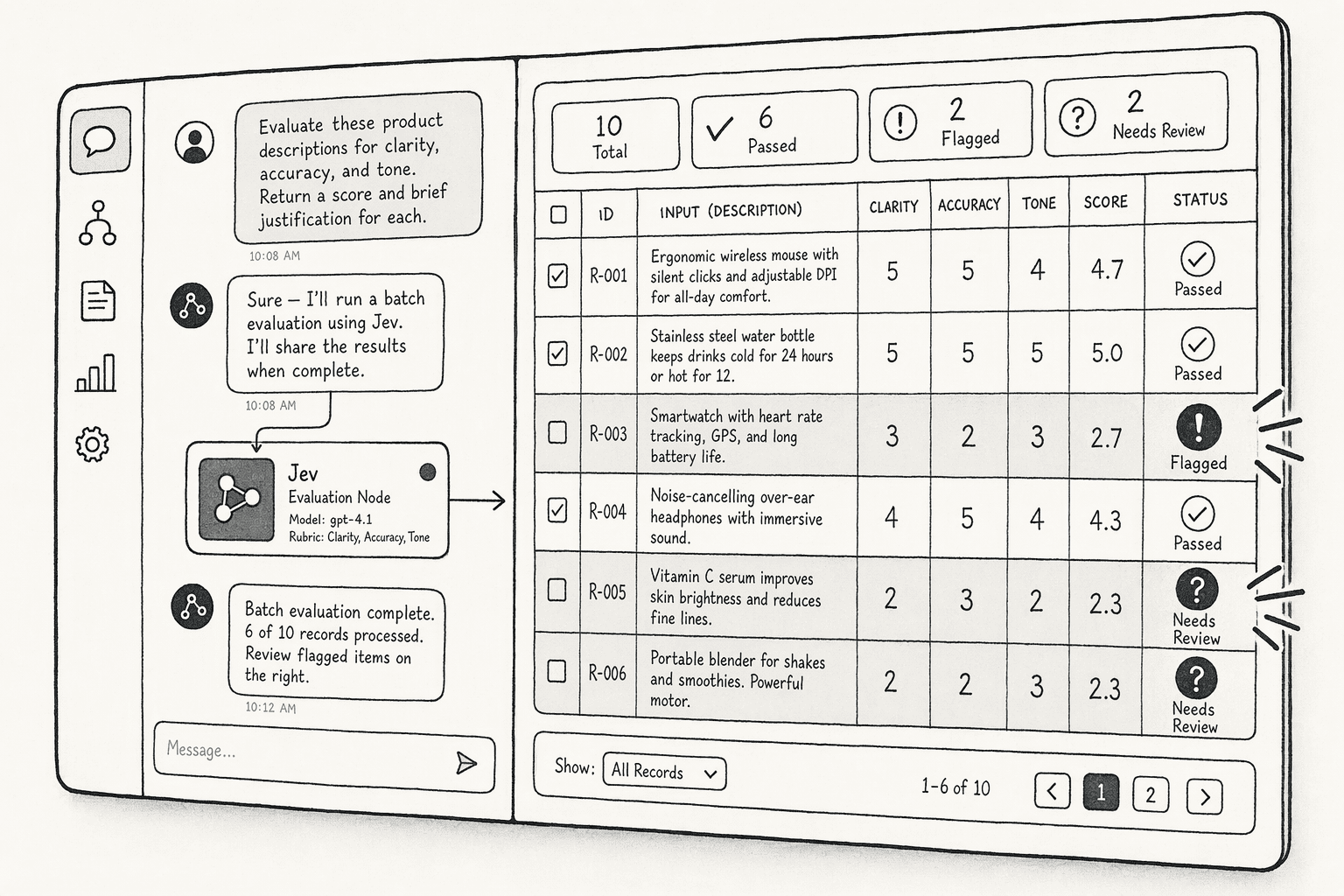
PromptQL is an AI workspace you give tasks to in plain English. It connects to your data, does the research and drafts the output. Jev adds speed when the same judgment has to be made across hundreds of items.
PromptQL can use its Jev integration in workspaces where Jev has been provisioned, so the first step is to check.
The steps below follow the pattern from PromptQL's AI job search walkthrough, but they work for any batch of records, such as job listings, support tickets or accounts.
Step 1: Check whether Jev is available in your workspace
Before you plan a large run, confirm what your workspace can do. Here's how:
- Open a thread with your PromptQL bot.
- Ask, "Is Jev available in this workspace? If not, tell me before we start."
Step 2: Give PromptQL your context and criteria
Jev only answers the questions it's given, so your criteria need to be clear. Here's what to share:
- The background PromptQL should judge against, such as your experience for a job search or your categories for ticket triage.
- The labels you want back, for example "strong fit," "possible fit" and "unlikely fit."
- Your deal-breakers and edge cases, written as plainly as you can.
Clear, literal criteria give Jev less room to misread you. You can also ask PromptQL to question you about anything missing before it starts.
Step 3: Ask PromptQL to run Jev across the full set
With your criteria confirmed, you're ready to scale up. Make sure your prompt covers these points:
- How many records to gather and evaluate.
- The labels to apply and what to flag for review.
- What to do if Jev isn't available.
PromptQL gathers the records and has Jev make the repeated calls. You get a ranked shortlist with reasons, plus a clear list of items that need a human look.
Step 4: Review the flagged results
Jev's confidence scores tell you where to look first. Focus your time here:
- Read the low-confidence items, since those are the ones Jev wasn't sure about.
- Spot-check a few "possible fit" results, especially while your criteria are new.
- Adjust any criterion that keeps producing surprises, then run it again.
Each pass sharpens your criteria and makes the next run more reliable. When the results look right, you can build a dashboard inside the same thread to track them over time.
Want to learn hands-on? PromptQL runs Rebuild With Jev workshops on decision bot architecture. See upcoming Jev workshops
You can also Start in PromptQL today and try it for yourself first-hand.
Conclusion
Jev's bigger impact is on how you design software. Adding AI used to mean asking for prose and cleaning it up. Jev pushes you to break work into small decisions with fixed answers, which makes AI easier to test, measure and trust.
Once each of those decisions costs a fraction of a cent, you can afford to check things you used to skip, such as every ticket, every tool call and every row. A good first move is to list the small judgments hidden in your own workflows. Each one is a candidate for Jev.
FAQs
Frequently Asked Questions
What is Jev AI and how does it relate to Hasura and PromptQL?
Jev AI is the company formed by the Hasura team to build PromptQL. Hasura is the parent organization behind the GraphQL Engine and Data Delivery Network, used by Fortune 100 enterprises. PromptQL is Jev AI's core product: an agentic semantic layer that replaces probabilistic LLM tool-calling with deterministic, governed query execution.
What are the key features and capabilities of Jev AI / PromptQL?
Deterministic pre-compilation of natural language into governed query plans, row-level security enforced at the data layer across heterogeneous systems, a multiplayer semantic layer where correcting the AI once benefits the whole team, and deployment options spanning cloud, BYOC, and on-premises infrastructure in 2026.
How does PromptQL ensure security, privacy, and governance for enterprise data?
Permissions are enforced deterministically at the data layer for every user, source, and query. The AI never sees raw database credentials or OAuth tokens. Deployment options including BYOC and single-tenant VPC keep data inside the customer's environment, with role-based access down to row and column level.
How does PromptQL's accuracy and deterministic execution compare to other AI agent approaches like tool-calling?
Standard tool-calling agents select tools probabilistically at runtime, creating nondeterministic, hard-to-reproduce failures. PromptQL pre-compiles the entire user intent into a single governed plan before touching data. The same question always produces the same plan, making errors reproducible and fixable rather than silent and cascading.
What is the Agentic Semantic Layer that PromptQL uses?
It is a shared, multiplayer context layer that captures business definitions, tribal knowledge, and exceptions invisible to typical database schemas. Instead of each AI interaction starting fresh, the layer compounds corrections across the team: fix the AI's understanding once, and every future query for every teammate reflects the fix.
What are the pricing, deployment, and platform availability options for PromptQL in 2026?
PromptQL is available as a cloud service and for self-hosted deployment via the Hasura Data Delivery Network (BYOC, single-tenant VPC, on-prem). Pricing is consumption-based at $0.20 per OLU all-in, covering tokens and infrastructure, with no minimums. Enterprise tiers add custom pricing, audit trails, and forward-deployed engineering support.
Sources
- Open, Reliable, and Collective: A Community-Driven Framework for Tool-Using AI Agents - arxiv.org
- Future-Proof AI Systems and AI Agents With Universal Semantic Layer Development - www.gartner.com
- PromptQL | About us - hasura.io
- PromptQL | The AI Analyst with enterprise-grade accuracy - promptql.hasura.io




