Introduction
Imagine two questions land in Slack on the same morning. One asks for a summary of last quarter's Q&A trends. The other asks for a script to cluster those same threads by intent. The first answer comes back fast, dense and useful. The second is syntactically perfect nonsense that imports a library that doesn't exist.
That's what happens when you fall for the default: one model, every task, no questions asked.
Slack makes the mismatch worse because it is conversational by default. Everyone types at the same bot from the same input box. The bot answers with the same voice whether it's summarizing a thread or proposing a database migration. A single-model Slack integration is not just suboptimal. It can be risky when the model is unfit for a task and nobody sees the failure mode coming.
The fix is routing. Not one model picking up every call, but a dispatcher that sends research questions to a fast model and code generation requests to a stronger one, with a human approval gate in between. This guide walks you through that pipeline.
How Do You Use Different LLMs for Different Tasks Inside Slack?
You use different LLMs for different tasks in Slack by routing each request to the model that fits it: a fast, low-cost model for questions and summaries, and a stronger model for code or complex reasoning. You can route with slash commands, emoji reactions, or keywords. Or you can use PromptQL Tag, which runs any model and lets you choose it per channel or per task.
Key Takeaways
The pipeline gives you fast research answers and safer code generation from the same Slack bot, without a single model crumbling under mismatched tasks.
- Model-to-task mapping works: A fast model handles Q&A and research; a stronger model steps in for code generation, with a human approving any write.
- Prompt structure decides your cache hits: Prompt caching works on an identical prefix, so put static instructions first and dynamic content last.
- Human-in-the-loop is required: Any write operation should need an explicit approval button in Slack.
- Shared and private bots segment risk: Channel-public agents handle general queries while DM-only private bots process sensitive tasks under controlled model assignments and permission scopes.
Step 1: Evaluate LLM Suitability for Slack Tasks (Q&A, Data Analysis, Creative, Code)
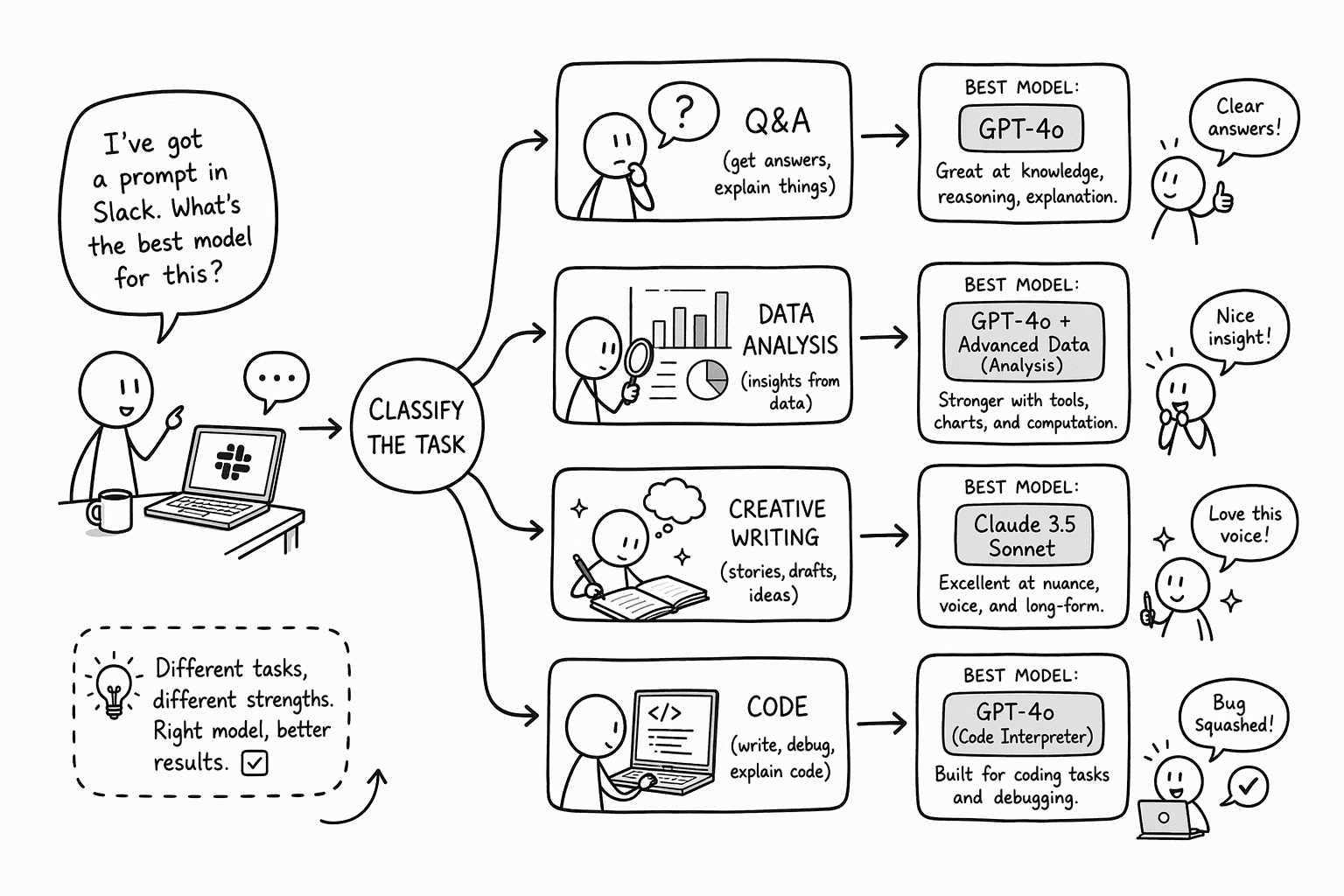
Break every Slack prompt into one of four buckets: Q&A, data analysis, creative writing, or code. Precision and instruction-following matter more than raw intelligence for most of these. Speed matters always, because a slow answer in a channel full of people waiting for a response quickly kills adoption.
Q&A and research belong on a fast, low-cost model that gets the facts straight. Summarization and lookup rarely need deep multi-step reasoning, so a smaller model is often enough. Test it on your own questions before you rely on it.
Creative and code are the natural breakpoint. Send both to stronger models. Creative work benefits from a higher temperature, which gives more varied output.
Code generation benefits from a low temperature and careful checking, because a model can produce plausible-looking code that imports libraries that don't exist. The allowed temperature range differs by provider, so check your model's docs.
A simple rule of thumb: if the request can be answered by retrieving and summarizing existing information, route it to the fast model. If it produces net-new syntax, routing logic, or creative prose, send it to a stronger model.
The dispatch logic does not need a classifier for this. The user self-selects with a command or a channel context, which the next step translates into an API call.
Step 2: Model Routing, How to Tag and Dispatch Tasks to Different LLMs in Slack
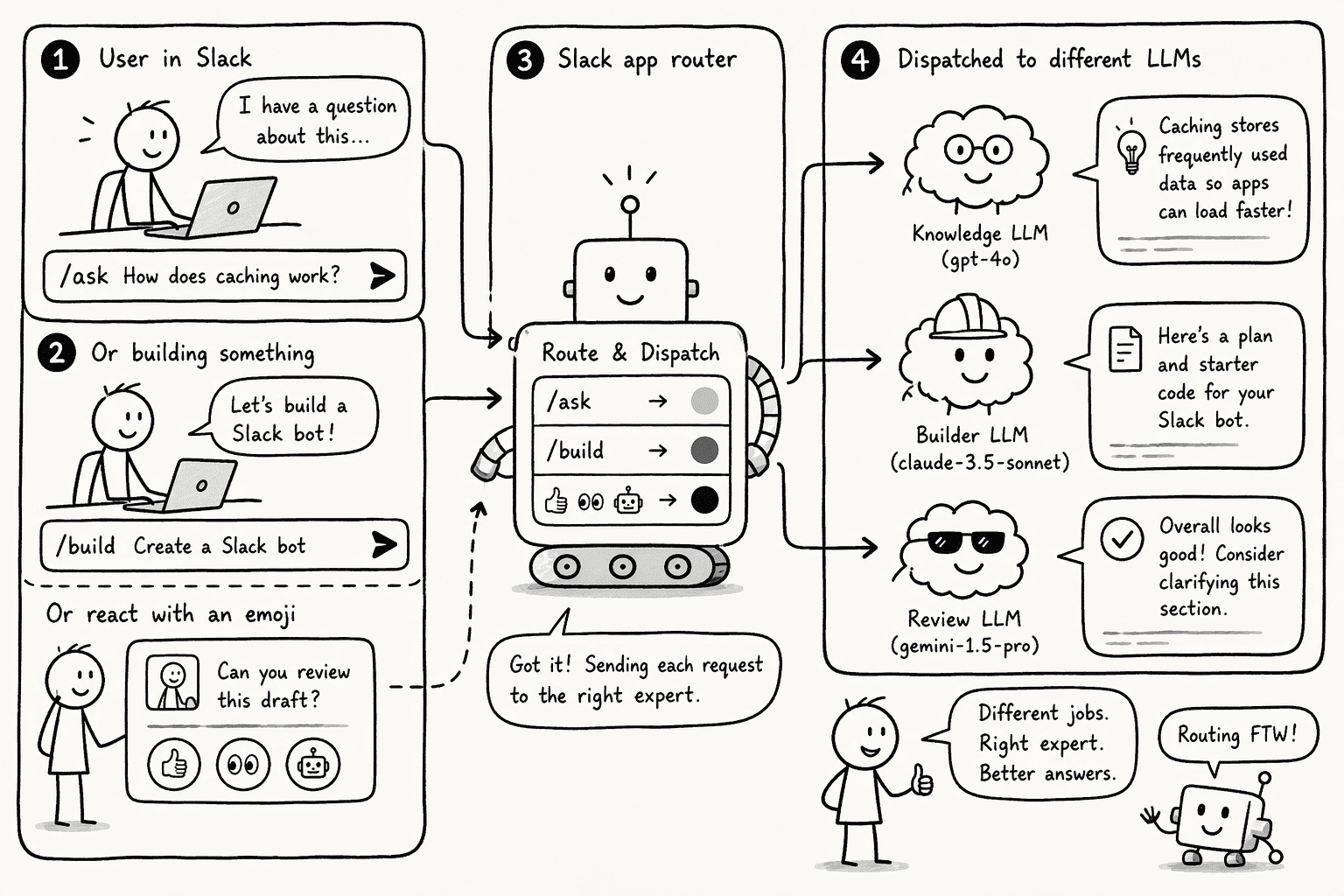
Intent detection works through explicit signals, no NLP classifier required. The simplest production pattern is a slash command: /ask routes to the fast Q&A model, /build routes to the code model. Users learn it in one session and the dispatch logic is a one-line switch statement.
For workflows that need to feel more fluid, emoji reactions double as routing signals. A responder bot posts a confirmation prompt, the user adds a :test-tube: or :hammerandwrench: reaction, and the event listener reads reaction_added to set the model parameter on the pending request.
Keyword triggers work as a fallback: any message containing "PR," "deploy," or "script" auto-routes to the code model while everything else hits the general model.
If you'd rather not build the router yourself, PromptQL Tag runs any model, including Claude, GPT, Gemini, DeepSeek and open-weight models, and lets you choose it per channel or per task. PromptQL Tag can also pick the right model for each task, and you can switch whenever you like.
Step 3: Security Architecture, Human-in-the-Loop Controls and Permission Scopes
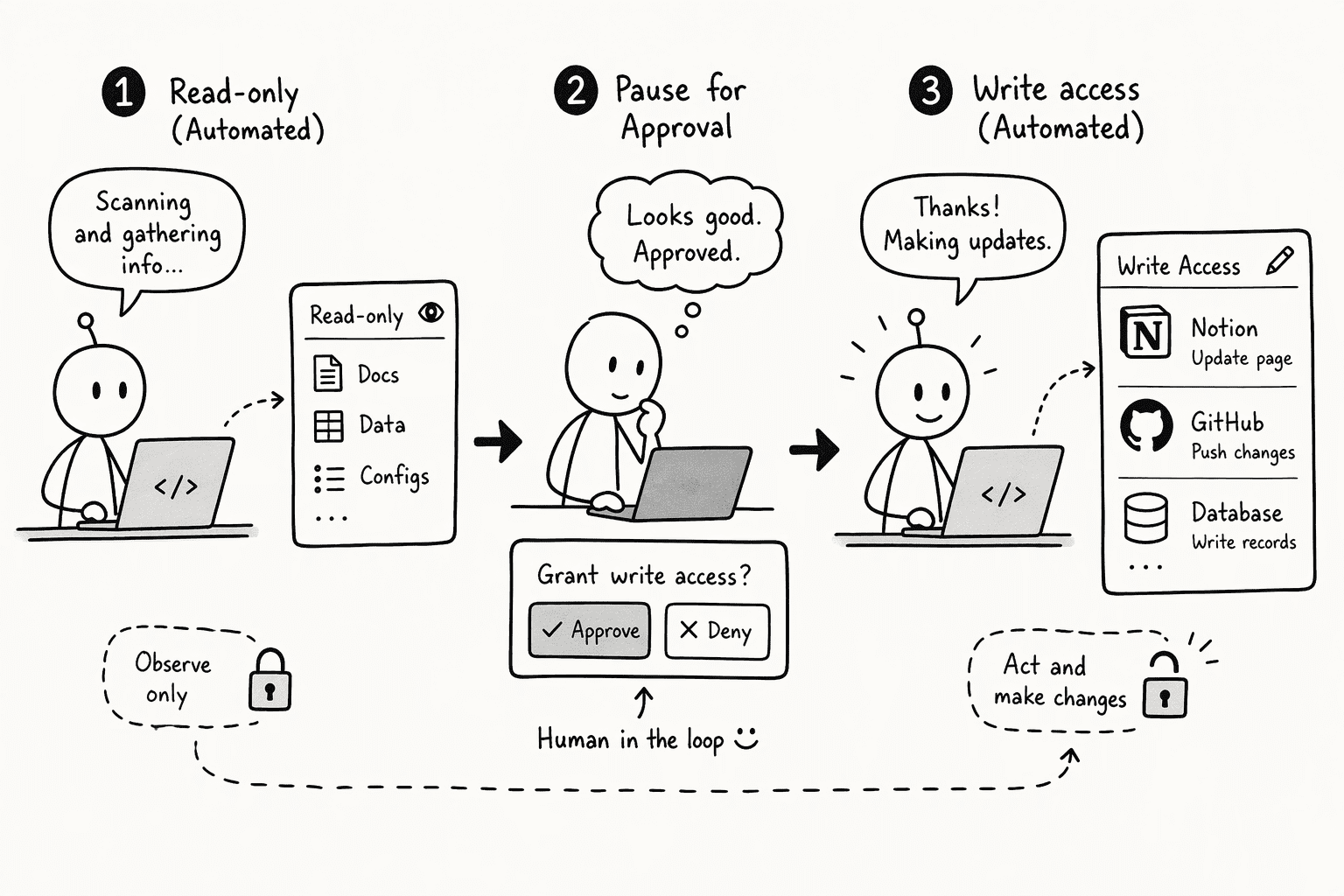
Every write operation needs an explicit approval button in Slack. Period. An agent that can update a Notion page, create a GitHub issue, or modify a database row without a human clicking something is a prompt injection away from damage.
The architecture enforces this by splitting read from write. Reads happen automatically within scoped channels. Writes pause until a person confirms.
Here is how the control surfaces compare across the two bot classes you will deploy:
| Control layer | Shared (channel-public) bot | Private (DM-only) bot |
|---|
| Read scope | Bound to the channel that triggered the request; the bot reads only conversations it belongs to | Bound to the DM thread; no cross-channel visibility |
| Write authority | Changes made under the app's identity, not a personal account, with an extra approval for shared-context artifacts | Write actions use the triggering user's own permissions after an explicit confirm prompt |
| Approval gate | Approval button required in-thread for any action that changes state | Same gate; credentials are injected at runtime, so they are never exposed to the model |
| Session isolation | Each thread gets its own session and isolated workspace; follow-up mentions in the same thread reuse the session | Same isolation pattern; with BYOC, conversation history stays in your own cloud |
Some integrations enforce this at the platform level. For example, in GitHub's Copilot integration with Slack, only users with write access to every repository selected for a session can trigger changes, and guest members and outside collaborators are blocked from starting or steering a session.
Keep Slack scopes narrow too. Request only what the bot needs, such as channels:history and chat:write, and don't ask for more "just in case". Give write access to other systems through each user's own permissions and an approval click.
Step 4: Cost Tracking and Pricing Models, Tokens vs. OLU Pricing in Multi-Step Slacks Tasks
Token-based pricing breaks down the moment you chain a few tools together. You pay per token on the input and the output, and every tool call stuffs another few thousand tokens back into the context window before the agent thinks again.
One "summarize this channel" request can easily turn into a dozen API round-trips, each one starting from a bigger prompt. Slack hides the damage further.
A bot in Slack is shared, so anyone in the channel can mention it, a single thread can run for days, and the cost lands on a team budget that no individual sees.
Routing is one of the simplest ways to limit cost. Use a smaller, cheaper model for Q&A and a stronger model only for the tasks that need it. Capping max tokens limits individual replies, but it doesn't cap total session cost.
PromptQL prices usage in OLUs. An OLU (Operational Language Unit) is a normalized unit of tokens that rolls up the different token types and different models into one consistent unit, so your bill doesn't change shape every time you switch models. That helps when you route tasks across models, and you can see exact OLU consumption.
Step 5: Configure Per-Thread Model Switching with Prompt Caching for Low Latency
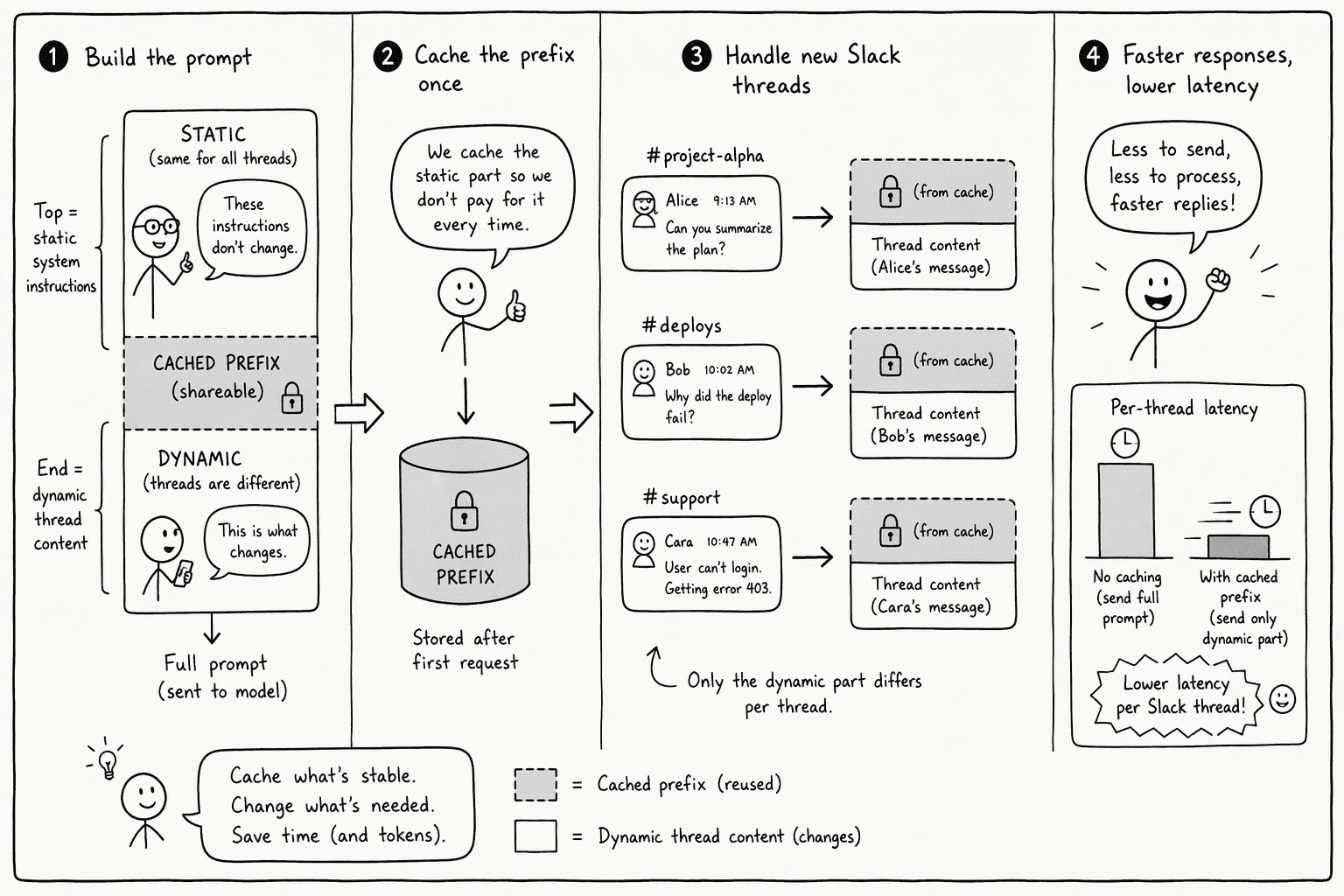
Prompt caching rewards a stable prompt. A prompt cache covers the full prefix of tools, then system, then messages, and a cache hit needs the prompt segments to be 100 percent identical up to the block you mark for caching.
The remedy is structural: front-load static system prompts, push dynamic content to the end, and keep what comes first identical from request to request.
Each provider has its own caching rules, so check the docs for every model in your router.
- Re-order the prompt. Move all static instructions (role, tool descriptions, output format rules) to the top of the system prompt. Put the current time, thread summary, or any dynamic variable after the cached portion, right before the user message.
- Map each Slack thread to one session. Give each Slack thread its own session and workspace, and have follow-up mentions reuse it. Don't expect the thread ID to work as a cache key. The cache is based on the content of the prompt prefix, with no conversation ID, so keep that prefix identical across follow-ups.
- Keep tool definitions stable. Changing tool definitions invalidates the cache at every level, and changing
tool_choice or adding or removing images invalidates the message cache. Decide on your tools before the thread starts. - Verify your cache hits. Check
cachereadinputtokens and cachecreationinputtokens in the usage response after each change.
Step 6: Design Shared Agents and Private Bots for Sensitive Work Division
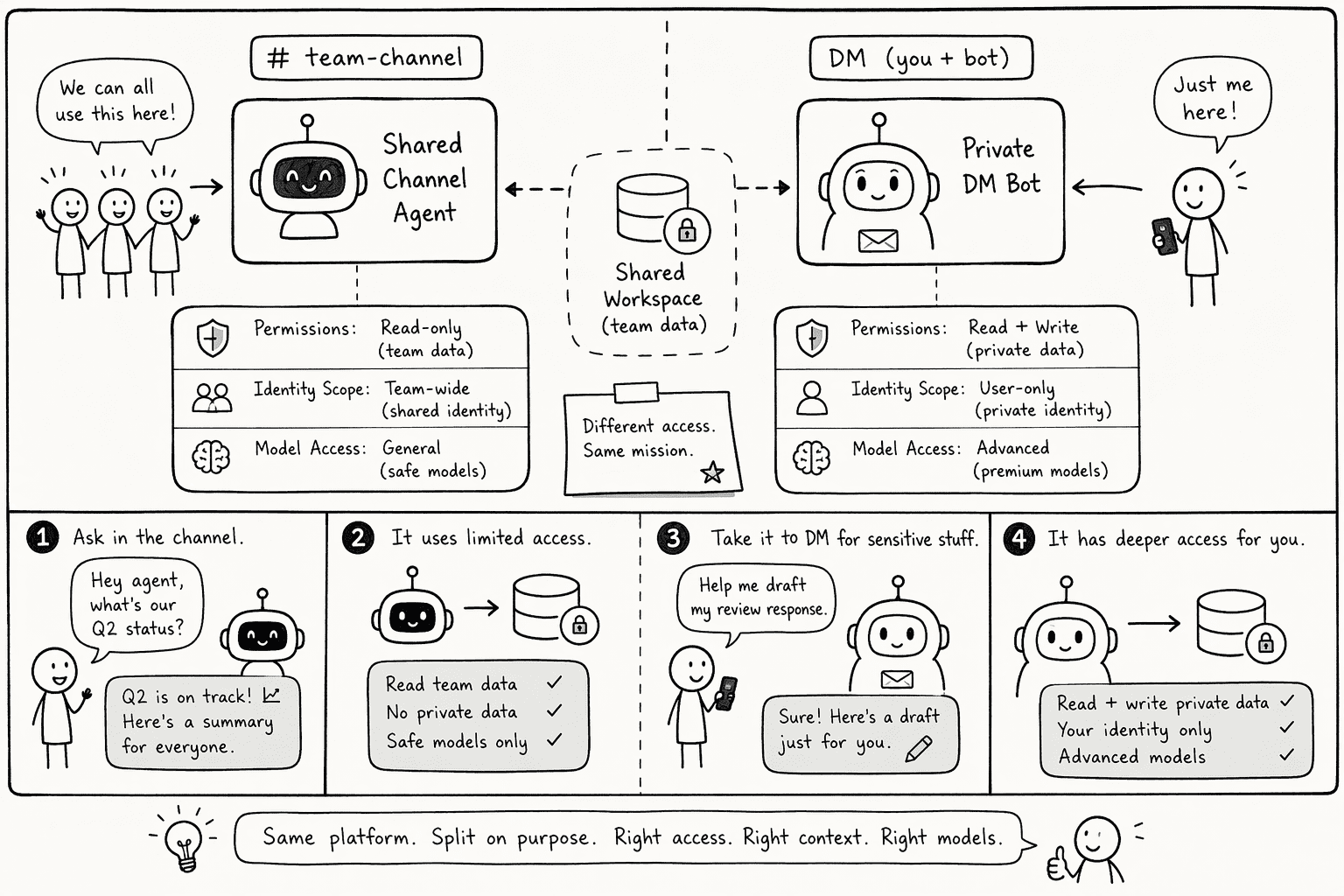
A shared agent should use channel-scoped permissions, show its work in-thread, and route to a pre-set model based on the slash command that triggered it.
A private bot should use a separate, controlled set of models, act with the triggering user's own permissions, and keep its conversation history out of shared view.
With PromptQL, each person keeps their own permissions, and you can keep conversation history in your own cloud with BYOC.
The split limits exposure: HR queries never touch the general-purpose model's context window, and the code agent never sees a compensation discussion. A build failure pinged in a channel still goes to the shared agent, while a sensitive question sent in a DM goes to the private bot. Each request reaches the right bot, with no overlap.
Conclusion
A multi-model Slack pipeline starts with one honest evaluation: which model fails at which task. From there, a slash command, an approval button, and a cache-aware prompt structure turn a single overloaded bot into a dispatcher that sends Q&A to the fast model and code generation to the specialist, with a clear view of cost.
The result is a smarter system, not a smarter model. And because a human in the loop operates the switch for any write, the system doesn't act on its own. Without that person, writes stall, which is exactly the point.
Frequently Asked Questions
Which large language models work best for data analysis versus creative writing in a Slack environment?
For data analysis, choose a model with strong reasoning and run it at a low temperature for more consistent output. For creative writing, raise the temperature for more varied output, within the range your provider allows. Match speed to use: a smaller model can handle quick Q&A. With PromptQL Tag, you can choose the model per channel or per task.
How can teams route Slack messages to different LLMs based on task type or complexity?
Use slash commands (/ask routes to a fast model, /build routes to a code-capable model) or emoji reactions on confirmation prompts to set the model dispatch. Keywords such as "PR," "deploy," or "script" can act as a fallback. You can also use PromptQL Tag, which lets you choose a model per channel or per task.
What security and compliance considerations matter when using multiple LLMs for work data in Slack?
Every write operation (code commits, page updates) must require an explicit approval button in Slack. Scope OAuth narrowly, and have write actions run with the triggering user's own permissions. Shared bots that create artifacts under an app identity can add an extra approval layer.
How does cost tracking and usage monitoring work when switching between different language models in Slack?
Per-token billing can punish multi-step Slack threads. PromptQL's OLU is a normalized unit that rolls up different token types and different models into one consistent unit, so the bill doesn't change shape when you switch models, and you can see exact OLU consumption. Using a cheaper model for simple Q&A also reduces cost.
What are the practical steps to configure model switching per thread inside a Slack-connected AI workspace?
Map each Slack thread to one session. Put static system prompts first for cache stability, and put dynamic content last, just before the user query. Keep tool definitions stable, because changing them invalidates the cache. Check cache hits in the usage response after each change.
How do shared agents and private bots handle different LLM assignments for sensitive versus general tasks?
Shared agents operate in channels with channel-scoped tools and a pre-set model. Private bots live in DMs, act with the triggering user's own permissions, can use a different, controlled model set, and keep their history out of shared view. Sensitive HR or legal queries should never cross into the general-purpose model's context.
Sources
- PromptQL | Architecture: the stable stack for AI - promptql.io
- Building agents for Slack - Slack Developer Docs - docs.slack.dev
- Integrating Copilot cloud agent with Slack - GitHub Docs - docs.github.com
- Agents and routing | QuantCDN - docs.quantcdn.io
- Slack AI Model Configuration | Bike4Mind Documentation - docs.bike4mind.com
- Build a Slack bot with the Agents API - developers.openai.com - developers.openai.com
- ローカルLLMはどんな業務で使えるのか? DGX Spark + DeepSeek V4-FlashのSlackチャットボットを評価した - zenn.dev