Introduction
Until this year, turning a sprawling Slack thread into a slide deck meant copying snippets, losing context, and spending hours formatting. It was friction.
Now Slack itself can build the deck. In its July 29, 2026 post, Slack announced that Slackbot can build a Google Slides or PowerPoint presentation from your own templates, right in Slack. Slack has grown past messaging and into execution.
Slack's own summary is that the deck that used to take an afternoon takes one conversation. This shift does more than save keystrokes. It shortens the time between deciding what to present and actually presenting it.
The question is no longer whether a conversation can become a deck. It's which path fits your tolerance for risk, your need for auditability, and how hard you're willing to push the automation. That's what this guide walks through.
Key Takeaways
You can generate a slide deck from a Slack conversation in 2026 with two main approaches, each tuned to a different level of complexity and governance.
- Native Slackbot drafting: Share your source material and a template, tell Slackbot what you're presenting and who it's for, and the it builds a shareable PowerPoint or Google Slides file from your templates.
- PromptQL Tag: When the deck has to draw on your business data, tag PromptQL in the thread. It can turn a Slack thread into a shareable deck, shows its plan before it runs, and works with each person's own permissions.
Step 1: Assess Your Slack Conversation for Slide-Worthy Narratives
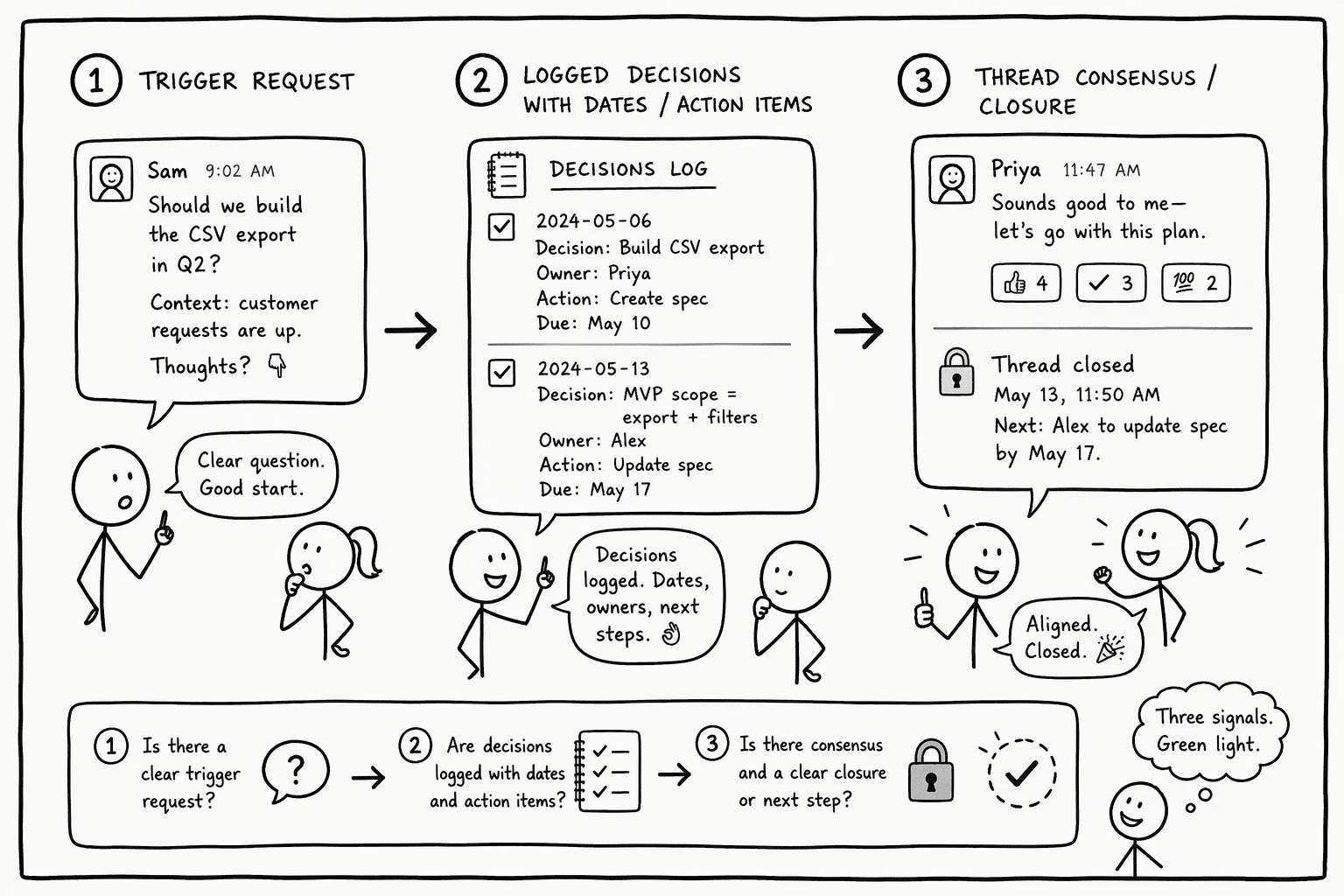
A long helpdesk thread or a design brainstorm produces noise. Look for three signals before you let an AI near the thread: a clear trigger where someone says "we need a summary," decisions someone logged with dates or action items, and enough consensus that the thread reads as closed. If the conversation meanders without hitting any of those, the output will be an outline of confusion.
The fastest way to ruin an AI draft is handing it a massive scrollback and a vague prompt. What works: write a one-sentence handoff. "This thread documents the Q3 product launch decision, covering pricing timeline, asset handoff dates, and roll-out lead assignments." That sentence becomes the North Star.
Better curation. Less garbage.
If you use PromptQL, tag it in the thread and paste the handoff. PromptQL shows its plan before anything runs, so you can check whether the thread actually had a story before any slide is built. If there is no arc, stop the run and ask the team to sync first. Slides amplify the narrative you feed them, and they cannot invent one from silence.
Step 2: Choose the Right Tool for AI-Powered Slide Generation from Slack
The right tool depends on whether you need a quick draft that feels like Slack, or a deck that draws on your data within each person's permissions. Here's how the two methods align with common use cases.
| Tool | Best for | How it works in Slack | What you get |
|---|
| Slackbot | Quick drafts, such as a sales recap or a sprint review | Share your source material and a template, then tell Slackbot what you're presenting and who it's for | A shareable PowerPoint or Google Slides file built from your templates |
| PromptQL Tag | Decks that draw on your business data and must respect each person's access | Tag PromptQL in a Slack thread and ask for the deck | A shareable deck from the thread, with the plan shown before it runs |
Slackbot builds slides without leaving the conversation. Share your source material and a template, tell it what you're presenting and who it's for, and it hands you a shareable PowerPoint or Google Slides file built from your templates. That works when the sales team just wrapped a call and needs a recap out before the next meeting. Slack notes that some features may not be available right away, depending on rollout timing and your plan.
PromptQL Tag handles the decks where the numbers get questioned. A board slide projecting Q3 revenue carries weight only if the analyst who built it can show where the figure came from. PromptQL shows its plan before it runs, and the code runs against your data in a secure sandbox, so the query behind a number is there to read. It can also run in your own cloud with BYOC, so your data stays in your environment.
Step 3: Connect Slack to Your Slide Platform and Configure Permissions Securely
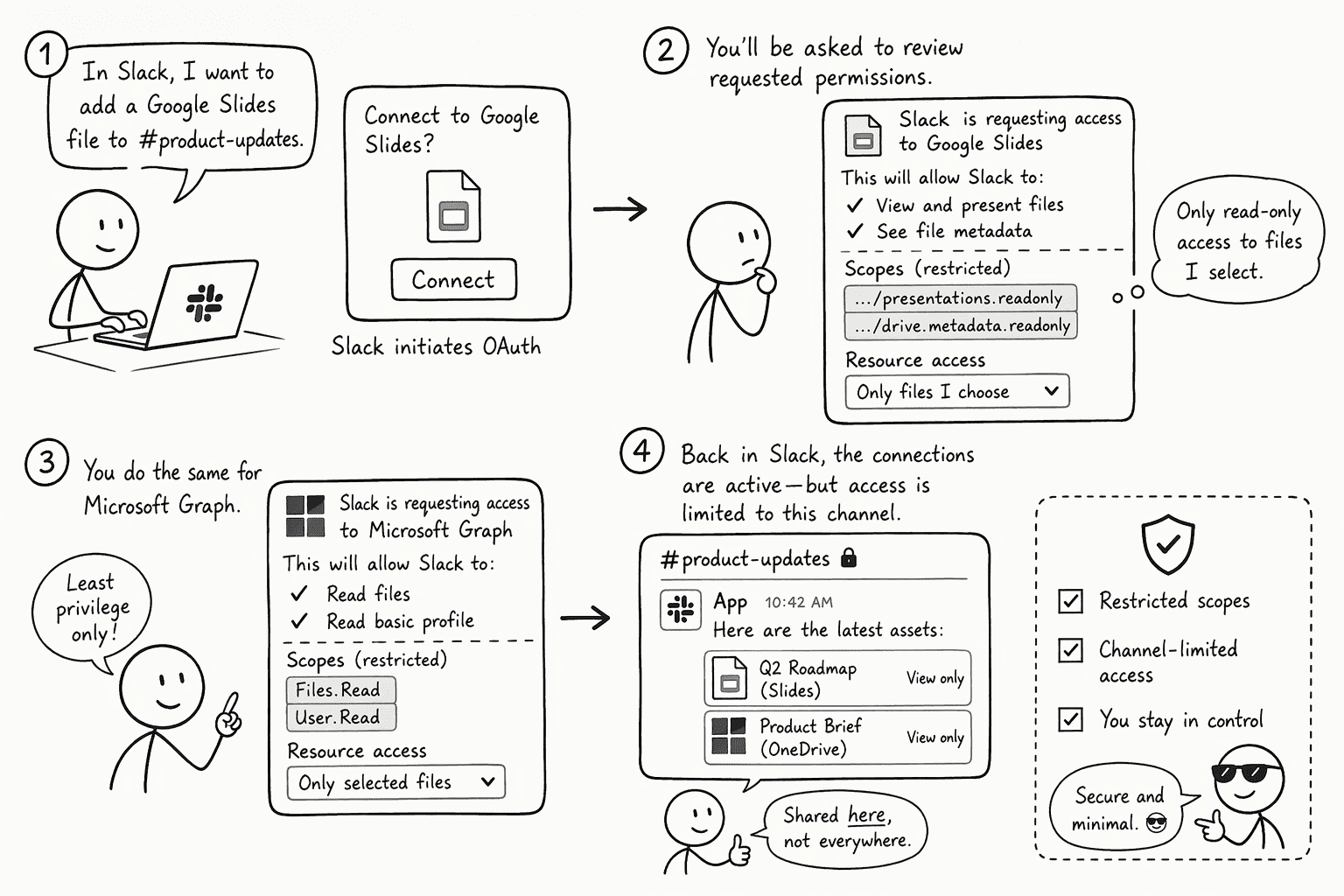
A common mistake is granting a bot full Drive access, installing it workspace-wide, and then scrambling when someone triggers it in a sensitive channel. If you connect a bot or integration yourself, the fix is a tight OAuth checklist that limits what it can touch.
- Review Google scopes: Google recommends the narrowest scope that works.
drive.file is the recommended, non-sensitive scope, and it limits the app to the specific Drive files you use with it. The presentations scope is classified as sensitive and covers all of your Slides presentations, so add it only if you need it. - Restrict Microsoft Graph permissions: Avoid
Files.ReadWrite.All, which, as an application permission, covers all site collections (and, as a delegated permission, all files the signed-in user can access). Use Sites.Selected instead, which gives the app no access until an admin grants it a role on a specific SharePoint site. - Keep the Slack bot to the right channels: Request
chat:write and leave out chat:write.public, which lets an app send messages to channels it isn't a member of. Then add the bot only to the channels where slide creation should run. The chat:write.customize scope only changes the name and avatar of the bot's messages, so it doesn't limit where the bot can post. - Use runtime credential injection: Enterprise platforms like PromptQL inject credentials at runtime, so they are never exposed to the model or to other users.
Getting the scopes right lets your team trigger slide generation from a Slack thread without worrying about what else the bot can see. It's the difference between a demo that gets disabled after a security review and a workflow you actually keep using.
Step 4: Build a Brand-Consistent Template for AI-Driven Decks
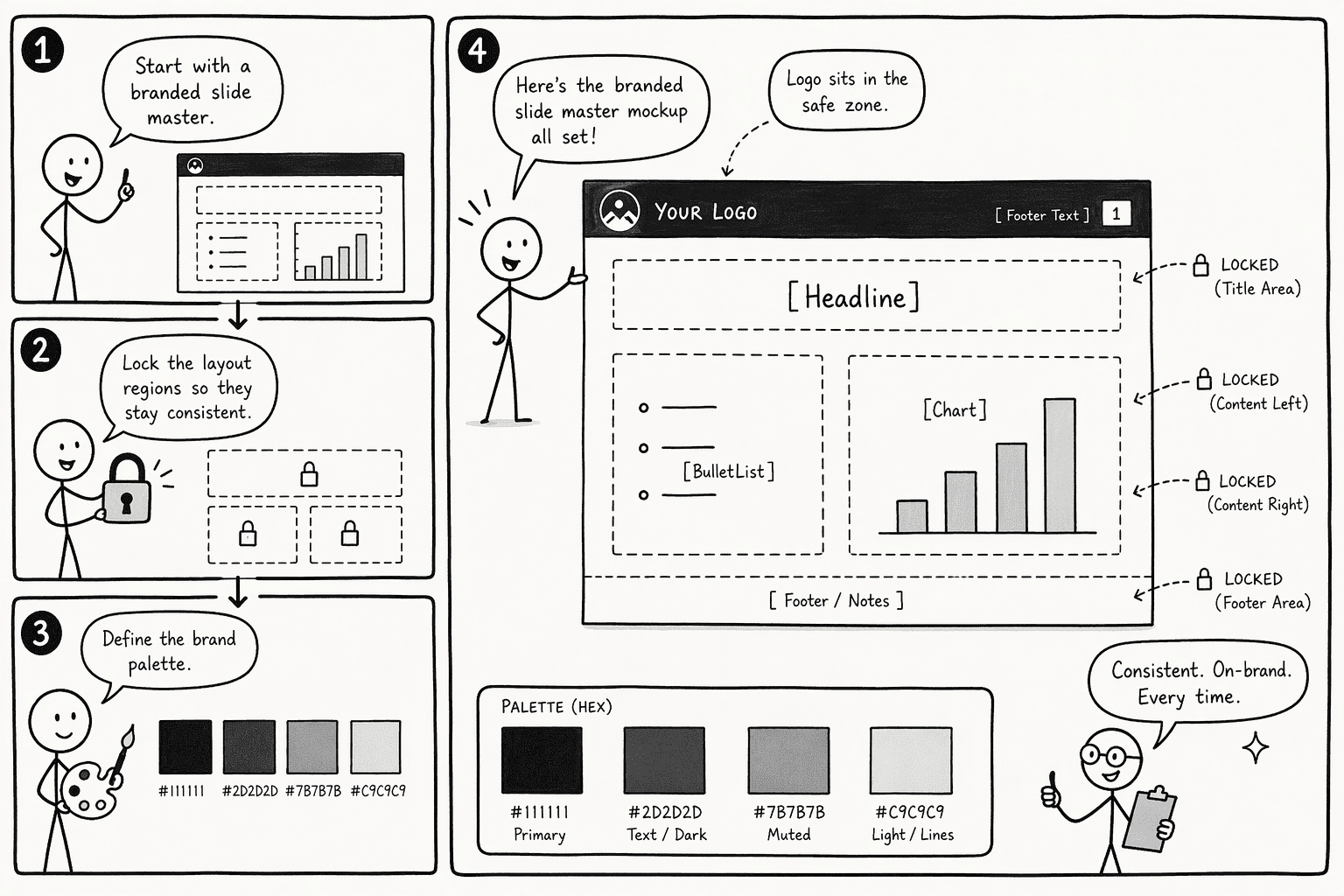
The loudest pushback against AI decks is often “that looks nothing like us.” Slack’s July 2026 feature drop handles this directly: Slackbot builds a Google Slides or PowerPoint deck from your own templates.
Build your template with locked slide masters. Set the brand palette hex codes, place the logo in the fixed column, and use clear placeholder labels such as [Headline], [BulletList], and [Chart].
Step 5: Build a Data-Backed Deck with PromptQL Tag
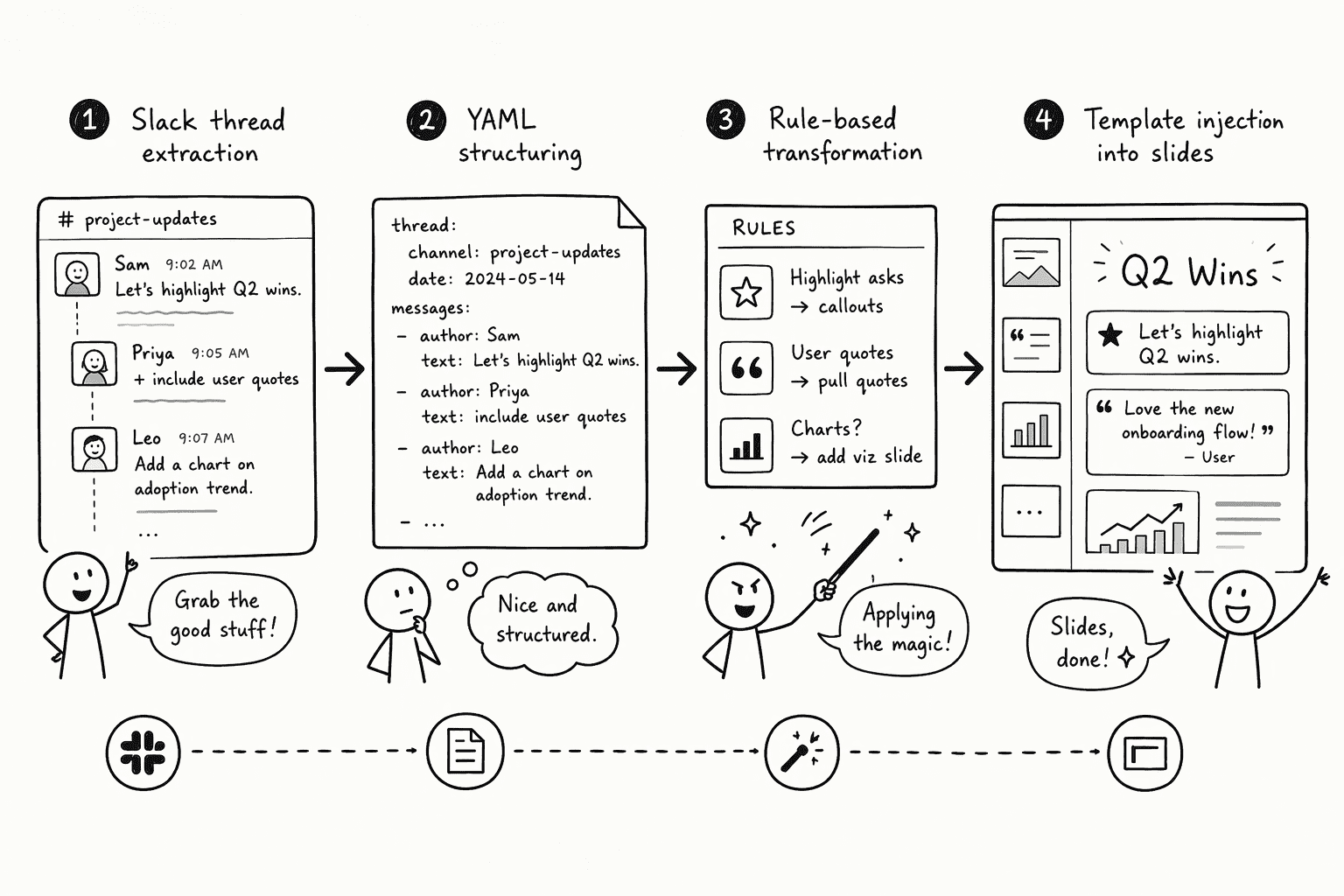
Slackbot can give you a slide deck in one conversation. Then your CFO asks whether every number maps to the source exactly. Speed alone doesn't answer that question.
When that matters, reach for PromptQL Tag. It works in Slack and acts with each user's permissions, so it only uses data the person asking is allowed to see. Here is the flow:
- Tag PromptQL in the thread and ask for the deck, with your one-sentence handoff.
- Review the plan before anything runs. PromptQL proposes its steps first, so you can approve or change them.
- Let it run. Python code runs in a sandboxed WebAssembly environment with a fixed, vetted dependency list, against your connected data.
- Review the result. PromptQL has a Google Slides integration that can generate new presentations from your data and insights.
- Correct it once. When someone fixes a number or a definition in the thread, PromptQL can propose it as a wiki entry for the team to approve, so the next deck starts from it.
Step 6: Review, Refine, and Discuss Slides Directly in Slack
A deck doesn't ship the moment it's generated.
If your deck lives in Pitch, the Pitch app for Slack shows a large preview of the slide when you share a link. A mention or comment in Pitch also creates a conversation under Apps in your Slack sidebar, and you can reply from Slack without opening the presentation.
Even with a good build, people still move commas. Slack keeps the sign-off conversation inside the channel where the work was assigned.
Step 7: Automate Recurring Slack-to-Slides Workflows
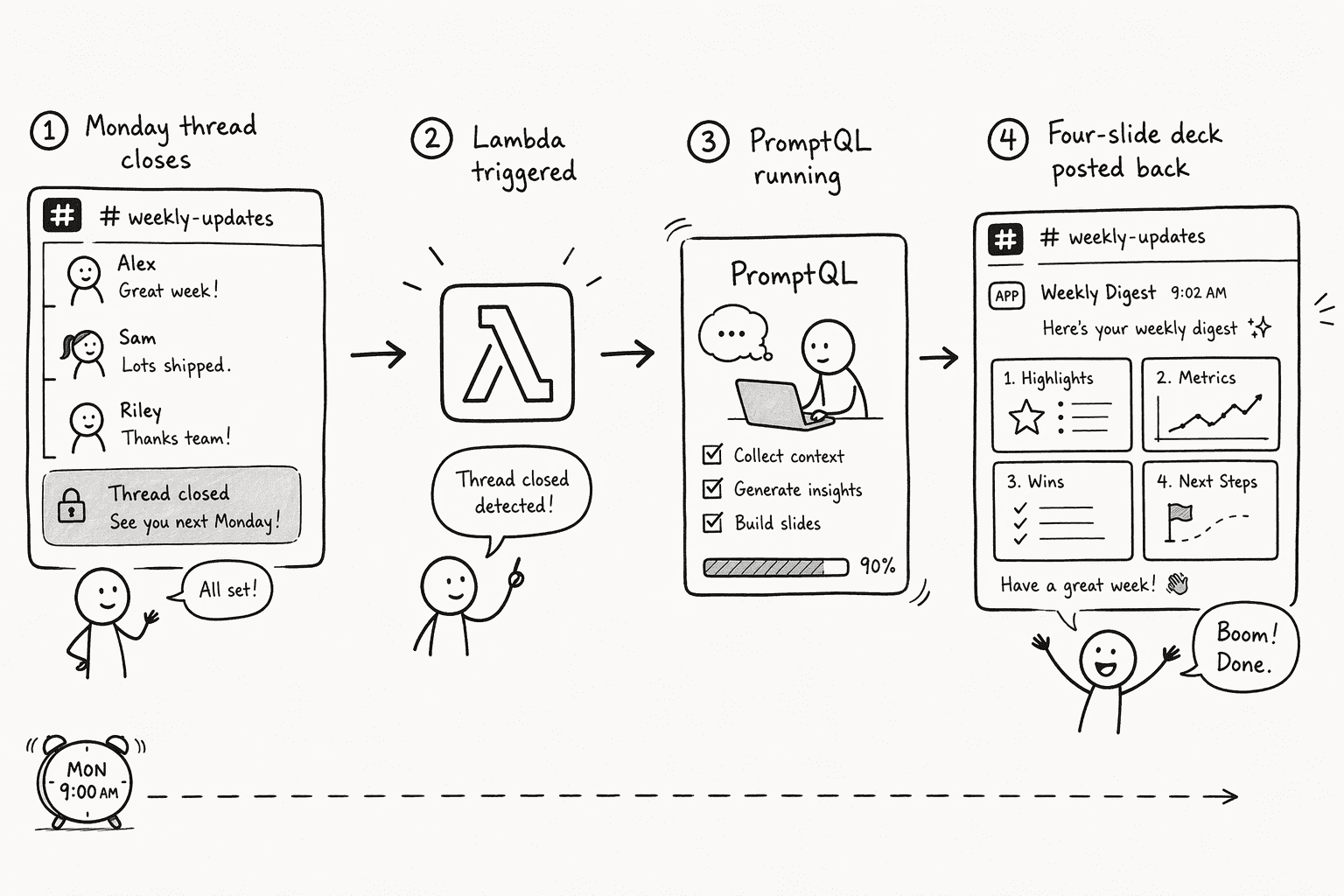
The real use appears when you stop asking for decks and they just show up.
In PromptQL, you can run a saved artifact on a schedule. PromptQL attaches the schedule to the artifact, with next-run and last-run times.
The trick is designing the trigger thread carefully. Set a thread format, such as: "Q: [obstacle this week] A: [resolution or escalate]." When everyone follows it, the thread is far easier to turn into slides. When someone goes off-format, flag the slide and have a human edit it before the deck ships.
Scheduling the rerun closes the loop between "could you make me a deck" and "the deck is already in the channel."
Conclusion
Two paths, one Slack thread. Use Slackbot when you need a fast draft without leaving the channel. And use PromptQL when someone on the team needs to see exactly where the numbers on slide seven came from.
Slack's slide creation shipped on July 29, 2026, though availability can depend on rollout timing and your plan. The real difference shows up in the meetings you no longer hold to create the deck you're about to present. Pick the path that matches your trust requirements, then automate the rest.
Frequently Asked Questions
Can you automatically turn a Slack thread into a formatted presentation?
Yes. As of July 2026, Slackbot can build a Google Slides or PowerPoint deck from your own templates after you share your source material and tell it what you're presenting. PromptQL Tag can also turn a Slack thread into a shareable deck using your data.
What tools or platforms connect Slack to Google Slides or PowerPoint?
Slackbot builds Google Slides or PowerPoint files from your templates. PromptQL works in Slack and has a Google Slides integration, and its integrations directory also lists Microsoft PowerPoint. The Pitch app for Slack adds slide previews and comment notifications for decks in Pitch.
How effective are AI agents at extracting the narrative from a messy Slack thread?
Effectiveness depends on curation. A clear one-sentence handoff gives the AI a starting point, and noisy, meandering conversations still need human filtering before generation. PromptQL shows its plan before it runs, so you can check it before any slide is built.
What specific PromptQL features support automated slide generation from conversations?
PromptQL Tag works in Slack and can turn a thread into a shareable deck. It shows its plan before it runs, runs code in a sandbox against your data, acts with each user's permissions, and can run in your own cloud. It also has a Google Slides integration that can generate new presentations from your data, and it can rerun a saved artifact on a schedule.
What are the steps to securely use AI to draft a slide deck from internal chat data?
Use narrow OAuth scopes for slide platforms, such as drive.file for Google and Sites.Selected for SharePoint. Add the bot only to the channels where it should run. Choose tools that inject credentials at runtime and act with each user's own permissions, so the bot cannot exceed the permissions of the person who triggered it.
How does generating slides from Slack with an AI workspace compare to manual summarization?
Slack says the deck that used to take an afternoon takes one conversation. Manual summarization gives you full control over the narrative but takes more time. Tools that show their plan and the query behind a number, such as PromptQL, make it easier to check where a figure came from.
Sources
- PromptQL | Architecture: the stable stack for AI - promptql.io
- Slack Feature Drop: Working While You’re Away | Slack - slack.com
- Slackbot can now build the dashboard, run the math, and draft the deck | PromptHacker - prompthacker.ai
- Work on your decks together in Slack | Pitch - pitch.com