
23 Nov, 2026
•
8 MIN READ
How to Verify an AI Answer Before Your Team Sees It
Introduction
Key Takeaways
- Set criteria first: Write your acceptance checklist before you read the AI's answer, so its confident tone does not set the bar.
- Separate the doer and the verifier: Have one agent or person generate the answer and a different one check it.
- Trace every claim: Check numbers, citations, and reasoning against the original source, not the AI's summary.
- Match the check to the output: Facts need source checks, code needs test runs, and numbers need a second calculation.
- Keep an audit trail: When you can see the plan and query behind an answer, a wrong number becomes something you can trace and fix.
- Hand over what you know and what you don't: Tell your team what is verified, what is unchecked, and what still needs a decision.
Step 1: Set Your Acceptance Criteria Before You Read the Answer
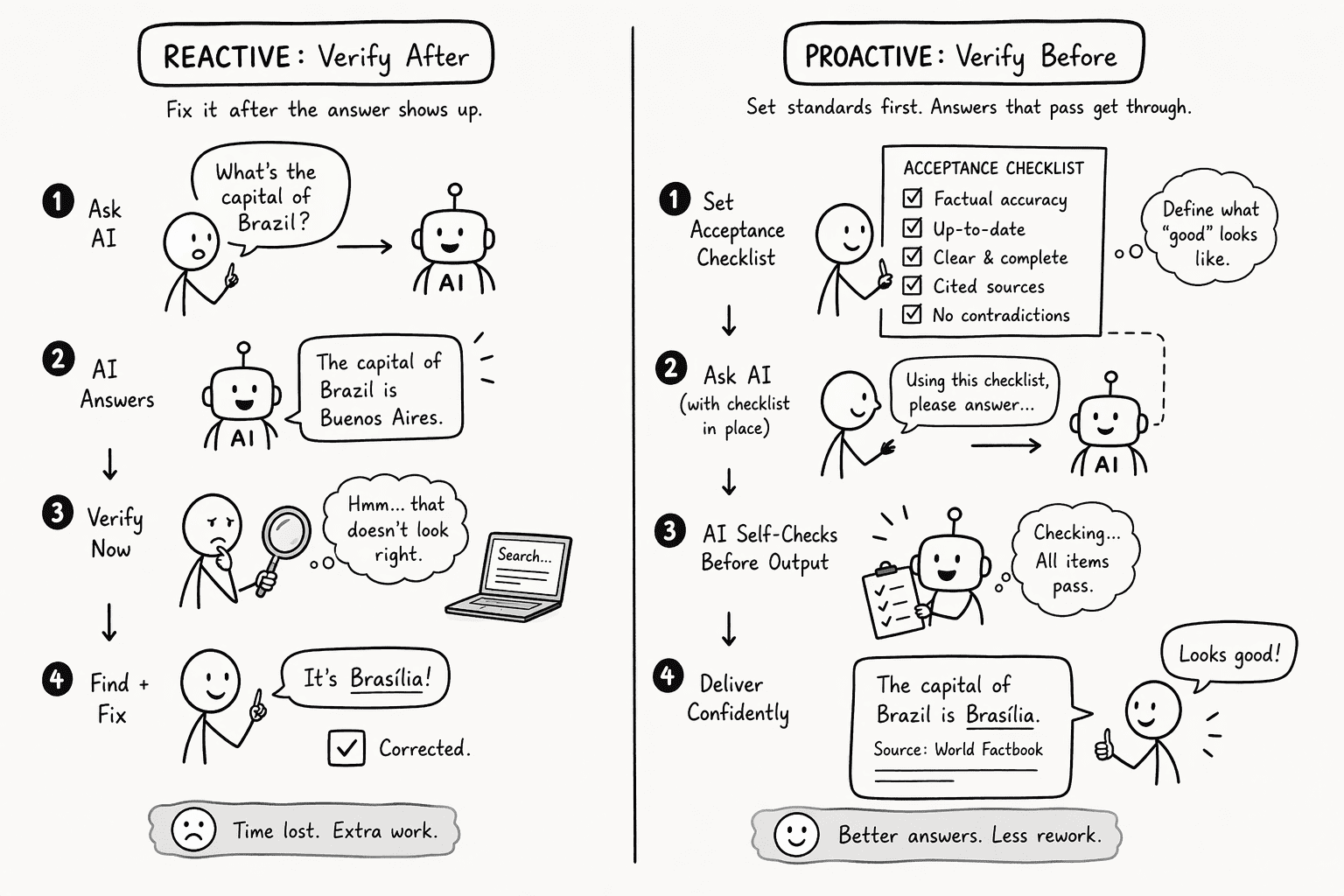
| Reactive check (after you read the answer) | Proactive check (before you read it) | |
|---|---|---|
| What decides the checks | The answer decides what you look at | A pre-set checklist decides if the answer passes |
| Bias risk | High, because confident phrasing anchors you | Lower, because the criteria exist before you see any text |
| Consistency | Varies by reviewer and by how busy they are | Repeatable across people and tasks |
| Example criterion | "Does this look right?" | "Every named data set has a verified row count." |
- Every number traces to a query result or a report.
- Every source named in the answer exists.
- The answer addresses the exact question you asked.
- Anything the AI could not confirm is labeled as unconfirmed.
Step 2: Separate the Doer From the Verifier
- Give the doer the task. For example: "Create a Q3 revenue summary."
- Give the verifier the checklist. For example: "Does this summary match the figures in the attached CSV? Flag any discrepancy over 2%."
- Ask for one of three verdicts per criterion: yes, no, or cannot confirm. The verifier cites evidence from the output or the source data.
Step 3: Trace Every Claim Back to Its Source
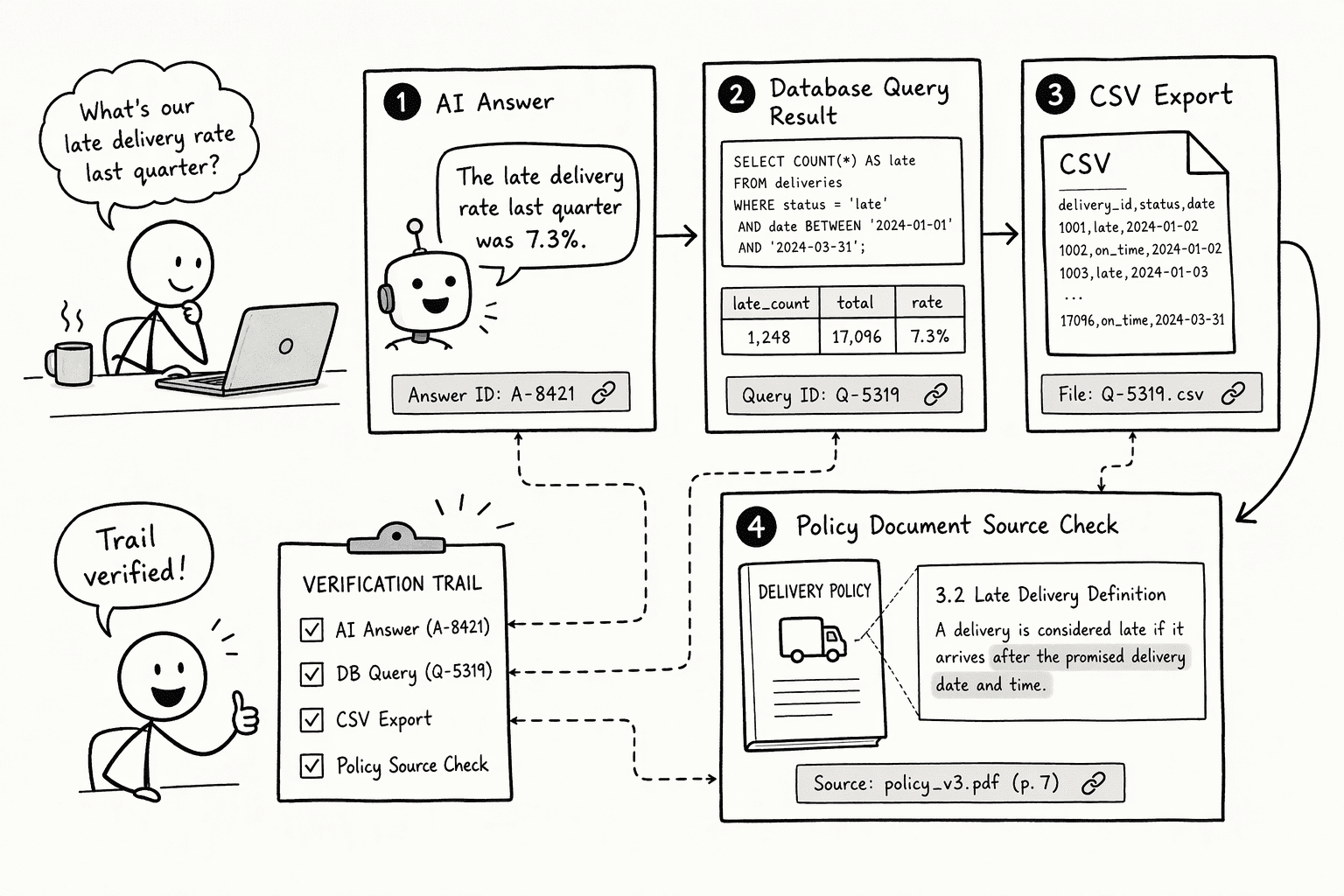
- Open the result, not the summary. If an answer says "403 rows returned," check that count against the export.
- Recalculate the numbers. If an AI says a rise from 40 to 60 is a 75% increase, run it yourself. It is 50%.
- Test every citation. Paste a DOI into a DOI resolver, search the exact title in quotes on Google Scholar, and confirm that the listed author published that paper in that journal.
- Compare the summary to the original. AI summaries often misread conclusions. Open the original page or PDF and check what it says.
- Check how current it is. Compare the answer against a current source, because the model may rely on older training data.
- Flip the premise. Ask yourself: if you had given the AI the opposite assumption, would its conclusion change? If the reasoning rests entirely on something you fed it, the whole chain is suspect.
Step 4: Match the Check to the Type of Output
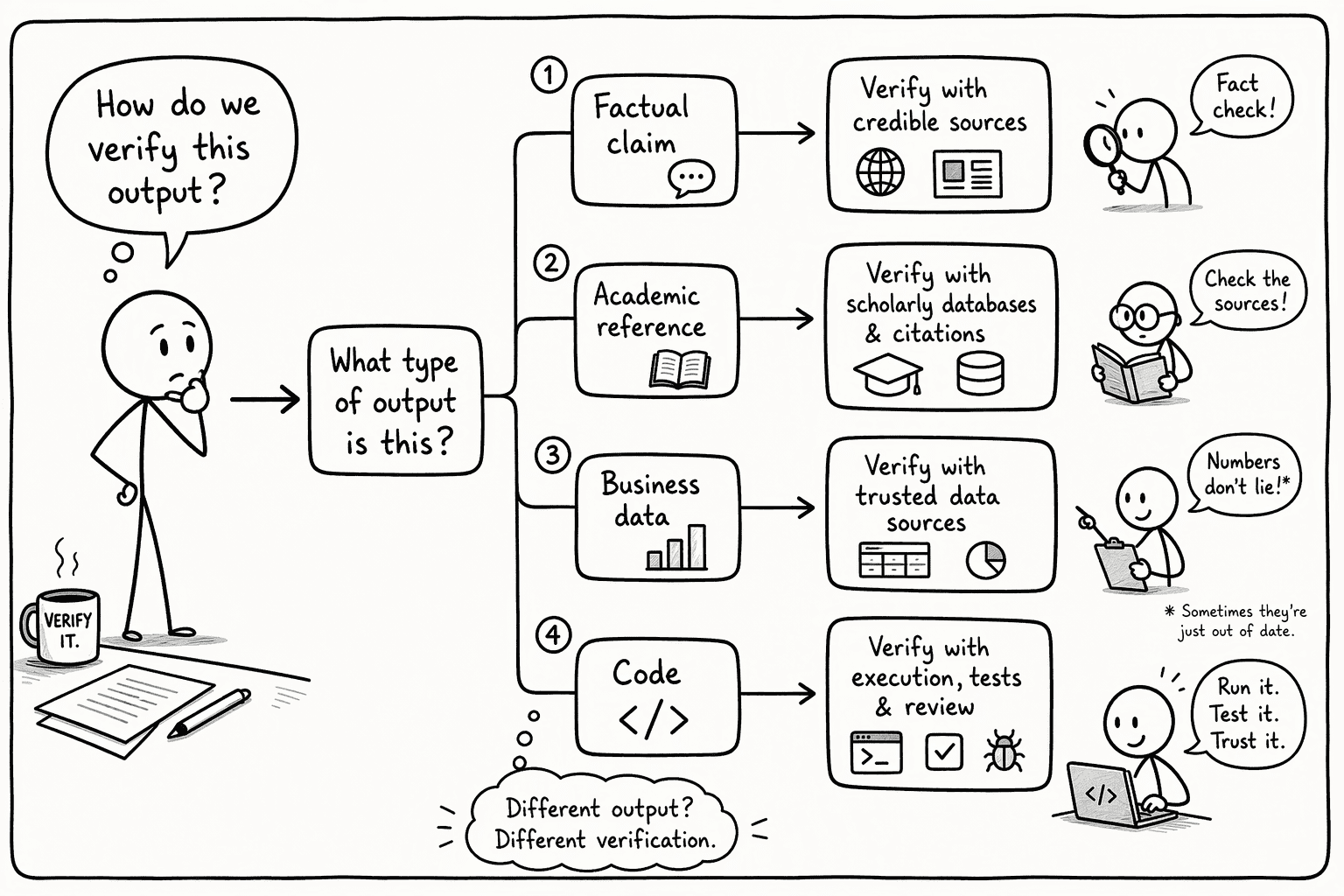
- Factual claims: Trace each non-obvious statement to a source, as in Step 3.
- Code: Run it in a sandbox with sample inputs, and compare the output to what you expect.
- Numbers: Calculate them a second way, or compare them to a known benchmark.
- Answers to vague prompts: The model fills gaps with plausible guesses. Re-prompt with more detail, or break the question into smaller, testable parts.
- Relevance: Confirm the AI answered your exact question. A correct answer to a different question is still the wrong answer.
- Missing perspectives: Look for missing variables, ignored counterarguments, or skewed framing. If you find them, flag the answer as incomplete and note the gap.
Step 5: Keep an Audit Trail You Can Trace
- You can see the plan and query. PromptQL lets you see the plan and query behind each answer, so you check the logic and the data instead of trusting a final number.
- Actions have an owner. PromptQL Tag's audit logs attribute every action to the actual person, not to a shared bot identity.
- Corrections are captured. When someone fixes an answer in a thread, PromptQL can capture the correction as a draft wiki entry that a person approves, edits, or rejects. The next answer starts from the corrected version.
- Your data can stay in your cloud. With PromptQL's BYOC option, which requires an Enterprise agreement, the data plane, where operational workloads and customer data live, runs in your own AWS, GCP, or Azure account. A separate control plane handles identity, provisioning, billing, and lifecycle management.
Step 6: Test It the Way Your Audience Will Use It
- Run it with typical and edge-case data. A script that only works on clean test data is not ready for the team.
- Walk through the handoff. If the AI wrote speaker notes, read them aloud with the deck open. Timing, flow, and missing context show up fast.
- Ask a non-expert to review it. An output is ready for team review when a colleague can supply the expected inputs, recognize a good result, and see when the agent needs help.
- Check the saved result, not the reply. A "saved successfully" message and a correct file are two different things. Open the file and check that it has the right sections and values, including the later pages and not just the first.
Step 7: Hand Over What's Verified, Unchecked, and Pending
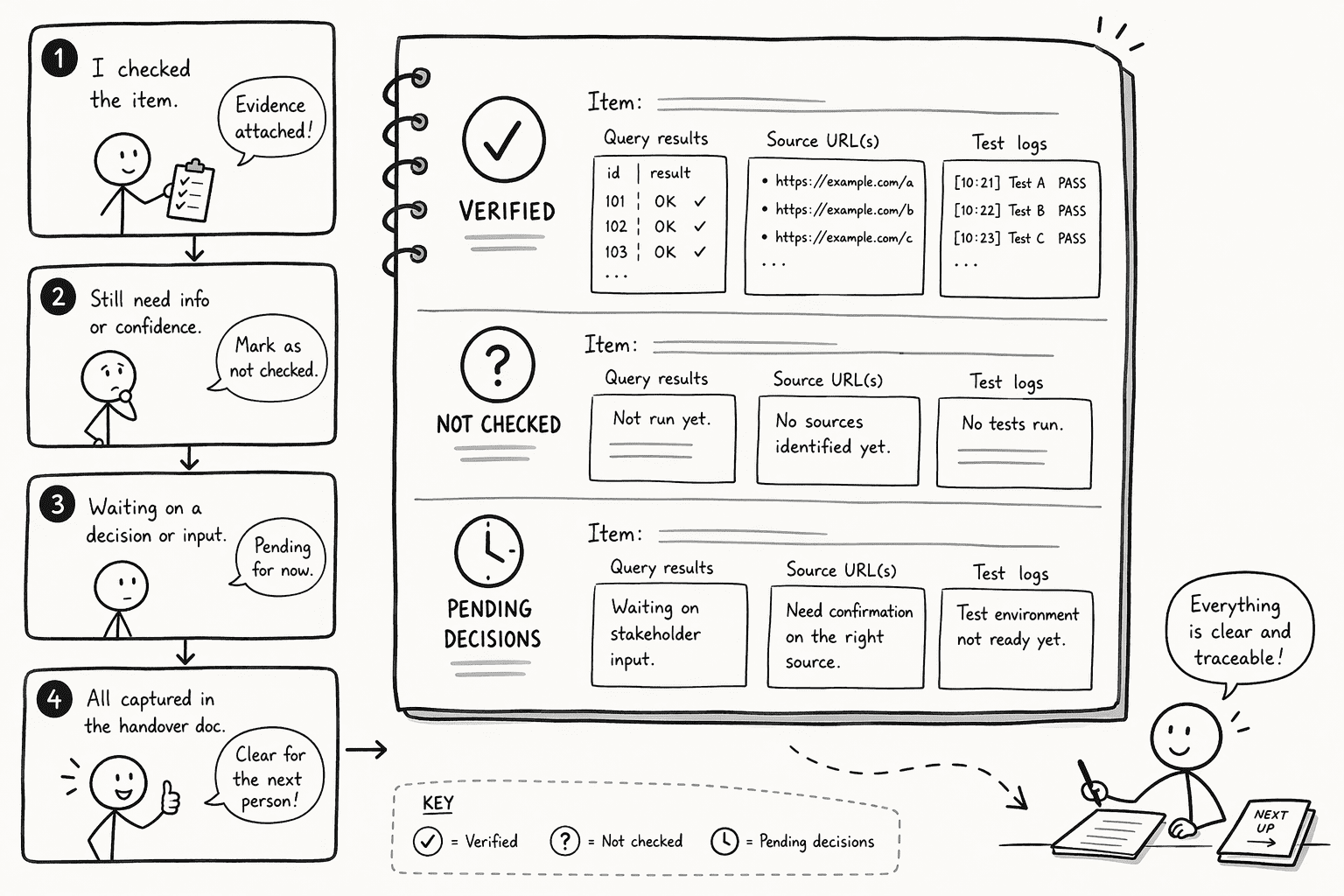
- Verified: List each claim with its evidence, such as a query result, a source URL, or a test log. A teammate should be able to repeat the check in thirty seconds. For example: "Q3 revenue matches the report export dated October 15, and the growth rate was recalculated independently."
- Not checked: Name the claims you could not verify, such as third-party citations or projections from a model you could not access, and say why. Silence here is the bigger risk, because a model writes assumptions with the same fluency as verified facts.
- Pending: List the decisions the AI cannot make, such as judgment calls, trade-offs, and approvals. For each one, say who needs to act and by when.
Conclusion
Frequently Asked Questions
What are the key risks of relying on an unverified AI answer?
What is a step-by-step process to validate an AI-generated answer?
How do I verify the data sources and reasoning behind an AI's response?
What tools, platforms, or features help audit and approve AI outputs before sharing with a team?
How does PromptQL's architecture support verification of AI answers?
Sources
- How to Get Accurate Answers From AI on Business Data - promptql.io
- AI Agent Quality Checks Before You Share with Your Team | Clanker Cloud Blog - clankercloud.ai
- Evaluating AI output – GenAI+U: A Student Learning Experience - open.lib.umn.edu
- How to verify an AI agent's output | Creaitivo - www.creaitivo.com
- How to verify an AI agent’s work | Stellary - stellary.co